Repository navigation
Releases: AlanY1an/decaf
Release list
Decaf 0.4.0 — Keep running with the lid closed

Decaf 0.4.0
Close the lid. Keep the agent running.
- Keep Running with Lid Closed is a new, opt-in switch in the cup menu and
Settings → General. While Decaf is keeping your Mac awake for an agent or a
manual hold, closing the lid no longer puts the Mac to sleep. With no hold
running, closing the lid sleeps the Mac as usual. - Turning it on shows a heat warning every time, unless you tick Don't show this
again. Your Mac stays on and gets warm with the lid shut, so don't put it in a
bag or a sleeve. - The first time, macOS asks you to allow Decaf's helper under System Settings →
General → Login Items & Extensions → Allow in the Background. The helper only
changes the sleep setting during a hold. - It turns itself off when the hold ends, below 20% battery, or if Decaf quits or
stops responding. The cup shows a small laptop badge while it is in effect.
Choose Settings → General → Check for Updates…, then install and relaunch.
Settings and usage history stay in place. Versions before 0.3.1 can update using
the DMG or Homebrew.
中文
合上盖子,agent 照样跑。
- 菜单栏和 Settings → General 新增可选开关 Keep Running with Lid Closed。
Decaf 正在为 agent 或手动保持唤醒时,合盖不会让 Mac 休眠;没有在保持唤醒时,
合盖照常休眠。 - 每次打开都会提示发热风险,勾选 Don't show this again 后不再提示。合盖后 Mac
持续运行并发热,请勿放进包里或电脑套里。 - 第一次使用时,macOS 会要求在 系统设置 → 通用 → 登录项与扩展 → 允许在后台 中
允许 Decaf 的辅助程序。它只在保持唤醒期间修改睡眠设置。 - 保持唤醒结束、电量低于 20%、Decaf 退出或无响应时会自动关闭。生效期间,菜单栏
杯子上会显示一个小笔记本图标。
通过 Settings → General → Check for Updates… 下载、安装并重启。设置和用量历史
都会保留。0.3.1 之前的版本可通过 DMG 或 Homebrew 更新。
Decaf 0.3.5
Decaf 0.3.5
Keep moving your Claude Code conversations between accounts.
- Claude updates no longer block moves just because the version changed.
Decaf checks local account identity, session records and transcripts before
moving. Records it cannot verify stay in place with a reason shown in review. - Unblock a previous move after continuing a conversation. If Undo cannot
safely restore the old state, review the last move and choose Keep here &
continue. Decaf verifies the current placement, preserves the latest history
and lets you start another move. This also works with older saved operations. - To move a conversation back, sign in to the next destination and start a new
Move. The same conversation can go A → B → A with its latest history.
Keeping a move ends Undo for that operation; it does not prevent future moves.
This feature supports local Claude Code sessions in Claude Desktop. Active,
remote, scheduled and conflicting sessions are still held with an explanation.
Choose Settings → General → Check for Updates…, then install and relaunch.
Settings, usage history and saved move records stay in place. Versions before
0.3.1 can update using the DMG or Homebrew.
中文
修复 Claude Code 会话在账号之间反复迁移时遇到的拦截。
- 不再因为 Claude 版本更新而禁止迁移。 Decaf 根据本地账号身份、会话记录和
对话文件检查兼容性;无法验证的记录留在原处,并说明具体原因。 - 继续聊天后,旧迁移记录不再一直挡住下一次迁移。 若 Undo 无法安全还原,
查看上次迁移并选择 Keep here & continue。确认当前保存位置后,保留最新
历史并允许继续迁移,也支持旧版留下的操作记录。 - 想换回原账号,在 Claude 登录下一个目标账号,再发起一次新的 Move。
同一个会话可以 A → B → A,带着最新历史一起移动。保留上次迁移会结束该次
操作的 Undo,不影响以后的迁移。
仅适用于 Claude Desktop 中的本地 Claude Code 会话;正在运行、远程、计划任务
以及存在冲突的会话仍会被跳过,并显示原因。
通过 Settings → General → Check for Updates… 下载、安装并重启。
设置、用量历史和迁移记录都会保留。0.3.1 之前的版本可通过 DMG 或 Homebrew 更新。
Decaf 0.3.4
Decaf 0.3.4
A fix for Move sessions after switching Claude accounts.
- Decaf now recognizes the signed-in destination when Claude's local bridge
state still lists the previous account. This fixes a case where a valid move
was blocked because the current account could not be confirmed. - The current configuration and running Claude process must still agree.
Conflicting organization records continue to block a move. Regression tests
cover moving, Undo and identity changes between preview and execution.
Includes PR #5. Support remains limited
to local Claude Code sessions in Claude Desktop 1.52386.3.
Choose Settings → General → Check for Updates…, then install and relaunch.
Sign in to the destination in Claude and refresh Move sessions. No reinstall
or cache reset is needed; settings and local usage history stay in place.
Versions before 0.3.1 can update using the DMG or Homebrew.
中文
修复切换 Claude 账号后,Move sessions 无法确认当前目标账号、导致迁移被拦截的
一种情况:Claude 本地 bridge 状态仍保留着上一个账号。
Decaf 仍会核对当前配置与正在运行的 Claude 进程;当前账号的组织信息冲突时继续
阻止迁移。补充了迁移、撤销和预览后身份变化的回归测试。目前仍支持 Claude Desktop
1.52386.3 中的本地 Claude Code 会话。
通过 Settings → General → Check for Updates… 下载、安装并重启,然后在 Claude
登录目标账号,刷新 Move sessions。无需重装或清理缓存,设置与本地用量记录保留。
0.3.1 之前的版本可通过 DMG 或 Homebrew 更新。
Decaf 0.3.3 — Switch accounts. Keep your conversations.
Decaf 0.3.3
Switch accounts. Keep your conversations.
- Move sessions now lives in the sidebar, labeled Claude Code. The cup
menu's Move Claude Code sessions… shortcut opens the same page. - Select one or more source accounts and a destination. Local email and
organization labels make accounts easier to recognize; missing labels can be
added manually. Expand conversations to inspect available pin/group labels
or leave individual sessions out. - Review the exact move before Decaf quits and reopens Claude. Saved originals
and per-session results support Undo last when the entries and history
still match. Conversations changed afterward are preserved.
This first release supports local Claude Code sessions in Claude Desktop
1.52386.3. Sign in to the destination in Claude first. Other Desktop versions,
remote/scheduled sessions and ambiguous records are not moved. Pin/group
placement and per-session permission grants do not transfer. This does not
switch account credentials or migrate Codex sessions.
On 0.3.1 or later, choose Settings → General → Check for Updates…, then install
and relaunch. Earlier versions can use the DMG or Homebrew. Settings and local
usage history stay in place. Move sessions guide.
中文
侧边栏新增 Move sessions · Claude Code:多选来源账号、指定目标账号,检查会话后
迁移。优先显示本地可验证的邮箱与组织;缺失邮箱可手动补充。可展开查看分组、置顶
标记并排除个别会话。菜单栏也有直接入口。
目前支持 Claude Desktop 1.52386.3 中的本地 Claude Code 会话。先在 Claude 登录
目标账号,Decaf 会在确认后正常退出并重开 Claude,保留原始记录及逐项结果。记录与
历史仍匹配时可以撤销;后续有改动的会话会保留并提示。分组、置顶和会话权限不随迁移
转移,不负责登录账号或迁移 Codex 会话。
0.3.1 及以后版本可通过 Settings → General → Check for Updates… 下载、安装并重启。
更早版本使用 DMG 或 Homebrew;设置与本地用量记录保留。
Decaf 0.3.2 — A seamless title bar
Decaf 0.3.2
- Fix the white/gray strip above Home and Settings: the title bar now matches the
page and sidebar backgrounds in both light and dark mode. - Keep the title bar in sync when the system appearance changes while a window
is open. Update options, welcome and custom keep-awake windows use the same
native background treatment.
On 0.3.1, choose Settings → General → Check for Updates…, then install and
relaunch. Earlier versions can update through the DMG or Homebrew. Your settings
and local usage history stay in place.
中文
修复 Home 和 Settings 顶部标题栏与页面背景不同色的问题,侧栏背景也延伸到窗口按钮
所在区域。浅色、深色及窗口打开时切换系统外观都会同步;更新说明、欢迎页和自定义
防休眠时长窗口的标题栏也统一了处理。
0.3.1 用户可以在 Settings → General → Check for Updates… 中下载、安装并重启。
更早版本可通过 DMG 或 Homebrew 升级。设置和本地用量记录保留。
Decaf 0.3.1 — Update without leaving Decaf
Decaf 0.3.1
- Update directly from Decaf: choose Check for Updates… from the cup menu or Settings → General, then download, install and relaunch in the update window.
- Update packages and the release feed are signature-checked. Existing settings, integrations and local usage history are kept.
- Checks are initiated by you. No background checks, usage uploads or system profiling.
Versions 0.3.0 and earlier need one manual update to 0.3.1 via DMG or Homebrew before this feature is available. Future releases can use the in-app updater. If you prefer to manage Decaf with Homebrew, the existing commands remain available under Update options….
中文
可以直接在 Decaf 里更新了:杯子菜单或 Settings → General → Check for Updates…,在更新窗口完成下载、安装和重启。更新包与更新信息均经过签名校验,原有设置、集成和用量记录保留。
仅在你主动点击时检查,不做后台检查,不上传用量。0.3.0 及更早版本需要先用 DMG 或 Homebrew 手动升级到 0.3.1 一次,之后的新版本就能在应用里更新。
Decaf 0.3.0 — A new home for your brew
Decaf 0.3.0 brings automatic keep-awake, Claude Code + Codex usage and Your brew into one spacious Home window.
What's new
- Home + Settings together. See whether your Mac is being kept awake, inspect daily or monthly tokens, and browse your 90-day activity without switching windows.
- A quieter Settings page. General, Agents, Safety and Your profile have more space and native controls. Open it from the sidebar or with ⌘,.
- Small, useful animations. Gentle tab transitions, a moving selection indicator and activity hover feedback respect Reduce Motion. Your month, agent filter and scroll position survive a visit to Settings.
- Clearer import status. Usage warnings stay visible above the chart; local-log details and a support summary are still available.
Your rhythm combines activity across both agents. The token panel can be filtered separately. Pause auto affects automatic agent holds; manual holds stay in the cup menu.
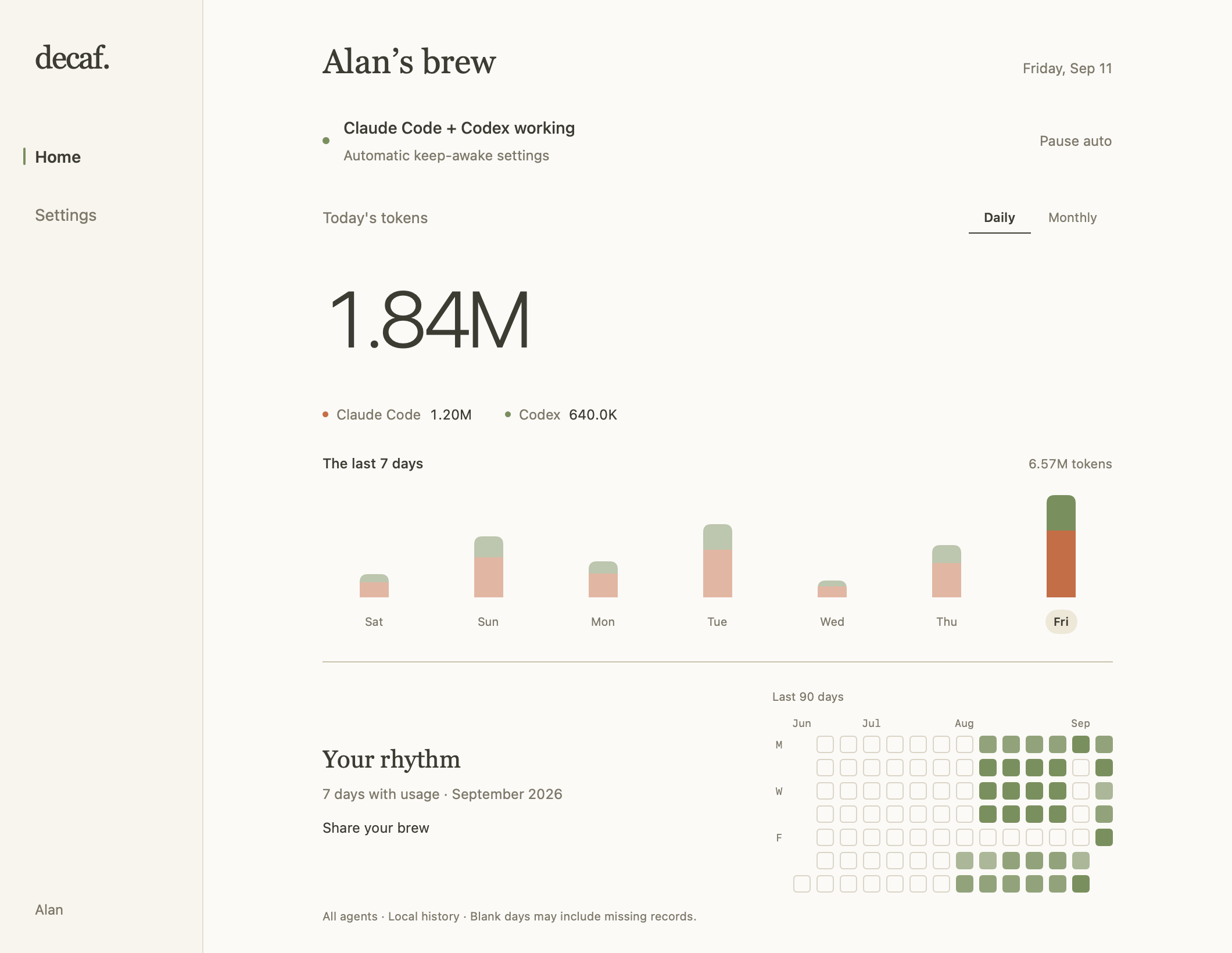
Native interface with example data. Your actual usage stays on your Mac.
Update
Quit Decaf from the cup menu, then update with Homebrew:
brew update
brew upgrade --cask AlanY1an/decaf/decaf
Or download Decaf-0.3.0.dmg below and replace Decaf in Applications. Reopen Decaf and choose Open Decaf… from the cup menu to see Home.
Existing preferences, integrations and local usage history are retained. No uninstall or cache deletion is needed. This release includes the Codex token-recovery fix from 0.2.1. When upgrading from 0.2.0 or earlier, allow the initial import to finish; recovery depends on the original logs remaining on this Mac. Token totals do not convert directly to subscription allowance percentages.
Updates remain manual. Updates… in the app opens the update guide; subscribe to Watch → Custom → Releases on GitHub for release notifications.
Requires macOS 14 or later. Universal DMG for Apple Silicon and Intel, Developer ID signed and notarized by Apple.
中文
0.3.0 把自动防休眠、双平台用量和 Your brew 放进一个新首页。
- Home 可以一起查看保活状态、每日/每月 token 和 90 天活动;Settings 就在侧边栏。
- 设置分为 General、Agents、Safety 和 Your profile,保留留白和原生控件。
- 标签切换和活动格子加入轻量动画,遵循系统「减少动态效果」。从设置返回时保留月份、工具筛选和滚动位置。
- 导入问题在图表上方提示,仍可查看本地日志状态、复制支持摘要。
退出 Decaf,运行上面的 Homebrew 命令,或下载 DMG 替换「应用程序」中的 Decaf。重新打开后,从杯子菜单点 Open Decaf… 查看首页。原有设置、集成和用量记录保留,无需卸载或删缓存。 从 0.2.0 或更早版本升级,也会获得 0.2.1 的 Codex 用量恢复修复;请等待首次导入完成,恢复需要本机仍保留原始日志。
Decaf 0.2.1 — Recover missing Codex tokens
Decaf 0.2.1 fixes missing Codex tokens and rebuilds affected history from the logs still on your Mac.
What was wrong
Parent tasks and subagents can share a Codex root session while keeping separate token counters. Decaf 0.2.0 mixed those counters and skipped some valid usage as a regression. It also missed completed-response records, including some compaction usage.
This patch gives each thread its own counter and counts completed responses once. Copied responses and overlapping legacy counters are deduplicated. Includes PR #1.
Recover your recorded tokens
-
Quit Decaf from the coffee cup menu.
-
Update with Homebrew, or download Decaf-0.2.1.dmg below and replace the app in Applications.
brew update
brew upgrade --cask AlanY1an/decaf/decaf
-
Reopen Decaf and wait for the usage import to finish. Open Usage Statistics → Monthly, select Codex, and browse the affected months.
The first launch automatically backs up your old Codex cache and rebuilds usage from available active and archived logs. You do not need to uninstall, delete the cache, or start new Codex tasks to recover older recorded usage.
Recovery requires the original logs to remain on this Mac. Deleted or remote-only logs cannot be reconstructed. Corrected totals may increase or decrease after deduplication; token counts do not convert directly to a subscription's weekly allowance percentage. Your original cache stays in ~/Library/Application Support/Decaf/Backups/ as codex-usage.json.before-v4-…. Backup/read failures retain the original cache. Claude Code's cache format is unchanged.
If an import warning remains, open the read-status line and Copy support summary for a bug report. Please do not upload raw conversation logs or credentials.
Requires macOS 14 or later. The DMG supports Apple Silicon and Intel.
中文:找回之前漏算的 Codex tokens
0.2.1 修复了父任务与子代理计数混用导致的漏算,并补上已完成响应(包括部分上下文压缩响应)的用量;重复记录只计一次。
退出 Decaf,运行上面的 Homebrew 升级命令,或下载 DMG 替换「应用程序」里的 Decaf,然后重新打开。等待导入完成后,进入 Usage Statistics → Monthly,选择 Codex 查看受影响的月份。
首次启动会自动备份旧缓存并重读历史日志,无需卸载、删缓存或重新运行任务。 只要原始日志仍在本机,之前被跳过的用量就能重新核算。已删除或只存在于远程的日志无法恢复;去重也可能让数字降低。旧缓存保留在上面的 Backups 目录中。
Decaf 0.2.0 — Claude Code + Codex, one daily brew
Codex token-count fix: update to v0.2.1. It rebuilds affected history from retained local logs after upgrading and reopening. No cache deletion needed.
Codex 漏算修复已在 0.2.1 提供。 升级并重新打开后会自动重算本机保留的日志,无需删除缓存。
Keep your Mac awake while Claude Code or Codex works, then see what your day — or month — brewed.
New in 0.2.0
- Codex keep-awake, alongside Claude Code. Each tool holds independently; the menu identifies approximate detection.
- Daily and monthly token statistics across both tools, with per-tool filters, cache details and import status.
- Your brew: a local profile, recorded activity and monthly coffee cards. Profile cards hide token quantities by default.
- Clearer updates: an Updates… entry with the installed version, release download and copyable Homebrew commands.
- Accounting corrections, backups before history rebuilds, and native Apple Silicon + Intel app/helper binaries.
Upgrade from 0.1.0
First quit Decaf from its menu.
Homebrew:
brew update
brew upgrade --cask AlanY1an/decaf/decaf
Then open Decaf from Applications.
DMG: download Decaf-0.2.0.dmg below, open it, replace Decaf in Applications, and reopen the app. The DMG and enclosed app are signed, notarized and stapled. Requires macOS 14 or later.
Your settings, integration paths and existing left-click behavior stay in place. No uninstall is needed. First launch may rebuild statistics from available local logs; old usage stores are backed up first. Corrected counts can differ, and missing source logs cannot be restored. Do not clear application data or use uninstall --zap when upgrading.
0.1.0 cannot notify you about this update inside the app. Updates remain manual, without background requests. For future notifications, choose Watch → Custom → Releases on this repository.
Boundaries
Token totals include cached tokens and available local history; they are not account-wide billing or subscription limits. Codex activity detection remains approximate, including a file-activity grace window after a task ends. Lid closure and battery safeguards still apply.
Usage and upgrade guide · 中文使用与升级指南
中文升级说明
这次加入 Codex 自动保活、Claude Code + Codex 每日/每月统计,以及 Your brew 个人页和月卡。
先退出 Decaf。Homebrew 用户运行上面的两条命令;DMG 用户下载下方 Decaf-0.2.0.dmg,替换「应用程序」里的旧版,再重新打开。无需卸载,原有设置和集成会保留。首次导入会先备份旧用量文件,再重建可用历史,修正后的数字可能变化。
旧版没有自动更新通道,这次需要手动升级。以后可通过 GitHub 的 Watch → Custom → Releases 订阅新版本。
Decaf 0.1.0
A menu bar app that keeps your Mac awake only while Claude Code is actually working, and lets it sleep the moment the agent is done or is just waiting on you.
Every other keep-awake app is a switch you have to remember to turn off. This one puts itself down.
Install
brew install --cask AlanY1an/decaf/decafOr download Decaf-0.1.0.dmg below. Requires macOS 14 or later. Signed with a Developer ID and notarized by Apple, so it opens with a double-click.
What's in this release
- Turn-precise detection via optional Claude Code hooks — one click, reversible — with a zero-config file-activity fallback if you skip them.
- Holds through long silent tool calls. A 20-minute build looks idle and isn't; four independent witnesses have to agree a session has gone quiet before the hold drops.
- Survives self-paced loops. When an agent schedules its own wake-up, Decaf reads that and waits with it instead of sleeping through the gap.
- Manual holds — 5 minutes to indefinite, or "until 6 PM".
- Token usage and rate limits in the menu, every number labelled official or estimated.
- Safety gates that always win — Low Power Mode, fast user switching, a low battery, and the lid.
Privacy
No network requests of any kind. It never reads your conversation — only timestamps, ids and token counters, a limit enforced by the code's structure and pinned by tests. Everything it writes is shown to you before it writes it.
Verifying this build
shasum -a 256 Decaf-0.1.0.dmg
# a03d0fffded2129af7c4bc5c5217ab6ec0f1280ec72c0d61c71e9f9dfb637fe0

spctl --assess --type execute -vv /Applications/Decaf.app
# accepted, source=Notarized Developer ID
Full notes: CHANGELOG.md · 中文说明