Repository navigation
Decaf 0.3.0 — A new home for your brew

Decaf 0.3.0 brings automatic keep-awake, Claude Code + Codex usage and Your brew into one spacious Home window.
What's new
- Home + Settings together. See whether your Mac is being kept awake, inspect daily or monthly tokens, and browse your 90-day activity without switching windows.
- A quieter Settings page. General, Agents, Safety and Your profile have more space and native controls. Open it from the sidebar or with ⌘,.
- Small, useful animations. Gentle tab transitions, a moving selection indicator and activity hover feedback respect Reduce Motion. Your month, agent filter and scroll position survive a visit to Settings.
- Clearer import status. Usage warnings stay visible above the chart; local-log details and a support summary are still available.
Your rhythm combines activity across both agents. The token panel can be filtered separately. Pause auto affects automatic agent holds; manual holds stay in the cup menu.
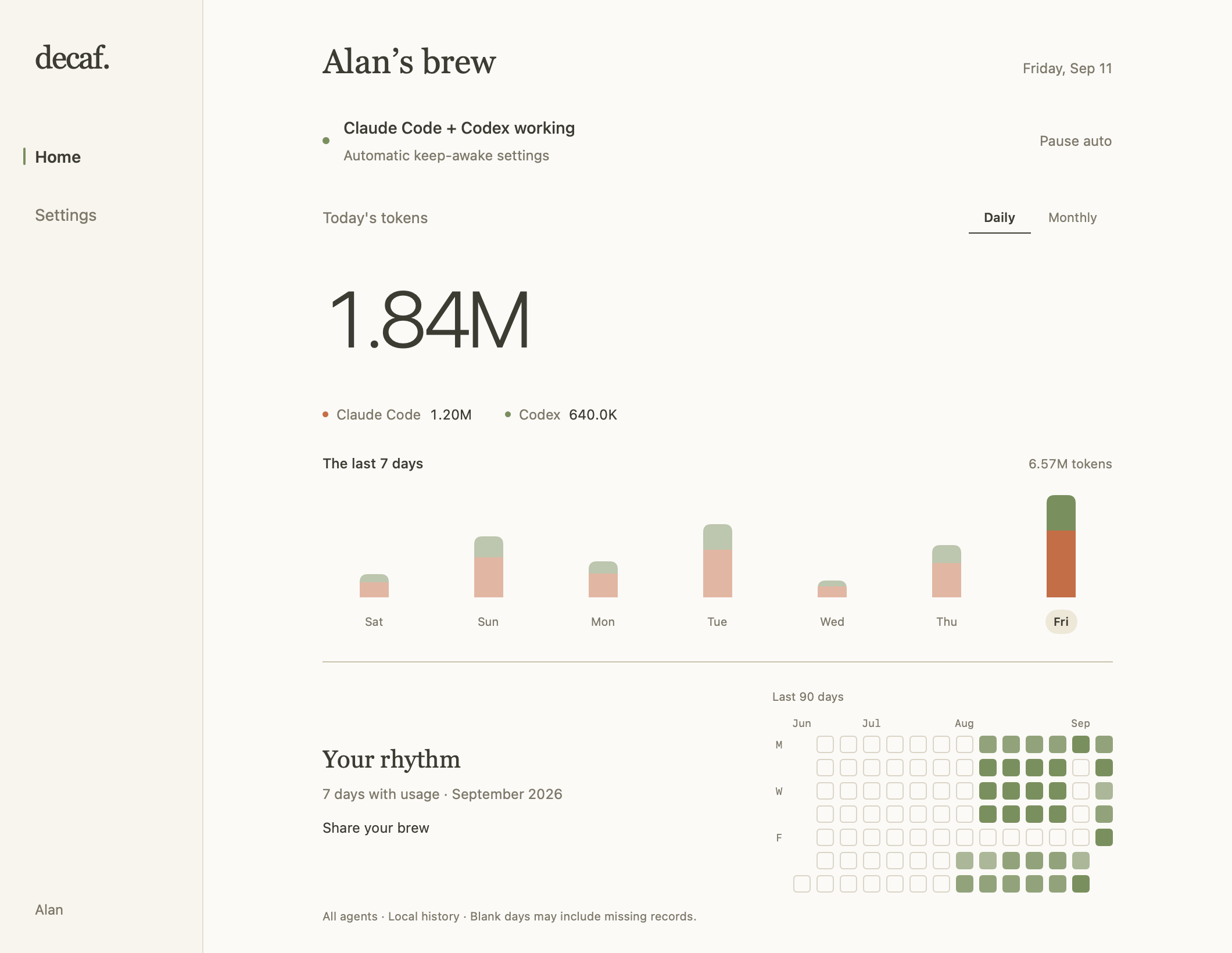
Native interface with example data. Your actual usage stays on your Mac.
Update
Quit Decaf from the cup menu, then update with Homebrew:
brew update
brew upgrade --cask AlanY1an/decaf/decaf
Or download Decaf-0.3.0.dmg below and replace Decaf in Applications. Reopen Decaf and choose Open Decaf… from the cup menu to see Home.
Existing preferences, integrations and local usage history are retained. No uninstall or cache deletion is needed. This release includes the Codex token-recovery fix from 0.2.1. When upgrading from 0.2.0 or earlier, allow the initial import to finish; recovery depends on the original logs remaining on this Mac. Token totals do not convert directly to subscription allowance percentages.
Updates remain manual. Updates… in the app opens the update guide; subscribe to Watch → Custom → Releases on GitHub for release notifications.
Requires macOS 14 or later. Universal DMG for Apple Silicon and Intel, Developer ID signed and notarized by Apple.
中文
0.3.0 把自动防休眠、双平台用量和 Your brew 放进一个新首页。
- Home 可以一起查看保活状态、每日/每月 token 和 90 天活动;Settings 就在侧边栏。
- 设置分为 General、Agents、Safety 和 Your profile,保留留白和原生控件。
- 标签切换和活动格子加入轻量动画,遵循系统「减少动态效果」。从设置返回时保留月份、工具筛选和滚动位置。
- 导入问题在图表上方提示,仍可查看本地日志状态、复制支持摘要。
退出 Decaf,运行上面的 Homebrew 命令,或下载 DMG 替换「应用程序」中的 Decaf。重新打开后,从杯子菜单点 Open Decaf… 查看首页。原有设置、集成和用量记录保留,无需卸载或删缓存。 从 0.2.0 或更早版本升级,也会获得 0.2.1 的 Codex 用量恢复修复;请等待首次导入完成,恢复需要本机仍保留原始日志。