Repository navigation
Releases: ArefinAlter/ogun
Release list
Ogun 0.1.0-alpha.1

Ogun Studio 0.1.0-alpha.1 includes the responsive desktop panel fixes and official installed-agent subscription connections. Grok Build uses a separate provider-owned sign-in and a restricted ACP subprocess profile; setup and protocol details explain the one-time login.
Windows x64 downloads:
- Installer:
ogun-studio-0.1.0-alpha.1-windows-x64-setup.exe - Portable Studio: extract the complete portable ZIP and run
ogun-studio.exe. - Runtime: CLI, daemon, hub server, ingest, edge sync, language server and operator helpers.
- SHA256SUMS.txt: checksums for all three bundles.
The packaged desktop started its bundled engine in a fresh profile, completed a real offline workflow, and passed repeated native window resizing with no page errors. Native workspace 359 tests, Studio 7 tests, installed-agent transport 12 tests, frontend 58 tests, strict Clippy, TypeScript and production builds passed. Both ZIPs passed integrity checks; the portable ZIP matches the payload used in acceptance.
Windows binaries are unsigned. Grok protocol/profile fixtures passed; live Grok entitlement or inference is not claimed. Existing Claude acceptance is historical; other provider plans and model availability remain provider-controlled. No new Linux/macOS desktop acceptance is claimed. See the full acceptance receipt.
Executable/UI source: 8ec8a00a9db6baa7d2f7879ecc30a4a2ce45728d. Shared core: a944e43035e9de9f5871ec6afd10c036e13457ad. PR #25.
Linux server runtime supplement (29 October 2026)
The separately named ogun-server_0.1.0-alpha.1_linux-x64.tar.gz contains the Linux x86_64 server runtime (glibc 2.34+), and ogun-hosted_0.1.0-alpha.1.tar.gz contains the hosted web assets. These are the runtime and web builds deployed on the Verne service. Verify them with SERVER_SHA256SUMS.txt; SERVER_SOURCE_MANIFEST.json records their source and binary hashes. Native Linux desktop GUI packages (ogun-studio-0.1.0-alpha.1-linux-x64.AppImage and ogun-studio-0.1.0-alpha.1-linux-x64.deb) are attached alongside the Windows installers, portable archives, and server runtimes. The original Windows assets and SHA256SUMS.txt are unchanged.
Ogun 0.0.1c (pre-alpha)
Ogun 0.0.1c (pre-alpha)
Studio and built-in workflow model steps can use installed subscription CLIs. Compiled built-in model operators preserve model/network grants, budgets, artifact containment and usage accounting; installed replacements and mixed API/subscription ladders retain their sandbox. A real Claude workflow produced the expected artifact and reported usage.
Installed Claude Code, Codex, Cursor and Antigravity CLI adapters use the owning tool's sign-in. The apps do not read browser/IDE credentials. Cloud consent, offline settings, budgets, request previews and cancellation remain. Each request uses stdin, a fresh private scratch directory, deadlines, output bounds and process-tree cleanup (Windows jobs; Unix process groups). Claude tools/hooks/MCP are disabled, Codex runs read-only with shell/web tools disabled, Cursor Ask gets an app-created deny policy, and Antigravity requires its own strict tool-permission setting. These controls do not claim OS isolation of the installed CLI.
Claude was tested live through each native provider path, plus an Ogun workflow. Codex is installed but its subscription sign-in did not pass on this machine. Cursor/Antigravity have protocol and policy coverage; live account acceptance remains. A consumer Grok subscription has no verified direct adapter. Cursor may expose a Grok model when that account is entitled. Subscription quotas and extra-usage billing remain the provider's responsibility; API price estimates are not subscription pricing.
Windows x64: installer and portable archive. Linux x64: AppImage and Debian package. CLI/runtime archives are included where applicable. Internal version: 0.0.1-beta.1. Unsigned OS binaries; macOS remains planned. See acceptance for what was tested and its limits.
Install over the prior app using its installer, or unpack the portable archive into its own folder. Back up your data before trying a pre-alpha update.
Download SHA256SUMS.txt with your asset and verify its SHA-256 checksum.
Ogun 0.0.1b (pre-alpha)
Ogun Studio is now a standalone desktop app: one installer, its own engine, no daemon to start, no account, and no hub or network needed to run it. This is a pre-alpha release, from Verne Ltd.
What it is
Ogun is a local-first developer platform for data acquisition, data engineering and agent benchmarks. Ogun Studio is its desktop app. From 0.0.1b the app carries its engine (ogund) and starts it for you on a private pipe with a per-launch secret, restarts it if it dies, and stops it when you close the app. Your data stays in your own user folder (%LOCALAPPDATA%\Ogun on Windows, ~/.local/state/ogun on Linux). A hub (a team server) is optional; the app works fully without one.
New since 0.0.1a
- Standalone Studio. Install, start, work. The Local environment is the default; the first screen offers two sample projects that run on your computer. No separate daemon, no server, no account.
- Real engine, real operators.
acquire,parse,filter,partition,hash,manifestand the rest of the core set run on your inputs, including live public APIs; backfills over hundreds of partitions survive killing the engine or the whole app and run only what did not finish. - Approvals in Studio. Facts first, an arming delay, your decision bound to the request hash and the Studio channel (the daemon checks the peer process). Nothing a script, an agent or another program does can decide one.
- Code operators in a Windows sandbox. Python code (with the small Python 3.13 that ships in the installer) runs only after you approved its exact hash, inside an AppContainer with no network and no access to your files beyond its inputs and scratch folder. Details and limits below.
- Agent threads with your own key. An agent inside the engine calls the model provider you configure (Anthropic, OpenAI and compatible endpoints, Gemini, Ollama) with your key from the operating system's credential store, a closed tool table, per-thread access levels, cards you press, spend caps and an offline switch. Models stay optional.
- Exporters. Deliver results to a folder, a SQLite file or an S3-compatible bucket from a connection you set up (secrets by name), each delivery approved by you.
- Sign in to a hub with your browser. Authorization code with PKCE and a loopback redirect, tokens in the credential store, refresh, sign-out, the hub's roles. See "What does not work yet" for the hosted hub.
- Benchmarks from the app. A sample suite runs on your computer with the network denied and hash-chained trajectories. It checks the harness, not any model.
Install
Windows 10/11 x64: run ogun-studio-0.0.1b-windows-x64-setup.exe (per-user, no administrator). Windows SmartScreen may warn because the file is not signed: choose "More info", then "Run anyway". Or unzip ogun-studio-0.0.1b-windows-x64-portable.zip anywhere and run ogun-studio.exe. Uninstalling removes the program and leaves the engine's data in %LOCALAPPDATA%\Ogun until you delete it.
Linux x64 (glibc 2.35 or later): chmod +x ogun-studio-0.0.1b-linux-x64.AppImage and run it, or sudo apt install ./ogun-studio-0.0.1b-linux-x64.deb on Debian or Ubuntu 22.04 or later.
ogun, ogund and ogun-server are also published as plain archives for each system.
Windows code-operator sandbox: exactly what it does
Everything that starts another program (code operators, tool adapters, model helpers, local benchmark runs) is started by ogun-sandbox.exe in a Windows AppContainer inside a job object.
- It isolates: the network (not even this computer's loopback), your files (the program reads only its scratch folder, its inputs, its code file and its own program folder, and writes only in scratch), other processes and the desktop (at most 16 processes, UI restrictions, killed with the engine), memory and CPU time (per-process limits), and handles (only stdin, stdout and stderr are inherited).
- It does not isolate: the names of files in the folders that hold an operator's inputs and of sibling scratch folders; files Windows lets every app package read (most of the Windows and Program Files folders); which hosts a granted network reaches (all or nothing); disk space in scratch; and a flaw in Windows itself.
- A program folder installed for all users outside Program Files (for example
E:\Python310) is copied once into the engine's state, up to 1.5 GiB; a bigger one needs a per-user install.powershell.exedoes not start inside it. - If the sandbox cannot start on your machine, operators that need it do not run at all; Settings says so and why. It is not a security boundary against a determined attacker with a Windows exploit. Details:
docs/windows-sandbox.md.
On Linux the engine uses bubblewrap when it is installed (the AppImage does not bundle it). macOS is not part of this release.
What does not work yet
- The hosted pre-alpha hub still runs 0.0.1a. Studio desktop signs in to a hub with your browser (authorization code with PKCE), but the hosted hub at
https://ogun.103.191.50.32.sslip.iohas to be upgraded first: its identity provider needs the public clientogun-studioand itsogun-serverneeds the 0.0.1b build. That upgrade was not applied (it needs the host's owner). Ready-to-run scripts are indeploy/pre-alpha/native-signin/. On the host: downloadogun-0.0.1b-linux-x64.tar.gzfrom this release, then./apply.sh <archive>(backs up, editsdex/config.yamlandserver.json, rebuilds the image, restartsogund,dexandogun-server),./check.sh https://ogun.103.191.50.32.sslip.io, and./rollback.sh <backup folder>to undo. Until then desktop sign-in to the hosted hub does not work; the app itself does not need it. The sign-in was verified end to end against a localogun-serverandogundwith an identity-provider stand-in that behaves like Dex for a public client, not against Dex itself. - No live model provider was called. There was no provider key on the build machine. The four request formats (OpenAI-compatible, Anthropic Messages, Gemini, Ollama) were run against local servers written from each provider's public documentation. Mistral, DeepSeek, Qwen, Kimi and GLM use the OpenAI-compatible path and were not exercised separately.
- Windows only was driven through the ten acceptance scenarios. The Linux AppImage was started headless (Xvfb) from a scratch home: window, engine and ingest bridge started, and the engine stopped with the app; the
.debwas inspected. No scenario was driven through the Linux build. macOS, Android and iOS are not built. - The binaries are not signed. Windows SmartScreen warns on the installer.
- Benchmarks in Studio run the sample suite only (scripted agents, not models). The Harbor, Spider 2.0-DBT and ADE-bench adapters exist in the engine and are not offered in the app.
- Streams: one file-tail stream was run through the app. MQTT, LoRaWAN, Modbus and HTTP-push sources were not run in this acceptance.
- Exports: the S3-compatible delivery was verified against a local server that checks AWS Signature V4, not against S3 or MinIO. Every delivery waits for your approval.
- Schedules run while the app is open. Studio is not a service; nothing runs while it is closed.
- Terminal approvals on Windows are not available; approvals are decided in Studio. Remote (passkey) approvals stay off.
- 70 of 101 connectors are manifests only; none is verified against its real service.
Known issues
acquireagainstapi.github.comsometimes failed its first request withhttp.protocol_errorfrom the shared transport. It is now treated as retryable, so runs recover on their own, but the cause is not understood.- The
github-releasessample reads the public GitHub API without a token, which allows 60 requests an hour per address; when that is used up the run fails withhttp.status_403and works again after the hour. (It happened during the acceptance run on this machine.) - Open-Meteo, used by the earlier sample, disallows all crawlers in its
robots.txt, andacquireobeys it; the starter project now reads the USGS earthquake catalogue instead. powershell.exedoes not start inside the Windows sandbox, and a Python installed for all users outside Program Files is copied once into the engine's state (up to 1.5 GiB).- Only one Studio per user at a time: a second launch does not start a second window or engine.
Verification
The binaries were built from the code of commit 28e214b; the commits after it change documentation and release text only. The acceptance run is in docs/ACCEPTANCE-0.0.1b.md: ten scenarios run on Windows 11 against the installed app, with a scratch profile each. All ten passed; scenarios 6 and 7 with limits, and every row says what was not covered.
| # | Scenario | Result |
|---|---|---|
| 1 | Install, launch, empty workspace, sample import | Passed (16 checks; also from the portable zip) |
| 2 | Core operators on real APIs, 121-partition backfill, kill ogund, kill the app |
Passed (19 and 6 checks) |
| 3 | Schedules and a stream | Passed (14); file-tail source only |
| 4 | Approvals in Studio | Passed (15) |
| 5 | Code operators in the Windows sandbox | Passed (13) |
| 6 | Agent threads with your own provider key | Passed with limits (33): no live provider was called |
| 7 | Hub sign-in from the desktop app | Passed with limits (35): a local hub and an identity-provider stand-in, not Dex; the hosted hub was not upgraded |
| 8 | Exporters and connections | Passed (19); the S3-compatible server is local |
| 9 | Settings, evidence bundle, storage rules | Passed (16) |
| 10 | Benchmarks from the app | Passed (13); the sample suite only |
Checksums
SHA256SUMS.txt is attached; the same lines:
ef64480815660bc89de1bd57d34a07363874bba71d2cf86d19d409f0627defdb  ogun-0.0.1b-linux-x64.tar.gz
ea1b6c9476047ccb326cc2bd4ced8e359663425b1958a7562b913ba0cdebce4e  ogun-0.0.1b-...
Ogun 0.0.1a (pre-alpha)
Ogun 0.0.1a is the first pre-alpha of Ogun, the local-first platform for data acquisition, data engineering and agent benchmarks by Verne Ltd. It contains Ogun Studio for the desktop, the ogun command line and the ogund daemon, for Windows x64 and Linux x64. It is for trying the product and giving feedback. Expect breaking changes, and do not use it for data you cannot lose.
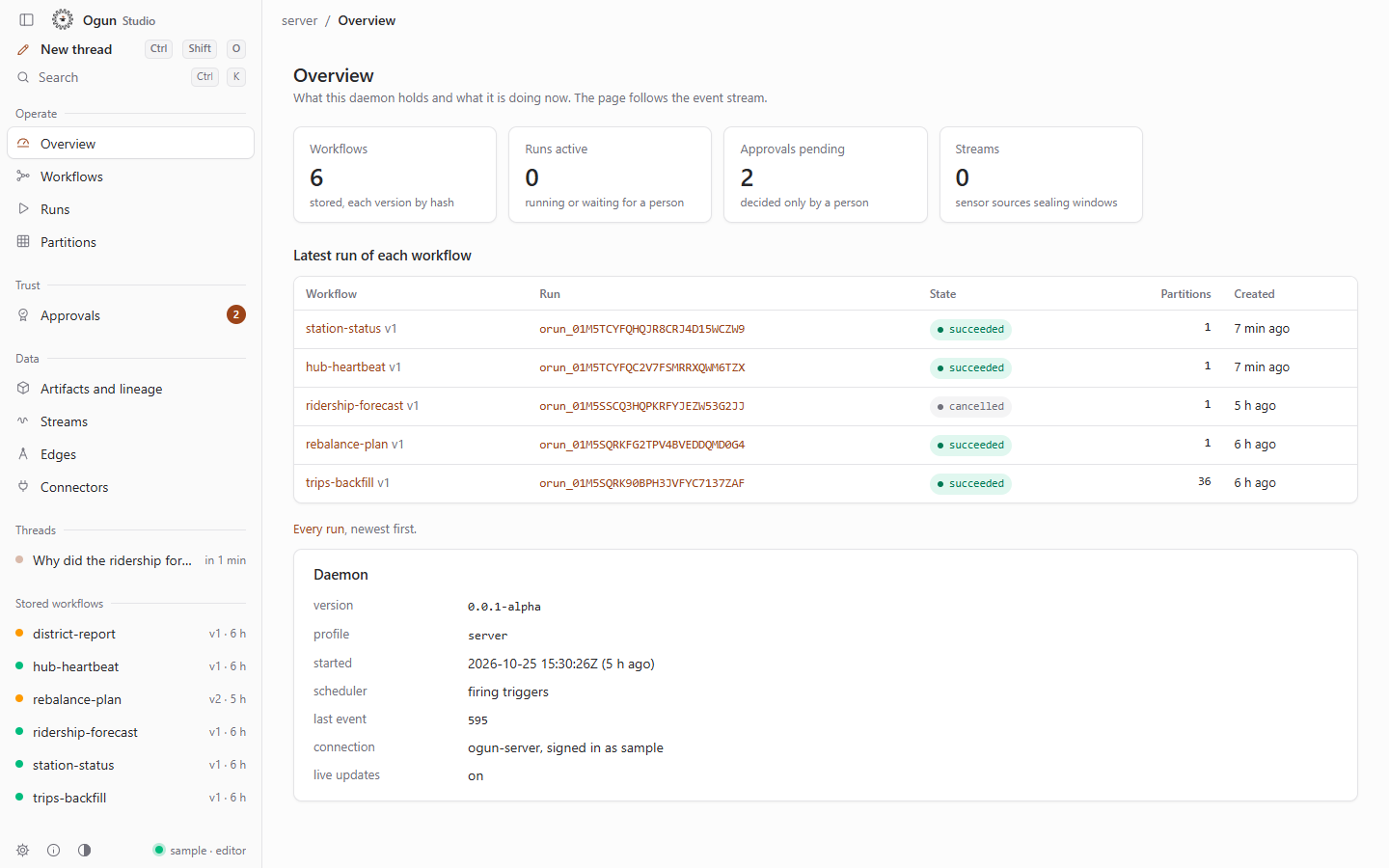
Try it in the browser
https://ogun.103.191.50.32.sslip.io
Ogun Studio on the real daemon with sample data. The sign-in page shows a shared sample account. Everything is reset every night at 03:00 UTC, and every visitor shares it, so do not enter anything private.
Downloads
| Platform | File | What it is |
|---|---|---|
| Windows x64 | ogun-studio-0.0.1a-windows-x64-setup.exe |
Ogun Studio, installer (3.3 MB) |
| Windows x64 | ogun-studio-0.0.1a-windows-x64-portable.zip |
Ogun Studio, portable: a single ogun-studio.exe (4.4 MB) |
| Windows x64 | ogun-0.0.1a-windows-x64.zip |
ogun (command line) and ogund (daemon) (11.7 MB) |
| Linux x64 | ogun-studio-0.0.1a-linux-x64.AppImage |
Ogun Studio, AppImage for most distributions (83.3 MB) |
| Linux x64 | ogun-studio-0.0.1a-linux-x64.deb |
Ogun Studio, package for Debian and Ubuntu 22.04 or later (5.2 MB) |
| Linux x64 | ogun-0.0.1a-linux-x64.tar.gz |
ogun and ogund, glibc 2.35 or later (13.5 MB) |
| All | SHA256SUMS |
SHA-256 of every file above |
No macOS, Android or iOS builds in this release.
Install
Windows 10 or 11 (x64)
- Download the installer, or the portable zip and unzip it.
- Run it. The builds are not signed, so Windows SmartScreen shows "Windows protected your PC": choose More info, then Run anyway. Check the SHA-256 first (see below).
- Studio needs the WebView2 runtime, which Windows 10 and 11 include.
Linux (x64)
- AppImage:
chmod +x ogun-studio-0.0.1a-linux-x64.AppImage, then run it. - Debian or Ubuntu 22.04 or later:
sudo apt install ./ogun-studio-0.0.1a-linux-x64.deb
Command line and daemon
Unpack the zip or the tar.gz, start ogund, then run ogun daemon status.
Studio links to the hosted hub by default, with a public token that acts as an agent: it reads workflows, runs, partitions, approvals, artifacts and lineage there, and its agent threads and settings go to the hub's pre-alpha service. Settings, Environments, "Use ogund on this machine" switches it to your own daemon; "Connect to a hub" to your own hub with your own token.
What works
ogund: workflows as hashed JSON documents, durable runs and node instances, partitions and backfills that survivekill -9and resume only unfinished work, cron schedules, streams as windowed partitions, approvals bound to a request hash, the content-addressed artifact store and OpenLineage events. The core operators (acquire,crawl,hash,manifest,dedupe,filter, ...) run for real.ogun: validate, hash, diff, put, run, backfill, partition-status, runs, show, approvals, approve/deny (on a terminal),ogun mcpandogun lsp.- Ogun Studio: overview, workflows, runs, partitions, approvals with the arming delay, artifacts and lineage, streams, edges, settings, and the agent screen.
- The hosted hub runs
ogundandogun-server(OIDC sign-in, Studio-web, REST, MCP) in containers.
Planned (not in this release)
- Code operators (
python,sql,dbt,shell,polars) need the operator sandbox: bubblewrap on Linux. Windows has no sandbox yet (only the explicitallow_unsandboxeddevelopment override), and the hosted hub has none, so they do not run there. - Approvals on Windows and macOS: peer inspection exists on Linux only, so terminal and Studio approvals are refused on a Windows
ogund. Remote approvals (Studio-web with a passkey) stay off until an external security review (ADR 0010). - Agent threads (O-17) are a proposal: the agent's replies are scripted and no model is called; its tool calls are real.
- Connections, provider settings, storage rules, evidence, sources and the archive in Studio are kept by the hosted hub's pre-alpha service, not by
ogundyet. - Most connectors are manifests only (29 built, 70 contract, none verified against the real service).
- macOS, Android and iOS builds.
Known issues
- The binaries are not signed. Windows SmartScreen warns about the installer (More info, then Run anyway).
- The hosted hub is shared by every visitor and reset every night; do not enter anything private there.
- The desktop link to the hosted hub is read-only for workflows and runs (a token is never a person), so the agent's "Store" and "Start" buttons are disabled there; use the browser to press them.
Checksums (SHA-256)
Compare a download with its line below or in SHA256SUMS: certutil -hashfile <file> SHA256 on Windows, sha256sum -c SHA256SUMS on Linux.
1e9a6fc525c67e9ec021a88c6e93d420b86519d9fe51380445aaf4f253f255d8  ogun-0.0.1a-linux-x64.tar.gz
c32634b471ae5842255711c2debac183955721813a017b73f10e6388f66243ff  ogun-0.0.1a-windows-x64.zip
dba002324c93f041210a16f89c2dae0fa0417cf814d557d4ed114ca1a733177a  ogun-studio-0.0.1a-linux-x64.AppImage
e86fa68a2097fae83d6f1c5eb1846533758cea01e6bcd4c95cad5533d3c96135  ogun-studio-0.0.1a-linux-x64.deb
31b6d420fce2520124230da8c2d37db7891c422f35057b68a60b5ad3ea294176  ogun-studio-0.0.1a-windows-x64-portable.zip
98db64bc782e4a11c3a3f7236062d33432aeb08ebdf1ae55df9051f1529c9c45  ogun-studio-0.0.1a-windows-x64-setup.exe
Built from main at the commit this tag points to: Windows x64 on Windows 11, Linux x64 in an Ubuntu 22.04 container (deploy/pre-alpha/release).
Licence
Apache-2.0. Published by Verne Ltd. Website: https://ogun-site.vercel.app