Repository navigation

Ogun 0.0.1a is the first pre-alpha of Ogun, the local-first platform for data acquisition, data engineering and agent benchmarks by Verne Ltd. It contains Ogun Studio for the desktop, the ogun command line and the ogund daemon, for Windows x64 and Linux x64. It is for trying the product and giving feedback. Expect breaking changes, and do not use it for data you cannot lose.
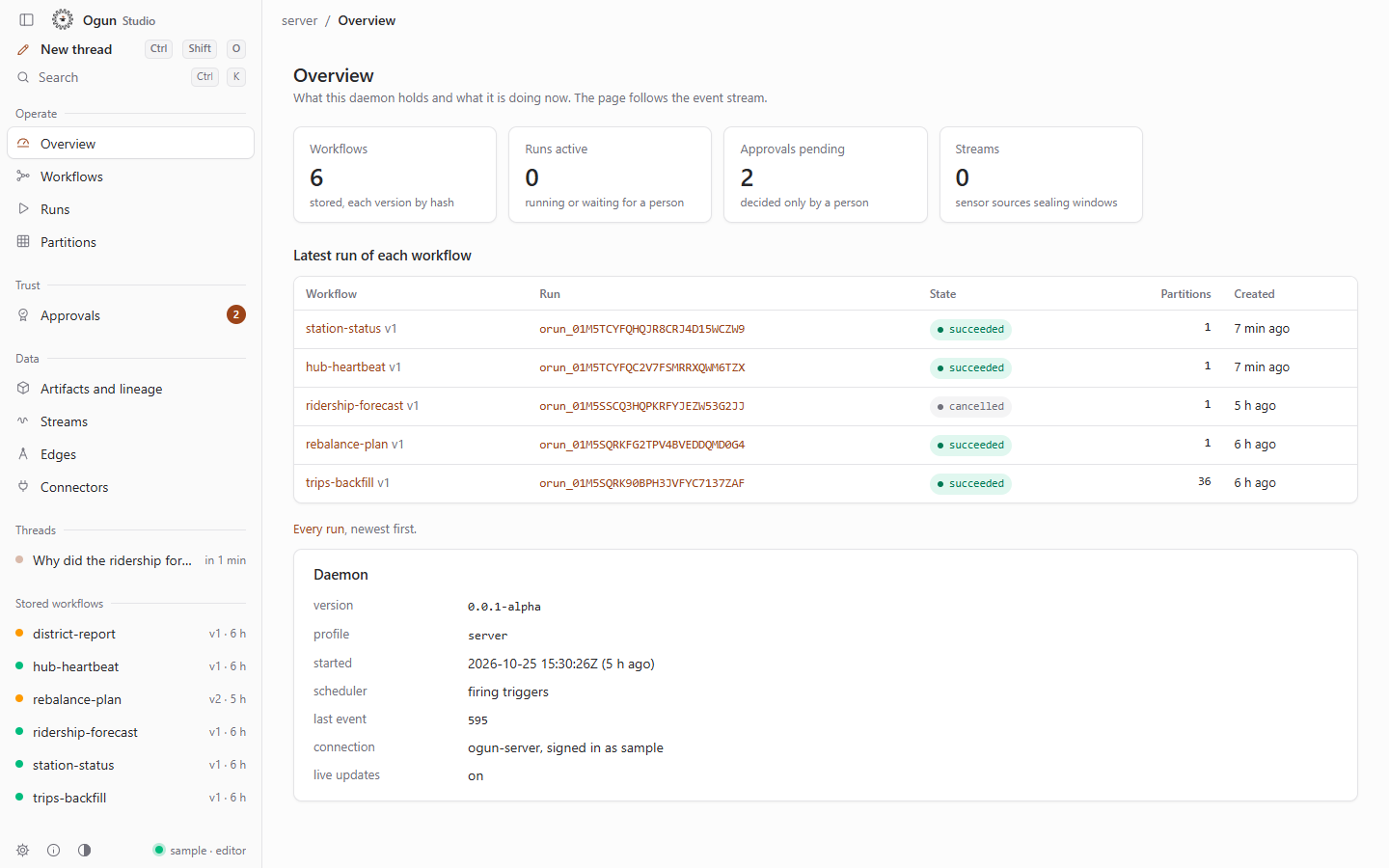
Try it in the browser
https://ogun.103.191.50.32.sslip.io
Ogun Studio on the real daemon with sample data. The sign-in page shows a shared sample account. Everything is reset every night at 03:00 UTC, and every visitor shares it, so do not enter anything private.
Downloads
| Platform | File | What it is |
|---|---|---|
| Windows x64 | ogun-studio-0.0.1a-windows-x64-setup.exe |
Ogun Studio, installer (3.3 MB) |
| Windows x64 | ogun-studio-0.0.1a-windows-x64-portable.zip |
Ogun Studio, portable: a single ogun-studio.exe (4.4 MB) |
| Windows x64 | ogun-0.0.1a-windows-x64.zip |
ogun (command line) and ogund (daemon) (11.7 MB) |
| Linux x64 | ogun-studio-0.0.1a-linux-x64.AppImage |
Ogun Studio, AppImage for most distributions (83.3 MB) |
| Linux x64 | ogun-studio-0.0.1a-linux-x64.deb |
Ogun Studio, package for Debian and Ubuntu 22.04 or later (5.2 MB) |
| Linux x64 | ogun-0.0.1a-linux-x64.tar.gz |
ogun and ogund, glibc 2.35 or later (13.5 MB) |
| All | SHA256SUMS |
SHA-256 of every file above |
No macOS, Android or iOS builds in this release.
Install
Windows 10 or 11 (x64)
- Download the installer, or the portable zip and unzip it.
- Run it. The builds are not signed, so Windows SmartScreen shows "Windows protected your PC": choose More info, then Run anyway. Check the SHA-256 first (see below).
- Studio needs the WebView2 runtime, which Windows 10 and 11 include.
Linux (x64)
- AppImage:
chmod +x ogun-studio-0.0.1a-linux-x64.AppImage, then run it. - Debian or Ubuntu 22.04 or later:
sudo apt install ./ogun-studio-0.0.1a-linux-x64.deb
Command line and daemon
Unpack the zip or the tar.gz, start ogund, then run ogun daemon status.
Studio links to the hosted hub by default, with a public token that acts as an agent: it reads workflows, runs, partitions, approvals, artifacts and lineage there, and its agent threads and settings go to the hub's pre-alpha service. Settings, Environments, "Use ogund on this machine" switches it to your own daemon; "Connect to a hub" to your own hub with your own token.
What works
ogund: workflows as hashed JSON documents, durable runs and node instances, partitions and backfills that survivekill -9and resume only unfinished work, cron schedules, streams as windowed partitions, approvals bound to a request hash, the content-addressed artifact store and OpenLineage events. The core operators (acquire,crawl,hash,manifest,dedupe,filter, ...) run for real.ogun: validate, hash, diff, put, run, backfill, partition-status, runs, show, approvals, approve/deny (on a terminal),ogun mcpandogun lsp.- Ogun Studio: overview, workflows, runs, partitions, approvals with the arming delay, artifacts and lineage, streams, edges, settings, and the agent screen.
- The hosted hub runs
ogundandogun-server(OIDC sign-in, Studio-web, REST, MCP) in containers.
Planned (not in this release)
- Code operators (
python,sql,dbt,shell,polars) need the operator sandbox: bubblewrap on Linux. Windows has no sandbox yet (only the explicitallow_unsandboxeddevelopment override), and the hosted hub has none, so they do not run there. - Approvals on Windows and macOS: peer inspection exists on Linux only, so terminal and Studio approvals are refused on a Windows
ogund. Remote approvals (Studio-web with a passkey) stay off until an external security review (ADR 0010). - Agent threads (O-17) are a proposal: the agent's replies are scripted and no model is called; its tool calls are real.
- Connections, provider settings, storage rules, evidence, sources and the archive in Studio are kept by the hosted hub's pre-alpha service, not by
ogundyet. - Most connectors are manifests only (29 built, 70 contract, none verified against the real service).
- macOS, Android and iOS builds.
Known issues
- The binaries are not signed. Windows SmartScreen warns about the installer (More info, then Run anyway).
- The hosted hub is shared by every visitor and reset every night; do not enter anything private there.
- The desktop link to the hosted hub is read-only for workflows and runs (a token is never a person), so the agent's "Store" and "Start" buttons are disabled there; use the browser to press them.
Checksums (SHA-256)
Compare a download with its line below or in SHA256SUMS: certutil -hashfile <file> SHA256 on Windows, sha256sum -c SHA256SUMS on Linux.
1e9a6fc525c67e9ec021a88c6e93d420b86519d9fe51380445aaf4f253f255d8  ogun-0.0.1a-linux-x64.tar.gz
c32634b471ae5842255711c2debac183955721813a017b73f10e6388f66243ff  ogun-0.0.1a-windows-x64.zip
dba002324c93f041210a16f89c2dae0fa0417cf814d557d4ed114ca1a733177a  ogun-studio-0.0.1a-linux-x64.AppImage
e86fa68a2097fae83d6f1c5eb1846533758cea01e6bcd4c95cad5533d3c96135  ogun-studio-0.0.1a-linux-x64.deb
31b6d420fce2520124230da8c2d37db7891c422f35057b68a60b5ad3ea294176  ogun-studio-0.0.1a-windows-x64-portable.zip
98db64bc782e4a11c3a3f7236062d33432aeb08ebdf1ae55df9051f1529c9c45  ogun-studio-0.0.1a-windows-x64-setup.exe
Built from main at the commit this tag points to: Windows x64 on Windows 11, Linux x64 in an Ubuntu 22.04 container (deploy/pre-alpha/release).
Licence
Apache-2.0. Published by Verne Ltd. Website: https://ogun-site.vercel.app