Repository navigation

AsoBeast, the open-source, self-hosted ASO toolkit, has a new look on every screen, and the daily pages now open with what moved and what to do next. The keywords page gets a sheet for each keyword, and a new keyword inspector looks up any keyword in any country without tracking it. The audit reads the App Store page itself and tells you how ready your app is to be featured.
Note
No breaking changes. The REST API, the shared types and the MCP tools only gain things, so scripts and agents built on 1.x keep working. The upgrade steps are the same as for 1.x; see the upgrade notes.
curl -fsSLO https://raw.githubusercontent.com/AsoBeast/asobeast/v2.0.0/docker-compose.pull.yml
docker compose -f docker-compose.pull.yml pull
docker compose -f docker-compose.pull.yml up -d --wait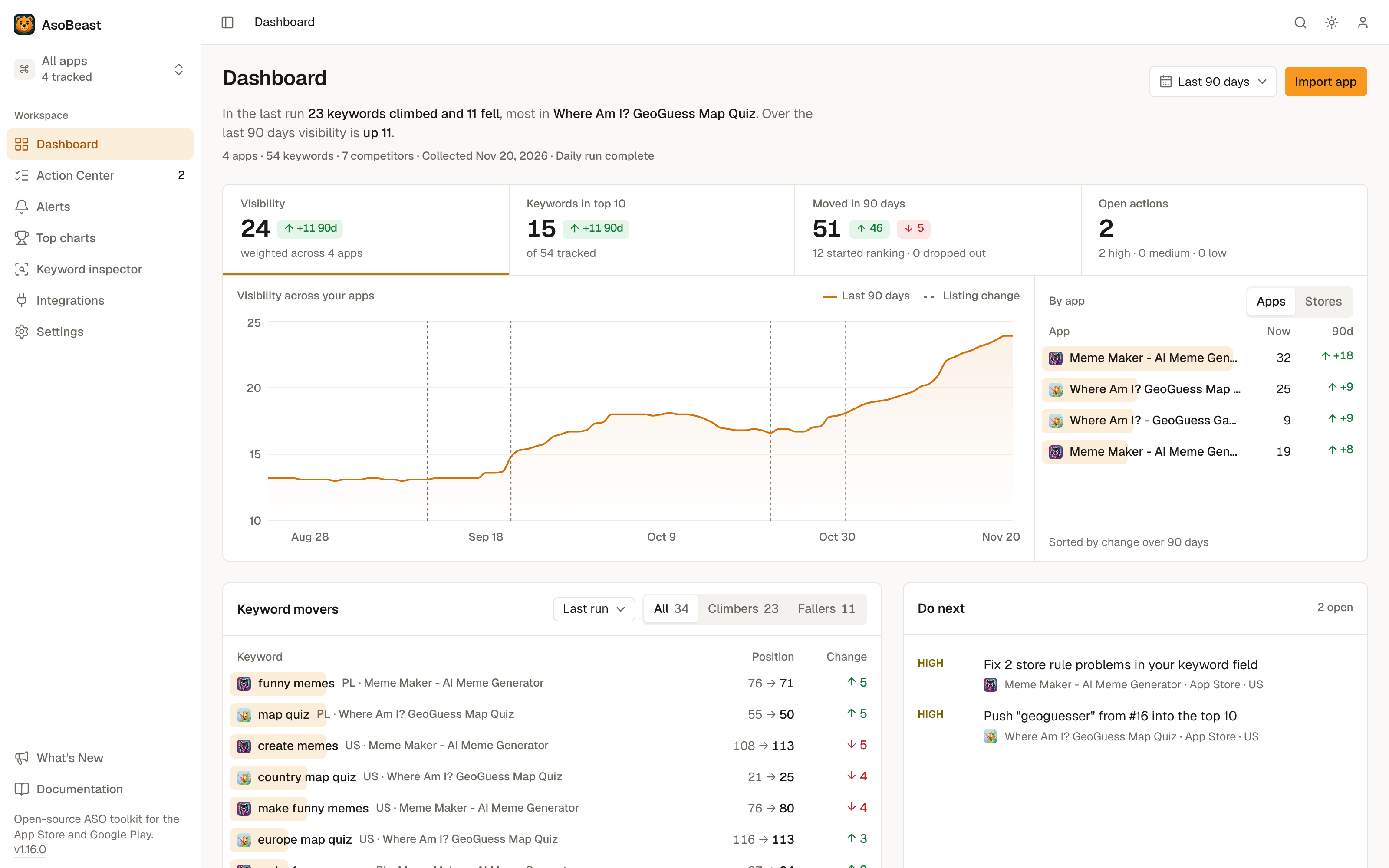
🌟 Highlights
A new look and a dashboard that starts with what moved
AsoBeast has a new typeface, warmer neutral colours and flatter panels with fine borders, in light and dark. Text and buttons are a step larger. Brand orange marks what you select and what's yours, and blue is left to charts. The sign in pages, error pages, notices and emails look the same way. (#722, #790, #793, #815, #849, #850, #851)
On the dashboard, pick the last 7, 30 or 90 days. One sentence says which keywords climbed and fell, four figures each draw their own chart, and a By app list shows which app caused a dip. The app overview opens the same way, and its chart marks the days your listing changed. (#724, #759, #762, #876) Read more
The keywords page, rebuilt
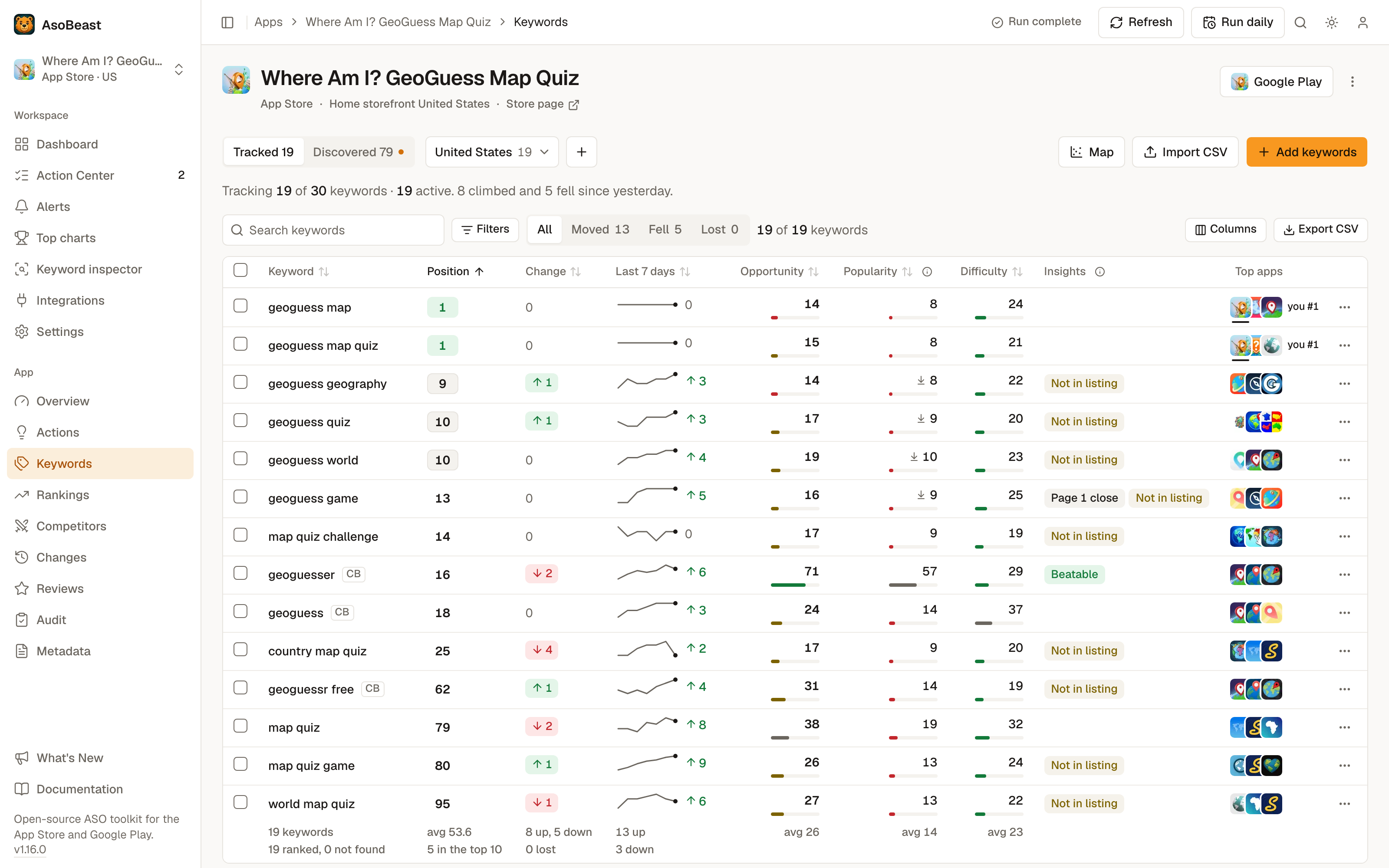
- Press a keyword for a sheet with its position, scores, history, the top 10 results and where it sits in your listing. Arrows step to the next one (#769, #770)
- One Filters button, a Change column, a 7 or 30 day trend line and the top three apps' icons, on a table that fits a small laptop (#764, #765, #848 thanks @Staberman)
- The Discovered tab now holds Suggestions and Keyword combinations, and you can track several suggestions at once (#767, #852)
- Select keywords and choose Add to keyword field to send them to the iOS keyword field editor (#854)
- A Reveal column shows how many letters a shopper types before the store suggests a keyword. Thanks @jay23606 (#751)
Keyword inspector
Keyword inspector in the sidebar reads any keyword in any country straight from the store, without tracking it: the top 50 apps, the autocomplete, its scores and the strength of the top 10. Each inspection lands on a map beside the others, and inspecting the same keyword again shows what changed. Agents with a write-scoped token get it as the inspect_keyword MCP tool. Thanks @ahmethakanbesel (#754), polished in #814. Read more
Featuring readiness
The audit now reads the public App Store page: it scores the preview video and adds a featuring readiness checklist beside the score, covering the preview video, in-app events, ratings, updates, localizations and screenshots. With App Store Connect connected, it also checks your featuring nomination and promotional text. The changes feed records in-app events, featured stories and the Editors' Choice badge, for your apps and your competitors. Thanks @coolswood (#752, #766, #834, #847, #875) Read more
Every page says where to start
- Action Center opens with the one action that matters most and a button to the page where you fix it (#797)
- Alerts is one feed grouped by day, and Rankings has a row per keyword with today's position, the move, the best and the average (#795, #798)
- Reviews charts your rating and keeps the reviews that need a reply one switch away (#800). A ratings goal says how many five-star ratings reach the average you want. Thanks @Staberman (#842)
- Competitors ranks you against every competitor by visibility, and Top charts shows where your apps stand in every chart (#799, #801)
- Changes reads the effect of each listing change after 7, 14 and 28 days (#805)
✨ Also new
- Imports and refreshes go first on a busy server, retry once by themselves, and a failure says why without spending your daily limit (#859, #865, #867)
- The first positions and scores of a new app or new keywords arrive before the daily run finishes (#845, #866)
- Play installs per search term reads explore traffic too, and says so when a month names no term. Thanks @coolswood (#755)
- Hosted and admin: deleting a workspace optionally asks why you leave, and the admin area shows trial conversion, departures and paying workspaces by plan (#825, #826, #827, #873)
🐛 Fixes
- An app that isn't found shows how far the check looked, such as
>30on Google Play, instead of always>200, and Google Play is asked twice before an app counts as gone (#843, #844) - Top 10 counts and visibility no longer dip every morning while the daily run is still checking (#853, #901)
- Competitor brands are no longer suggested for your title, subtitle or keyword field (#885)
- An App Store keyword whose words sit in different fields is marked Words split, no longer Not in listing (#885)
- The suggested keyword field keeps words whole, so
focusno longer becomesfocu(#902) - App Store searches list as many apps as you asked for, in rank order, and competitor suggestions follow the store's You Might Also Like order (#846, #860 thanks @coolswood)
- Action Center shortcuts open the right menu, and bulk changes work on more than 100 actions (#900)
- AI features no longer fail on image downloads or long answers (#753)
- Store queues keep running through database and proxy faults, and the API stops cleanly while Redis reconnects (#743, #813)
- Focus stays in place when a section reloads, and running buttons stay focusable (#791, #903, and #808, #810 thanks @Staberman)
- Hosted sign up and trial fixes (#740, #741, #744, #757, #872)
⚠️ Upgrade notes
- Six forward migrations apply on start: new
KeywordInspection,FeaturingSync,AlertRelayandWorkspaceDeparturetables, plus a few columns. Nothing existing is rewritten. - Postgres gets 512 MB instead of 384 MB in both Compose files, with tuned memory settings, after the old limit ran out under load (#743). The stack needs about 128 MB more RAM, and a customised Compose file has to copy the change by hand.
- New optional environment variables:
RETENTION_KEYWORD_INSPECTIONS_DAYS(default180),AI_MAX_OUTPUT_TOKENS(default16384, refuses to boot below1024),PROXY_INTERACTIVE_RESERVE(default1, proxy pool only) andGOOGLE_PLAY_OAUTH_PUBLISHED(defaulttrue; set it tofalsewhile your Google consent screen is still in testing, which hides Sign in with Google).CRON_TRIAL_NOTICESnow runs hourly; only billing uses it. - Some numbers move once. The audit now scores the preview video, so an App Store app without one scores about three to four points lower on its next audit. Not found rows from before this release still read
>200. - API and MCP additions only. New
/keyword-inspectionsroutes andGET /portfolio/history, plus the stored description, genre and dates on an app. New MCP read toolslist_keyword_inspectionsandget_keyword_inspection, and the write toolinspect_keywordfor write-scoped tokens. Nothing is removed or renamed.
Take a backup first, as always.
Full Changelog: v1.16.0...v2.0.0


