Repository navigation

Helios Profile Patcher 
Abstract
Program to provide a mechanism to quicky add interfaces and bindings to an existing Helios Profile.
Description
The target Helios profile is opened first, and then there is the option to provide substitution values for the following variables
which can appear in the sparse profile.
$(HeliosPath)$(VehicleName)$(var1)$(var2)$(var3)
There is also the ability to perform character substitutions on send keys bindings in the target profile.
Warning
The number of characters in the Original Characters field must be the same as in the Replacement Characters field.
Next you press the Patch button which allows you to load in the sparse profile used to patch the target profile. The window that appears
then allows you to select / deselect the interfaces, bindings & controls from the sparse profile that you want to add to the target profile.
Support for controls is limited to controls that live directly on the monitor surface. Controls which are on panels are not moved over to the target profile.

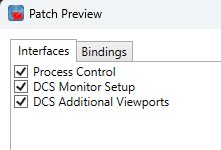
The sparse profile is read and the interfaces which are not contained in the original profile are offered for inclusion
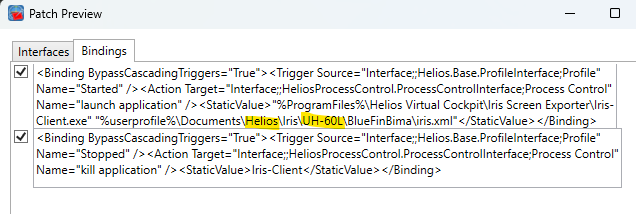
Similarly, the bindings in the sparse profile are offered after any substitutions have been made.
Note
You need to create the sparse profile used for patching manually so that it contains just the interfaces and bindings that you
wish to add to the target profile. When you are creating this sparse profile, you can add any of the variables shown above for later
substitution.
Example of a sparce Helios Profile used to add IRIS start and stop to an existing profile
<?xml version="1.0" encoding="utf-8"?>
<HeliosProfile>
  <Version>3</Version>
  <Interfaces>
    <Interface TypeIdentifier="HeliosProcessControl.ProcessControlInterface" Name="Process Control">
      <Configuration xmlns="http://Helios.local/HeliosProcessControl/Interfaces/ProcessControl/Configuration" />
    </Interface>
    <Interface TypeIdentifier="Patching.DCS.MonitorSetup" Name="DCS Monitor Setup" />
    <Interface TypeIdentifier="Patching.DCS.AdditionalViewports" Name="DCS Additional Viewports" />
  </Interfaces>
  <Bindings>
    <Binding BypassCascadingTriggers="True">
      <Trigger Source="Interface;;Helios.Base.ProfileInterface;Profile" Name="Started" />
      <Action Target="Interface;;HeliosProcessControl.ProcessControlInterface;Process Control" Name="launch application" />
      <StaticValue>"%ProgramFiles%\Helios Virtual Cockpit\Iris Screen Exporter\Iris-Client.exe" "%userprofile%\Documents\$(HeliosPath)\Iris\$(VehicleName)\BlueFinBima\iris.xml"</StaticValue>
    </Binding>
    <Binding BypassCascadingTriggers="True">
      <Trigger Source="Interface;;Helios.Base.ProfileInterface;Profile" Name="Stopped" />
      <Action Target="Interface;;HeliosProcessControl.ProcessControlInterface;Process Control" Name="kill application" />
      <StaticValue>Iris-Client</StaticValue>
    </Binding>
  </Bindings>
</HeliosProfile>