Repository navigation
Gallery
Everything AFK Shipwrecks looks like in game, in one place. The animations play by themselves and loop, without sound; the videos have sound and play when you click them. Each one links to the page that explains it.
Alerts.mp4
The two hold alerts, about two minutes apart: the orange nearly-full banner and a screen flash as the count reaches 200/210, then the overlay counting down the last seconds to the red full-hold banner and its flash. Both can also play a sound, your own if you like: the cog on the full alert's Notification setting picks it, and the early warning has its own Play sound switch (Settings). More in Alerts and reminders and Timers.
Parking.mp4
Sailing into a spot: a yellow box round each wreck shows the water a hook can reach it from, and the green box where two overlap is a double spot. The label counts your hooks in ("1 of 2 hooks in") until it says Parked, then the big boxes clear away and only the small tile boxes and timers stay. More in Parking and double spots.
Your.next.step.mp4
A full round of sorting. The inventory boxes show what to drop (red) and alch (green); once that's done the cargo hold lights up for the deposit, and taking salvage out lights the salvaging station. The second time, after the drops, alchs and a quick deposit, the hold has too little salvage left to fill the inventory, so a hook lights up in green instead. More in Sorting and your next step.
With a few slots left (5 by default), an orange banner and a screen flash, so you can head back before it's full. It can play a sound too (Play sound, in Settings). More in Alerts and reminders.
The overlay counts down the last seconds, then the banner turns red and the screen flashes when the hold is full. Add a sound, your own if you like, with the cog on the Notification setting in Settings. More in Alerts and reminders.
Sailing towards a salvaging spot: the overlay appears at the top of the game as soon as a wreck site is in view, with the hold's count and the wrecks in reach. More in The overlay.
The parking video without sound: the reach boxes, one hook in, then both, and Parked. More in Parking and double spots.
Shift-right-click an item and its AFK Shipwrecks entry opens to Keep, Deposit, Alch and Drop, each in its box color. Marking the planks Drop puts a red box on both at once, and from then on every plank you sort gets one. More in Sorting and your next step.
Drop the red items and alch the green one, and the cargo hold lights up. Take salvage out, and the salvaging station lights up straight away, without closing the hold first. More in Sorting and your next step.
After dropping, alching and depositing the cannonballs, the hold has too little salvage left to fill your free inventory, so a hook lights up in green: going on a hook yourself beats a half-empty withdraw. More in Sorting and your next step.
A hook has stood empty for the grace period while a crewmate could work it: the HOOK EMPTY banner and a screen flash, then the green boxes lead through the Sailing tab, Facilities and Assign to Cabin Boy Jenkins, and the banner goes once he's back on. It can play a sound too, your own if you like: the cog on Hook empty, crewmate free in Settings (Crew and hooks). More in Alerts and reminders.
Leaving a hook to go and sort: flashing green boxes show each click to put a crewmate on it, the Sailing tab, Facilities, the hook's Assign button and the best free crewmate. Every click is still yours. More in Alerts and reminders.
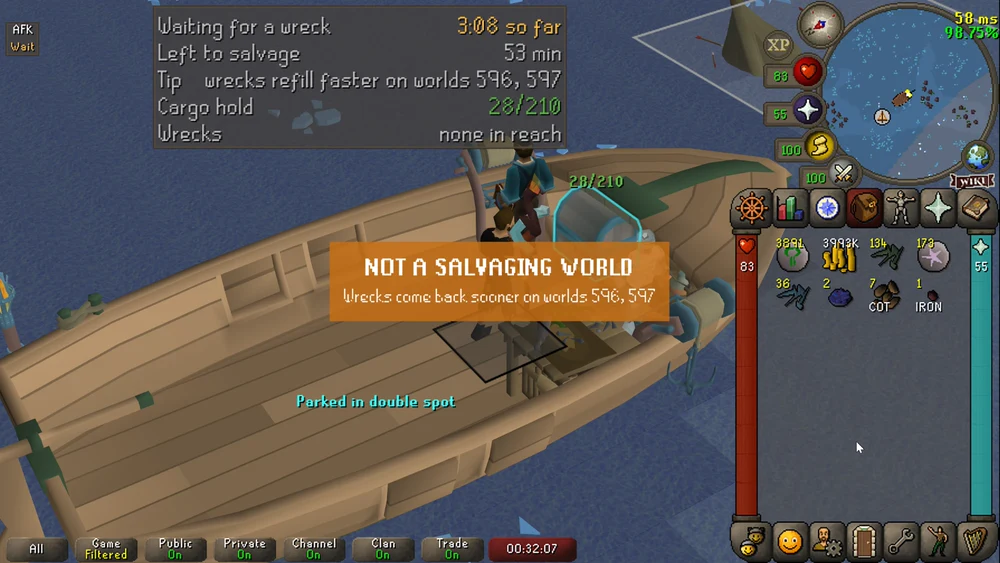
Waiting more than three minutes for a wreck on an ordinary world: an orange notice flashes in the middle of the screen, and the overlay's Tip line says the same. On the salvaging worlds (596 and 597) every site is worked, so wrecks come back sooner. More in Timers.