Repository navigation
Releases
BrightScout v1.1.4

very small patch
what changed
- last three epa was removed, since it is no longer seen as a needed statistic.
- max_teleop_epa was changed to max_epa, since there was no good reason of just knowing max teleop epa
good luck in the 2025 season!
BrightScout v1.1.3
Made a crucial patch that should allow teams to actually scan QR codes.
What changed
- QR codes, in reality, should have never been able to be scanned because of the way commas were being added in the CSVString method. The way of adding commas was changed, and should work a little bit better.
- Delete button is removed as to not have them accidentally removed. This adds the issue of blank matches being added inflating the scroll view if not handled, but it can be fixed by reopening the app. This is better than possibly having all data removed, so I'll take it.
- Back button was added on to the Scout Activity in order to allow versions of android that don't have back buttons to still travel through menus seamlessly.
As always, if you find anything crazy, let me know by making an issue on this repo.
Download APK is found below! Good luck in the 2025 season!
BrightScout v1.1.2
Small update from the list, simply adding more data points for the average export.
What changed
- Max TELEOP EPA has been added to help calculate if a team can do better than their normal epa. This can hopefully help find us a team who's simply going too fast for their own good, or determine if someone is broken.
- Last Three EPA has been added to figure out how good a robot has been as of recent. Of course, this should be considered close to the actual EPA, as the last three EPA is using less matches to calculate averages.
Also, since this update makes changes to the database table, you will have to uninstall and remove the data you once had for BrightScout and install it from a clean slate.**
As always, if you find anything crazy, let me know by making an issue on this repo.
Download APK is found below! Good luck in the 2025 season!
BrightScout v1.1.1
Very small update from v1.1 adding small tweaks from some feedback.
*What changed
- Amount of matches that a team has data for has been added to the average sheet in export
- Comment graphic updated to broaden interactions to driving overall. This was specifically done to include tipping robots, as that is a very important factor in picking
- Clipboard debugging removed. The app used to use android's clipboard to make sure the CSV string looked accurate, but since that is no longer is necessary, it's gone now.
**A reminder that this app is optimized for Android Tablets in Portrait Mode.
If you attempt to use this app in other configurations, it's possible that the graphics will switch around and render BrightScout unusable.
Also, since this update makes changes to the database table, you will have to uninstall and remove the data you once had for BrightScout and install it from a clean slate.**
As always, if you find anything crazy, let me know by making an issue on this repo.
Download APK is found below! Good luck in the 2025 season!
BrightScout v1.1
This is BrightScout v1.1, which makes some minor adjustments from the last version, and patches some bugs.
Bugs addressed
- The comments box was accidentally set to Numbers only! Yikes! This version turns it back to text, so everything should be okay now.
- App used to get very slow after a while, which was caused by calling startActivity when dismiss was hit from ScoutActivity. This has now been changed to use the proper method: finish().
Big change
Exporting now gives you the approximate EPAs from each team you scout! Use this to see which team is actually contributing the most points on average. This should hopefully be a big piece of information to be looking at when Alliance Selections go underway :)
However, there is one thing to address: In BrightScout, algae contributions are not counted for AUTONOMOUS. This decision was made because, at the time of Week 0, it seems algae really shouldn't be dealt with since they don't offer any more points than they do in tele-op. Including algae during auto in this app would make for a longer list of things for scouters to track, which, especially for less experienced scouters, can cause less accurate data to be input. BrightScout tries its best to optimize the data points needed for alliance selection by only getting the most important metrics, which at this time, would only include coral scored in AUTONOMOUS.
Minor Adjustments
- Wording changed on the comments graphic to make the climbing section a little easier to understand.
- Size of comment graphic adjusted to be a little more clear
- Message that pops up for net and processor if you don't mark high or low algae is now only prevalent if hitting the add button and not the minus button.
- Removed "Kept scoring Algae" and "Kept scoring Coral" options in endgameDropdown, since those options could confuse scouters.
- Match view changed to be a bit taller on the home page.
- Names of variables and IDs slightly modified in the code to be a bit more intuitive.
A reminder that this app is optimized for Android Tablets in Portrait Mode.
If you attempt to use this app in other configurations, it's possible that the graphics will switch around and render BrightScout unusable.
Also, since this update makes changes to the database table, you will have to uninstall and remove the data you once had for BrightScout and install it from a clean slate.
As always, if you find anything crazy, let me know by making an issue on this repo.
Download APK is found below! Good luck in the 2025 season!
BrightScout v1.0.1
This is BrightScout version 1.0.1, only making some minor improvements to the last release in order to facilitate the scouting process.
What changed
- The match list in the home screen now doesn't perfectly align with match heights, making it obvious that the list is scrollable
- The options for "export raw data to csv" and "export averaged data to csv" are now combined to a simple "export data to csv"
- BrightScout locks itself to be portrait mode only
- If the processor/net is scored without marking high or low algae, a message pops up asking the user if they forgot to mark those options. Of course, this is just a reminder, as it is possible to grab algae from the ground, meaning it's entirely possible that a team could go without picking up algae from the reef and score it into the processor/net.
- New comment pop up box! This stops the hassle of having to put down the keyboard to make sure you typed in the right thing. It also gives a helpful graphic for those blanking on what to write at the end of a match.
- The dismiss button was renamed to "return" button to accurately reflect it sending you back to the home screen.
- Colors are now consistent on the toolbar at the top.
- "Syncing Data" message changed to be short lasting, allowing other toasts to come up quicker.
- Creating match makes a message that tells the user a match has been made.
- Compile method changed so that dropdowns are valid when autofilled.
- Issue with positionDropdown not being checked correctly was fixed.
A reminder that this app is optimized for Android Tablets in Portrait Mode.
If you attempt to use this app in other configurations, it's possible that the graphics will switch around and render BrightScout unusable.
Download APK is found below! Good luck in the 2025 season!
BrightScout v1.0
This is the first BrightScout release for the 2025 season, how exciting!
This release introduces BrightScout to GitHub, allowing the FRC community to download and use this for their season's competitions. Check back for any inevitable bugs or glitch patches.
If you're new to BrightScout, here's how it works:
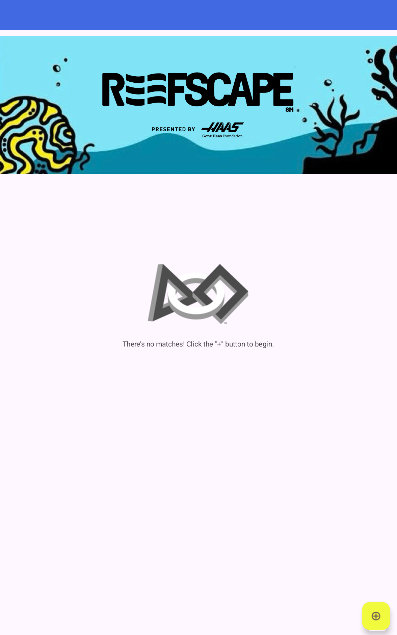
The main menu screen allows you to navigate through all of the matches you have made. To make a match, you hit the + button located at the bottom right of the screen. To compile data and scan QR codes, hit the three dots located on the top right of the screen and hit the option you are looking for.
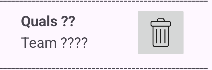
To start scouting, hit the title of the quals match text as seen in the image below. If you wish to delete that match data, hit the trash can icon as seen in the image below.
You will be met with the following screen:
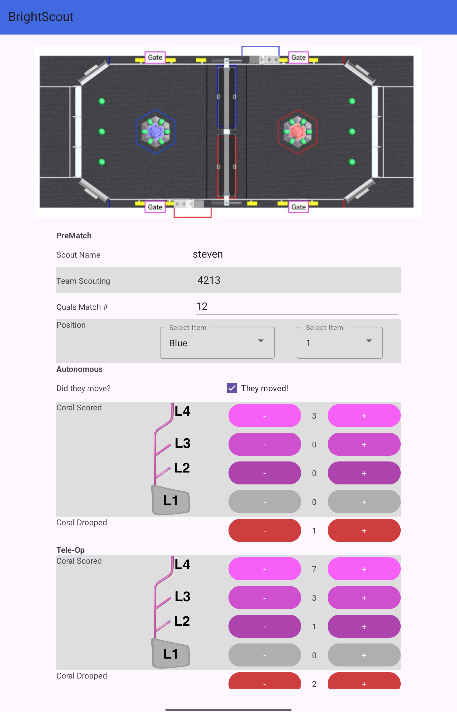
This is the scouting menu, which allows you to put down all of the vital information you need to get accurate data on a team. Scroll to access all of the information points, and when you've filled everything out, make sure to hit the "compile" button at the very bottom. It will show you a QR code like this:
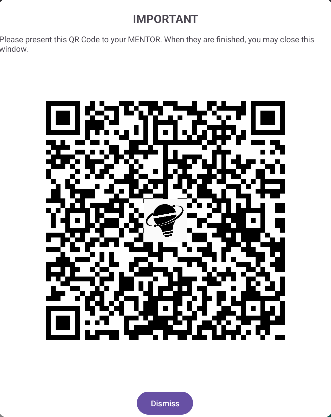
This QR code can be scanned by the scanning option on the home screen (see above). Once you're done, hit dismiss.
A reminder that this app is optimized for Android Tablets in Portrait Mode.
If you attempt to use this app in other configurations, it's possible that the graphics will get messed up.
Download APK is found below! Good luck in the 2025 season!