Repository navigation
Mobilephone v1.41

·
29 commits
to master
since this release

Recommended CSP Version: CSP 0.2.0 (2651) and newer
Important:
This update will reset most of your settings. Sorry in advance!
Added:
- Hovering over the app now pauses the autoscrolling and allows you to scroll up/down in chat using the mousewheel.
- Scroll speed option added to Chat settings tab.
- Chat history settings to change how many messages are kept and how old they need to be to be removed.
- Default: Keeps 50 messages as a minimum and excess will get removed if the messages are older than 15 minutes.
Changed:
- Chat Input box is now always visible instead of fading in/out.
- Notification Sound Volume now has a
Playbutton next to it for testing instead of automatically playing when changing the volume.
Known Issues:
- Only Latin alphabet and Western Arabic numerals are supported by the font. Kanji, Cyrillic etc. will be displayed using a different font via font fallback.
- Currently Playing will display some programs (like
battle.net) if theSpotify Appoption is enabled in your CSP Music module settings - Currently Playing will be stuck on
loading...if theAcTools.CurrentlyPlaying.exefails to start even though the music module is configured correctly and the music player is supported - When using the AssettoServer PatreonTwitchChatPlugin, some Twitch features like Announcements are not be displayed correctly and will result in empty lines
Updating & Installation:
Updating Ingame:
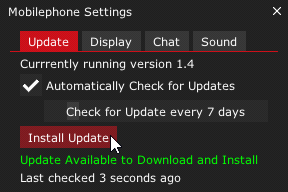
- Open the Mobilephone Ingame
- Select the
UpdateTab - Click the
Check for Updatebutton - Click the
Install Updatebutton
Automatic Installation via Content Manager:
- Download
mobilephone.zip - Drag & Drop
mobilephone.zipinto Content Manager and clickInstall
Manual Installation:
- Download
mobilephone.zip - Extract and place the
mobilephonefolder inside the\apps\luafolder of your Assetto Corsa installation.
(By default:C:\Steam\steamapps\common\assettocorsa\apps\lua)