Repository navigation
Mobilephone v1.5

·
17 commits
to master
since this release

Supported CSP Versions: CSP 0.2.0 (2651) and newer
Added:
- Right clicking will add a mention of the
@Senderto the chat input, only works when input is not active
Changed:
- Custom Color refactored
- Moved pickers next to each other inside settings
- Added reset buttons for both colors
- Fixed rare issue that would cause saved colors to not apply
Known Issues:
- Only Latin alphabet and Western Arabic numerals are supported by the font. Kanji, Cyrillic etc. will be displayed using a different font via font fallback.
- Currently Playing will display some programs (like
battle.net) if theSpotify Appoption is enabled in your CSP Music module settings - Currently Playing will be stuck on
loading...if theAcTools.CurrentlyPlaying.exefails to start even though the music module is configured correctly and the music player is supported - When using the AssettoServer PatreonTwitchChatPlugin, some Twitch features like Announcements are not be displayed correctly and will result in empty lines
Updating & Installation:
Updating Ingame:
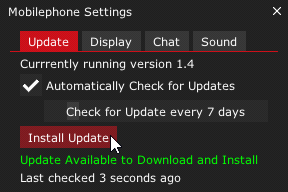
- Open the Mobilephone Ingame
- Select the
UpdateTab - Click the
Check for Updatebutton - Click the
Install Updatebutton
Automatic Installation via Content Manager:
- Download
mobilephone.zip - Drag & Drop
mobilephone.zipinto Content Manager and clickInstall
Manual Installation:
- Download
mobilephone.zip - Extract and place the
mobilephonefolder inside the\apps\luafolder of your Assetto Corsa installation.
(By default:C:\Steam\steamapps\common\assettocorsa\apps\lua)