Repository navigation
Smartphone v1.29

·
64 commits
to main
since this release


Changes:
- Updater now removes unused files and folders during the update
- Change message timestamps to only be drawn once per message group and minute
- Fixed Use Colored Usernames setting requiring a restart to apply
- Highlight Latest Message will now only apply to messages send by Players
Compare all changes:
Updating & Installation:
Oldest Supported CSP Version: CSP 0.2.3 (3044)
Updating Ingame:
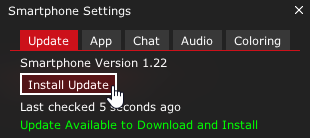
- Open the Smartphone Ingame
- Select the
UpdateTab - Click the
Check for Updatebutton - Click the
Install Updatebutton
Automatic Installation via Content Manager:
- Download
smartphone.zip - Drag & Drop
smartphone.zipinto Content Manager and clickInstall
Manual Installation:
- Download
smartphone.zip - Extract and place the
smartphonefolder inside the\apps\luafolder of your Assetto Corsa installation.
(By default:C:\Steam\steamapps\common\assettocorsa\apps\lua)
Known Issues:
- Username colors might be incorrect on servers that use custom name color scripts for players that reconnect in a different carslot.
- Song Information will sometimes be picked up from the wrong source (e.g. Browser instead of Spotify), or not at all.
Make sure thatShow desktop overlay when using media keysis enabled in your Spotify settings or try adding unwanted programs to theIgnored processesin the your CSP Music module settings.