Repository navigation
ORBIT 1.0.3


ORBIT 1.0.3
The latest version. ORBIT grows from a simple group chat into a full friends-and-communities platform for the PlayStation 3. ✅ Tested by the developer on real PS3 hardware.
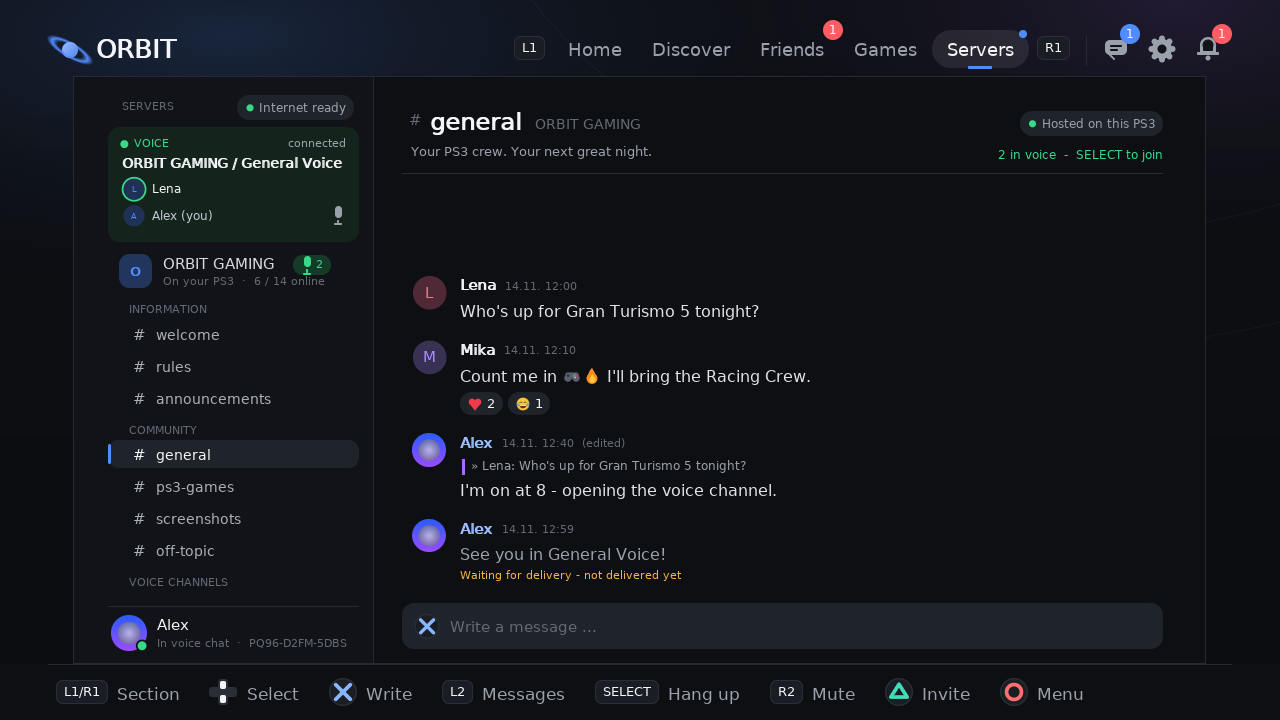
What's new
- Friends – 20-character friend code, requests, accept/decline, remove, block, a persistent Orbit ID per PS3, shared servers, message, call, add to your server
- Private messages – one-to-one and group chats, replies, editing, deleting, six reactions, search, mute, timestamps
- Offline messages – wait on your PS3 (“Waiting for delivery”) and are delivered once the other PS3 is reachable
- Community servers – categories, text and voice channels, templates, description, welcome message, icon, colour, banner, public or private, private channels
- Roles & permissions – Owner, Admin, Moderator, Member and custom roles with ten permissions, enforced by the host PS3
- Profiles – avatar, colour, about me, favourite game, custom status, Online / Away / Busy / Invisible
- Four interface languages – English, German, French, Spanish, automatic from the PS3 system language
- Notifications, four themes (Dark, Blue, Purple, Minimal), new navigation with five sections
Voice chat
- Voice channels: switch channels, mute people for yourself, volume per person 0–200 %, server-wide moderator mute
- Microphone test in Settings › Audio
- More robust playback (high-priority audio thread, larger buffer) and a noise gate that ignores constant hum
🎮 PS5 controller
- ✅ Microphone: you can speak through the PS5 controller microphone (connected by USB, handled by the PS3).
- ❌ Speaker: voice chat audio cannot be played through the controller's built-in speaker. Use your TV or another supported PS3 audio output.
Install
- Download
Orbit-PS3-1.0.3.pkgbelow. - Copy it to a FAT32 USB stick (or
/dev_hdd0/packages/via FTP). - On a PS3 with CFW or HEN: Package Manager › Install Package Files, then start Orbit Chat.
Full guide: docs/INSTALLATION.md · Deutsch: Anleitung
⚠️ Updating from 0.9.5
- Install over 0.9.5 – your name, groups and messages are kept. Groups become servers automatically.
- Downgrading to 0.9.5 afterwards is not supported. Back up
/dev_hdd0/game/ORB000001/USRDIR/datafirst if you might want to go back.
Known limitations
- Servers are available only while ORBIT runs on the host PS3
- No voice chat while a game is running
- The host PS3 can read the messages it hosts – connections are encrypted, but this is not strict end-to-end encryption (privacy)
- No Japanese, Korean or Chinese characters in the bundled font
- Per PS3: 48 slots (servers, private chats, friend inbox), 32 people, 512 stored messages, 16 connected PS3s
Versions 1.0 to 1.0.2 were internal milestones and were never released. Full changelog: CHANGELOG.md
Checksum
| File | Size | SHA-256 |
|---|---|---|
Orbit-PS3-1.0.3.pkg |
1,710,432 bytes | 2ad2c9f82ce3fe21ca0679fc9767fc746299db02886c243d78bde4d2c3792283 |
Title ID ORB000001 · content ID UP0001-ORB000001_00-0000000000000000 · APP_VER 01.03
ORBIT is an independent homebrew project, not affiliated with Sony. Developed with extensive AI assistance; concept, decisions and hardware testing by the human creator.