Repository navigation
Browser extension
The JobWarden extension for Chrome and Firefox saves the job posting you're looking at to your JobWarden in one
click, and shows on its toolbar icon whether a page is already saved. It's the
extension/ folder of the repository: plain JavaScript and
Manifest V3, with no build step.
It's on its way to the Chrome Web Store and Firefox Add-ons. Until it's listed there:
- Get the extension: the
jobwarden-extension-<version>.zipof the release with your server's version (Settings → About says which), unzipped; or theextension/folder of a clone. -
Chrome (and Edge, Brave...): open
chrome://extensions, turn on Developer mode, click Load unpacked and pick that folder. Firefox (140 or later): openabout:debugging#/runtime/this-firefox, click Load Temporary Add-on… and pick itsmanifest.json. Firefox keeps it until it restarts; to keep it for good, sign it as an unlisted add-on on addons.mozilla.org, e.g. withnpx web-ext sign --source-dir extension --channel unlisted. - In the extension's settings (⚙ in its popup, or Options in its menu), enter your server's address (e.g.
http://localhost:9273; the browser asks you to allow any other) and your profile ID, which JobWarden's Settings → Your profile shows with a button to copy it.
Updating: replace the folder with the new release's (or git pull), then click the extension's reload button in
chrome://extensions (in Firefox, about:debugging). The browser reads manifest.json only then, so an option that
needs a new permission can't be turned on before; the settings page says so.
On a job posting, click the extension's icon. It looks the page up in JobWarden first:
- Not saved yet: it reads the posting (the title, company, place, salary, description and the company's logo), which you can correct, then I applied or Bookmark.
- Bookmarked (★): I applied, or remove the bookmark.
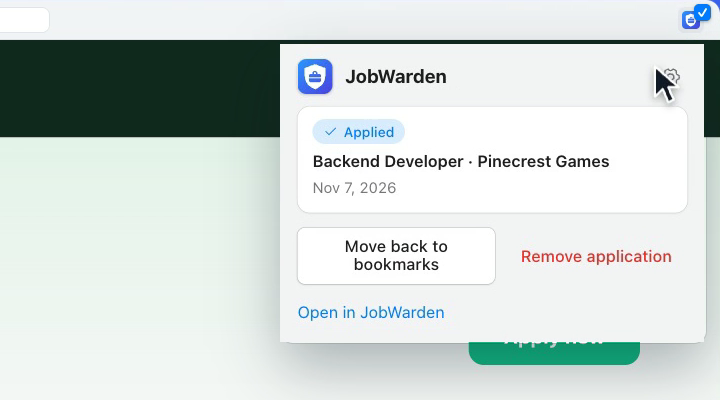
- Applied (✓): move it back to the bookmarks, for an application you didn't send, or remove it.
- Further along: Open in JobWarden.
It also watches a company from its job board on Greenhouse, Lever or Ashby (the eye beside ⚙, see the watchlist), can put ★ or ✓ on the toolbar icon of every tab showing a saved posting, and can bring the reminders set on the calendar as your system's notifications.
The same job comes back again and again: in searches, in job alerts, posted again on another board. The extension remembers it for you, so you don't read it twice, or apply twice.
- On the toolbar icon, as soon as a posting opens: a grey ★ if you bookmarked it, a ✓ if you applied, in the colour of where it stands: blue applied, orange interviewing, green offer, red rejected. Turn it on in the extension's settings: Show on the toolbar icon whether a page is already in JobWarden. The browser asks you to let the extension see your tabs' addresses, and each page you open is then looked up on your own server, and nowhere else.
- In the popup, always: instead of the form to save it again, the job's status and its date, with Open in JobWarden.
It knows a job by its posting's own link, without the tracking parameters job boards add, and finds that link even on a search page that shows the job: the same job, found twice, is the same job.
It reads most job boards and career sites from the schema.org JobPosting they publish for Google's job search, and
LinkedIn, Indeed, Glassdoor, Greenhouse, Workday, pracuj.pl, InfoJobs and BestJobs from what the page shows. It keeps
one application per posting: it drops tracking parameters from links, and saves a job's own link even from a search
page.
The extension talks to the server's capture API, under /api/captures (jobwarden.capture.path), and to nothing
else:
| Call | What |
|---|---|
GET /profile?key= |
The profile a profile ID names |
POST / |
Saves a posting ("action": BOOKMARK or APPLY), with the site's icon as a data:image/png;base64,... URL in icon and the company logo's address in logoUrl
|
GET ?userId=&link= |
Looks a link up: 204 when it isn't saved |
POST /{id}/move-back-to-saved |
Takes back "I applied" |
DELETE /{id}?userId= |
Removes an application |
POST /reminders/due?userId= |
The reminders due, which it takes |
GET /watchlist?userId=&link= |
Whether a page is on a Greenhouse, Lever or Ashby board, and whether the company is watched (204 when it isn't on one) |
POST /watchlist, DELETE /watchlist/{companyId}?userId=
|
Watches a company, or stops |
GET /version |
The server's version and the latest release, which the popup compares with its own |
Each call on an application answers with its current state: its id, title, company, status, and when it got that
status. Errors are RFC 9457 problem details with an errorCode, in the
language of the request's Accept-Language. The API allows the extensions' origins (chrome-extension://,
moz-extension://) and never web pages (CORS). The server downloads a company's logo itself, from the public internet
only, never from its own machine or network.
The extension's version is the server's: one release carries both, and VersionTests fails when they differ. Its popup says when a newer JobWarden is out, and when the server already runs a newer version than the extension.
Its texts are in extension/_locales/<language>/messages.json, in JobWarden's languages: pages name them with
data-i18n="key", scripts with message('key').
ExtensionMessagesTests
checks that every language has every text and that every text named exists. ESLint checks its JavaScript with the
pages', on ./mvnw verify (in web/, npm run lint).
The extension talks only to the server entered in its settings: PRIVACY.md says what it sends and when.