Repository navigation

MacTrack 5.0: clearer scan visibility and more manageable address history
Released November 17, 2026. Download MacTrack 5.0.
MacTrack 5.0 helps administrators see scan progress, exclude uplink sightings
and manage MAC and IP history with partition-based retention. Its dashboard and
Process Status page show current activity and skipped runs.
Highlights
- See what collection is doing. The new Dashboard tab brings status cards
together. Process Status reports scan phases, skipped runs, maintenance timings
and table sizes, so an administrator has somewhere to start investigating a delay. - Manage MAC and IP history together. Both history tables support partitioning
by scan date. Retention drops whole expired partitions; existing installations
can rebuild their tables to use daily, weekly or unpartitioned layouts. - Keep uplink and trunk sightings out of scans. Set regular expressions for
port names and aliases globally, per site or per device. The scanner reports
how many MAC sightings it skipped. - Keep useful observations through interruptions. Recovery fixes preserve
completed scans during interrupted partition exchanges and retain staging data
when recovery cannot finish. Address reports also retain Layer 2 sightings
without current ARP data and identify older observations. - Read device and address results more clearly. Collection fixes cover Cisco,
Aruba and other scanners. Interface and authorization status pills, theme
styles, and corrected MAC, IPv6 and vendor handling improve the reports used
during day-to-day troubleshooting.
The release also includes security hardening across administrative actions,
imports, exports and device collection. See the full changelog
for individual changes.
Upgrade decision guide
| Check | What to plan |
|---|---|
| Runtime | Cacti 1.2.29+ and PHP 8.2+; check Cacti's own PHP requirements too. |
| Storage | MySQL 8.0+ or MariaDB with partition support for partitioned history; unpartitioned tables remain supported. |
| Existing tables | Updating files does not rebuild history. Choose a layout and run the partitioning utility when ready. |
| Rebuild impact | Scheduled scans and maintenance pause; MAC/IP results are incomplete. Allow space for another copy of each table and its indexes. Large histories can take hours. |
| Recovery | If a rebuild stops, rerun the same command to resume. Keep the original rebuild tables until recovery completes. |
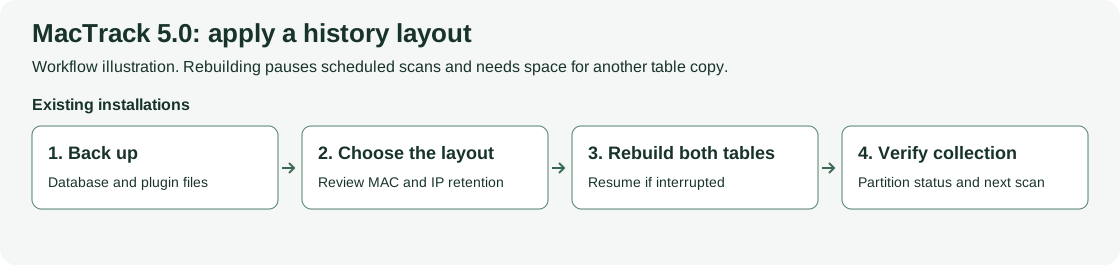
Upgrade and verify
-
Back up the database and plugin configuration/files together. Confirm the
runtime requirements before replacing the plugin files inplugins/mactrack. -
Complete the plugin upgrade in Cacti's Plugin Management. Check the Cacti log
for upgrade errors before starting a history rebuild. -
For an existing installation, review Console > Settings > Mactrack > Port
and IP Address Partition Size and both retention settings. Prefer daily or
weekly when planning a CLI rebuild; legacy hourly/per-scan layouts have
different maintenance behavior described in the partitioning guide. -
During a maintenance window, use MacTrack Utilities > Configure Port and IP
Address Partitioning, or run this from the Cacti directory as the poller user:php plugins/mactrack/cli/upgrade_partitioning.php
-
Check View Partition Status for both history tables and Process Status
for completion. Confirm the next scheduled scan finishes and fresh MAC/IP
sightings appear before closing the maintenance window.
The utility changes only tables that do not match the selected scheme.
Read the partitioning and interruption-recovery guide
for the exact layout options and progress messages.
Behavior changes to review
- MacAuth email: configured report frequencies now take effect. Review
recipients and frequency if reports previously never arrived. - Stored MAC values: corrected binary SNMP decoding can change previously
malformed values. Review historical matches and affected authorizations. - Device exports: SNMP credentials are omitted. Imports preserve existing
credentials; newly imported devices need credentials entered separately.
If rollback is needed, restore plugin files and the database from the same
pre-upgrade backup; do not assume an older plugin can use an upgraded schema.
Contributors and change history
Thank you to the developers, translators, testers and reviewers who kept this
plugin moving forward. See the linked contributor credits and selected commits.
Those links include the comparison, paginated history and original author records.
Contributors recorded for this release: @aqr199, @bmfmancini, @EkaterinePapava, @ka1lie, @Linegod, @mixneko, @MukundaKatta, @nakayama1869, @netniV, @oz-agent, @somethingwithproof, @TheWitness, @Thumb23, @weblate, @xmacan, @xxconn, @yeager.