Repository navigation
Releases
FORGE v0.15.0 — Ubuntu Creative Assistant

Install
Download and extract FORGE-v0.15.0-linux-x86_64.tar.gz. From the extracted folder, run:
./install.sh --check
./install.sh
./forge
The installer downloads the private runtime and model weights. Use a 64-bit x86 Linux desktop with Python 3, a supported AMD GPU, ROCm, and Vulkan. To enable text-to-image and text-to-3D, follow the optional FLUX setup in the included README. The SHA-256 checksum is available alongside the archive.
Ubuntu creative assistant
- Adds local Qwen3-VL subject enhancement with separate, persistent creative suggestions and revision history.
- Use this idea and Create revised version queue separate revisions without changing an active generation.
- Persists checkpoints, chat context, suggestions, selected ideas, and revision history so work resumes safely after restart.
Safer model scheduling
- Enforces one heavy model at a time: Qwen releases before FLUX, TRELLIS, upscaling, or UniRig starts.
- Adds AMD VRAM and Linux RAM preflight checks; FORGE never frees memory from other applications.
- Qwen prefers GPU placement and can use a RAM-checked CPU fallback when GPU VRAM is unavailable.
- Chat requests wait while generation has exclusive model ownership.
Ubuntu experience
- Adds interactive model previews with more generous initial framing and up to 25× zoom-out for large models.
- Adds a Dimension Studio action for local full-screen model inspection.
- Adds compact, read-only GPU/VRAM, system-memory, and CPU telemetry glyphs.
- Build diagnostics are hidden by default and available with
Ctrl+L.
Verification
- 23 automated tests pass on the Ubuntu runtime.
- Offscreen Qt UI rendering was verified.
- Includes Linux generation and 3D preview screenshots.
FORGE v0.05 for Linux
FORGE is now available on Linux x86‑64 with a native Qt desktop app for local AMD GPU workflows.
- Generate reference images with FLUX.1-schnell, build textured 3D models with TRELLIS, and use UniRig for rigging.
- Preview generated images in chat and orbit GLB models with studio lighting.
- Launch FORGE from the Ubuntu application menu and pin its logo to the dock.
- Read the Linux install guide for setup steps, screenshots, and command-line examples.
Install
Download and extract FORGE-v0.05-linux-x86_64.tar.gz. From the extracted folder, run:
./install.sh --check
./install.sh
./forge
The installer downloads the private runtime and model weights. Use a 64-bit x86 Linux desktop with Python 3, a supported AMD GPU, ROCm, and Vulkan. To enable text-to-image and text-to-3D, follow the optional FLUX setup in the included README. The SHA-256 checksum is available alongside the archive.
FORGE v0.05
FORGE v0.05 makes building feel like a conversation. Name your project, watch it come together step by step, and keep several builds organized at once.
Install
Download FORGE-v0.05-Setup.exe below and run it. It upgrades v0.01–v0.04 in place and keeps your private runtime, so there's nothing new to download if v0.04 is already set up. Requirements are unchanged: Windows x64, an AMD CPU, a ROCm-compatible Radeon GPU with 16 GB VRAM, 32 GB RAM and 100 GB of free storage.
New
- Name every project. Before a build starts, FORGE suggests names from your prompt right away, and the local Qwen model adds its own ideas a moment later. Click one or type your own. The name labels the result and its folder in Documents\FORGE. Say
named Buddyto skip the question. - Quality from your words. Say super, premium, prime, high quality, HQ, ultra, best or detailed to build at high quality: 1024 geometry, 20 sampler steps, a 2048 px texture atlas and 4K Unity textures.
forge me a super applebuilds a high-quality apple. draft builds faster. If the 1024 weights are missing or the GPU runs short, FORGE finishes at standard quality instead of failing. From the command line, use--quality highor--resand--steps. - Watch it happen. The conversation shows the polished prompt 📝, the reference image 👀, the background-removed cutout ✂️ and the 3D model ✨ as each one is ready, and tells you what comes next.
- Job cards with Cancel. Every project gets a card above the message field showing whether it's queued, working, done, failed or cancelled, with the current stage and elapsed time. Cancel drops a queued job or stops a running one, including FLUX, TRELLIS, Blender and UniRig, and removes its unfinished files. Click a card to jump to that project.
- A messaging layout. Your messages are on the right, FORGE's on the left, and chat answers even while a build is running.
- Smarter attachments. An attached file suggests what to do next: Preview or Rig for a GLB, Build 3D, Remove background or Upscale for an image. A .txt file becomes your prompt, ready to review. Other file types are refused with a clear message. Preview replaces the Open model button.
- High-quality images are painted, then upscaled 4× to 3072 px.
- Tidy results. Every image, model and rigged result keeps its actions, including Open folder, on one compact row. Click an image to open it in your viewer.
- Ctrl + L shows or hides the raw build log, which now stays out of the way.
Fixed
- Saying "hi" could start a project named after the greeting. Chat now offers to build something only when your message describes something, and its buttons say exactly what they'll build.
- "make it" could build the last greeting or question. It now reuses only a real idea.
- Running Setup again over an installed FORGE could stop with Windows Installer error 1603. Windows remembers the installer's file name, and Setup repaired from a copy with a different name. Setup now reuses the recorded name, and if anything goes wrong it points you to a full log at
%LOCALAPPDATA%\FORGE-Data\install.log. The v0.05 installers were replaced with this fix on November 21. If you downloaded v0.05 earlier, download it again.
Notes
- High-quality builds take considerably longer than standard ones.
- Emoji in the app appear as single-colour symbols, a limitation of Windows' WPF text rendering.
Verified
Tested on Windows 11 with a Radeon RX 9060 XT:
- Upgrading from v0.04 keeps the runtime, and the v0.04 installer refuses to downgrade v0.05.
- Naming, chat small talk, file type checks, quality routing and the command and quality routing tests all pass.
- A real high-quality build ran through the reference image, cutout and sculpting at 1024 geometry. Cancelling it stopped every process and cleaned up.
- Standard-quality builds, rigging, upscaling, background removal and chat all work end to end.
FORGE v0.04
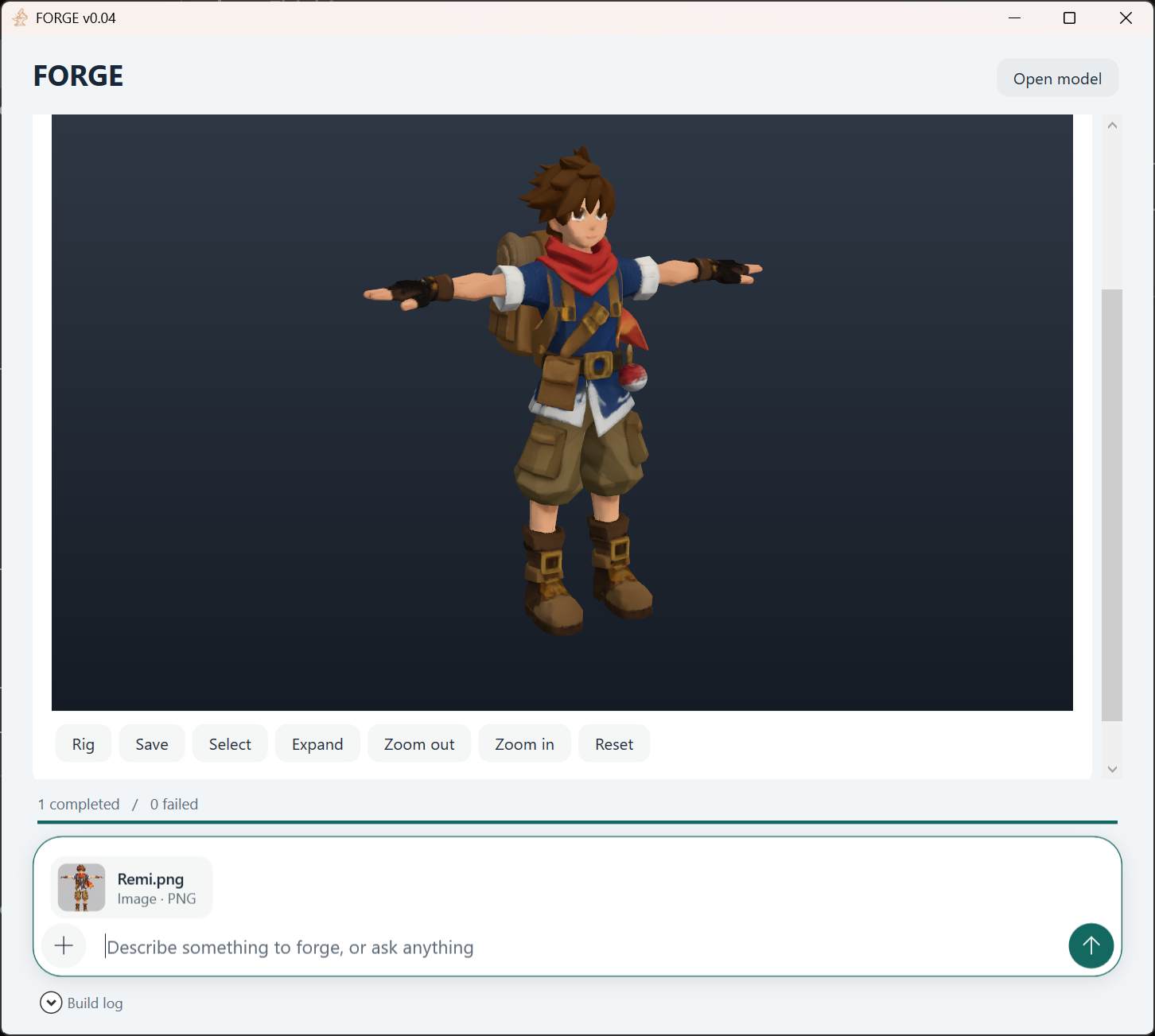
FORGE v0.04 turns the builder into a conversation. Chat about an idea, attach a picture or model, and rig, upscale or cut out what you make, all on your own AMD PC.
Install
Download FORGE-v0.04-Setup.exe below and run it. It installs over v0.01–v0.03 and keeps the private runtime you already have. It then adds the UniRig runtimes from runtime-v0.04 (about 5 GB) and downloads the UniRig checkpoints and Qwen3-0.6B chat model from Hugging Face (about 7 GB). Requirements are unchanged: Windows x64, an AMD CPU, a ROCm-compatible Radeon GPU with 16 GB VRAM, 32 GB RAM and 100 GB of free storage.
New
- Chat. Ordinary messages go to a local Qwen3-0.6B model running on the CPU. Replies offer Generate image and Build 3D buttons when you want to act on an idea.
- Rigging. Type rig with a model selected to rig it with UniRig on your Radeon GPU and export an FBX. Attach an image and FORGE builds the model first.
- Upscale enlarges an image or texture 4×. Remove background creates a transparent PNG.
- mold joins forge, build and make as a way to start a 3D model.
- Attachments. Click + or drag a PNG, JPEG, WebP, GLB or FBX onto the window. It appears as a chip in the message field; hover it and click the red × to clear it.
- Results have Save, Select and Expand buttons. Expand opens a resizable full-window preview.
- New design. A rounded composer, quieter buttons and the new FORGE icon on the taskbar, Start menu and installer.
- Command line: new
upscale.cmd,background.cmdandrig.cmd, for examplerig.cmd model.glb model-rigged.fbx.
Fixed
- Upgrading from an earlier version could fail with Windows Installer error 1625 or 1603. Every build now cleanly replaces the previous one.
- Runtime setup could crash while unpacking UniRig, because some of its files have paths longer than Windows' 260-character limit.
- If the new tools failed to install, FORGE would not open at all. It now opens with image and 3D generation available and finishes the install on the next launch.
- Command-line flags such as
--outfailed with "parameter name 'out' is ambiguous". - Chat messages no longer create job folders in Documents\FORGE.
Verified
Tested on Windows 11 with a Radeon RX 9060 XT, upgrading an existing install. Image generation, upscaling, background removal, a full 3D build, rigging and chat all completed.
FORGE v0.03
FORGE v0.04 runtime
Runtime files that FORGE v0.04 setup downloads automatically. You don't need to download anything here by hand: run FORGE-v0.04-Setup.exe.
| Bundle | Parts | Contents |
|---|---|---|
unirig |
unirig.part0–unirig.part9 (about 5 GB) |
Portable UniRig code with AMD compatibility changes, Python 3.11 for mesh extraction and FBX export, and Python 3.12 + AMD ROCm 7.2.1 PyTorch for GPU inference |
This release contains code and Python runtimes only. Setup downloads the model weights from Hugging Face at pinned revisions: the UniRig skeleton and skinning checkpoints, the OPT-350m config, and Qwen3-0.6B for local chat.
Setup checks each part against the SHA-256 checksums in manifest-v004.json, which matches desktop/manifest-v004.json in the repository. It joins the parts, unpacks them under %LOCALAPPDATA%\FORGE-Data\runtime and deletes the downloaded parts afterwards.
Licenses: UniRig (MIT), PyTorch (BSD 3-Clause), AMD ROCm (see AMD's component notices). Check each project's license before commercial use.
FORGE v0.02
Setup downloads runtime code from the runtime-v0.01 release on this project. Model weights still come from Hugging Face.
FORGE v0.01
FORGE runtime code v0.01
Pinned runtime code for FORGE setup.
Setup downloads these files from this release instead of astral-sh, repo.radeon.com, PyPI, trellis.cpp, Real-ESRGAN, and blender.org. Model weights are not included. FLUX.1-schnell and the TRELLIS.2 GGUFs still come from Hugging Face.
See NOTICE.txt for the upstream projects and their licenses.