Repository navigation
Releases
DecAero 0.4.2 (Windows and Android)

What's new in 0.4.2
Voice calls side by side. Voice channels sit 5 kHz apart, closer than an 8400 bit/s carrier is wide, and a call next to one already running often got no decoder. A new carrier on the left of a running call got one that was stopped at once, so a decoder seemed to appear to the left and vanish. Now every carrier in a row gets its own decoder on the right frequency: the deep scan reports every carrier in its channels, not just the strongest; a decoder locked on its carrier only claims 2.5 kHz either side; and a decoder just started on a carrier is no longer stopped by its neighbour's find. The middle call of three is found too. On recordings this also finds a P 10500 carrier that was missed before.
ACARS log to a file. A "save to file" tick box beside "hide empty" writes every ACARS message with text to Documents\DecAero\acars\acars-YYYY-MM-DD.txt (a file a UTC day). Each message is one line with the aircraft's ICAO address, registration and type, GES, frequency and the text, so searching for ICAO 407FCD or a registration finds whole messages:
2026-11-21 13:23:51Z ICAO AABBC9 N791AN B772 GES 50 1545.2219 MHz ACARS N791AN label RA block H | QUTULYVAA0161FTM | ANOTHER MDT FL360 | ...
| File | What |
|---|---|
decaero-gui.exe |
Windows 10/11, 64-bit, portable |
DecAero-0.4.2.apk |
Android 8+, arm64. SHA-256 bee8ff53786d26f88b11a28c0f8733e1c881a6df9681c948de24f5980213d377 |
Tested on a test modulator and on recordings, not yet on live traffic. Still open: a voice carrier 12 dB weaker than its neighbour is not found (it is when alone). The APK is signed with a development key: uninstall any copy built elsewhere before installing it.
Portable Windows executable for 64-bit Windows 10/11, nothing to install (static C runtime).
| File | What |
|---|---|
decaero-gui.exe |
Inmarsat Classic Aero receiver: P channels (600, 1200, 10500 bit/s) with ACARS, C channel voice (8400 and 21000 bit/s) with call recording, voice follow. Input from a recording, an SDR++ server, plain TCP/UDP I/Q, or a HackRF, Airspy / HydraSDR, ADALM-PLUTO, SDRplay, Fobos, RTL-SDR or USRP |
Receive only. Windows SmartScreen may warn on first start because the file is unsigned ("More info", then "Run anyway").
Built from 4fff543 by GitHub Actions.
SHA-256:
77dd7cd4e3f816ecbf3686bd0852b3697bb36aedc3aaefb332753d2e5b71ca78 decaero-gui.exe
DecAero 0.4.1 (Windows and Android)
What's new in 0.4.1
Live aircraft lookup. Each aircraft address seen is looked up once on adsbdb.com, in the background and no faster than one a second. Its registration, type and owner come before the downloaded database's, and the MIL mark now follows the registered owner (air force, navy, army, coast guard, defence…) whenever the answer names one, instead of the database's flag. Answers are kept in aircraft-live.txt beside the database, so each address is asked only once. A "live lookup" tick box in the Aircraft panel turns it off; only the 24-bit address is sent.
Voice decoder closes on call release. A call progress unit reporting release now closes the voice decoder straight away, whether it is heard on the voice channel or on a P channel (for that aircraft's call). The log says "voice decoder closed", and the frequency is left alone for 30 s or until a new call is assigned there, so a lingering carrier does not restart it.
Hide empty messages. A "hide empty" tick box beside the Messages tab leaves out messages with no text in them (mostly label _d acknowledgements). It is remembered between runs.
| File | What |
|---|---|
decaero-gui.exe |
Windows 10/11, 64-bit, portable |
DecAero-0.4.1.apk |
Android 8+, arm64. SHA-256 3fddc2fd93c4eb7733e0c22aa638d3877f554ce0c5174d0fc47037ada5efd0c5 |
Not yet seen on real traffic: a release closing a voice decoder (no recording here has one). The APK is signed with a development key: uninstall any copy built elsewhere before installing it.
Portable Windows executable for 64-bit Windows 10/11, nothing to install (static C runtime).
| File | What |
|---|---|
decaero-gui.exe |
Inmarsat Classic Aero receiver: P channels (600, 1200, 10500 bit/s) with ACARS, C channel voice (8400 and 21000 bit/s) with call recording, voice follow. Input from a recording, an SDR++ server, plain TCP/UDP I/Q, or a HackRF, Airspy / HydraSDR, ADALM-PLUTO, SDRplay, Fobos, RTL-SDR or USRP |
Receive only. Windows SmartScreen may warn on first start because the file is unsigned ("More info", then "Run anyway").
Built from e74c8e5 by GitHub Actions.
SHA-256:
f96d772e082aba44f9fdba7e5d2ae4250214ae9b76e53633537fc5739a34fbc5 decaero-gui.exe
DecAero 0.4.0 (Windows and Android)
What's new in 0.4.0
DecAero on Android. DecAero-0.4.0.apk is the same receiver laid out for fingers on a phone held sideways: the band fills the screen, big buttons down the left open one panel at a time, pinch to zoom, drag or double-tap to place a decoder, and keys of its own for frequencies and addresses. It drives an RTL-SDR (V3, V4) or an Airspy / HydraSDR on the phone's USB socket (OTG lead), an SDR++ server, plain TCP/UDP I/Q, or a recording. A one-line debug bar along the bottom shows frame time, CPU, lost blocks and how the selected carrier is held. Copy the APK to the phone and open it; Android asks once to allow installing from that source. Android 8 or later, 64-bit ARM.
RTL-SDR, built in. The RTL-SDR no longer needs rtlsdr.dll beside the exe: one pure-Rust driver on Windows, Linux and Android (the dongle needs the WinUSB driver on Windows, as for any RTL-SDR program). An RTL-SDR Blog V4 is recognised even when Windows gives no manufacturer name, which had left its tuner on the wrong reference and its PLL unlocked. The top bar names the dongle and tuner and says when the PLL is not locked.
Holding lock on an RTL-SDR. The V4's tuner wanders by hertz within a tenth of a second at L-band, and 600 and 1200 bit/s carriers kept losing lock. With an RTL-SDR the carrier's phase is now measured every 32 bits, and the frequency loop catches a carrier that has got away faster, for every radio. On two recordings from a V4, frames with a good CRC went from 75 % to 93 % and from 34 % to 88 %; a HydraSDR recording is unchanged (85 %).
Satellite table. The system table's satellite list is decoded in full (number, longitude east or west, both P channels, spot beams) and the Signalling tab opens with a table of the satellites heard and where their P channels are.
Also since 0.3.1: the L-band correction carriers (continuous BPSK between the Aero channels) are found and decoded to their clear header; a sharper interpolation filter and a post-filter on 21000 bit/s speech; a double-click places a decoder as wide as the carrier under it; the band's buttons fit with a side panel open.
| File | What |
|---|---|
decaero-gui.exe |
Windows 10/11, 64-bit, portable |
DecAero-0.4.0.apk |
Android 8+, arm64. SHA-256 6e6ea93febd0056c7adaea67fc73ce563ce3f0eb720160df11a2e95a2a4c1796 |
Not yet tried: either USB radio on a phone with a live P channel for long, sound out on Android, the HydraSDR on a phone. The APK is signed with a development key: uninstall any copy built elsewhere before installing it.
Portable Windows executable for 64-bit Windows 10/11, nothing to install (static C runtime).
| File | What |
|---|---|
decaero-gui.exe |
Inmarsat Classic Aero receiver: P channels (600, 1200, 10500 bit/s) with ACARS, C channel voice (8400 and 21000 bit/s) with call recording, voice follow. Input from a recording, an SDR++ server, plain TCP/UDP I/Q, or a HackRF, Airspy / HydraSDR, ADALM-PLUTO, SDRplay, Fobos, RTL-SDR or USRP |
Receive only. Windows SmartScreen may warn on first start because the file is unsigned ("More info", then "Run anyway").
Built from 05a6dbf by GitHub Actions.
SHA-256:
3c97a36763be40b4c2df60e961d31470f4d02df6304e5a747df2a5589e2a1928 decaero-gui.exe
DecAero 0.3.1 (Windows portable)
What's new
- Call type from the signalling: the call announcement on the P channel is read: telephone, fax, data by modem (with the modem and speed) or digital data. It is in the log and, for the aircraft's call, as "Service" in the Call panel. Only calls from the ground are announced there.
- Fax and data calls are marked and kept: a 21000 bit/s call whose frames are clean but not speech is marked "not speech: fax or data" in the Voice panel, and its frames are saved to a
21kfolder beside the calls. They are not decoded: how fax and data sit in those frames is not public, and the saved frames are for working it out. Not yet seen on a real fax or data call.
What it does, with pictures, is in the README.
Portable Windows executable for 64-bit Windows 10/11, nothing to install (static C runtime).
| File | What |
|---|---|
decaero-gui.exe |
Inmarsat Classic Aero receiver: P channels (600, 1200, 10500 bit/s) with ACARS, C channel voice (8400 and 21000 bit/s) with call recording, voice follow. Input from a recording, an SDR++ server, plain TCP/UDP I/Q, or a HackRF, Airspy / HydraSDR, ADALM-PLUTO, SDRplay, Fobos, RTL-SDR or USRP |
Receive only. Windows SmartScreen may warn on first start because the file is unsigned ("More info", then "Run anyway").
Built from 3bc774f by GitHub Actions.
SHA-256:
864218a2d484986a551c09b3a77f347b9c890d7cbddaedcdc26d69c6385d15aa decaero-gui.exe
DecAero 0.3.0 (Windows portable)
What's new
- Voice on the older 21000 bit/s C channel: these calls are now decoded to sound, played and recorded like the 8400 bit/s ones. The channel's frame was worked out from a recording; its 9.6 kbit/s speech codec (British Telecom's multipulse LPC) is decoded from its definition in ICAO Annex 10, Volume III, Appendix 7 to Chapter 4. The scan finds these carriers, voice follow tries both voice rates on an assigned channel, and the channel shows its signalling and call progress. Checked on one recorded call, not yet on a live one.
- Follow range: press Follow voice, then drag across the band: new carriers are only followed inside that range. Nothing is started until the range is marked.
- I/Q recording: the I/Q button records the part of the band on screen to a WAV file (16-bit, in
Documents\DecAero\iq). - Ended calls tidy up: a voice channel's decoder is removed when its call ends.
- Assigned voice channels are picked up sooner: the channel an aircraft is sent to is looked at every second until its carrier shows.
- QPSK constellation on bursts: R and T channel bursts at 10500 bit/s are drawn as plain QPSK's four corners too.
Known: fax and modem data sent on a voice channel in place of speech is not decoded (it will sound like noise).
What it does, with pictures, is in the README.
Portable Windows executable for 64-bit Windows 10/11, nothing to install (static C runtime).
| File | What |
|---|---|
decaero-gui.exe |
Inmarsat Classic Aero receiver: P channels (600, 1200, 10500 bit/s) with ACARS, C channel voice (8400 and 21000 bit/s) with call recording, voice follow. Input from a recording, an SDR++ server, plain TCP/UDP I/Q, or a HackRF, Airspy / HydraSDR, ADALM-PLUTO, SDRplay, Fobos, RTL-SDR or USRP |
Receive only. Windows SmartScreen may warn on first start because the file is unsigned ("More info", then "Run anyway").
Built from b2732fa by GitHub Actions.
SHA-256:
a4be38d82a09adc33776fb845e2bed2362d038773f7652a3b30d5d9965c40411 decaero-gui.exe
DecAero 0.2.0 (Windows portable)
What's new
- Tuning digits: the centre frequency is now big digits. Scroll or click a digit to step it, right-click to zero it and those after it.
- Tune by dragging: on a live input, drag the band with the middle button to retune the radio. The waterfall's history moves along with the tuning instead of clearing.
- SDR++ server controls: the server's own controls for its radio (source, sample rate, gain mode, gain, bias-T) are shown under the top bar and can be changed from here. Tried against a real SDR++ server with an Airspy: samples, tuning and the controls work.
- Disconnect: once a network input is connected, the Connect button becomes Disconnect.
- Scales that fit: the spectrum trace and the waterfall colours take their floor and peak from what is on screen, so strong carriers are no longer clipped and the noise stays dark when zoomed in.
- QPSK constellation: the 8400 and 10500 bit/s channels are drawn as plain QPSK's four corners, with the offset taken out (they were two columns of three lumps).
- Call progress: the call progress unit is read: who rang whom, the call's priority (distress, urgent, general) and how far it has got (status, connect, result, release). It is in the log line, in a new column of the calls table, and in the Call panel of a voice channel, with the last power change asked of the aircraft and the last cause given. Checked by test only, not yet seen on a live call.
Known: after a retune, about half a second of waterfall rows sit in the wrong place, and the decoders are restarted by the scan. Changing the sample rate at the server drops the connection.
What it does, with pictures, is in the README (the pictures there predate the tuning digits).
Portable Windows executable for 64-bit Windows 10/11, nothing to install (static C runtime).
| File | What |
|---|---|
decaero-gui.exe |
Inmarsat Classic Aero receiver: P channels (600, 1200, 10500 bit/s) with ACARS, C channel voice (8400 bit/s) with call recording, voice follow. Input from a recording, an SDR++ server, plain TCP/UDP I/Q, or a HackRF, Airspy / HydraSDR, ADALM-PLUTO, SDRplay, Fobos, RTL-SDR or USRP |
Receive only. Windows SmartScreen may warn on first start because the file is unsigned ("More info", then "Run anyway").
Built from 7788643 by GitHub Actions.
SHA-256:
82ccec2d7ddc2ac13779e5263d70b79c362df71dab1cf99981c9a538a16e9bf4 decaero-gui.exe
DecAero 0.1.1 (Windows portable)
What's new
A small update to v0.1.0.
- Tone frames in the log: a voice frame that carries a call tone (ringback and the like) and decodes without errors is now written to the log in hex as a "tone frame" line. Tones are still silent in the audio: where the tone's number and level sit in this codec's frames is not known yet, and these lines are what it will be worked out from. Not exercised yet, because no recording to hand holds a clean tone frame.
Nothing else in the receiver has changed. What it does, with pictures, is in the README.
Portable Windows executable for 64-bit Windows 10/11, nothing to install (static C runtime).
| File | What |
|---|---|
decaero-gui.exe |
Inmarsat Classic Aero receiver: P channels (600, 1200, 10500 bit/s) with ACARS, C channel voice (8400 bit/s) with call recording, voice follow. Input from a recording, an SDR++ server, plain TCP/UDP I/Q, or a HackRF, Airspy / HydraSDR, ADALM-PLUTO, SDRplay, Fobos, RTL-SDR or USRP |
Receive only. Windows SmartScreen may warn on first start because the file is unsigned ("More info", then "Run anyway").
Built from e3c33a4 by GitHub Actions.
SHA-256:
f153c24c659e3d04292cf6df89e0340d0bac146c9520a431600819833ec0eff3 decaero-gui.exe
DecAero 0.1.0 (Windows portable)
First release. A receiver for Inmarsat Classic Aero: it decodes every carrier in the band at once, follows voice calls as they are set up, and shows for each carrier how well it is being received.
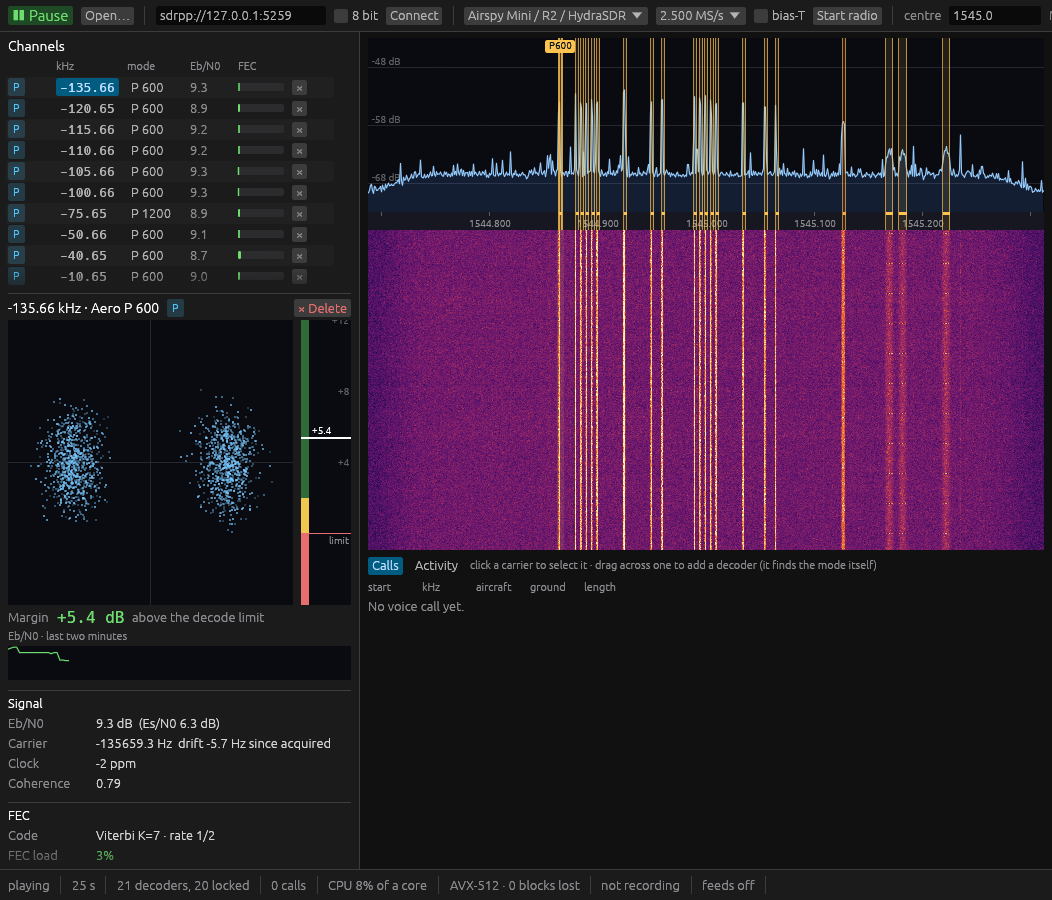
What it does
Decoding
- P channels (ground to aircraft) at 600, 1200 and 10500 bit/s, with ACARS messages put back together from their signal units.
- R and T channel bursts (aircraft to ground), with ADS-C position reports read out of the ACARS they carry.
- C channel voice at 8400 bit/s, decoded to sound.
- A scan of the whole band finds the carriers and starts a decoder on each; you can also drag across a carrier to add one, and it names the mode itself.
- A decoder that loses its carrier finds it again on its own.
Voice
- Voice follow: when a ground station assigns a voice channel, a decoder is started there and you hear the call.
- Every call is saved as a small Ogg Opus file (about 5 MB an hour), named by date, time, frequency and aircraft, with a line in
calls.csv.
How well it is receiving
- For each decoder: constellation, margin above the decode limit, Eb/N0, carrier offset and drift, clock error, FEC load, pre-FEC bit error rate, unique word errors, CRC and frame counts.
- Built for weak signals: the margin bar shows how close each carrier is to failing.
The band
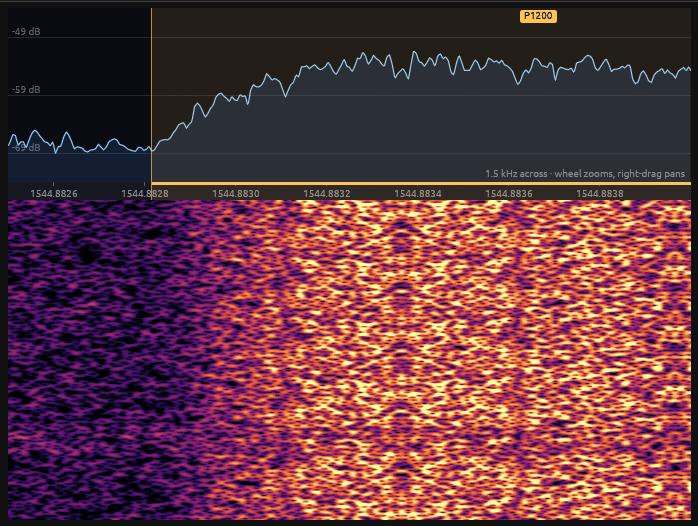
- Spectrum and waterfall at 60 rows a second, drawn pixel for pixel.
- The wheel zooms about the cursor and right-drag pans. As you zoom in the FFT gets finer, down to 1 Hz bins, and what is already on screen stays.
Aircraft
- Registration, type and operator from a database fetched when you ask, with the country from the address and a mark for military aircraft.
- A list of aircraft seen, all, United States only, or military only.
Activity
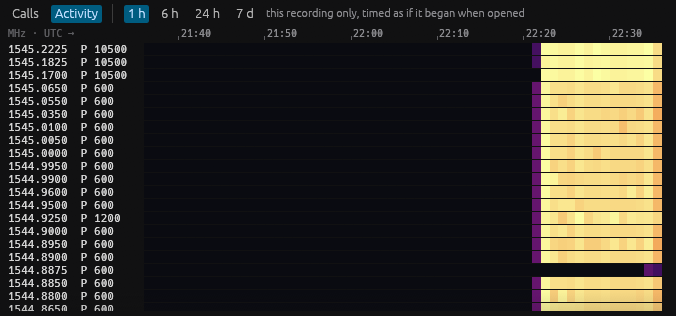
- A heat map of which frequencies were in use and when, over the last hour, 6 hours, day or week. A live input's history is kept between runs.
Feeds out
- ACARS as JSON over UDP in JAERO's layout, to any number of collectors.
- ADS-C positions as SBS (BaseStation) lines over TCP, for a map.
Inputs
- A recording (WAV, I/Q or a receiver's audio output).
- An SDR++ server, or plain I/Q over TCP or UDP.
- A radio directly: HackRF, Airspy / HydraSDR, ADALM-PLUTO, SDRplay, Fobos, RTL-SDR or USRP, with gain controls and bias-T (off unless you turn it on).
Settings are kept between runs in %APPDATA%\DecAero\prefs.txt.
Where it stands
Decoding is checked on off-air recordings and on JAERO's samples. Not yet tried on air: the direct radio inputs, a real SDR++ server, C band, and a voice call strong enough to listen to. Call tones (ringback) are silent: see docs/DESIGN.md, which has the design and what is left.
Portable Windows executable for 64-bit Windows 10/11, nothing to install (static C runtime).
| File | What |
|---|---|
decaero-gui.exe |
Inmarsat Classic Aero receiver: P channels (600, 1200, 10500 bit/s) with ACARS, C channel voice (8400 bit/s) with call recording, voice follow. Input from a recording, an SDR++ server, plain TCP/UDP I/Q, or a HackRF, Airspy / HydraSDR, ADALM-PLUTO, SDRplay, Fobos, RTL-SDR or USRP |
Receive only. Windows SmartScreen may warn on first start because the file is unsigned ("More info", then "Run anyway").
Built from 2481885 by GitHub Actions.
SHA-256:
5902866a8e0c678c519bdbe32f4fcc51d4b0ca2f7061dacad8780d99cdc2e42b decaero-gui.exe