Repository navigation
v0.19.1

这一版改了什么
- 11-06 v0.19.1:Linux 多人部署的成员命令进系统沙箱,修复 Key 文件可被绕过读取的漏洞;升级前先装 bubblewrap。
- 11-06 企业后台能按连接器和技能控制成员权限,设存储配额,打开组织内任务分享;连接器接入增加内置检查。
- 11-06 记忆可挂在项目上,甲客户的口径不跟到乙客户。
- 11-06 画布按 / 搜节点,图片可切宫格、批量做视频,一组卡能存成工作流再插回。
- 11-06 工程线显示工作目录和改动数,逐文件看 diff,可放弃单个文件的修改;有源码的文件夹就地读写。
- 11-06 资料库上万文件点击即响应,遍历移到后台线程;多任务按内存排队,重活单独限流,不再拖慢电脑。
- 11-06 命令行写代码每轮提示词减少 75%,有源码的目录就地运行,工具按需加载。
- 11-06 评测集支持 CSV、Excel、TXT 上传和页面新建,可设权重、必须项和扣分项,人工与评委对账看 kappa。
- 11-06 方舟下线型号提前告警,生图生视频按顺序回退;新增豆包配音、转写和自定义语音接口,线上请先自测。
- 11-06 对话悬停看时间,回复可直达执行追踪,追踪显示 TTFT、TPOT;侧栏直接列项目,页签不再被挤走。
每条对应的代码和判据在 CHANGELOG。
安装 / Install
| 系统 / Platform | 下载文件 / Asset |
|---|---|
| macOS · Apple Silicon | OpenWorkBuddy-*-mac-arm64.dmg |
| macOS · Intel | OpenWorkBuddy-*-mac-x64.dmg |
| Windows · x64 / ARM64 | OpenWorkBuddy-*-win-setup.exe |
| Windows · portable | OpenWorkBuddy-*-win-x64-portable.exe / OpenWorkBuddy-*-win-arm64-portable.exe |
Windows 推荐安装版:按机器自动选架构。免安装版每次启动都要解压,首次打开可能较慢,请勿重复双击。
On Windows, use the setup installer unless you need a portable copy. Portable builds extract on every launch and may take longer to open.
SHA256SUMS.txt 提供各安装包的 SHA-256 校验值,可核对下载内容是否一致。
Compare your download's SHA-256 hash with SHA256SUMS.txt to check file integrity.
第一次打开 / First launch
当前 macOS 包使用 ad-hoc 签名,未经过 Apple 公证;Windows 包未使用代码签名证书。
请从本仓库 Releases 下载,并在确认来源后决定是否继续安装。
macOS builds use ad-hoc signing without Apple notarization. Windows builds are not code signed. Verify the download source before proceeding.
-
macOS「无法验证」:先将应用拖到「应用程序」。关闭提示,进入 系统设置 → 隐私与安全性 → 仍要打开,按系统要求确认。
macOS “cannot be verified”: move the app to Applications, dismiss the prompt, then use System Settings → Privacy & Security → Open Anyway.
Apple 操作说明 / Apple instructions.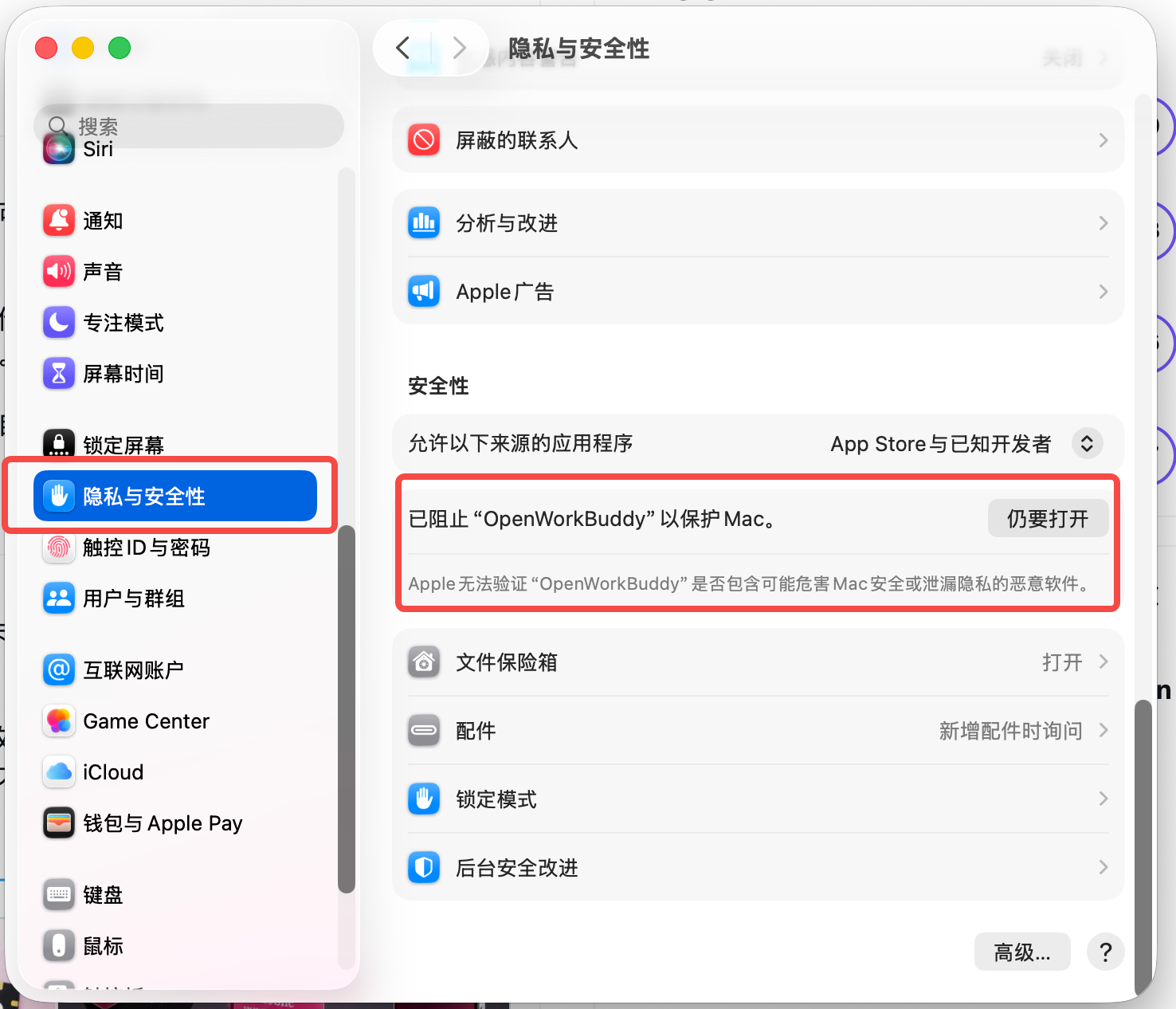
如图,在 系统设置 → 隐私与安全性 的「安全性」区域找到 OpenWorkBuddy,点击 「仍要打开」,再按系统提示确认。此入口通常在尝试打开应用并被拦截后出现。
In System Settings → Privacy & Security, find OpenWorkBuddy under Security, click Open Anyway, then confirm when prompted. This option usually appears after an attempt to open the app is blocked. -
macOS「已损坏」:重新下载;仍有问题时检查签名及启动日志,见下方安装指南。这个提示不能只按「无法验证」处理。
macOS “is damaged”: download a fresh copy, then check the signature and startup log using the installation guide if needed. -
Windows SmartScreen:核对来源后选择 更多信息 → 仍要运行。组织设备还可能受管理员策略限制。
After checking the source, use More info → Run anyway. Managed devices may have additional restrictions.
装完后注册账号,在「设置 → 模型」配置可用的模型,再完成 第一份项目汇报 PPT。模型服务可能收费;不附带 API Key。
After registering, connect a model in Settings → Models and complete the first project update deck. Model providers may charge for usage; no API key is included.
排查与升级 / Troubleshooting and upgrades
- 双击无反应 / No window:查看
~/OpenWorkBuddy/logs/boot.log(Windows:%USERPROFILE%\OpenWorkBuddy\logs\boot.log)。分享日志前请删去个人路径、账号和凭据。 - 黑屏 / Blank window:在数据目录的
config.json中,将server.disable_gpu设为true,然后重启。 - 数据目录 / Data directory:默认
~/OpenWorkBuddy,可用OPENWORKBUDDY_HOME更改。卸载应用不会删除此目录。 - 升级 / Upgrade:先备份数据目录并关闭应用。安装包用户下载同架构的新包覆盖安装,免安装版换成新文件。源码用户先检查
git status;只有工作区干净且分支可快进时,执行git pull --ff-only、npm ci后重启。有本地改动或分叉时保留原目录,按安装指南处理。
Back up the data directory and close the app. Replace the installed or portable build with the new package for your architecture. Source users: checkgit statusfirst; only rungit pull --ff-onlyandnpm ciin a clean working tree whose branch can fast-forward. Preserve a modified or diverged checkout and follow the installation guide.
中文安装与启动 · English user guide · 中文用户指南 · 开发者 / Developer guide
有用的话欢迎 Star 收藏,通过 Watch → Custom → Releases 接收新版本通知。
Star the repository if it helps you, or enable Watch → Custom → Releases for release notifications.
Full Changelog: v0.19.0...v0.19.1