Repository navigation
Releases
Ansible Flow Designer 0.78.0

An agent converted eight more playbooks into flows and wrote down what slowed it down. Fixes:
- The checks follow Ansible on variables set twice. A node input is a play var, and a set_fact or register of the same name wins over it. So a step that sets the input's own name now counts as setting the input: a value created on one branch, with a default set on every path before it, no longer warns "may be undefined". The new warning
input-shadowedflags the opposite case, where another step sets the name after thefrom:step and the step reads that value instead. Accepts the new rule makes unnecessary show as stale (ADR-0018 amendment). - Steps that ignore errors: an open fail port on a step with
ignore_errors: trueorfailed_when: falseis an info, not a warning. Ansible still fails such a step on an undefined variable, so it stays listed. - One accept for several ports:
accept(andunaccept) take a list inat, with one reason. flow:works wherepath:is asked: the flow tools takeflowas another name for the flow file, the namesource_outlineuses. Before, it was ignored, and with two flows in the workspace the tool failed.- Imported flow names: a playbook of several plays is named after the play with the most tasks, not a helper play that comes first.
- Layout check first:
flow_describewithlayout: truegives the layout check total near the top, so page 1 of a long answer has it.
Ansible Flow Designer 0.77.0
Feedback, without telemetry: the extension still sends nothing itself. It only opens links, and you decide what to send.
- Send Feedback… (Command Palette, and the designer's … menu) opens a short form in the browser. Report a Problem… opens a GitHub issue, with new forms for a bug report or an idea.
- One notice after a week of real use (three days with a flow in the designer, seven since the first) asks for a rating or a few words. Not Now asks once more, a month and three days of use later at most; Don't Ask Again ends it. It never shows when another notice asked at the same start.
- After uninstall, at the next restart of VS Code, the browser opens a short "why did you leave?" page once. Not after Don't Ask Again, on a remote server or in CI.
afd.feedback.prompt(default on) turns off the notice and the uninstall page. The README's new "Feedback and privacy" section says what happens to an answer (ADR-0033).
Ansible Flow Designer 0.76.0
An AI agent converted eight real playbooks (5 to 210 tasks) into flows, then filed everything that slowed it down or made the result wrong. This release fixes all of it. Imported flows now pass the checks as imported and run as the playbooks did, and the tools give large flows in pieces an agent can read. Far fewer warnings need an accept.
Generated code and import:
- Paths work from
generated/: generated playbooks run from the flow'sgenerated/folder, so{{ playbook_dir }}pointed there and scripts next to the playbook were not found. Validation stayed clean. Import and the outline now write every path next to the playbook, including script paths inside commands, from{{ afd_repo_root }}, the repository root the generated plays set. The newbinding-playbook-dirwarning flagsplaybook_dirleft in a binding. - Shared task files: a task file run as
include_taskscan write its paths as{{ afd_repo_root | default(playbook_dir) }}/…, and then works from the playbook and from the flow. The import notes each such file that needs this. - A rescue step knows what failed: every step keeps the failure as host facts (
afd_failed_result,afd_failed_task,afd_failed_node), so the step on itsfailed_hostscan report it. Before, Ansible'sansible_failed_resultwas gone by then, and reports said "unknown error". Imported rescue steps read the new names. - block/rescue/always imports cleanly: the always steps are imported once. Hosts that failed are marked, run them, and fail after them, as in Ansible. A second copy of the always steps registered every variable twice, so a fresh import had 28 errors and no generated code.
- Looped and self-including includes run as written: an
include_tasksin a loop, or of a file that includes itself, becomes one step bound toinclude_taskswith its vars, loop and when. Before, it was a draft step, or a copy inlined one level deep. Such a step's code keeps only the keywords Ansible allows on an include. meta: end_playends the hosts: it becomes an end node, after a decision on itswhen. Before, it was a step that let hosts through, so a dry run would have carried on into the upgrade.- Readable names: keys are cut at a word boundary, a
{{ var }}in a title reads<var>, and the intent no longer repeats the title. A file of one task is that step on the level, titled by the include (for example "phase_event: preflight started"). Include vars stay only on the steps that read them. - A node input's default reaches the code: the generated play var falls back to it. Before, the default only quieted the check.
- Re-import: flows imported before this version are offered updates for many steps on their next re-import, because imported steps now look different.
Checks:
- No more false unknown variables:
x is not skippedreads onlyx.- Names a template sets itself (
{% set %},{% for %}) are not reads. - A
set_factthat builds up its own value over a loop is fine. - AWX's
awx_*andtower_*variables are known. - A variable read only with
| defaultoris definedis an info, not a warning.
- Variables set outside the flow:
flow.external_varslists what AWX or Kestra extra vars, the inventory or a caller sets at run time, and steps read those without an input. Oneupdate_flowreplaces the hundreds of accepts the agent needed. - "May be undefined" knows guards: a read behind an
is definedtest, in the step'swhenor a decision before it, is fine. So is an input markedoptional: true. The suggested fix no longer says "give it a default", since a default makesis definedalways true. - Accepting a warning:
flow_validateprints the exact key after each warning, andcheck:<code>without a subject accepts every warning of that code on the step. An accept that matches no warning is refused, and one that stops matching later is flagged (stale-decision). Before, a wrong key was saved and hid nothing.
AI tools:
- Large flows fit:
- Every answer stays under 40,000 characters and comes in pages.
flow_validatehassummary: trueand filters by code, node and severity.flow_describehasnodes,detail: briefandonly_problems.flow_importanswers in about 6,000 to 13,000 characters, where it took 38,000 to 157,000.source_outlineshows#3,#9or#25-#37in full in one call, or everything withfull: true.
- New edit ops:
rename(several keys at once);replace_text(find and replace in bindings);dissolve_subflow(move a subflow's steps up, the reverse of extract);regenerate(writegenerated/again after an edit outside the tools).
- Generated code:
flow_validatesays whethergenerated/is current. - Deleting a step leaves nothing dangling: subflow outputs that lifted it go, and inputs that read it lose their
from:, with a note each. - Renaming an input also rewrites the step's keywords (
when,loop) and a decision's condition. - Large playbooks: the import prompt and the skill suggest importing a playbook of more than about 40 tasks first and restructuring it, instead of adding its steps one by one.
Subflows and layout:
- Named exits: a subflow can have exits of its own, such as
dry_run_done. Each is a port on the subflow node that the parent wires likeok_hosts. Extract into Subflow creates one where the selection leaves for two places. An end node inside a subflow ends the host's run. - Auto layout uses the canvas's ports: a decision's true and false labels no longer overlap, steps fed by
failed_hostsstand right of the column they handle, and simple chains stand in one straight column. Over the test flows, the problems the layout check finds went from 28 to 10. - The AI layout check follows the canvas: the check and
tidy_upuse the canvas direction (afd.canvas.direction). The MCP server reads it from the workspace's settings, then the user's.
AI setup:
- Agents set up before 0.69.1 work again: their registrations pointed at the server copy of the old publisher ID, which is gone, so the flow tools failed to start (CONNECTION_CLOSED). At start, the extension now finds registrations of a server that no longer exists and offers to repair them.
- The server copy is refreshed at every start: it is replaced in one step and now includes the Ansible probe that scenario verification needs.
- Show AI Integration Diagnostics shows which server file each agent's registration starts, and whether it exists.
- The MCP server writes startup errors to its log and to
AFD_MCP_TRACE.
Ansible Flow Designer 0.75.0
The agents built into Cursor, Kiro, Antigravity IDE and Devin Desktop (Windsurf) can now design and change Ansible flows, the way Copilot does in VS Code. These editors install the extension from Open VSX. It now installs in VS Code 1.94 or later; it asked for 1.140 before.
-
Cursor's agent gets the flow tools automatically: the extension registers them through Cursor's extension API each time it starts, for the folders you have open. Nothing is written. The agent lists them as
extension-ansible-flow. -
Kiro, Antigravity IDE and Devin Desktop ask once: the first time the designer shows a flow with a step, one notice offers to give the editor's agent the flow tools and the
ansible-flowskill, and names the files it writes. After Set Up, they are kept up to date at each start. Antigravity loads them at once; Devin uses them with its agent set to local.afd.ai.hostIntegrationturns this off. -
Set Up AI Assistants knows Kiro, Antigravity IDE and Devin Desktop, with the files each agent was seen to read. "Other agent…" no longer lists Windsurf and Kiro as manual.
-
The MCP server never searches your home folder: Cursor starts global servers there without naming a folder.
flow_listthen searched the whole home folder, took about 20 seconds and listed flows from other projects. Now the server answers "No folder to work in", and Cursor's entry from Set Up passes the open folder (${workspaceFolder}). -
Updates keep your agent settings: an update of an MCP entry changes only the command, its arguments and environment. Settings you or the agent added stay, such as Kiro's
autoApproveanddisabled. A skill copy written by a newer version of the extension (VS Code and a fork on one machine) is left alone. -
VS Code 1.94 or later: the designer, validation, generated playbooks, runs and the MCP server work from 1.94.
-
The module catalog needs VS Code 1.101 or later: it uses SQLite from Node.js 22.13. In an older editor, the catalog says it is off and why, and everything else works without it. Binding checks then have no catalog facts.
-
Copilot's flow tools need VS Code 1.95 or later: before that, VS Code has no tools API for extensions. The extension starts without them and logs one line. Other assistants use the MCP server, as before.
-
Show AI Integration Diagnostics: a new command that reports how this editor and its built-in agent can reach the flow tools. It covers the editor and its runtime, how the MCP server would start, and which agent APIs the editor offers. It also lists the MCP servers and skills each agent is configured with on this machine. It only reads; MCP server entries are listed by name only.
-
The MCP server can trace and fall back: with
AFD_MCP_TRACE=<file>, it logs each start, the client's name and roots, tool listings and calls (names only, not arguments). WithAFD_MCP_ROOTS, it works in those folders when the agent sends no roots. -
Changes made while a flow was closed are marked the same in every editor: some editors keep a file loaded after its designer closes and reload it only when the designer opens again. Such a change was marked as an outside edit made just now, and old marks came back. Now it is marked as a change since you last had the flow open, and the marks end when the designer closes, as in VS Code.
Ansible Flow Designer 0.74.4
The last, smaller findings of the code review (AFD-125): files the extension writes are always valid, scenario runs cannot leave the machine they run on, and a few names and upgrades that Ansible would refuse are caught in the designer. The AWX token and device credentials travel more safely, and the module catalog, the designer and the AI tools are sturdier against odd input. Large flows are faster to edit, and a few small designer bugs are gone.
-
Deleting many steps at once is fast: select-all and delete on a flow of 400 steps took 14 seconds, with VS Code unresponsive; it now takes under a third of a second. Pasting many steps, Tidy Up on large flows, the checks of data references and exporting images of every level are faster too.
-
The layout direction applies at once: changing
afd.canvas.directionnow redraws open designers. Before, it waited for the next edit. -
Generate code on save says when it fails: a failure shows in the status bar and the log, instead of nothing. After Overwrite on save, the result is shown too.
-
Saving stays quick when Git is slow: the version bump on save waits for Git's copy of the file for a moment only, then uses the copy read before. VS Code drops a save step that keeps running over its time, which would have ended the version bump for good.
-
Code mode shows the newest scan: a sync asked for while one was running now runs again after it.
-
Git copies of a flow are not opened as flows: a flow file shown by a diff or the Timeline no longer gets a designer session, problems and layout of its own.
-
Resizing the side panel ends when you let go, also when the mouse button is released outside the designer.
-
Outside changes: a step added and then removed by edits outside the designer is no longer counted as "1 step removed".
-
AWX over plain http is refused: an
http://AWX address would send the token unencrypted, so Ansible Flow refuses it before the token is asked for or sent. For a lab AWX without TLS, turn on the newafd.awx.allowHttp. An AWX on this machine (localhost) needs no setting. -
afd.awx.verifyTlsandafd.awx.allowHttpcome from your user settings only: a repository's.vscode/settings.jsoncan no longer turn TLS checks off for the AWX your token is stored for. If you had turnedverifyTlsoff in a workspace, set it in your user settings. Turning it off now shows a warning once per session. -
AWX requests end: each request has a time limit for its whole answer, not only between chunks. An answer over 64 MB is not read, and a list whose pages lead back to themselves stops instead of looping.
-
SSH host keys are checked in the
afd-eeimage: the image used to turn host key checking off, so a run accepted any host key and could hand device credentials to whoever answered. A lab setshost_key_checking = Falsein its ownansible.cfg. The image's base and its collections (ansible.netcommon 8.7.1, ansible.utils 6.1.1, cisco.ios 11.6.0) are pinned, so a rebuild gets what was tested. AWX sets its own host key checking for jobs; this does not change AWX runs. -
The module catalog keeps going: a collection file that reads as JSON but is no catalog dump is skipped, as a truncated one was; it used to fail the whole catalog. Indexing that hangs stops after 5 minutes and ends when VS Code closes the window. A search of more than 30 words uses the first 30, so the ranking stays right.
-
Copilot asks the right question for scenarios: List and Check no longer ask for confirmation, since they only read. Add, Update and Delete say they change the scenarios file. Verify says it runs
ansible-playbookin your environment. -
The designer's messages are checked in VS Code: a message of the wrong shape is refused. Open Code opens files in the workspace folder, or outside it only when the last code scan named the file. Compare with reads only a version from its own list. The module docs lookup takes plugin names only.
-
MCP errors name files relative to the workspace, and your home folder as
~, instead of by absolute path. -
JUnit for several flows is one XML file:
afd-scenarios --junitwrote one document per flow, one after the other, which CI dashboards could not read once there were two flows. All flows' suites now go under one<testsuites>root. Terminal colour codes in Ansible's output are left out, since XML does not allow them. -
Exports and flow files take any text: draw.io and SVG exports leave out control characters XML does not allow (a title pasted from a terminal). Tabs and line breaks in labels are kept. A flow text with a line or paragraph separator (U+2028, U+2029, NEL) or another control character is written quoted and escaped, so Ansible's YAML reader reads the same text back.
-
Scenarios run on this machine only:
- A host or group name in a scenario must be one inventory word (letters, digits,
.,_,-). A name with a line break could add an inventory line of its own, with a real connection. - Scenario inputs cannot set
ansible_*variables. Extra vars outrank the inventory, soansible_connection: sshin inputs took the run to a real machine.
- A host or group name in a scenario must be one inventory word (letters, digits,
-
Scenario run folders are private: with
--pythonand--wsl, only you can read or write them. With an image, other users can read the run folder but not write to it, and the image writes its events into a folder of their own. Before, the folder was open to every user of the machine, and Ansible loads plugins andgroup_varsfrom beside the playbook. -
A bad scenarios file is a problem, not a crash: an empty entry (
-alone), a name that is a number, or a list where a map goes is reported with the scenario. A flow file the command line cannot read, or a path that does not exist, ends with one line and exit code 2, not a stack trace. A flow file with too many YAML aliases (a "billion laughs") is reported as not readable. -
Input, output and register names Ansible can use: a name such as
retry-count, or a Python or Jinja keyword (in,not,true,none,class), is now a problem in the designer, on hand-written and AI-written flows too. Before, only the designer's own edits checked it, and Ansible refused the generated playbook. The flow schema says the same, for editors that read it. -
Become user without become: a Become user set on a step or subflow without Become now still goes into the generated play. It applies when
ansible.cfgor the inventory turns become on, as in format 1. Before, upgraded steps ran as root there. Become set to false turns both off. -
Upgrade Flow Format names the nodes marked tested by hand that lose the mark because they are not implemented.
-
Removing several items from a
[a, b, c]list in one edit works. Deleting a node with several wires, or clearing several accepted findings, failed with "overlapping edits" when the file wrote that list in flow style.
Ansible Flow Designer 0.74.3
More fixes from the code review (AFD-125): names and paths that come from a flow, a playbook, an AWX export or the Ansible environment no longer lead outside the workspace. Secrets stay out of files and child processes. Runs in WSL stop when you stop them, and your repository's own callbacks keep running. Several flow edits and generated plays now do what the design says.
-
A step title with
{{ }}no longer breaks the run. Ansible renders play and task names and messages, so a title such as "Install {{ item }}" (common in imported playbooks) stopped the whole playbook with "Error processing keyword 'name'". Titles, intents and reasons are now written so they show exactly as typed. -
Renames keep a subflow's outputs working: renaming a step inside a subflow, or one of its outputs, now also updates the subflow output that lifts it (
from: <step>.<output>). Before, the generated code read an undefined variable. -
A new or renamed step no longer takes over references: a key that would make an existing
from:read the new step instead of the one around it (another level's step, or a subflow's own input) is refused when you type it. A generated key gets a number instead. -
max_fail_percentage counts the step's own failures: a step inside a subflow counted the hosts earlier steps had failed, too, and could stop healthy hosts. The simulator counts the same way.
-
Decision conditions: a condition written whole as
{{ x == 1 }}works. A condition with{{ }}inside it ({{ x }} == 1) is a problem that says how to write it, instead of failing every host at run time. Spaces inside quoted strings in a condition are kept. -
A YAML alias inside what it names (
&s … *swithin itself), in a flow file or on the clipboard, is refused with a message instead of hanging the designer. -
Re-import keeps the order of new tasks: several tasks added to the playbook in a row used to arrive in reverse order.
-
include_tasksimports as Ansible runs it: itswhenis checked once, before the file runs, so the import adds a decision in front of the file's subflow (false goes around it) instead of putting the condition on every task in the file. Its tags no longer reach the tasks inside, and itsapply:does.import_tasksis read as before. -
Scenario simulation of host patterns: a pattern of only
!or&terms (!db) starts from every host, as in Ansible. A pattern that nameslocalhostor127.0.0.1without an inventory entry now asks for a check in Ansible instead of guessing. -
Code mode drift: a step bound to a collection role (
ns.collection.role) is no longer reported as "role missing" when it compiles. A role task file that another covered file includes is no longer reported as "task not in design" (adding it would run it twice). -
"Saving…" never stays for good: a designer action that fails in VS Code now answers with its error. One that is never answered ends after 2 minutes. Before, a read-only
generated/file could leave the spinner turning. -
Fast edits no longer get lost: commands from the designer run one after the other. Holding Delete or Ctrl+D acts once, not once per key repeat. Before, a quick second edit could be rejected, and the first one shown as an edit made outside the designer.
-
Revert brings the flow's problems back too: the Flows view and Problems no longer keep the facts of unsaved text after Revert or closing without saving.
-
A lighter start: the workspace is scanned for flows once at start-up, without
node_modulesand.git. After a save, only that flow is read again, not every flow in the workspace. -
A move VS Code refused no longer leaves the node where it was dragged: it goes back to where the file has it.
-
A designer behind another tab keeps its state: the open level, mode, lens, selection and an unsaved binding are still there when you come back to it.
-
Stop Run in WSL ends the run's processes in the distribution, not only
wsl.exe. It ends the run's shell and everything under it, and nothing else in the distribution. A scenario that times out on Linux or macOS ends ansible-playbook too, not only the shell that started it. -
Secret inputs and the vault password:
- Their temporary files are removed however the run ends, including Stop and a closed terminal.
- Their variables are unset once written, so ansible-playbook and what it starts (local tasks, inventory scripts,
lookup('env')) never see them. - A vault password with backslashes now works in WSL and in images whose shell is dash.
-
Run events never hold a secret: the event callback leaves the values out as it writes, so a run that is stopped or crashes leaves nothing behind either. A list or dict secret is matched by its parts too (
{{ creds.password }}), and so is the vault password. -
Your callbacks keep running: a run adds Ansible Flow's event callback to the
callbacks_enabledandcallback_pluginsof youransible.cfginstead of replacing them, so ARA, syslog or another audit callback still records runs started from VS Code. -
Flow keys and IDs: a key that is not a lowercase slug, or an ID that is not a ULID, never names a file or a folder. The scenarios file, the run and scenario folders, the run history and
generated/<key>.ymlare refused for such a flow instead of being written elsewhere; fix the key, or run Complete IDs. -
Module catalog: a collection whose name or version would make its dump file land outside the catalog cache is left out of the catalog, both in the environment and in VS Code.
-
Create Role (Code mode) is offered only for a role name that makes one folder under
roles/: not for a collection role, and not for a name with a path in it. -
Import:
include_tasks,vars_files, role names and AWX playbook paths that lead outside the workspace folder, through..or a link, are not read. A file is read only up to 2 MB. -
AI tools: the MCP server and Copilot's flow tools decide a new file or an export by the folder it is written through, links followed, so a linked
flows/orgenerated/folder cannot lead outside the workspace. An export onto an existing link is refused. -
AWX in Restricted Mode: Set Up AWX Template and launching in AWX need a trusted workspace, as local runs do. Importing from AWX only reads and still works. Set Up asks before it attaches credentials the flow file names, and before it changes a template of the same name that runs another playbook.
Ansible Flow Designer 0.74.2
Security fixes from a code review (AFD-125). The flows you design work as before. Several things a cloned repository, a flow file or a playbook could make the extension do are now refused.
- Scenario verify from a terminal agent: the MCP server runs Ansible in the environment of your VS Code user settings (
afd.environment.*, as Set Up Ansible Environment… writes them). A repository's.vscode/settings.jsoncan name an image, container options or mounts, so the server uses those keys only when you start it withAFD_MCP_WORKSPACE_ENVIRONMENT=1.AFD_USER_SETTINGSnames the settings file when it is not found. Copilot and the designer already needed a trusted workspace for this. Every scenario run now uses an emptyansible.cfg, so the repository's own config never loads. Theflow_scenariostool says that verify runs programs. - AI assistant setup: Remove AI Assistant Setup and the setup's updates delete only files inside the skill folder, whatever its manifest lists. A folder that is a link, or whose manifest does not read, is left alone.
- Shared subflows: a copy's source must be a
.flow.yamlin the same workspace folder, named by a relative path, and at most 2 MB. Absolute and network paths are refused before anything is opened, so a flow cannot make Windows connect to another machine. - Import: a playbook whose YAML aliases expand to more than 100,000 values is refused with a message. A file of under 1 KB could expand to a billion values and stop the extension.
- Generated code: titles, playbook refs, inventory targets and parameter values that contain a line break Ansible's YAML reader knows (U+0085, U+2028, U+2029) or a control character stay on their line, or in quotes. They can no longer add a play under a comment. A parameter named
$commentor$flowis written as data. - Stop Run removes the run's container, so the playbook stops changing hosts at once. A scenario that times out, and a probe call that hangs, remove their containers too.
- CI: every push and pull request runs the type checks, Biome and the unit tests. Publishing runs them first, and only its last job holds the Marketplace and Open VSX tokens. No dependency's install script runs in that job.
Ansible Flow Designer 0.74.1
The extension works as in 0.74.0. This release brings its page up to date and is the first one published from CI.
- The README shows the extension at work: a short recording at the top builds on the Hello sample. It adds a step from a port, gives its failure a rollback in one click, shows the play it makes, and runs the flow as a skeleton, where one host fails and ends at Stopped. Three shorter ones show handling a failure from a port's menu, a run that shows where every host went, and a scenario that turns red when a step fails for a host. They load from the repository and are not part of the extension package.
- Published from GitHub Actions: a version tag publishes the extension to the Visual Studio Marketplace (Trusted Publishing, no stored token) and Open VSX, and creates the GitHub release.
- Now on Open VSX as
chistokhinsv.ansible-flow-designer, for VSCodium, Cursor and other editors that use it.
Ansible Flow Designer 0.74.0

Ansible Flow Designer is a VS Code extension for designing Ansible automation as a diagram. You draw the steps and decide what happens when each one fails. The extension then writes the playbook and runs it, locally or in AWX.
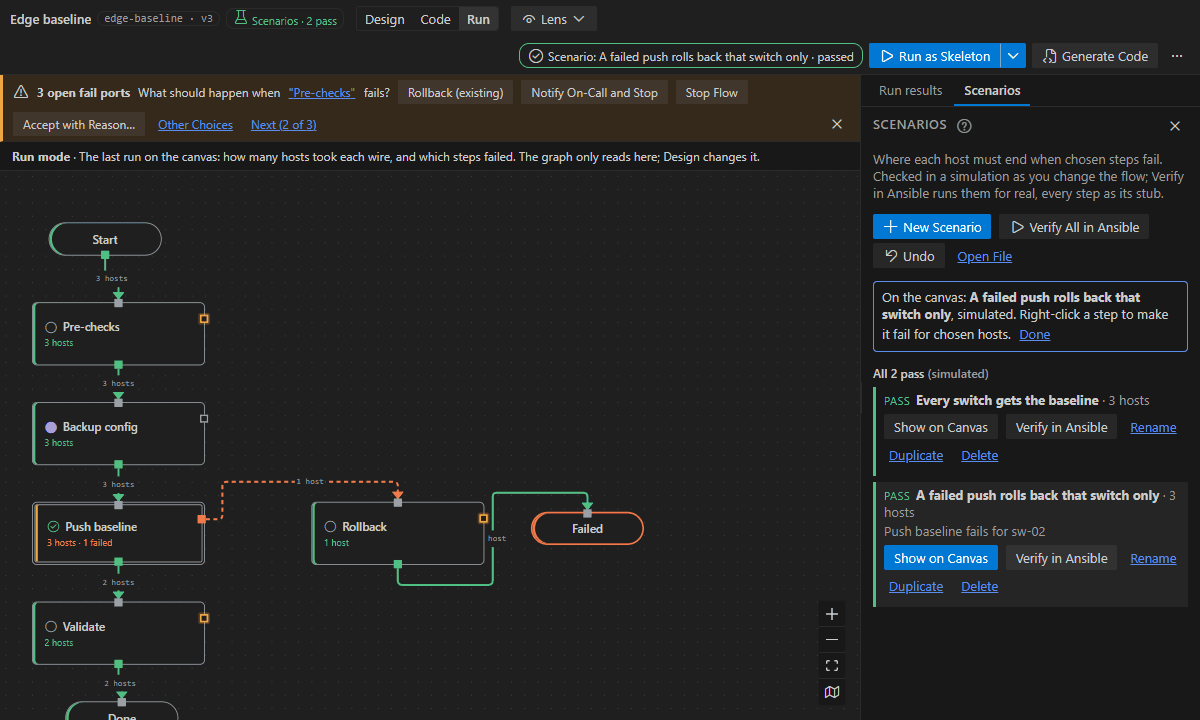
This version makes scenario tests part of the canvas. A scenario says what goes wrong (a step fails for some hosts, an approval is rejected) and where each host must end up. It replaces typed YAML with clicks, and it gives an answer in milliseconds instead of minutes.
Install
You can install it in three ways:
-
From the Visual Studio Marketplace: Ansible Flow Designer. Alternatively, run this from the terminal:
code --install-extension chistokhinsv.ansible-flow-designer
-
From the VSIX below:
code --install-extension ansible-flow-designer-0.74.0.vsix
-
From VS Code: in the Extensions view, open … and choose Install from VSIX….
Requirements:
- VS Code 1.140 or later.
- Designing needs nothing else.
- Runs need ansible-core 2.19 or later. It can come from an execution environment image (Docker or Podman), WSL, or a local venv.
What's new since 0.69.1
- Scenarios on the canvas.
- The Scenarios chip in the top bar says how they stand ("3 pass", "1 failing") and opens the Scenarios tab.
- New Scenario starts with every host where the flow sends it now, so it passes and guards that routing from then on.
- Planting failures: right-click a step to plant Fail, Unreachable, Time Out or Unchanged for chosen hosts. Decisions and approvals offer their own choices, and the canvas shows the simulated run as you choose.
- Instant checks. A simulator works out where each host goes without running Ansible.
- Scenarios are checked shortly after you change the flow or its scenarios file, and a miss shows in Problems on the host's
expectline. - Verify in Ansible still runs the real stub run. Its verdicts are kept and marked out of date when the flow's routing changes.
- A suite runs the same flows through the simulator and through Ansible 2.19 to 2.21, and requires the same result.
- Scenarios are checked shortly after you change the flow or its scenarios file, and a miss shows in Problems on the host's
- Scenarios stay current. Renaming a step, an end or a subflow rewrites the scenarios file in the same edit. Accept New Ends takes the new routing when you meant to change it.
- The Testing view lists every flow with its scenarios. Check (simulated) is the default; Verify in Ansible is the other profile.
- AI assistants: a new
flow_scenariostool, for Copilot and the MCP server, lists, adds, updates, checks and verifies scenarios. - Samples and guide:
- The Hello and Edge baseline samples come with scenarios.
- The first-flow walkthrough has a "Test where hosts end" step.
- The Scenario tests page is rewritten.
- Command line and CI:
--simulateneeds no Ansible,--checkchecks the files only, and--wslruns in WSL. - Smaller: the VSIX went from 5.3 MB to 3.2 MB.
- Fixed:
- A flow with two host-list inputs read its scenario hosts from the wrong one.
- A scenario run stopped every host at an
inventory_targetstep whose output came from its result.
For the details, see the CHANGELOG (0.70.0 to 0.74.0) and the Scenario tests guide.
SHA-256 of the VSIX: ea3835e1430277da517733869d3640288dfd741c6e9fceaddff89ea1943c7a99
Ansible Flow Designer 0.69.1
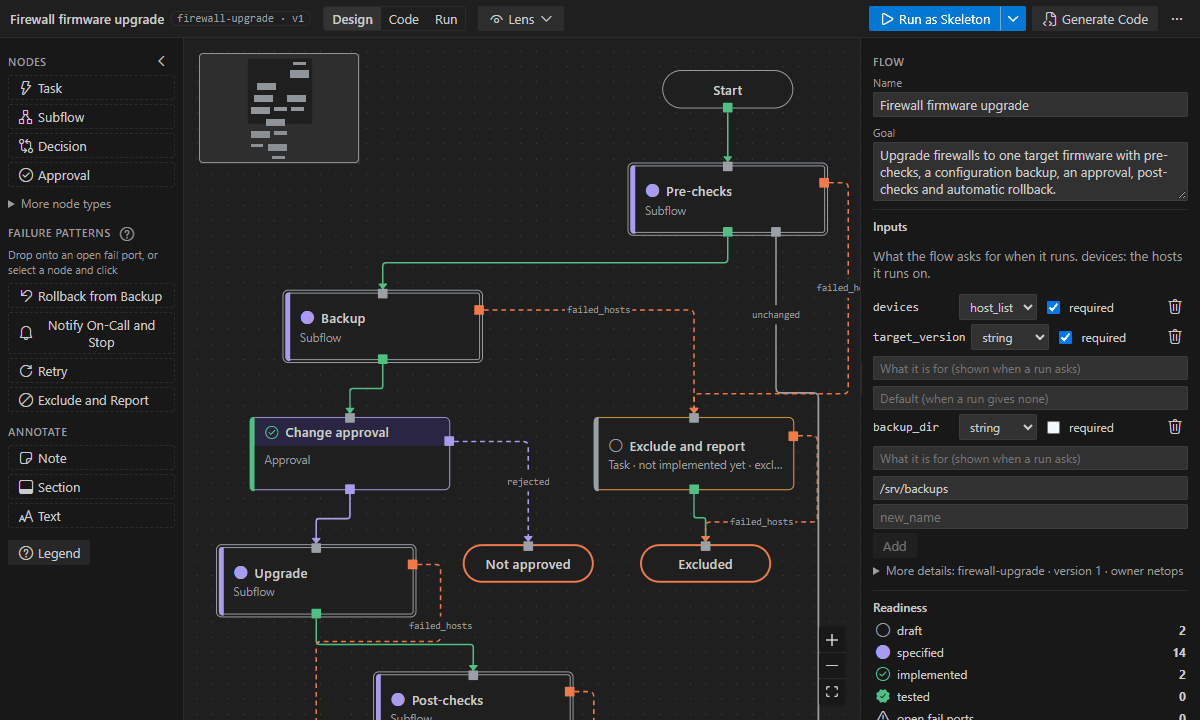
This is the first public release of Ansible Flow Designer, a VS Code extension for designing Ansible automation as a diagram. You draw the steps and decide what happens when each one fails. The extension then writes the playbook and runs it, locally or in AWX.
Install
Download ansible-flow-designer-0.69.1.vsix below, then install it in either of these ways:
-
From the terminal:
code --install-extension ansible-flow-designer-0.69.1.vsix
-
From VS Code: in the Extensions view, open … and choose Install from VSIX….
Requirements:
- VS Code 1.140 or later.
- Designing needs nothing else.
- Runs need ansible-core 2.19 or later. It can come from an execution environment image (Docker or Podman), WSL, or a local venv. Set Up Ansible Environment… helps you pick one.
To get started:
- Click the Ansible Flows icon in the Activity Bar.
- Click Open Sample Flow….
- Run the Hello, Ansible sample as a skeleton on
localhost.
The first tutorial takes 10 minutes.
What it does
- Top-down canvas: steps, decisions, approvals, parallel branches and subflows. Every step has a
failed_hostsport, and the flow is not done until each one is handled or kept open with a reason. - Failures in one click: rollback from backup, notify on-call and stop, exclude and report, retry.
- Playbooks generated on every save: one play per step. A new flow runs as a skeleton in check mode before any code exists.
- Bind steps to modules, roles and playbooks from your execution environment's catalog, with their docs:
- pass data between steps with
@; - let whoever runs the flow set a step's retries, delay or timeout.
- pass data between steps with
- Design versus code: Code mode compares the flow with the code it runs and fixes drift in either direction.
- Run locally (check mode, or for real and audited) or in AWX with approvals. Run mode shows where every host went.
- Lenses: inventory, data, code, access, timing, and changes since a commit.
- Bring what you have: import playbooks and AWX workflows. AI assistants (Copilot, Claude Code and others) build and fix flows through flow tools. You can also export to draw.io and run scenario tests in CI.
In this version (0.69.1)
- New icon, with a matching Activity Bar glyph and Marketplace banner.
- Publisher
chistokhinsv: the extension ID is nowchistokhinsv.ansible-flow-designer. If you installed an earlier VSIX underafd-dev, uninstall it. Its stored AWX token and remembered flows do not carry over. - Shorter README; the rest of the details are in
docs/details.md.
Version 0.69.0 lets a step's Retries, Delay and Timeout be set by whoever runs the flow (Ask at Run Time…). For that and all earlier changes, see the CHANGELOG.
SHA-256 of the VSIX: c4f18d62346cd5bc3dbc3467f44d39bb727a2754a2b44d785e499673323708a0