Repository navigation
Releases: CodeWithAmeer/MeerCut
Release list
MeerCut 1.0.0

The first public release of MeerCut, a free, open-source video editor for Windows 11 by
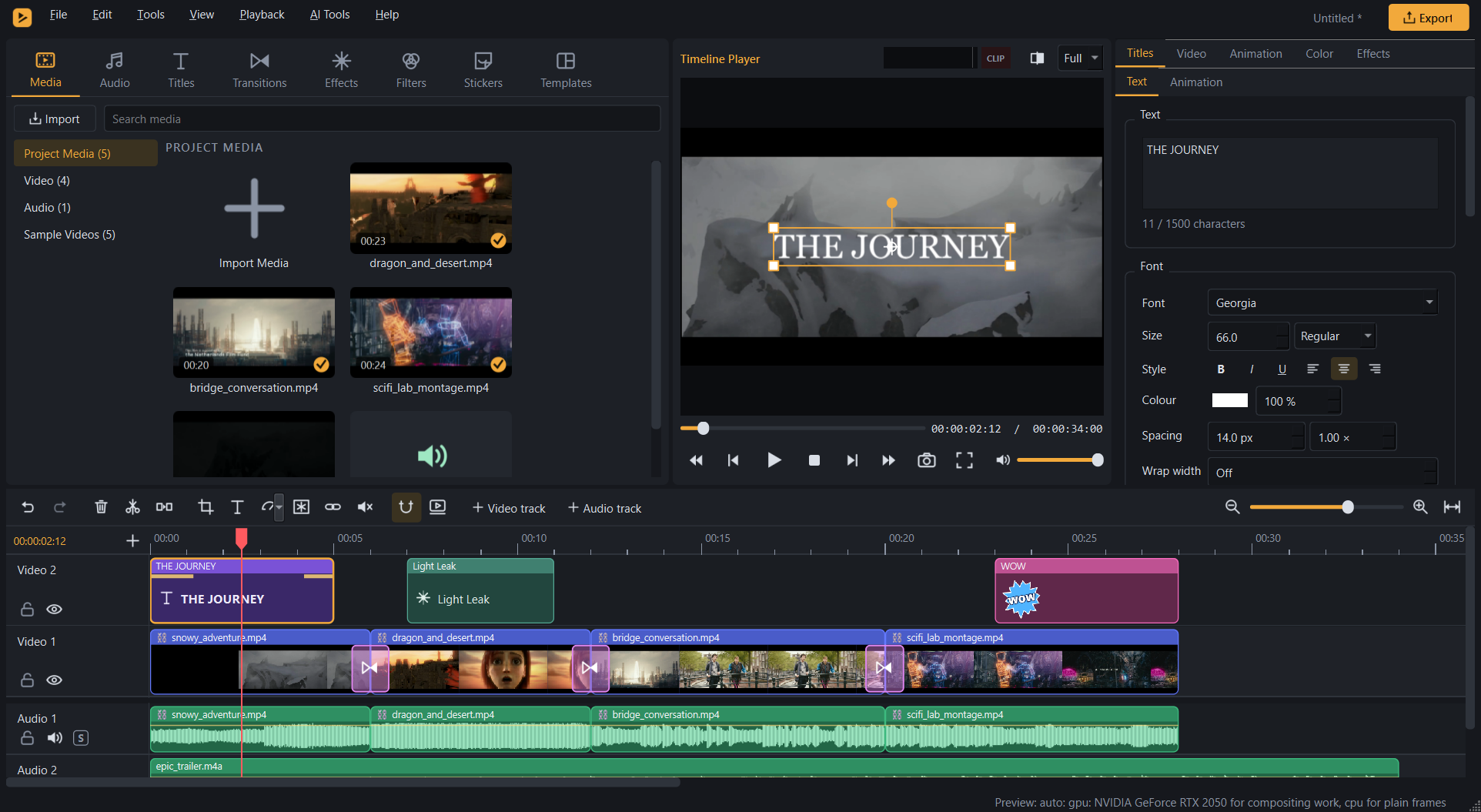
CodeWithAmeer. It covers multitrack editing, titles, 19 transitions, 30 effects,
46 filters, colour grading, an audio mixer, export to the common formats, and AI tools that run on your own PC. There
is no account, no watermark and no telemetry.
Download
| File | What it is |
|---|---|
| MeerCut-1.0.0-win64-setup.exe | Installer (recommended). Installs for the current user without administrator rights, or for all users. |
| MeerCut-1.0.0-win64-portable.zip | Portable. Unzip anywhere and run MeerCut.exe. |
| MeerCut-1.0.0-source.zip | The complete corresponding source of this release (the tagged commit). |
| SHA256SUMS.txt | SHA-256 checksums. |
Install. Run the installer, or unzip the portable ZIP and start MeerCut.exe.
Check the download.
- PowerShell:
Get-FileHash .\MeerCut-1.0.0-win64-setup.exe -Algorithm SHA256, then compare withSHA256SUMS.txt. - Git Bash or Linux:
sha256sum -c --ignore-missing SHA256SUMS.txtchecks the files you downloaded. The last three
lines check the programs in the portable ZIP once it is extracted next toSHA256SUMS.txt.
The files are not code-signed. Windows SmartScreen may show "Windows protected your PC". If the checksum matches,
choose More info › Run anyway.
Requirements
- Windows 11, 64-bit. The installer accepts Windows 10 1809 or later, but that is untested.
- Disk space: about 200 MB.
- GPU: a DirectX 11 GPU is optional; without one the CPU renders the same picture.
- AI models are not included. AI Tools › Model Manager downloads the ones you choose and shows their licences
(AI_MODELS.md). The AI tools run on the GPU
(DirectML or Vulkan) or on the CPU, which is much slower.
Highlights
- Editing.
- A multitrack timeline: snapping, split, ripple delete, trim, In / Out, "Delete this gap", unlimited undo.
- Keyframes, masks and 14 blend modes.
- Autosave and crash recovery.
- Library.
- 54 title templates, 19 transitions, 30 effects and 46 filters.
- 93 stickers, 34 templates, 17 music beds and 40 sound effects.
- Media › Sample Videos: five practice clips.
- Colour and motion.
- HSL, Curves, Colour Wheels and .cube LUTs.
- Speed ramps, optical flow, motion tracking and stabilisation.
- Audio. Automation, crossfades, a 10-band EQ, ducking, noise reduction, loudness normalisation and a limiter.
- Export.
- MP4, MOV, MKV, WebM, GIF, WAV and FLAC (H.264, HEVC, AV1, VP9, ProRes).
- NVIDIA and Intel hardware encoders, with a reported CPU fallback.
- Local AI. Background Removal, Speech to Text, Auto Reframe, AI Interpolation and Video Upscaling.
The full feature list and screenshots are in the README.
Known limitations
- Windows 11 x64 only. No HDR or alpha-channel export. AMD AMF encoders are not built.
- Real-ESRGAN x4plus upscaling is slow: about 17 s per 720p frame on an RTX 2050, and minutes per frame on a CPU.
- Scene Detection finds hard cuts reliably, slow dissolves less reliably.
- The commercial-use status of some AI model weights is unclear. The weights are not distributed with MeerCut.
How this release was verified
On the development laptop: Intel Core i5-12450H, 8 GB RAM, Intel UHD Graphics + NVIDIA GeForce RTX 2050, Windows 11
Home.
| Check | Result |
|---|---|
| Test suite, Release build (unit, end-to-end renders, GUI): this tree | 507 / 508. The one failure came from unpublished measurement data left in the build checkout. With that data removed, as in a fresh clone, the 20 tests that read it were run again: 15 pass, 5 skip. |
| Test suite, Debug build: the same code in the development repository, with the measurement data | PASS: 508 / 508 |
| 10 example projects rendered by the packaged renderer with only Windows on PATH (ffprobe-checked); nothing loaded from outside the package and Windows | PASS: 10 / 10, no problems |
Installer: install, version, Start menu, .mcproj association, export with the installed programs, reinstall, uninstall, user data unchanged |
PASS: 18 / 18 |
| Portable ZIP identical to the program folder; source ZIP identical to the tagged commit | PASS |
| A clean Windows installation, other GPUs, other hardware, Windows 10 | not tested |
A few tests compare MeerCut's colour tools with measurement data that is not published. They skip themselves in this
public tree; they passed in the development repository.
SHA-256
46f058f0b1f14c02953bc27ebc8b45efdc5661729fa5ed94ef932c831997cddb  MeerCut-1.0.0-win64-portable.zip
7131db1a07582af8c77879bae34ff35cc0aa9e307af3916d4323710b6fd5758c  MeerCut-1.0.0-win64-setup.exe
37b9f56e1811f863fc3273090a0423cd63768aa855b1f0f3a2cb3e9fcebcd349  MeerCut-1.0.0-source.zip
47c4de9f99f34e963ca2b12a5baa98436d4c8f00438e7468093f838317caa438  MeerCut-1.0.0-win64/MeerCut.exe
2c321e4e50fcd0fe1d6f9661f94633e5b68c009bd55298fd7dc03971578dc007  MeerCut-1.0.0-win64/fa-render.exe
4f88aacebc2995e39468dcaad6da067b89941ae6ec427d44b27f8b1cbf26b65a  MeerCut-1.0.0-win64/fa-probe.exe
Credits and licence
The sample videos Bridge Conversation and Sci-Fi Lab Montage are excerpts of Tears of Steel, (c) Blender
Foundation | mango.blender.org. Snowy Adventure and Dragon and Desert are excerpts of Sintel, (c) Blender
Foundation | durian.blender.org. Both films are licensed under CC BY 3.0.
MeerCut is not affiliated with or endorsed by the Blender Foundation.
MeerCut is free software under the GNU General Public License, version 3 or later. The binaries include FFmpeg built
with x264 and x265, so the distribution as a whole is GPL.
- THIRD_PARTY_NOTICES.md lists every
third-party component; the packages carry their full licence texts inlicenses\. - CREDITS.md credits the media.
Filmora and Wondershare are trademarks of their respective owners. MeerCut is an independent project and is not
affiliated with, endorsed by or sponsored by Wondershare.