Repository navigation
Update 1.0.3

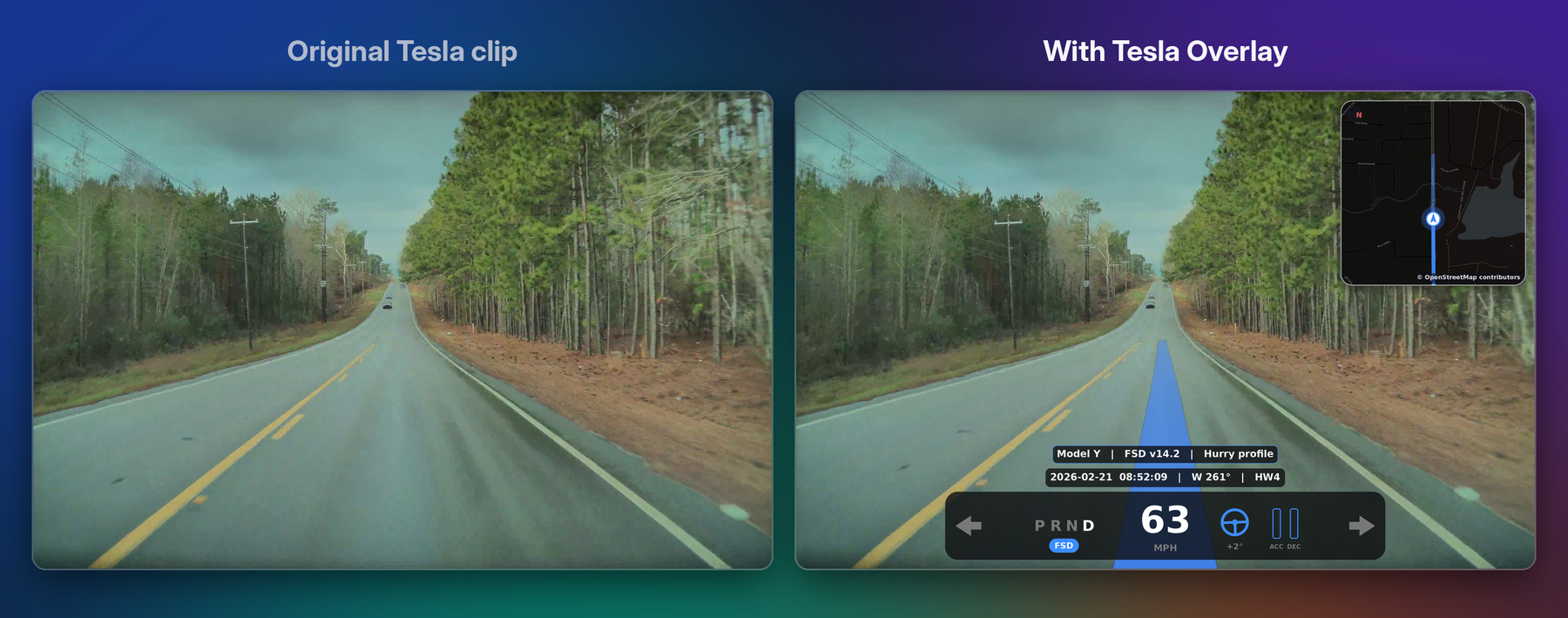
Tesla Overlay 1.0.3. Turn Tesla dashcam clips into videos with your speed, an FSD-style driving path and a live map, burned right in.
What's new since 1.0.1
Advanced menu (1.0.3)
A new Advanced menu in the Overlay card adds details Tesla's clips don't record. Anything you set is shown on the video in a second strip next to the date and time, and Clear all removes it.
- Speed profile: Sloth, Chill, Standard, Hurry or Mad Max.
- Car model: every Tesla model and trim, from Model 3 to Cybertruck Cyberbeast.
- FSD version: every release from v9 to v14.3, including the HW3 Lite builds, or choose Other version to type an exact one such as 14.3.13.
HW3 and HW4 support (1.0.2)
- Hardware menu with Auto, HW3 and HW4. Auto works out which hardware recorded the clip from its video size: HW3 records every camera at 1280 × 960, while HW4 records the front camera at 2896 × 1876 and the other cameras at 1448 × 938. If a clip was resized and gets detected wrong, pick HW3 or HW4 yourself.
- Better driving path on HW3 cars. The hardware sets the camera's field of view used to draw the path, so it lines up with the road on both HW3 and HW4.
- Hardware label on the video. HW3 or HW4 now appears next to the date, time and heading. Turn off Show hardware in video to hide it.
Fixes
- The Car model and FSD version menus now display correctly in dark mode.
Command line
New options: --hw=auto|hw3|hw4, --no-hw-label, "--model=Model Y", --fsd=14.3 and --profile=Hurry.
Downloads
| Platform | File |
|---|---|
| Windows 10 and 11 | TeslaOverlay-1.0.3-windows.zip |
| macOS 11 or newer | TeslaOverlay-1.0.3-mac.zip |
| Source code | source-1.0.3.zip |
The apps aren't signed with paid developer certificates yet. On Windows, click More info, then Run anyway. On a Mac, open the app once, then click Open Anyway under System Settings > Privacy & Security. SHA256SUMS.txt lists the checksums of every file.
Which clips work
Dashcam clips (SavedClips and RecentClips, not Sentry) recorded on firmware 2025.44.25 or later, on HW3 or newer.
Support the project
Buy me a coffee · Buying a Tesla or trying FSD? Use my referral link (currently includes a free month of FSD; see the link for Tesla's current terms).
Licenses
Tesla Overlay is free for personal and noncommercial use under the PolyForm Strict License 1.0.0. The desktop apps bundle FFmpeg 7.1, which is licensed under the GNU GPL; its source is available at https://ffmpeg.org/releases/ffmpeg-7.1.tar.xz, and all third-party licenses are listed in THIRD_PARTY_NOTICES.txt. Map data © OpenStreetMap contributors. Not affiliated with Tesla, Inc.