Repository navigation
Rat-Man v1.0.0

What's new in v1.0.0 — The comeback (2026-11-20)
The first downloadable version: the old team project rebuilt, fixed and filled out.
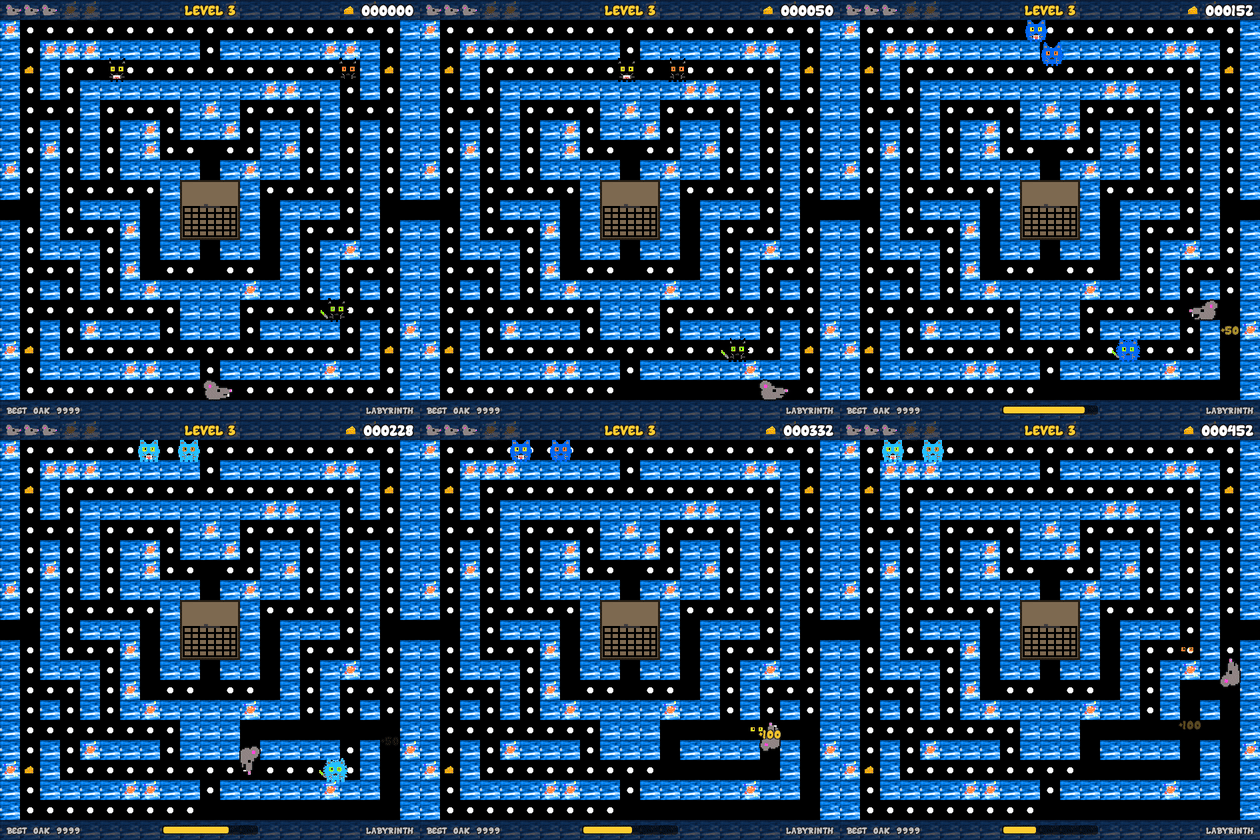
- Mac and Windows apps. Your friends can download and play with no Java install needed.
- Hand-designed levels. Each level has its own maze. Random mazes are still available as a setting.
- Smarter cats with names and personalities:
- Alpha, the Chaser: the confident leader who comes straight at you.
- Explorer, the Ambusher: the smallest and scrappiest, who cuts you off.
- Yoda, the Flanker: comes at you from the side.
- Smooth 60fps movement for the rat and the cats.
- Original music and sound effects, plus a HUD for score, level and lives with some personality.
- Glowing cheese that's easier to spot.
- How to Play guide on the main menu, including an intro to each cat.
- Settings screen for music, sound effects and random mazes.
- Pause menu with Resume, Restart and Main Menu.
- Colourful menus, bigger outlined sprites and a bigger boss.
- Bug fixes, including cats and maze walls no longer ending up inside the cat cage, and the rat now turning reliably.
🐀 Rat-Man
A Pac-Man-style maze game. You're a rat collecting cheese while three cats (Alpha, Explorer and Yoda) hunt you down. Grab the big cheese to turn the tables. Every 4th level, the Three-Headed Cat shows up.
No Java needed: everything the game needs is bundled inside.
Download
| Your computer | Download |
|---|---|
| Mac (Apple Silicon: M1, M2, M3, M4…) | Rat-Man-…-mac.dmg |
| Windows 10 / 11 | Rat-Man-…-windows.zip |
Files are listed under Assets below.
Mac: install and first launch
- Open the
.dmgand drag Rat-Man into Applications. - Open Rat-Man. macOS will say it can't verify the developer, because the game isn't signed with a paid Apple developer account. Click Done (or Cancel).
- Open System Settings → Privacy & Security, scroll down, and click Open Anyway next to the Rat-Man message. Confirm with your password.
- From then on, it opens normally.
If macOS says the app "is damaged and can't be opened", open Terminal and run:
xattr -cr /Applications/Rat-Man.app
then open it again.
Windows: install and first launch
- Unzip
Rat-Man-…-windows.zip(right-click → Extract All). - Open the Rat-Man folder and double-click Rat-Man.exe.
- If Windows shows "Windows protected your PC", click More info → Run anyway (the game isn't signed with a paid certificate).
How to play
- Move: arrow keys or WASD, or a controller's D-pad / left stick
- Pause: P or Esc, or Options / Start
- Controllers: PS5, PS4, Xbox and Switch Pro, over USB or Bluetooth, on Mac and Windows. Every menu works with the D-pad + Cross / A.
- Check HOW TO PLAY on the main menu for the rules and the cats' strategies.
- Settings has toggles for music, sound effects, rumble, and random mazes.
Every version's changes are listed in the changelog.
High scores are saved on your own computer.