Repository navigation
Releases
VerifyLens 0.27.0 - with a pull request, evidence outside the change is not Verified

Fewer wrong Verified verdicts when you check a pull request on the browser page. In 0.26.0, about half of the Verified verdicts on real pull requests stood on the wrong line. Almost all of the wrong ones had an evidence line far from anything the pull request changed. Verdicts on all our earlier cases did not change.
What changed
- With a pull request, the evidence must be in the change.
- The browser page knows which lines a pull request changed.
- If the evidence line is outside them, the requirement is not called Verified. Its reason says "evidence line is outside this change".
- Different and Failed are still reported.
- This applies only to pull request addresses. In VS Code, JetBrains and CI, a requirements file describes the whole feature, so a rule the change did not touch can still be Verified.
- A settings line or a loop header is not the evidence for a requirement without a number.
timeout: options.timeout ?? 10_000carries every word of its statement, so "Add an init hook" landed on it.- A
forloop header carried every word of the loop body. - Both are still used for requirements that have a number.
- Fewer lines that are not requirements. These are now left out:
- review-bot summary categories ("Bug Fixes", "New Features") and the lines under their Documentation, Tests and Chores categories;
- test result lines ("75 passed", "
pnpm build: passed"); - observed results that end in a mark ("Response status: 500 ✓") and code location notes;
- the title of a bug-report issue, which names the bug rather than what the code must do.
- Clearer words. Found by our JetBrains build.
- A process line or a type-level requirement now says "not looked for" with its reason, instead of "no evidence found".
- When a test passes but the requirement stays Not verified, the note on the code line gives the reason too.
Numbers
These are our own reading of each Verified line. Tests were counted as passing because CI passed before merge. This is not a benchmark.
| 0.26.0 | 0.27.0 | |
|---|---|---|
| New: two repositories, 16 pull requests, first run | right 2, wrong 4 | right 2, wrong 3 |
| Seen while fixing: four repositories, 64 pull requests | right 15, wrong 22 | right 17, wrong 9 |
- On the new repositories the change is small. The wrong Verified verdicts left have the right line, but a sentence that describes the bug: an issue title such as "… ignores abortOnUnmount", or a sentence cut off at a comma.
- An earlier draft of this version went from 9 wrong to 10 on its first run on one of the four repositories. Looking at that run is how the change rule was found.
Install
- VS Code: search for VerifyLens in the Extensions view.
- Cursor: search for VerifyLens. Cursor's store copies Open VSX with a delay.
- CI:
uses: DamunKorea/verifylens@v0.27.0. - Command line or agent hook, no install:
npx -y github:DamunKorea/verifylens ci --worktree(Node.js 22.18+ and git). - Without installing: https://damunkorea.github.io/verifylens/
The JetBrains preview is managed separately and keeps its own version.
한국어
체험 페이지에서 PR 을 볼 때 틀린 「확인됨」이 줄었습니다. 0.26.0 에서는 실제 PR 의 「확인됨」 절반쯤이 틀린 줄을 근거로 삼았습니다. 틀린 것은 거의 모두 PR 이 바꾼 곳과 멀리 떨어진 줄이었습니다. 우리 예전 사례의 판정은 하나도 바뀌지 않았습니다.
- PR 주소로 볼 때는 근거가 이번 변경 안에 있어야 「확인됨」입니다.
- 근거 줄이 PR 이 바꾼 곳 밖이면 「근거 줄이 이번 변경 밖」으로 남깁니다.
- VS Code · JetBrains · CI 는 요구사항 파일이 기능 전체를 말하므로 그대로입니다.
- 숫자 없는 요구사항에는 설정값 줄 · 반복문 머리를 근거로 쓰지 않습니다.
- 요구사항이 아닌 줄을 덜 뽑습니다.
- 리뷰 봇 요약의 갈래 이름과 문서 · 테스트 갈래 아래 줄
- 테스트 결과 줄
- 끝에 ✓ · ✗ 가 붙은 관찰 결과, 코드 위치 메모
- 버그 신고 이슈의 제목
- 판정하지 않는 줄은 「코드에서 찾지 않음」으로, 검사는 통과했는데 미확인이면 줄 끝에도 까닭을 적습니다. 우리 JetBrains 판이 찾았습니다.
틀린 「확인됨」은 고치며 본 저장소 넷에서 22 → 9 로 줄었습니다. 처음 본 저장소 둘(PR 16개, 첫 결과)에서는 4 → 3 입니다. 남은 것은 버그를 말하는 문장이 「확인됨」이 되는 경우입니다. 벤치마크가 아닙니다.
VerifyLens 0.26.0 - a first test on real pull requests
A first test on real pull requests, and what it changed. We ran 17 merged pull requests of a public TypeScript repository and read every line VerifyLens took as a requirement. Half were not requirements, and three of those were Verified. This version fixes that, and an older bug that let lines in test files become evidence. Verdicts on all our earlier cases did not change.
What changed
- Fewer lines that are not requirements. When requirements are taken from a pull request or an issue, these are now left out:
- the author's to-do list in pull request templates: add tests, run tests, format and lint commands, TSDoc;
- reasons and quotes such as "According to RFC …" or "This matters for …";
- descriptions of the old behavior, such as "… made the request throw, so the response was 500";
- the reproduction and environment sections of issue templates.
- Process lines and type-level requirements are never Verified.
- "Add tests for …" now says "not a code behavior (a process step)".
- "A type error when …" says "type-level requirement, not readable".
- A change's own new tests are linked when their names differ from the sentence.
- Which tests: new tests in the test file paired with the evidence file, sharing a word with the requirement and with the evidence line.
- They count toward Verified only when the requirement's number was matched in the code.
- Otherwise the requirement stays Not verified with the reason "linked only by this change's new tests", and the tests are listed so you can check them.
- A
test/ortests/folder at the top of the repository is a test folder. Before, lines in files such astest/hooks.tscould become evidence. In one repository, 12 of 16 Verified verdicts stood on such lines.
Numbers
These are our own reading of each line. Tests were counted as passing because CI passed before merge. Three repositories is not a benchmark.
| A: 17 PRs (seen while fixing) | B: 17 PRs (new) | C: 15 PRs (new) | |
|---|---|---|---|
| Lines taken as requirements | 82 → 54 | 177 → 168 | 66 → 59 |
| Real requirements dropped | 0 | 0 | 0 |
| Verified on the right line | 1 → 3 | 2 → 3 | 2 → 6 |
| Verified but wrong | 5 → 2 | 4 → 4 | 14 → 7 |
| Different | 0 → 0 | 0 → 0 | 0 → 0 |
First runs:
- B: the first version of the new-test rule went from 6 Verified to 14 (right 2 → 6, wrong 4 → 8). We changed the rule before release.
- C: the first run changed no verdict, and the 13 lines it dropped were all non-requirements. Reading its results found the
test/folder bug.
The B and C numbers in the table are after those fixes.
Still: 13 of the 25 Verified verdicts on these pull requests are on the wrong line, mostly a neighbouring condition or a default value. On real pull requests, open the evidence line before you trust Verified.
Install
- VS Code: search for VerifyLens in the Extensions view.
- Cursor: search for VerifyLens. Cursor's store copies Open VSX with a delay.
- CI:
uses: DamunKorea/verifylens@v0.26.0. - Command line or agent hook, no install:
npx -y github:DamunKorea/verifylens ci --worktree(Node.js 22.18+ and git). - Without installing: https://damunkorea.github.io/verifylens/
The JetBrains preview is managed separately and keeps its own version.
한국어
실제 PR 로 처음 시험하고 고쳤습니다. 공개 TypeScript 저장소의 병합 PR 17개를 돌려, VerifyLens 가 요구사항으로 뽑은 줄을 모두 읽었습니다. 절반은 요구사항이 아니었고, 그 가운데 셋이 「확인됨」이었습니다. 이번 판은 그 문제와, 테스트 파일의 줄을 근거로 삼던 예전 버그를 고칩니다. 우리 예전 사례의 판정은 하나도 바뀌지 않았습니다.
- 요구사항이 아닌 줄을 덜 뽑습니다. 다음 줄은 이제 뽑지 않습니다.
- PR 양식의 할 일(테스트 추가 · 실행, 서식 · 린트 명령, TSDoc)
- 까닭 · 인용(「According to RFC …」)
- 고치기 전 버그 설명(「… made the request throw, so the response was 500」)
- 이슈 양식의 재현 · 환경 칸
- 절차 줄 · 타입 요구사항은 「확인됨」이 되지 않습니다.
- 「Add tests for …」는 「코드 동작이 아닌 줄(절차)」로 나옵니다.
- 「A type error when …」는 「타입 요구사항 — 읽지 못함」으로 나옵니다.
- 이름이 문장과 달라도 이번 변경의 새 테스트를 잇습니다.
- 근거 파일과 짝인 테스트 파일의 새 테스트만 잇습니다.
- 숫자가 코드와 맞은 경우만 「확인됨」으로 셉니다.
- 그 밖에는 「이번 변경의 새 검사로만 이어짐」(미확인)으로 남기고, 테스트 목록을 보여 줍니다.
- 저장소 맨 위의
test/·tests/도 테스트 폴더로 봅니다. 한 저장소에서는 「확인됨」 16개 가운데 12개가 테스트 파일 줄을 근거로 삼고 있었습니다.
세 저장소 PR 49개(판단은 우리가 직접)에서 틀린 「확인됨」은 28개 중 23개에서 25개 중 13개로 줄었습니다. 아직 절반쯤은 근거 줄이 틀립니다. 실제 PR 에서는 「확인됨」도 근거 줄을 눌러 직접 보세요. 벤치마크가 아닙니다.
VerifyLens 0.25.2 - tests out of date and no test results are not no test
A fix to 0.25.1's wording: it said "no test" where tests exist. Our JetBrains build found it. That build checks again after every save, so these notes are seen most there. No verdict changes.
What changed
-
"Tests out of date" and "no test results" are not "no test". 0.25.1 said "no test" whenever no test was linked. That also covered two cases where the tests may well exist:
- test results older than the code, which are set aside;
- no test results at all, for example when no JUnit report was produced.
The note under the code line, the hover, the Problems list, the report and the reasons now say:
- "tests out of date" when the results were older than the code;
- "no test results" when there are no results at all, as on the browser page with no tests typed;
- "no test" only when results exist but none is linked to the requirement;
- "test not run" when a test is linked but has no result.
-
The evidence chain and the pill next to the attempt numbers use the same words.
-
A test check of our own was stale. A smoke test had been checking an old word against an old build, so it did not catch the 0.25.1 change. It now checks the message itself and runs against a fresh build.
Install
- VS Code: search for VerifyLens in the Extensions view.
- Cursor: search for VerifyLens. Cursor's store copies Open VSX with a delay.
- CI:
uses: DamunKorea/verifylens@v0.25.2. - Command line or agent hook, no install:
npx -y github:DamunKorea/verifylens ci --worktree(Node.js 22.18+ and git). - Without installing: https://damunkorea.github.io/verifylens/
The JetBrains preview is managed separately and keeps its own version.
한국어
0.25.1 의 낱말 실수를 고쳤습니다. 테스트가 있는데도 「검사 없음」이라고 할 때가 있었습니다. 우리 JetBrains 판이 찾았습니다. 그 판은 저장할 때마다 다시 확인해서 이 글이 가장 자주 보이는 곳입니다. 판정은 바뀌지 않습니다.
-
「검사 오래됨」 · 「검사 결과 없음」은 「검사 없음」과 다릅니다. 0.25.1 은 이어진 테스트가 없으면 모두 「검사 없음」이라고 했습니다. 그런데 아래 두 경우는 테스트가 있을 수 있는데도 그렇게 말했습니다.
- 결과가 코드보다 오래되어 쓰지 않은 경우
- 테스트 결과 파일이 아예 없는 경우
이제는 이렇게 나눠 말합니다.
- 검사 오래됨: 결과가 코드보다 오래됨
- 검사 결과 없음: 결과가 하나도 없음. 테스트를 적지 않은 체험 페이지도 여기에 해당합니다.
- 검사 없음: 결과는 있는데 이 요구사항에 이어진 테스트가 없음
- 검사 안 돌림: 이어졌지만 결과가 없음
-
근거 사슬과 숫자 알약도 같은 말을 씁니다.
-
우리 시험 하나가 낡아 있었습니다. smoke 시험이 미리 빌드한 판으로 돌아서 0.25.1 의 변화를 잡지 못했습니다. 이제 안내 문장 자체를 보고, 새로 빌드한 판으로 돕니다.
VerifyLens 0.25.1 - the same words for tests everywhere
The same words for tests everywhere. Our own promotion session found this while recording a GIF on the browser page. It is not a user report, and no verdict changes.
What changed
- "No test" and "test not run" in every place. 0.23.0 split these two reasons, but some places still said "no test run" for both. The affected places were the note under the code line, the hover, the Problems list, the report and the text summary. All of them now say one of four things:
- "tests pass";
- "a test fails";
- "test not run": a test is linked but has no result;
- "no test": no test is linked.
- The pill next to the attempt numbers now says "No linked test" in Korean too.
- A Korean count reads as "on the 5th time". For a sentence such as "연속 5회 실패하면 계정을 잠근다", the read-as tags showed a bare "5회". They now show "5회째에" in Korean and "on the 5th time" in English. Our JetBrains build pointed this out.
Install
- VS Code: search for VerifyLens in the Extensions view.
- Cursor: search for VerifyLens. Cursor's store copies Open VSX with a delay.
- CI:
uses: DamunKorea/verifylens@v0.25.1. - Command line or agent hook, no install:
npx -y github:DamunKorea/verifylens ci --worktree(Node.js 22.18+ and git). - Without installing: https://damunkorea.github.io/verifylens/
The JetBrains preview is managed separately and keeps its own version.
한국어
검사를 말하는 낱말을 어디서나 맞췄습니다. 우리 홍보 세션이 체험 페이지에서 GIF 를 찍다가 찾았습니다. 사용자 제보는 아니고, 판정은 바뀌지 않습니다.
- 「검사 없음」과 「검사 안 돌림」을 어디서나 나눕니다. 0.23.0 에서 두 이유를 나눴지만, 코드 줄 표시 · 마우스 올림 · 문제 목록 · 리포트 · 글 요약은 여전히 둘 다 「검사 미실행」이라고 했습니다. 이제는 네 가지로만 말합니다.
- 검사 통과
- 검사 실패
- 검사 안 돌림: 테스트는 이어졌지만 결과가 없음
- 검사 없음: 이어진 테스트가 없음
- 숫자 그림 옆 알약: 한국어 화면에서도 「연결된 검사 없음」으로 나옵니다.
- 한국어 「연속 5회 실패하면」: 읽은 것 칩이 「5회」 대신 「5회째에」로 나옵니다(영어 화면은 「on the 5th time」). JetBrains 판이 짚은 것입니다.
VerifyLens 0.25.0 - see what was read from each requirement
The result shows what VerifyLens read from each requirement sentence. "How do you turn a written requirement into a check without an LLM?" was the question we got most on X. Three people asked it separately. The answer is now in the picture. No verdict changes.
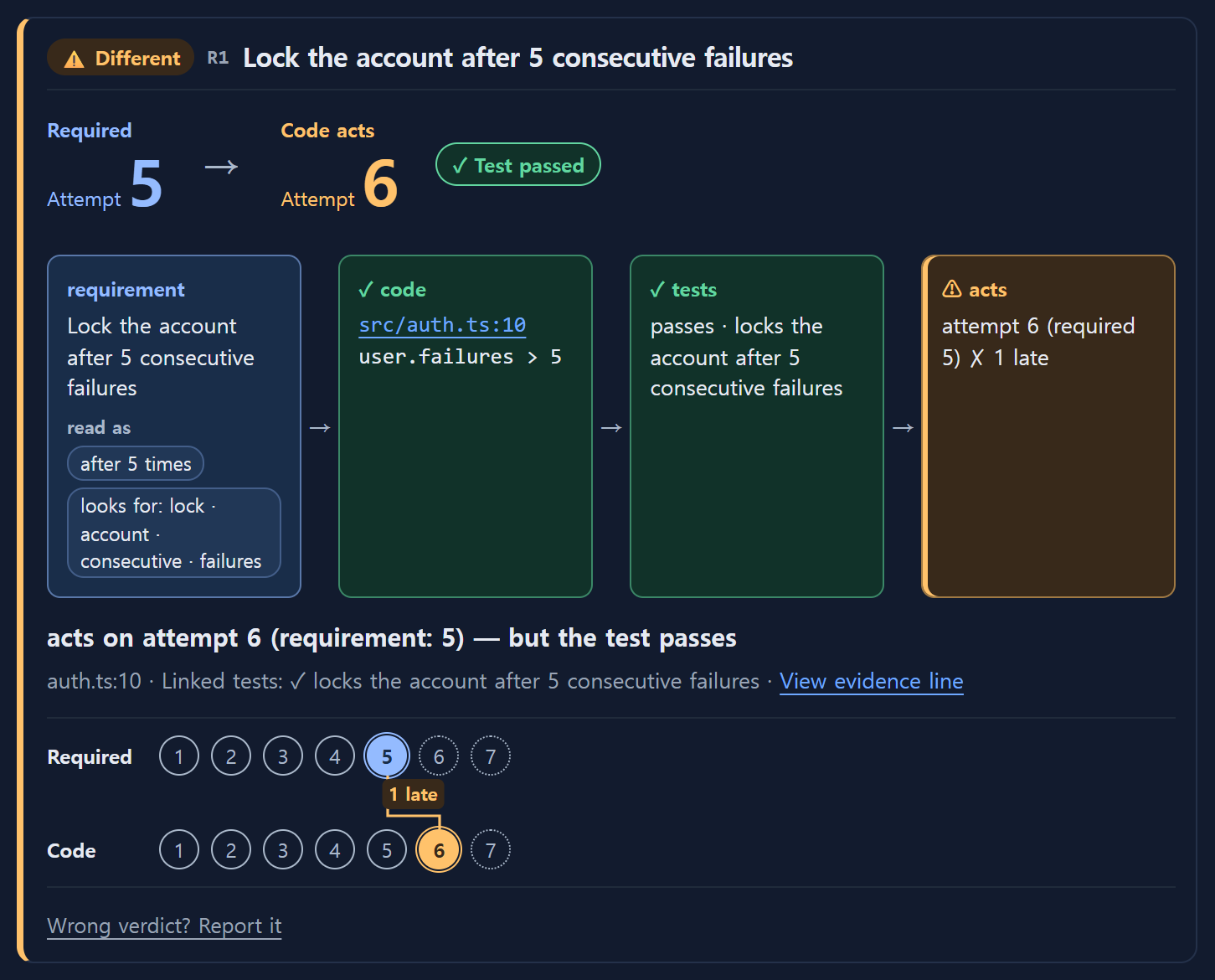
What changed
- "Read as" under every requirement. The requirement step of the evidence chain lists what was read from the sentence:
- numbers and their direction: "after 5 times", "at most 100", "at least 90 days", "within 15 minutes";
- an HTTP status: "HTTP 404";
- the kind of rule: "must block", "only once", "only rule", "needs a check";
- the state the rule is about: "state: banned";
- the words it looks for in the code: your keywords, or the sentence's words as you wrote them.
- Where you see it: on the browser page and in the extension's report.
- Example: "Lock the account after 5 consecutive failures" reads as "after 5 times" and looks for lock, account, consecutive and failures. That is why
user.failures > 5is the line it compares. - The picture at the top of the README now shows the tags.
Try it
Paste a public pull request address, or your own sentence and code, on the browser page. If a verdict is wrong, the report link under it is the fastest way to tell us.
Install
- VS Code: search for VerifyLens in the Extensions view.
- Cursor: search for VerifyLens. Cursor's store copies Open VSX with a delay.
- CI:
uses: DamunKorea/verifylens@v0.25.0. - Command line or agent hook, no install:
npx -y github:DamunKorea/verifylens ci --worktree(needs Node.js 22.18+ and git). - Without installing: https://damunkorea.github.io/verifylens/
The JetBrains preview is managed separately and keeps its own version.
한국어
결과에 VerifyLens 가 요구사항 문장에서 읽은 것이 보입니다. X 에서 가장 많이 받은 질문은 「LLM 없이 글로 쓴 요구사항을 어떻게 검사로 바꾸나」였고, 세 사람이 따로 물었습니다. 이제 그 답이 그림 안에 있습니다. 판정은 바뀌지 않습니다.
- 「읽은 것」: 근거 사슬의 요구사항 칸 아래에 다음을 칩으로 붙입니다.
- 숫자와 방향(「5번 뒤」 · 「100 이하」 · 「90일 이상」)
- HTTP 상태 번호
- 규칙 종류(막아야 함 · 한 번만 · 그것만 허용 · 확인 조건 필요)
- 상태 낱말
- 코드에서 찾는 낱말
- 보이는 곳: 체험 페이지와 확장의 리포트입니다.
- 예: 「연속 5회 실패하면 계정을 잠근다」는 「5회」로 읽고, account · lock · fail · consecutive 를 코드에서 찾습니다.
- README 맨 위 그림도 이 칩이 보이게 바꿨습니다.
VerifyLens for JetBrains IDEs 0.21.0 (preview)
VerifyLens for IntelliJ IDEA, WebStorm and other JetBrains IDEs — preview 0.21.0.
Follows the engine of the VS Code extension 0.27.0. No verdict changes on our examples. Since JetBrains preview 0.20.0:
- The note at the end of a code line gives the reason. When a test passes but the requirement stays Not verified, 0.20.0 said only "Not verified · tests pass". It now adds why, for example "tests pass · linked only by this change's new tests" or "tests pass · no deciding check".
- Lines that are not judged say so. A process line ("Add tests for …") or a type-level requirement no longer reads "no evidence found" or "looks for: …", as if VerifyLens had looked. The chain says "not looked for (a line that is not judged)" and the tag says "process step — not judged" or "type-level — not read".
- A settings line or a loop header is not the evidence for a requirement without a number. A line such as
timeout: options.timeout ?? 10_000carries every word of its statement, so "Add an init hook" landed on it. The condition inside is now the evidence line. Both are still used for requirements that have a number.
The other change in VS Code 0.27.0, "with a pull request, the evidence must be in the change", applies only to pull request addresses on the browser page. It does not apply here: a requirements file describes the whole feature.
Install
Download verifylens-jetbrains-0.21.0.zip below (do not unzip it), then Settings → Plugins → ⚙ → Install Plugin from Disk…. Needs a JetBrains IDE on platform 2026.1 or newer, Node.js 18+ and git.
The JetBrains Marketplace listing is still in review with 0.4.1.
Checked, and not checked
- JetBrains Plugin Verifier reports Compatible on IntelliJ IDEA 2026.3 and Android Studio 2026.1.3.
- 15 automated tests pass on IntelliJ IDEA 2026.3 and Android Studio 2026.1.3. One of them asserts the new line note, the "not looked for" step and the "not judged" tag.
- The built-in sample and twelve small example projects were run with the engines of 0.20.0 and 0.21.0 and compared field by field. The verdicts and evidence lines are the same; only the words above differ.
- One more example, made for this version: "Add an init hook option to the client" moved from the settings line to
config.initHook, and "Hidden items are skipped" moved from the loop header toitems[i].hidden. "The default timeout is 10 seconds" stayed on the settings line. - Still wrong, as in 0.20.0: for a made-up requirement that the code does not implement, the engine picks a neighbouring condition about another number and says Different. Open the evidence line before you trust a verdict.
- The new words were seen in the pictures the tests save, not in a real IDE window.
- A symbolic link on macOS or Linux was not tried.
- WebStorm has not been tried.
한국어
VS Code 0.27.0 과 같은 엔진입니다. 검사는 통과인데 「미확인」으로 남을 때 코드 줄 끝 글에 까닭이 붙습니다(예: 「검사 통과 · 이번 변경의 새 검사로만 이어짐」). 판정하지 않는 줄(절차 줄 · 타입 요구사항)은 「근거를 찾지 못함」 대신 「코드에서 찾지 않음 (판정하지 않는 줄)」이라고 말합니다. 숫자 없는 요구사항에는 설정값 줄 · 반복문 머리를 근거로 쓰지 않습니다. 우리 예제의 판정은 0.20.0 과 같습니다. 아래 zip을 받아 Settings → Plugins → ⚙ → Install Plugin from Disk… 로 설치합니다. JetBrains 장터는 아직 0.4.1로 심사 중입니다.
VerifyLens for JetBrains IDEs 0.20.0 (preview)
VerifyLens for IntelliJ IDEA, WebStorm and other JetBrains IDEs — preview 0.20.0.
Follows the engine of the VS Code extension 0.26.0, which was changed after a first test on real pull requests. Since JetBrains preview 0.19.1:
- Process lines and type-level requirements are never Verified. A line such as "Add tests for …" is not judged and no code line is linked to it. Its reason is "not a code behavior (a process step)". A line such as "A type error when …" says "type-level requirement, not readable": VerifyLens reads runtime conditions, not TypeScript types.
- A change's own new tests are linked when their names differ from the sentence. Only new tests in the test file paired with the evidence file (
coupon.test.tsandcoupon.ts). The evidence chain shows the test. It counts toward Verified only when the requirement's number was matched in the code. Otherwise the requirement stays Not verified with the reason "linked only by this change's new tests", so you can check the test yourself. - A
test/ortests/folder at the top of the repository is a test folder. Before, lines in a file such astest/helpers.tscould become the evidence line.
Install
Download verifylens-jetbrains-0.20.0.zip below (do not unzip it), then Settings → Plugins → ⚙ → Install Plugin from Disk…. Needs a JetBrains IDE on platform 2026.1 or newer, Node.js 18+ and git.
The JetBrains Marketplace listing is still in review with 0.4.1.
This zip was built and tested on the engine of VS Code 0.26.0; the tag points at that commit. VS Code 0.27.0 came out while this was being published. A JetBrains preview on that engine follows.
Checked, and not checked
- JetBrains Plugin Verifier reports Compatible on IntelliJ IDEA 2026.3 and Android Studio 2026.1.3.
- 15 automated tests pass on IntelliJ IDEA 2026.3 and Android Studio 2026.1.3. The new one builds a small coupon project and asserts the three new reasons, in the rows and in the evidence chain.
- The built-in sample and ten small example projects were run with the engines of 0.19.1 and 0.20.0 and compared field by field: no difference.
- One more example, made for this version: a condition in
test/helpers.tswas the evidence line with the 0.19.1 engine and is not with 0.20.0. That requirement is not implemented in the code. The engine then picks a neighbouring condition about another number and says Different. The 0.19.1 engine does the same when the helper file is absent, so this wrong Different is not new. Open the evidence line before you trust a verdict. - The new reasons were seen in the pictures the tests save, not in a real IDE window.
- A symbolic link on macOS or Linux was not tried.
- WebStorm has not been tried.
한국어
VS Code 0.26.0 과 같은 엔진입니다(실제 공개 PR 로 처음 시험한 뒤 고친 판). 「테스트 추가」 같은 절차 줄과 타입 오류 요구사항은 판정하지 않고 「미확인」으로 둡니다(이유: 「코드 동작이 아닌 줄(절차)」 · 「타입 요구사항 — 읽지 못함」). 검사 이름이 문장과 다르면 이번 변경이 새로 더한 검사를 이어 보여 주되, 숫자가 맞게 판정된 때가 아니면 「확인됨」이라 하지 않습니다(이유: 「이번 변경의 새 검사로만 이어짐」). 저장소 맨 위의 test/ · tests/ 폴더 줄은 근거가 되지 않습니다. 아래 zip을 받아 Settings → Plugins → ⚙ → Install Plugin from Disk… 로 설치합니다. JetBrains 장터는 아직 0.4.1로 심사 중입니다.
VerifyLens for JetBrains IDEs 0.19.1 (preview)
VerifyLens for IntelliJ IDEA, WebStorm and other JetBrains IDEs — preview 0.19.1.
The same words for tests in every place. Same engine as the VS Code extension 0.25.2; no verdict changes. Since JetBrains preview 0.19.0:
- The note at the end of the code line says why there is no test result. 0.19.0 said "no test run" in four different cases. The line note, the tool window rows and the evidence chain now say one of these:
- "tests pass";
- "a test fails";
- "test not run": a test is linked to the requirement but has no result, for example a skipped test;
- "no test": results exist but none is linked to the requirement;
- "tests out of date": the results are older than the code and were set aside. You see this right after you save a file, until the tests run again;
- "no test results": there is no test report at all.
- "5회 실패하면" reads as "on the 5th time". Among the read-as tags, a Korean count such as "연속 5회 실패하면 계정을 잠근다" showed as a bare "5회". It now reads "5회째에".
Install
Download verifylens-jetbrains-0.19.1.zip below (do not unzip it), then Settings → Plugins → ⚙ → Install Plugin from Disk…. Needs a JetBrains IDE on platform 2026.1 or newer, Node.js 18+ and git.
The JetBrains Marketplace listing is still in review with 0.4.1.
Checked, and not checked
- JetBrains Plugin Verifier reports Compatible on IntelliJ IDEA 2026.3 and Android Studio 2026.1.3.
- 14 automated tests pass on IntelliJ IDEA 2026.3 and Android Studio 2026.1.3. One of them saves a file and asserts that the line note ends with "검사 오래됨" (tests out of date).
- The built-in sample and eight small example projects were run with the engines of 0.19.0 and 0.19.1 and compared field by field. The verdicts are the same; only the words above differ. One example with the test report removed says "no test results" in the rows, the line notes and the chain.
- The new words were not looked at in a real IDE window this time; they were checked in the automated tests and in the engine output.
- A symbolic link on macOS or Linux was not tried.
- WebStorm has not been tried.
한국어
검사 결과를 말하는 낱말을 모든 곳에서 맞췄습니다. 0.19.0 은 코드 줄 끝에 네 가지 경우를 모두 「검사 미실행」이라고 썼습니다. 이제 「검사 안 돌림」(이어진 검사는 있는데 결과가 없음) · 「검사 없음」(이어진 검사가 없음) · 「검사 오래됨」(결과가 코드보다 오래됨 — 파일을 저장한 직후) · 「검사 결과 없음」(테스트 결과 파일이 아예 없음)으로 나누어 말합니다. 「읽은 것」 칩의 「5회」는 「5회째에」로 읽습니다. VS Code 0.25.2와 같은 엔진이고 판정은 바뀌지 않았습니다. 아래 zip을 받아 Settings → Plugins → ⚙ → Install Plugin from Disk… 로 설치합니다. JetBrains 장터는 아직 0.4.1로 심사 중입니다.
VerifyLens for JetBrains IDEs 0.19.0 (preview)
VerifyLens for IntelliJ IDEA, WebStorm and other JetBrains IDEs — preview 0.19.0.
The evidence chain now shows what was read from each requirement sentence. Same engine as the VS Code extension 0.25.0; no verdict changes. Since JetBrains preview 0.18.0:
-
"Read as" under the requirement box. In the tool window, the requirement box of the evidence chain lists what VerifyLens read from the sentence, as small tags:
- the numbers and their direction: "after 5 times", "at most 100", "at least 90 days";
- an HTTP status: "HTTP 404";
- the kind of rule: "must block", "only once", "only rule", "needs a check";
- the state the rule is about: "state: locked";
- the words it looks for in the code: your keywords, or the words of the sentence.
For example, "Lock the account after 5 consecutive failures" reads as "after 5 times". That is why
user.failures > 5is the line it compares, and why it says the code acts one attempt late. -
This is the answer to the question we were asked most: how is a written requirement turned into a check without an LLM. Sentence, these pieces, the code line, the test.
Install
Download verifylens-jetbrains-0.19.0.zip below (do not unzip it), then Settings → Plugins → ⚙ → Install Plugin from Disk…. Needs a JetBrains IDE on platform 2026.1 or newer, Node.js 18+ and git.
The JetBrains Marketplace listing is still in review with 0.4.1.
Checked, and not checked
- JetBrains Plugin Verifier reports Compatible on IntelliJ IDEA 2026.3 and Android Studio 2026.1.3.
- 14 automated tests pass on IntelliJ IDEA 2026.3 and Android Studio 2026.1.3. They assert the tags in Korean and English, that only the requirement box has them, and that the sample with two results shows them in both.
- The built-in sample and seven small example projects give the same output as with the 0.24.0 engine apart from the new tags.
- The tags were looked at in a real IntelliJ IDEA 2026.3 window (English, dark theme, 150% display scale). The Korean screen and the light theme were seen only in the pictures the tests save.
- A symbolic link on macOS or Linux was not tried.
- WebStorm has not been tried.
한국어
근거 사슬 그림의 요구사항 칸 아래에, 문장에서 읽은 것을 작은 칩으로 보여 줍니다: 숫자와 방향(「5번 뒤」), HTTP 상태, 규칙 종류(「막아야 함」 · 「한 번만」 · 「확인 조건 필요」), 상태(「상태: locked」), 코드에서 찾는 낱말. 「LLM 없이 글로 쓴 요구사항을 어떻게 검사로 바꾸나」에 대한 답입니다. VS Code 0.25.0과 같은 엔진이고 판정은 바뀌지 않았습니다. 아래 zip을 받아 Settings → Plugins → ⚙ → Install Plugin from Disk… 로 설치합니다. JetBrains 장터는 아직 0.4.1로 심사 중입니다.
VerifyLens for JetBrains IDEs 0.18.0 (preview)
VerifyLens for IntelliJ IDEA, WebStorm and other JetBrains IDEs — preview 0.18.0.
Same engine as the VS Code extension 0.24.0. Correct code is called Not verified less often. Since JetBrains preview 0.17.0:
- Tests link more easily, and only where the code agrees. A test is linked when its name covers at least half of the requirement's ideas and shares a word with the evidence line. With keywords, a test can also be linked through the requirement sentence. Korean test names are read through the glossary.
- "Return 404 when …" is read as a check. The status code is matched in the code (
res.status(404)), and "does not exist / is not found" asks for a condition that handles the missing case. - "No activity for 90 days" means at least 90 days.
- Sending and recording must actually happen. For "A welcome email is sent after signup" or "… is written to the audit log", a function counts only if it calls something that sends or records. A
mailerorauditparameter that the function never calls is no longer enough for Verified.
The plugin's own code is the same as 0.17.0. What the engine still gets wrong is listed in the VS Code 0.24.0 notes and in known mistakes.
Install
Download verifylens-jetbrains-0.18.0.zip below (do not unzip it), then Settings → Plugins → ⚙ → Install Plugin from Disk…. Needs a JetBrains IDE on platform 2026.1 or newer, Node.js 18+ and git.
The JetBrains Marketplace listing is still in review with 0.4.1.
Checked, and not checked
- JetBrains Plugin Verifier reports Compatible on IntelliJ IDEA 2026.3 and Android Studio 2026.1.3.
- 14 automated tests pass on IntelliJ IDEA 2026.3 and Android Studio 2026.1.3.
- The built-in sample and five small example projects give the same output as with the 0.23.0 engine.
- Two more examples were written for this check and run through the bundled engine:
- Correct code: "Return 404 when the project does not exist" and "Accounts with no activity for 90 days are marked inactive", both with a passing test, were Not verified with the 0.23.0 engine and are Verified now.
- Wrong code: "A welcome email is sent after signup", where
signuptakes amailerand never calls it and a test with that name passes, was Verified and is Not verified now.
- The IDE window was not opened for this version.
- A symbolic link on macOS or Linux was not tried.
- WebStorm has not been tried.
한국어
VS Code 0.24.0과 같은 엔진입니다. 맞는 코드가 「미확인」으로 남는 일이 줄었습니다. 검사 이름이 요구사항과 절반 이상 겹치고 근거 줄과 같은 낱말이 있으면 검사를 잇습니다. 「없으면 404를 돌려준다」는 상태 번호와 없는 경우를 다루는 조건을 봅니다. 「90일 동안 활동이 없으면」은 90일 이상으로 읽습니다. 「메일을 보낸다」 · 「기록한다」 요구사항은 함수가 실제로 보내거나 기록하는 것을 불러야 근거로 봅니다. 아래 zip을 받아 Settings → Plugins → ⚙ → Install Plugin from Disk… 로 설치합니다. JetBrains 장터는 아직 0.4.1로 심사 중입니다.