Repository navigation
Retromind 0.2.4-alpha
Pre-release
Retromind 0.2.4-alpha (Linux AppImage)
Retromind is a media frontend for Linux focused on games, movies, books and more.
It is designed to be portable, controller‑friendly and run well on Linux desktops.
1. Download
Linux (x86_64)
-
Retromind-0.2.4-alpha-x86_64.AppImage
SHA‑256 checksum:f6490191517835f219e6ad4a1ef9744f1caed366f53a8a3a5ce0491277d582dd -
Retromind-0.2.4-alpha-x86_64.AppImage.zsync
SHA‑256 checksum:2e469abfd0702c16c52949a47e46e486fa2998d6ffad91c22fd5301522ae08ac -
Retromind-0.2.4-alpha-x86_64.AppImage.manifest.tsv
SHA‑256 checksum:61a963b52ffbb537e82a4f26a0b7ebb3b7d4a0eb591591ff0bda52111ef1c075
2. Install / Run
Download the AppImage and make it executable:
chmod +x Retromind-0.2.4-alpha-x86_64.AppImage2.1 Start BigMode directly
./Retromind-0.2.4-alpha-x86_64.AppImage --bigmode2.2 Start the regular desktop UI
./Retromind-0.2.4-alpha-x86_64.AppImage3. What’s new in 0.2.4-alpha
Hi there,
It's time for another Retromind update! :)
Over the past two weeks, I've been focusing on improving BigMode performance, adding two new themes, and fixing a number of bugs and edge cases in the application.
The two new themes:
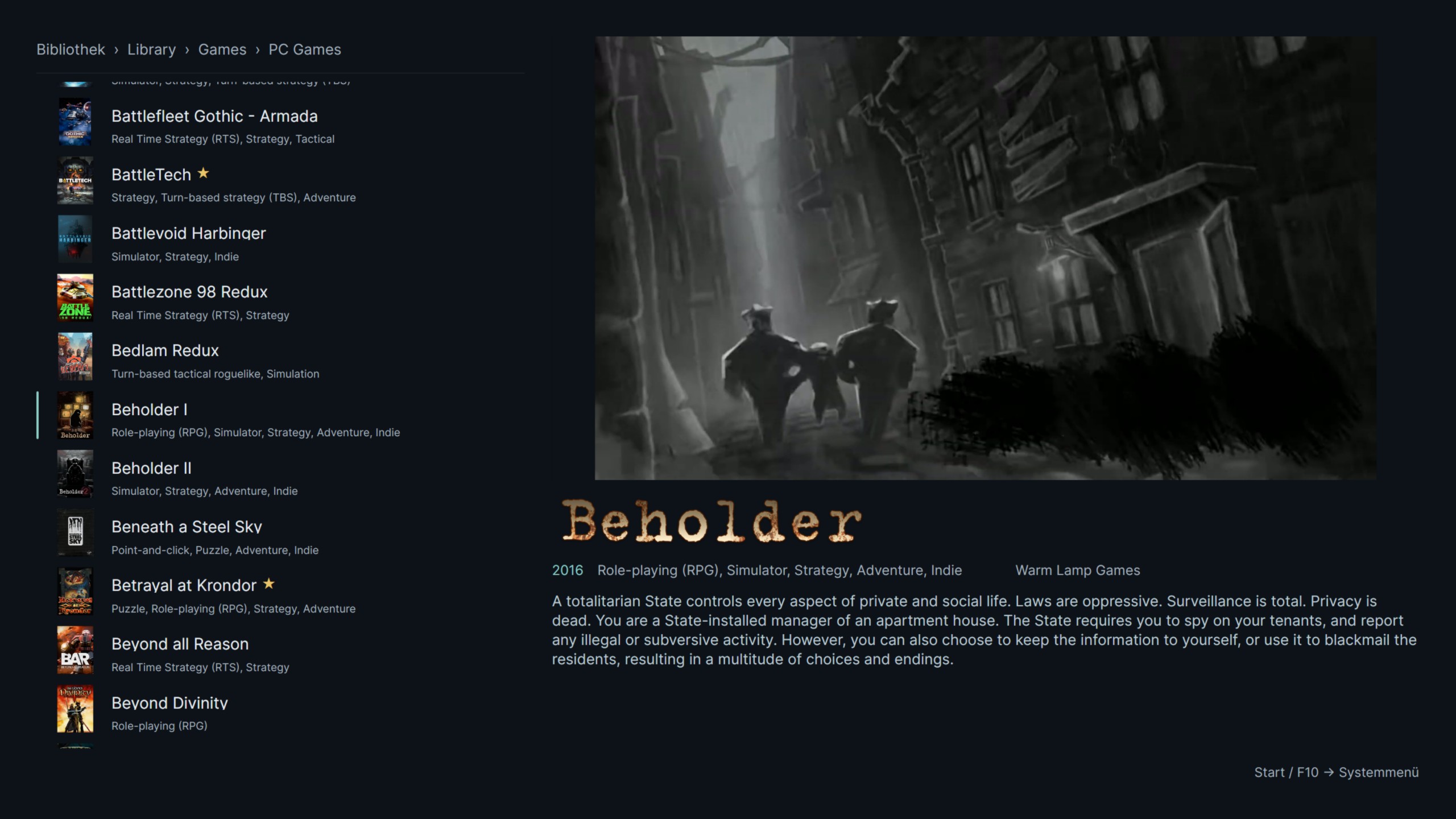
Cinematic-Theme:

Navigator-Theme:
You can now browse and download available PDF manuals directly from ScreenScraper, including different regional versions. Manuals can be downloaded individually or imported in bulk, with duplicate documents automatically skipped.
And as always...plenty of small bug fixes
Retromind is still in alpha, and there's plenty more to improve. If you run into problems, have ideas for new features, or just want to share your experience, feedback is always welcome!
Thanks to everyone who has tried Retromind so far! :)
Below the full list of changes:
Added
- new Navigator BigMode theme with compact vertical library navigation, breadcrumbs, a fixed artwork/video preview and achievement progress
- new Cinematic BigMode theme with expansive artwork and video previews, a mixed category/media cover shelf, and a layout scaled for large screens
- select and download available ScreenScraper PDF manuals individually, including regional variants, with optional bulk import and automatic skipping of identical documents
Changed
- use Navigator as the default BigMode theme for new settings and categories while preserving saved theme choices
- shorten the shared BigMode system-menu hint while continuing to show custom controller and keyboard assignments
- reduce redundant artwork loading and bound cached artwork memory while browsing BigMode libraries
- publish only the current
Retromind-<version>-x86_64.AppImage.zsyncupdate metadata; retire the legacy filename containinglinux
Fixed
- allow GOG installations to be retried from the context menu after a cancelled or failed reinstall leaves the game folder without its launch executable
- prevent the first game in a newly opened BigMode category from briefly appearing in the previous theme
- make subcategories and directly contained media reachable together throughout BigMode, Home and System browsing, including Arcade and LivingRoom with Home disabled
- preserve mixed selections in nested search categories without accidentally including or excluding entire branches
- keep category artwork paths consistent during renames and moves, abort invalid category trees safely, preserve files when recovery is uncertain, and show a visible recovery notice after an incomplete drag-and-drop rollback
- show separate bulk-scraping totals for imports, missing matches, skipped items and failures, with accurate cancellation and provider-limit completion messages
- keep controller navigation consistent when using multiple controllers or combining the D-pad and stick, and release held directions on disconnect, focus loss and monitoring shutdown
- limit remote artwork downloads and reject excessive image dimensions to reduce memory spikes while browsing
- preserve existing multi-disc playlists when updates fail and fall back to the primary disc instead of launching an incomplete or outdated playlist
- keep metadata-import error messages readable below the results and explain when a manual download returns no valid PDF
- display scraped quotation marks, apostrophes, umlauts and other HTML-encoded characters correctly in metadata previews and imports across scraper providers
4. Known issues / limitations
-
Linux only
Windows is not supported at the moment. -
Early version
Expect rough edges, missing settings and occasional layout glitches.
Feedback and bug reports are very welcome.
5. System requirements
- Linux x86_64
- GLibC: glibc >= 2.36 (Debian 12 "bookworm" baseline)
- OpenGL/Vulkan‑capable GPU (recommended)
- .NET runtime is bundled in the AppImage (self‑contained), no separate installation required
6. Debugging / logs
To capture additional LibVLC and console output (useful for bug reports), you can run:
./Retromind-0.2.4-alpha-x86_64.AppImage --bigmode |& tee vlc-log.txtWhen opening an issue, please include:
- A short description of what you did
- Your Linux distribution and version
- The AppImage version (
0.2.4-alpha) vlc-log.txt(if video/audio is involved)- Optional: output of
dotnet --infoif you also run a non‑AppImage build
7. Links
- Project page: https://github.com/Dark574/Retromind
- Issue tracker: https://github.com/Dark574/Retromind/issues