Repository navigation
PS5SD 0.8.0

PS5SD 0.8.0 rebuilds the web UI to be clearer. Every feature stays; most are easier to find.
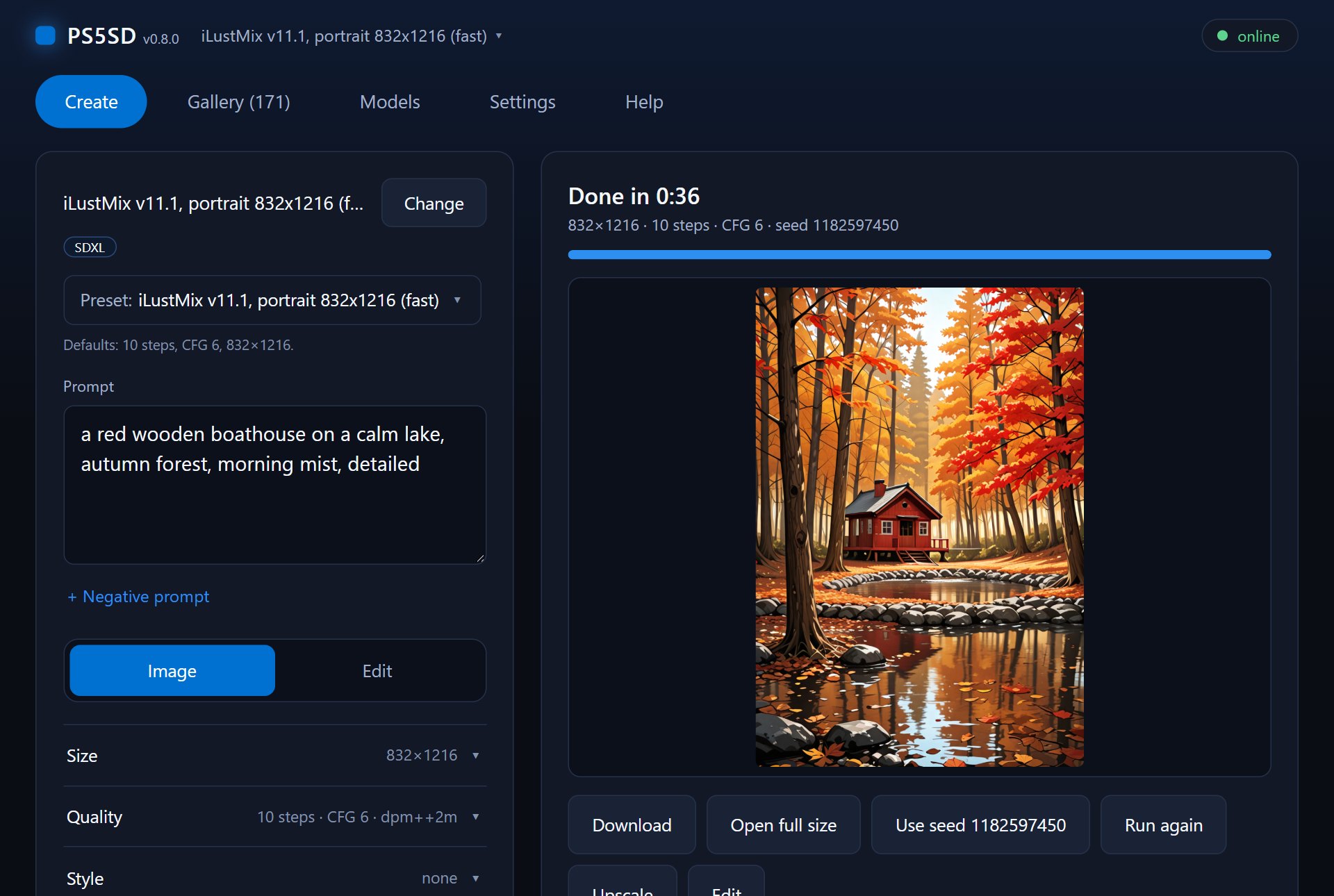
New
- Five tabs: Create, Gallery, Models, Settings, Help. On a phone they sit at the bottom of the screen, and Generate stays in view while the settings scroll. The Settings tab holds what is about the app, not the image: the done signal, the TV, the Upscale button's model, the API key.
- The Create tab:
- the model is picked in place, with tags for what it is (SDXL, FLUX, Wan, video, ControlNet), and a switch shows its progress there;
- one mode at a time (Image, Edit, Guide, Video): a video model never shows the hires fix, an SD 1.5 model never shows ControlNet;
- settings in groups (Size, Quality, Style, Hires fix, Seed, Video), each closed with its values in one line;
- the result next to the settings on a PC, first after a run on a phone, at the size of the window;
- progress with the step, the time per step, the time left, and "Decoding the video…" for a video;
- Ctrl+Enter generates.
- A count next to Generate: send any number of images in one go (new seeds each, or seed, seed + 1, … with a fixed seed), and add more to the queue while it runs. The page shows how many are waiting, and Cancel all stops them; images already made stay. A run started from another device shows up too. In the API:
repeatonPOST /sdcpp/v1/img_gen. - The Models tab in three parts:
- Installed: image models, video models, LoRAs and upscalers, each in its own group, with names a person reads and tags; saved settings under their model; Delete and Edit in a ⋯ menu;
- Get more: the catalog as cards, with what each model is good at and the time an image takes on the console, measured (SDXL about 70 s, FLUX.3 Klein about 2 minutes, Z-Image Turbo about 75 s, SD-Turbo about 2 s); the one-click LoRAs and upscalers; add by link, upload, Hugging Face search;
- Downloads, with a count, Retry, and Clear finished.
- Gallery filter: All, Images, Videos.
- Less text on the page: the long explanations moved to Help, one ⓘ away.
- LoRAs by family: the Create tab lists the LoRAs made for the loaded model's family first, and says so when a picked LoRA is for another family.
Fixed
- FLUX.3 Image Klein Q6_K ran out of memory at its default 1024x1024 (it needs 5.37 GB on the GPU for a step, 5.08 GB are free). It fits up to about one megapixel; its preset now starts at 896x896. An installed copy keeps 1024x1024 until it is installed again, or set the size on the Create tab.
- The catalog's Wan 2.1 entry said about 15 minutes for a video; with the CausVid LoRA it is 3 minutes 40 s.
Under the page
The web UI is now a few files (ps5/webui/src: the page, app.css, one script per part) that the build puts back into one page. Still no npm and no framework. scripts/webui-dev.py serves it on a PC with the console's API behind it.
Install
Install from the homebrew store, or unpack PPSA99576.zip into /data/homebrew/ on the console and let ShadowMountPlus scan.
Next: gallery thumbnails, the settings saved with each image, and longer videos, see ROADMAP.md.