Repository navigation
DNS Switcher 0.1.1

DNS Switcher now installs like a regular Windows app, and measures each resolver several times instead of once.
Download DNS-Switcher-Setup-0.1.1.exe below. dns_switcher.exe is the same app without installing (it needs Run as administrator to apply DNS).
Installer, service and tray
- Setup program in English and Portuguese: installs to Program Files, adds a Start menu entry, and uninstalls from Settings → Apps.
- DNS Switcher Service (visible in
services.msc) is the only part that changes network settings. The app runs with normal user rights and never shows a UAC prompt. - The service accepts requests only from this computer, re-validates every address and adapter, and runs
netsh/ipconfigfrom System32 directly, never through a shell. - Notification-area icon: closing the window keeps DNS Switcher there, with quick switching, Automatic, Find fastest, Flush DNS and Start with Windows.
dns_switcher.exenow shows product, publisher and version in Properties → Details.
Measurement
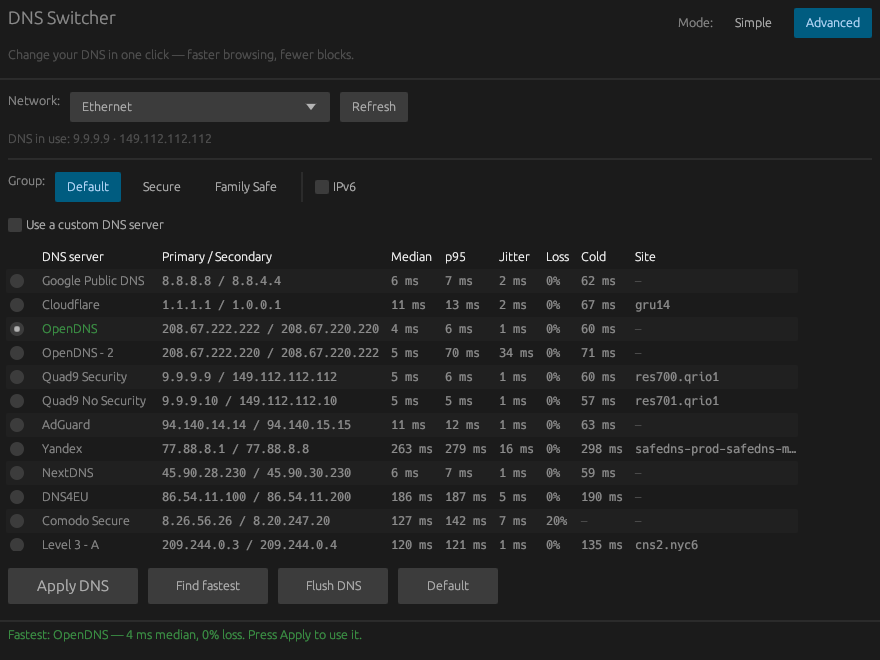
- 5 cached lookups per resolver, shown as median, p95, jitter and loss. The fastest is picked by median among servers with at most 20% loss, with p95 as the tiebreak.
- Cold column: one lookup of a never-cached name, the delay you feel on sites you open for the first time.
- Site column: which anycast location answered (CHAOS TXT
id.server). For examplegru14is Cloudflare in São Paulo. - Replies must carry the matching transaction id and response flag. 6 servers are measured at a time to avoid false loss on home routers.
- The window shows which DNS your adapter is using right now.
Resolvers
47 IPv4 and 30 IPv6 resolvers, up from 37 and 21. Every address was probed live before it went in.
- New: Gcore, Control D (unfiltered, malware, malware + ads, family), AdGuard Unfiltered, CIRA Canadian Shield (private, protected, family), Quad9 Secured with ECS, DNS.SB, AliDNS, Tencent DNSPod.
- Renamed: Verisign and Neustar entries are now UltraDNS Public, their current operator.
- Removed: Norton ConnectSafe (no longer answers) and DNS4EU's IPv6 addresses (no reply in testing; DNS4EU over IPv4 stays).
Before you run it
The files aren't digitally signed yet, so SmartScreen may warn you: click More info and then Run anyway. Compare the SHA-256 below, or build from source (see the README).
Requires Windows 10 or 11, 64-bit.
SHA-256
62ea116389e8df87b5dec9f1d0ca7fac101a4f39b0ce3e3ac9e77af04dfc6bd7  DNS-Switcher-Setup-0.1.1.exe
e5ce8ef34525c3c2d1bdd9a5feb6835198da75f6a24cf3ef78ff397df75c7334  dns_switcher.exe
In PowerShell: Get-FileHash .\DNS-Switcher-Setup-0.1.1.exe
Full list of changes in CHANGELOG.md.