Repository navigation

GZ MODEL EDITOR v3.1.½ [INJECTION-DAY]
Version 3.1 focuses on safer Custom Model injection, improved weight transfer, material control, smaller BDG files, and clearer update notifications.
Alot of the fixes are thanks to being notified via the Discord!!
v3.1 Changes
[Custom Injector]
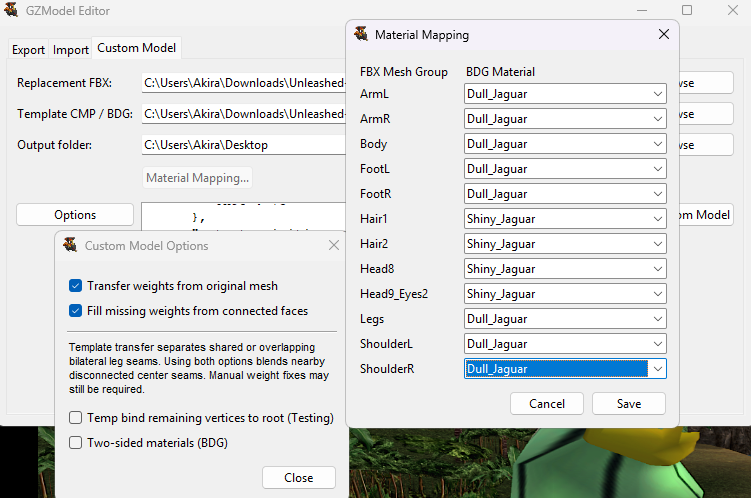
- Added Material Mapping for assigning individual FBX mesh groups to CMP or BDG materials.
- Automatic material matching remains enabled by default.
- Added automatic and manual support for two-sided materials.
- Explicit FBX properties such as
DoubleSided,TwoSided, and disabled backface culling are detected automatically. - Generic model-level
CullingOffno longer incorrectly makes every material two-sided. - Triangle winding can be corrected automatically using the FBX normals.
- Already-weighted Shapes.BDG donors now preserve their native weights by matching bones by name.
- Improved handling for unarticulated hands when transferring weights from the original model.
- Improved disconnected seam detection and weight blending.
- Nearby separate body parts are prevented from incorrectly sharing weights.
- Incomplete or truncated weight seams can be repaired.
- Added separate controls for Transfer Template Weights, Fill Unweighted Connected, and Bind Unweighted to Root.
- Custom Model reports now clearly show which weight operations were applied.
Manual fixes may still be required.
[Materials]
- Material Mapping displays real FBX mesh names and template materials.
- Different mesh groups can use different template materials, such as a dull body with shiny armor or accessories.
- Explicit mappings work with both CMP and BDG models.
- The mapping button displays the number of assigned mappings.
- Material mappings reset when either input file changes.
[BDG]
- Custom injection now removes unused zero-filled mesh space left by earlier injections.
- Resources are repacked using the game's native alignment.
- Reinjecting the same model no longer causes the BDG to grow repeatedly.
- Non-mesh resources, materials, textures, and the template skeleton remain preserved.
- Added stricter GX stream and resource validation.
[Import]
- Added Keep Mesh Position.
- Added Singular Bone Movement.
- Added Import Animation. The Editor no longer does it by default to avoid issues with skeleton edits.
- Added two-sided material support for BDG imports. The double sided option is still available and labeled as "Force" rather than add.
[Updates]
- GZ Model Editor now checks GitHub automatically when launched.
- An update notification is only shown when a newer release is available.
Fixes since v3.0.0
[Custom Injector]
- Custom Model options have been condensed into an Options button.
- Custom Models semi compress into strips to lower filesize.
[WII]
- Improved custom injection for specific characters (such as Mothra Larvae, King Ghidorah)
Tested with Each Wii Character, If another Error shows lmk, it's likely a different problem
- Detection of certain blend76/skin64 vertex formats
- Custom injection should have working similar lighting effects to base models
- BDG supports more than 4 weights depending on what the vertex uses
- Fixed the bone influence error in some characters.
- "1" Error should be fixed, it now ignores the premade camera, light, and Cube/CubeModel objects if they still exist.
- Added a special case to move ghidorah's necks with the spine bone [Wii]
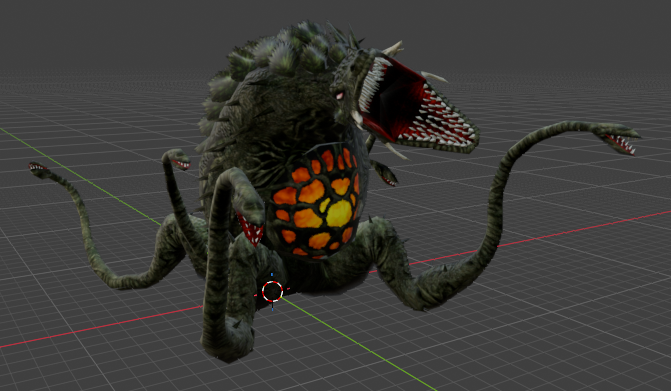
Biollante is now fixed!!!
[PS2]
-
Replaced the outdated files for GU PS2, Allowing it to function without errors
-
Fixed an issue with animation quaternions being extracted incorrectly for GUPS2 animations
-
GU PS2 now fully extracts with character textures
-
Fixed a vert weight issue with King Ghidorah
-
When bones are moved, the subtree also follows similar to PS2 (Neck -> Head and all / Tail bone -> Rest of Tail)
Bone Edits are now as secure as PS2, avoiding unnecessary crashes/corruption from bone edits rewriting animations.
Guide in process of being updated (Click Here)
½ Update & Bone Import _end Error
Singular Bone Positionnow updates animations correctly- Any instance of _end leaf bones blender may create when exporting is ignored, especially duplicates
- Lift_Node Bone Restriction: Un-Moveable, will break physics if moved.
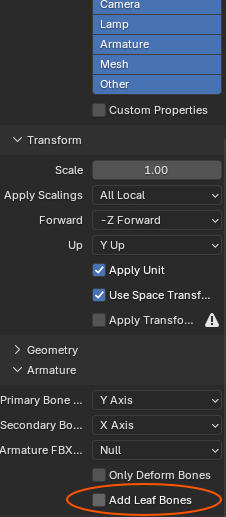
The Program should fully ignore any bones with _end in the name that blender creates, but if you want to be FULLY sure it works:
When exporting a saved .fbx, on the left bar find “Armature” and disable “Add Leaf Bones”, _end bones do not exist in-game.