Repository navigation

7e34b66  Ebullioscopic
Hariharan Mudaliar
Atoll v3.0.0 — Santorini
Atoll 3.0 is the largest update since Atoll began. Lyrics now follow the music, the lock screen gains real controls, the notch picks up new tools, and nearly every part of the app is faster, lighter on battery and more reliable. This release also brings support for macOS 27 and more than a hundred bug fixes.
Highlights
Lyrics that follow the music. The sung line lights up word by word in time with playback. Lyrics can appear beside the player, stay pinned under the closed notch, or fill their own column in the expanded lock screen player. When LRCLIB has no match, Atoll now checks NetEase Cloud Music.
A more capable lock screen. A volume slider now sits under the playback controls. The player can open with large album art as soon as the Mac locks. New options include a fingerprint unlock animation, colored inline widgets, a custom weather city, and a temperature gauge that shows the day's range.
More music sources, more control. TIDAL, NetEase Cloud Music and QQ Music join the source picker, and the Now Playing source no longer disappears after a failed startup check. The heart control saves songs in Apple Music, Spotify, YouTube Music and Cider, without a developer account.
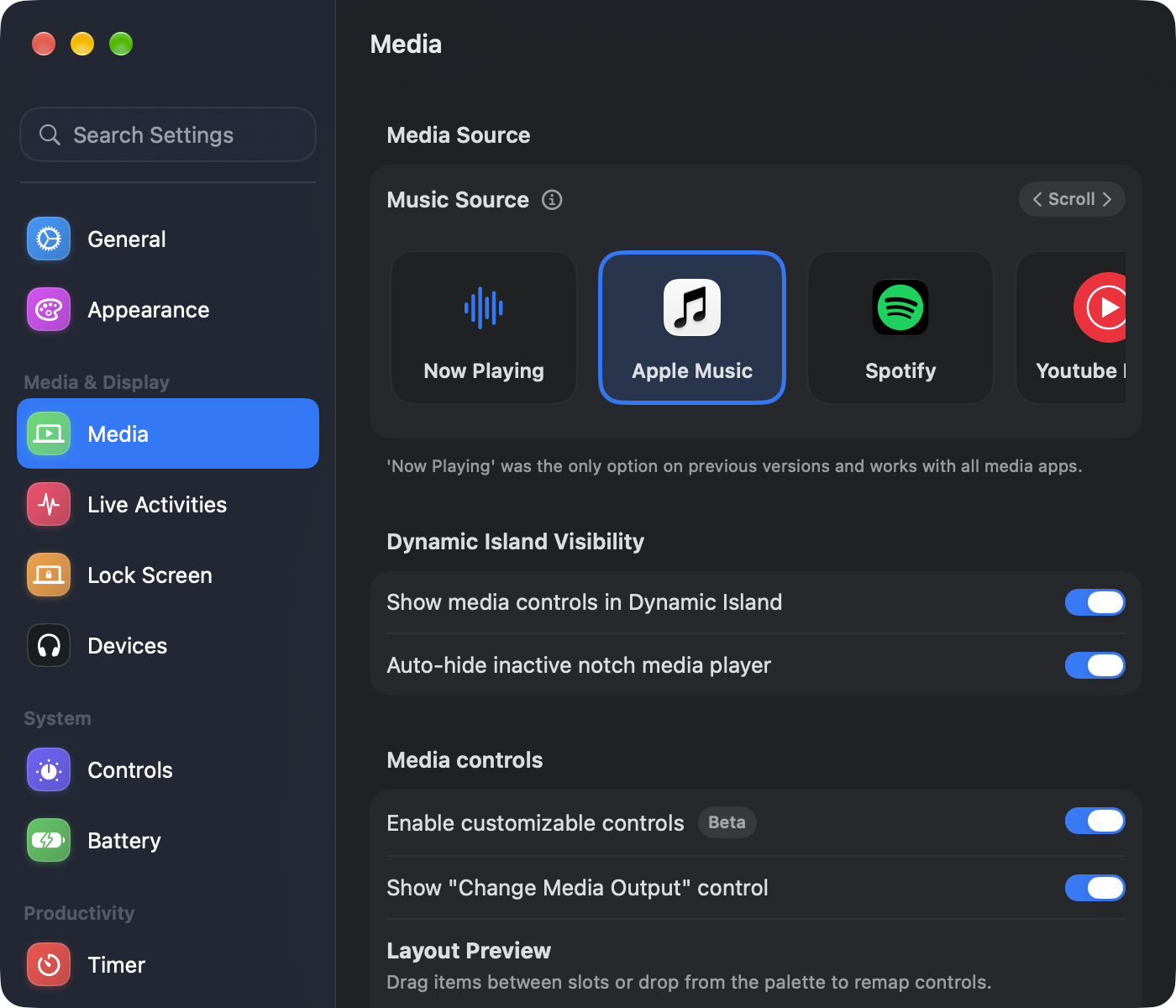
New controls in the notch. A per-app volume mixer gives each app its own slider and mute button. Keep Awake keeps your Mac awake for a set time or until you turn it off, and cleaning modes black out the screen or lock the keyboard while you wipe them.
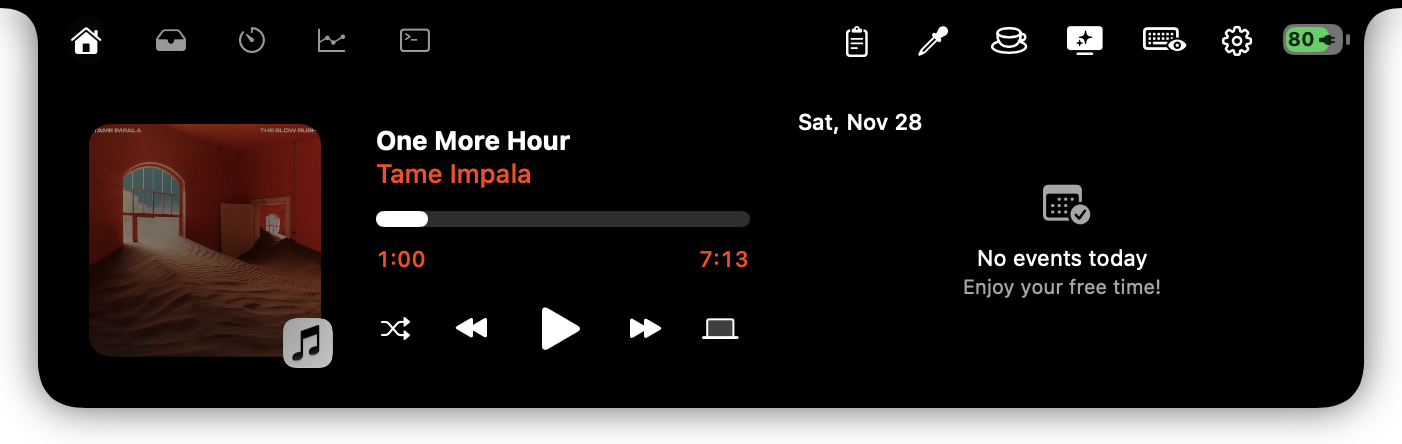
Navigate your way. Swipe between tabs, pick the tab the notch opens on, move the tab bar to a rail along the leading edge, and set how fast the notch animates.
LLM Usage, expanded. Track GitHub Copilot, OpenRouter, DeepSeek, New API and Antigravity alongside Claude, Codex, Gemini and Cursor. Cost estimates now account for cached tokens, and gauges can show the quota you have left.
A redesigned clipboard. The clipboard has a new panel and a card-grid tab in the notch. You can drag items straight into other apps, choose whether history is saved across restarts, or hand clipboard history to Maccy.
More from the Shelf, Terminal and Calendar. Convert files on the Shelf to another format and select several at once with a marquee. Pop the terminal out into a floating window. Switch the calendar between 3 Days, Week and Month views.
Back up your settings. Export your Atoll settings to a file and import them on the same Mac or another one. API keys, sign-ins and private data are never included.
Faster, and easier on your battery. Atoll does far less work while idle. Background polling has been replaced with system notifications, animations are smoother on 120 Hz displays, and memory stays bounded with large LLM usage logs and lock screen artwork.

Privacy indicators now follow the apps that are actually using your microphone or camera.
What's new
Notch
- Swipe two fingers across the tab bar to switch tabs.
- Choose which tab the notch opens on with the new “Open to” setting.
- Place the tab bar along the leading edge, and optionally switch tabs on hover.
- Set the notch animation speed from 1× to 2×. When Reduce Motion is on, the notch uses a short fade.
- Keep a shortcut-opened notch open until you press the shortcut again.
- Open the full notch directly on hover when it is hidden on non-notch displays.
- Set the island's top margin on external displays.
- Seek the playing track with the arrow keys while the notch is open.
- Adjust and mute each app's volume from the per-app mixer.
- Keep your Mac awake from the notch, with a timer, an optional display-on setting and ⌘⇧K.
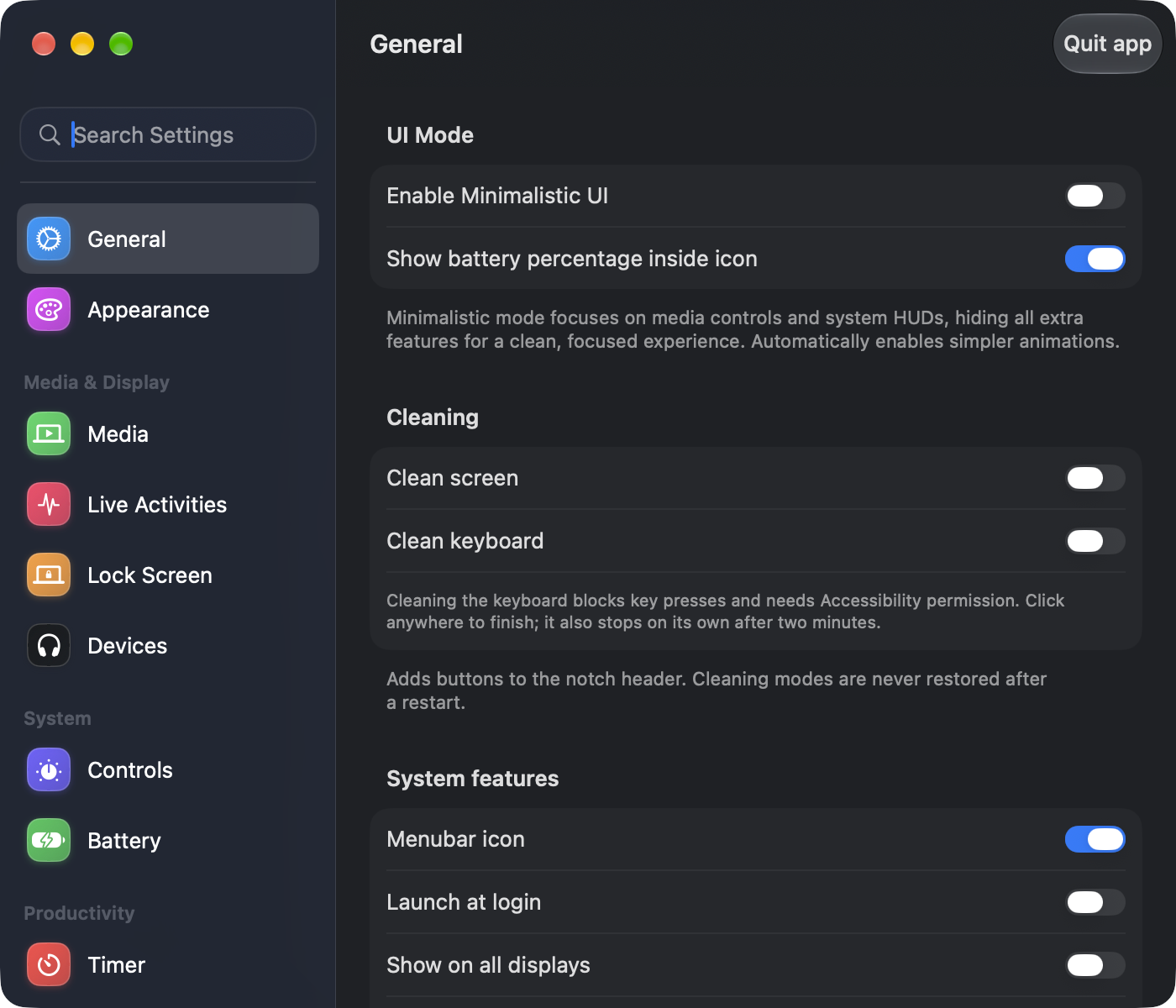
- Clean the screen or keyboard without triggering anything by accident.
Media and lyrics
- New music sources: TIDAL, NetEase Cloud Music and QQ Music.
- Favourite the playing song in Apple Music, Spotify, YouTube Music and Cider. TIDAL shows whether the current song is already a favourite.
- A Spotify Like Song control that works from the notch, the lock screen and the minimalist player.
- TIDAL's shuffle and repeat buttons now work.
- The source picker explains what each source supports. Unsupported controls are dimmed instead of hidden.
- Lyrics can appear beside the player and sweep word by word, with a choice of Sweep or Solid highlighting. Instrumental breaks are marked with music notes.
- Pin the current lyric line under the closed notch, with one, three or five lines of context.
- Atoll looks up lyrics in NetEase Cloud Music when LRCLIB has no match.
Lock Screen
- A volume slider in the music panel, plus an “Always show volume control” option.
- A lyrics column in the expanded player.
- Open the player with large album art when the Mac locks.
- Hide lock screen widgets while a screen saver runs.
- Set the weather city manually.
- Colored inline widgets and a temperature gauge that shows the day's range.
- Fingerprint or lock unlock animations.
- Dark and Light widget appearances for bright wallpapers.
- Widgets step aside when the macOS 27 Siri overlay appears.
HUDs and Live Activities
- HUDs for going offline and for connecting to Wi-Fi or Personal Hotspot.
- Live charging wattage in the charging HUD and the battery popover.
- A screen recording live activity with an optional stop button.
- Download speed beside the download indicator.
- Download detection now covers Firefox, Opera and Free Download Manager.
Calendar, Timer and Terminal
- 3 Days, Week and Month calendar views.
- A minimal calendar that hides the date picker.
- An option to hide the calendar while music is playing.
- Double-click a date to open it in Calendar, Fantastical or Notion Calendar.
- Rename a running timer.
- Set how long the timer rings and how often it reminds you.
- Mirror timers from the Clock app in the notch.
- Pop the terminal out into a floating window.
- Open the notch on the Terminal tab automatically while a command runs.
Shelf and Clipboard
- Convert images, video, audio and rich text from the Shelf's Convert To menu.
- Select several Shelf items at once with a marquee, and remove a single item with its × button.
- Choose whether dragging an item off the Shelf moves the file or copies it.
- A draggable clipboard tab with a card grid in the notch.
- Use Maccy as the clipboard source.
- Choose whether clipboard history is saved across restarts.
LLM Usage and Screen Assistant
- New providers: GitHub Copilot, OpenRouter, DeepSeek, New API with multiple accounts, and Antigravity with token and cost tracking.
- A Claude plan badge, cache-aware cost estimates and a remaining-quota view.
- Screen Assistant supports a custom OpenAI-compatible base URL and model.
Extensions and Settings
- Extensions can create content-only tabs that handle their own scrolling.
- Extensions settings link to the Marketplace.
- Export and import your settings.
Improvements
Performance and battery life
- Opening, closing and hovering the notch is smoother on 120 Hz displays, with less work on the main thread.
- Animations in the open notch are capped at 30 fps where a higher rate isn't visible. Spotify Canvas video is decoded only once.
- Hover, OSD, clipboard, Bluetooth, brightness and Focus monitoring are event-driven or run only when needed. They pause while the display sleeps.
- Atoll now checks for macOS's HUD helper with a direct system query instead of starting a separate process. That check was previously Atoll's single largest CPU cost.
- The Shelf loads items lazily and reads file information off the main thread, so drops and drags stay responsive.
- Memory stays bounded when reading LLM usage logs, and logs older than the 7-day window are skipped.
- Timers and system stats no longer re-render the whole notch every second.
macOS 27 support
- You can open the notch by hovering in fullscreen apps.
- The notch stays visible after macOS 27 renames the built-in display.
- Atoll no longer quits when Music reports no AirPlay devices.
- Lock screen widgets step aside when the Siri overlay appears.
Design
- Music controls, skip animations and the LIVE indicator follow Apple's sizing and motion.
- The battery shows its percentage inside the icon, the charging notification shows a bolt, and the notch header icons are optically balanced.
- The lock screen player sits lower on the screen, its sliders stay gray until you use them, and its source badge sits on the corner of the artwork.
- Settings are reorganized, and each setting describes what it actually controls. Lock Screen settings are now split into General and Widgets.
- French, Korean and Simplified Chinese translations are complete. Traditional Chinese is new. Spanish, Turkish and Dutch translations are improved.
Privacy and security
- Clipboard history skips content that password managers mark as private.
- Your OpenAI key is sent only to OpenAI. Custom servers must use HTTPS unless they run on this Mac.
- Credentials for the new LLM Usage providers are stored in the Keychain.
- Reading your Claude quota no longer signs Claude Code out.
- A new security policy explains how to report vulnerabilities privately.
Bug fixes
Notch and displays
- Clicking the notch over a fullscreen app no longer leaves the app's title bar and the menu bar showing.
- The notch no longer shakes, flickers or closes right after opening when you hover over its edges.
- The notch stays centered under the camera when a HUD or track change needs more room.
- Hover-to-open and the idle animation work while nothing is playing.
- The notch stays in place after clamshell mode changes or connecting a display.
- Hide in fullscreen now works in Split View and follows the app that is actually playing media.
- Live activities no longer cover the frontmost app's menus.
- Scrolling no longer leaves the open notch blurred.
- One swipe skips exactly one track.
HUDs and indicators
- macOS's own volume and brightness HUD is no longer frozen, stuck or misplaced, including after Atoll quits or crashes.
- Volume no longer keeps changing after rapid key presses.
- The volume HUD shows the correct output device and stays visible in Light Mode.
- HUDs no longer appear twice when you use multiple displays.
- The keyboard backlight HUD now appears for remapped illumination keys.
- Brightness keys stay in sync with auto-brightness.
- Volume keys work correctly with Lunar and BetterDisplay.
- Camera, microphone, screen recording and Focus indicators no longer show false positives, flicker or get stuck.
- AirPods noise-control pop-ups no longer appear when the listening mode hasn't changed.
Media and lyrics
- The correct artwork appears after track changes in Apple Music and Spotify, including after Spotify ads and for streamed or local Apple Music tracks.
- The Now Playing source no longer disappears from the source picker.
- Lyrics and the progress bar stay in sync after pausing.
- Untagged tracks and alternate versions no longer show the wrong lyrics.
- The real-time waveform picks up players opened later and no longer stays flat.
- Custom Lottie visualizers now work.
- The output picker's volume slider can be dragged.
- The expanded player's controls no longer overlap at scaled resolutions.
Lock Screen
- Widgets and artwork appear on the display set as main.
- Turning off weather no longer hides the other lock screen widgets.
- Fullscreen artwork no longer freezes Atoll or causes memory spikes, and your full wallpaper setup is restored when you unlock.
- The lock screen notch matches the physical notch, with no gap above it.
- The lock screen player is restored if it disappears while the Mac is locked.
Calendar, Timer and Terminal
- The music player, calendar and Mirror no longer overlap on the Home tab.
- Switching calendar days is fast again with large Reminders libraries.
- Calendar and Reminders permissions are handled separately.
- Zoom's Join button opens the meeting.
- Timers keep counting while the Mac sleeps.
- A newly started timer no longer disappears when an earlier timer's cleanup runs.
- Scrolling the timer's preset list no longer closes the notch.
- Input method candidates now appear above the terminal, and switching to the terminal no longer shows a gray flash.
- Selecting text in the terminal scrolls through its history when you drag past the edge.
Shelf, Clipboard, Downloads and Notes
- Links and text dropped on the Shelf are visible and can be removed.
- Rich text keeps its formatting when dragged out of the clipboard.
- Paused downloads now show a pause indicator.
- Note titles are visible while you type in Light Mode.
LLM Usage, Stats and system
- Claude quota, reset countdowns and pricing work reliably, including after token rotation.
- Codex totals and OpenAI model pricing are correct.
- Gemini and Antigravity no longer ask for Keychain access repeatedly.
- CPU temperature is now reported on M5 Macs.
- The Stats tab keeps updating when the notch appears on more than one display.
- Atoll no longer uses a full CPU core after a background helper exits, and stops its helpers when it quits.
- High-memory alerts are based on the memory Atoll actually uses.
- LocalSend transfers work with LocalSend 1.18 receivers.
- The Accessibility permission is detected as soon as you grant it, and Developer Tools access is requested less often.
Upgrading
If you use Atoll 2.3.x, the update will be offered automatically. You can also choose Check for Updates to install it now. To download Atoll directly, visit the v3.0.0 release page.
Atoll 3.0.0 is signed and notarized by Apple and requires macOS 14.6 or later.
Thank you
Atoll 3.0 includes work from these contributors:
@33643forever, @akij22, @Alfred77-byte, @arunike, @bar-d, @benfirad, @c1osed1, @createthisnl, @DaniilDem, @davidzou-jx, @Davshiv20, @DeepanshuSagore, @ericxu1210, @fgoos, @Fuheshka, @huanhuan0812, @ice345, @jierqiu1204-star, @Llhhy1, @magicsk, @Marcus2626, @medazizktata, @mehmetefeaytas, @mikkley, @MoFeng2223, @mvanhorn, @OwenSalah-sk, @remyaub, @Ruken16, @S123MR, @samgestudio-dev, @Shirowwww, @songyaolun, @StellarSea, @StudioKeys, @svviitzerland, @swording-k, @techynAR, @tibetgao, @tuncasoftbildik, @vastien, @vlnd0, @wppypewo, @xiaochuan-hu, @YueMiyuki and @zavekl.
Thanks also to everyone who reported issues and tested the alpha and beta builds.


