Repository navigation

Player profiles shared with the other recompilations, playtime, the journal fixed on ultrawide screens, and a lighter
NativeXRenderer.

Important
You need your own original copy of the game, as an ISO image of your Xbox 360 disc. This release contains none
of the game's files: the launcher extracts them from your ISO the first time it opens.
Updating from v0.2.0
Open the launcher: its Updates page offers v0.3.0. Update now downloads it, checks it and restarts the
launcher. Your game files, saves, achievements and settings stay where they are.
You can also run the installer and install over your v0.2.0 folder.
How to play
- Download one of these:
- the installer,
PiratesAtWorldsEndRecomp-v0.3.0-setup.exe. It installs for your user, without
administrator rights, in%LOCALAPPDATA%\Programs\PiratesAtWorldsEndRecomp, with a Start menu shortcut; - the zip,
PiratesAtWorldsEndRecomp-v0.3.0-windows-x64.zip. Extract it into a folder you can write to (not
underProgram Files).
- the installer,
- Run
PiratesAtWorldsEnd Launcher.exe. The first time, choose or drop the ISO of your disc (a full Redump image or
a trimmed one): the launcher checks that it is this game's USA version and extracts its files. You do not need the
ISO afterwards. - Create your profile, choose your options and press Play. When you quit the game, the launcher comes back.
Requirements:
- Windows 10 or 11, 64-bit;
- a GPU with a Vulkan driver (NVIDIA DLAA needs an RTX GPU);
- the Microsoft Visual C++ Redistributable 2015–2022 (x64).
What's new
Profiles

- A player profile shared by the launchers of every ElGus recompilation. The first time the launcher opens it
asks you to create one, and copies into it the saves, settings and achievements of your installation. The
originals stay inuserdata\. - The game runs with your profile: its saves, its settings in the game and its achievements are the profile's.
Profiles are kept in%APPDATA%\ElGuslml Recomps. - The profile page: your games, your hours of play, your streaks of days played and the week's activity, and the
achievements you choose to show. - Every game in one place: Continue or Play on another game's card opens that game's launcher.
- Edit or delete a profile from the sidebar's menu.
Graphics
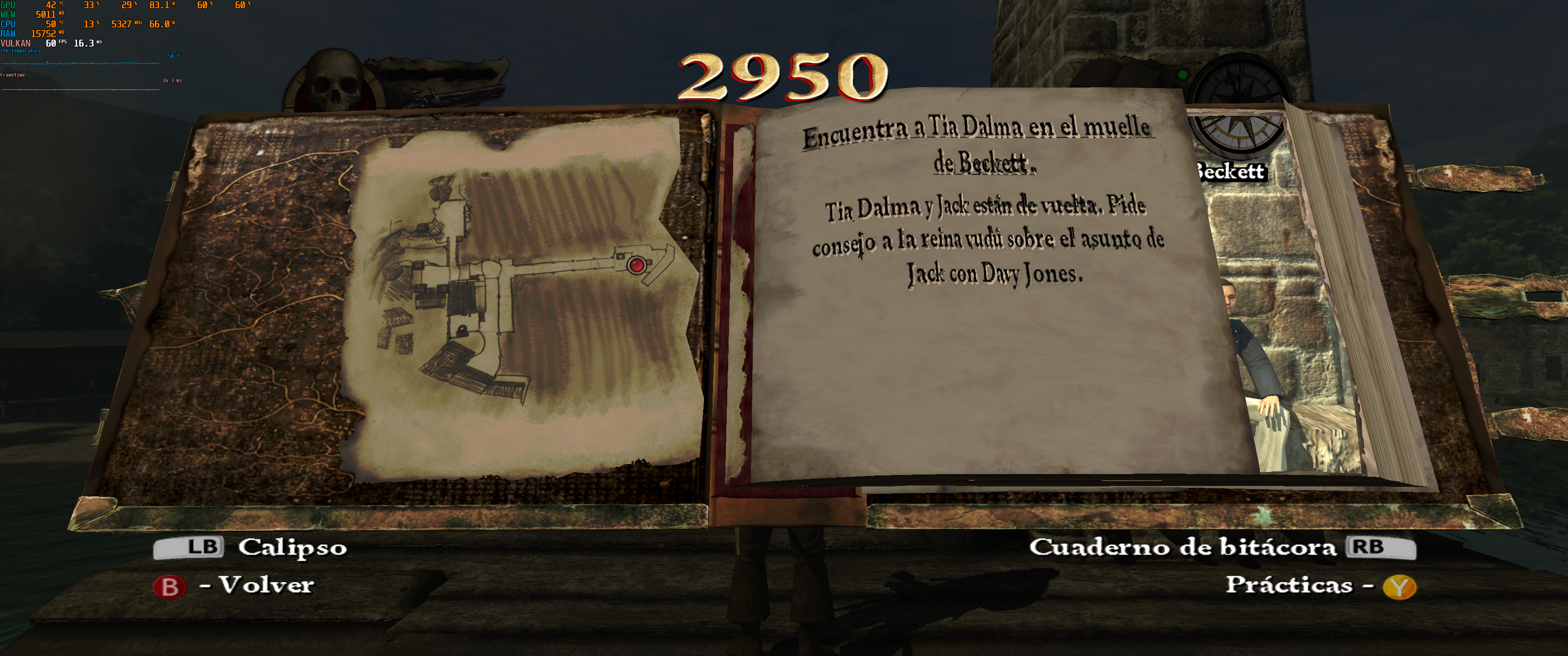
| Before | After |
|---|---|
|
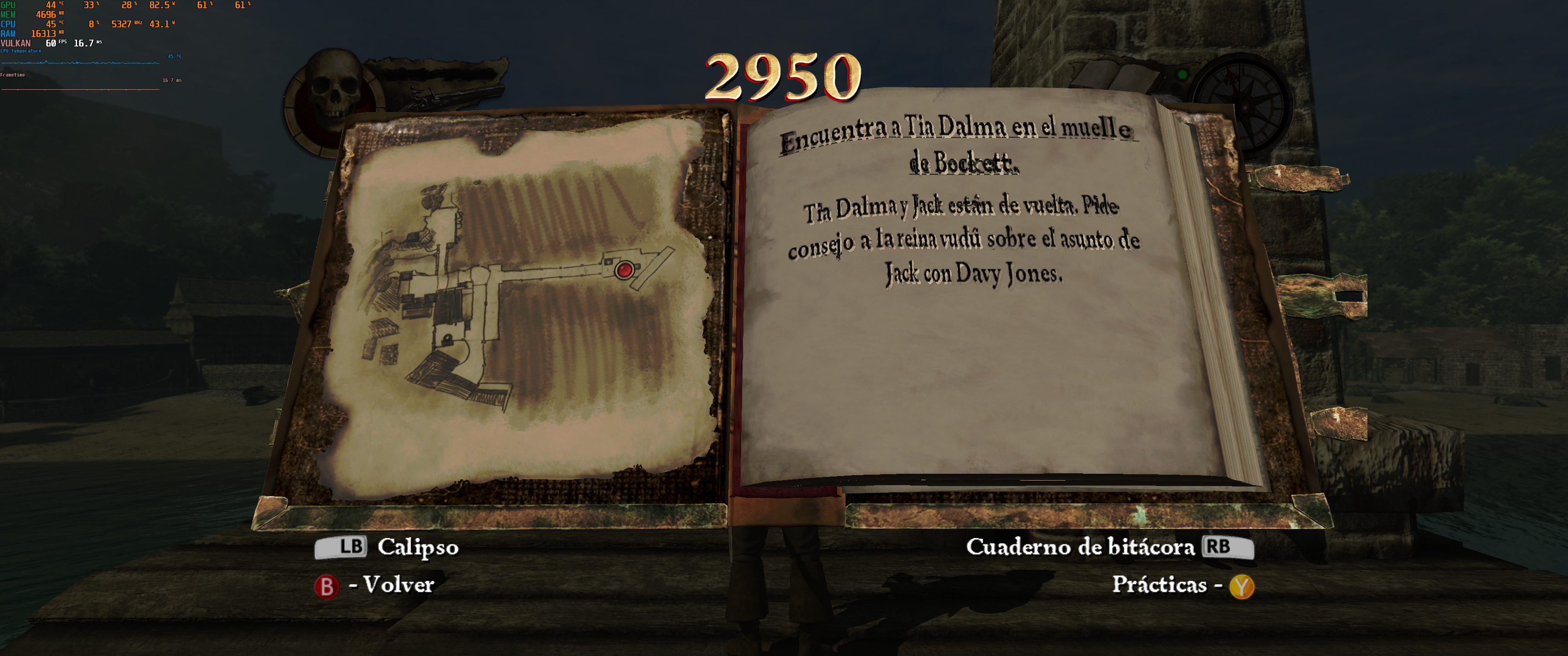 |
- The journal on ultrawide screens: the book is no longer stretched across the screen, and its pages no longer
show the scene through their sides. - A lighter NativeXRenderer, improved while bringing it to Guitar Hero: Metallica:
- less CPU time per draw, and fewer interruptions of the GPU's work to upload the game's data;
- at high refresh rates, the renderer sleeps while it waits for the screen instead of keeping a CPU core busy.
- The first time an effect appears, NativeXRenderer now waits for its shaders when it draws into an off-screen
texture, instead of leaving that texture undefined. On a first run, the first level's load can take a fraction of a
second longer.
Other changes
- The launcher shows its own version beside the game's, in the sidebar and on the Updates page.
- The ReXGlue SDK is updated, with a fix in its audio decoding (XMA files with several streams).
Known limitations
- AMD and Intel graphics cards: NativeXRenderer, the default renderer, has only been tested on NVIDIA cards. If
the game closes, stays black or looks wrong on another card, choose Xenos as the renderer on the launcher's
Graphics page, and please tell us your card's model. - Keyboard and mouse controls are experimental. Please report what does not work as you expect.
- Testing so far: the first levels have been played, in sessions of an hour. Later levels have not been tested
yet, nor the cutscenes on ultrawide screens. - Wide screens: the HUD stays in a 16:9 area in the middle; it is not anchored to the screen's edges.
- New areas: the first time one appears, a few objects can show up some frames late while their shaders compile.
They are cached for the next time. - DLSS upscaling modes other than DLAA are experimental. They can only be chosen in
potcawe_options.toml.
Please report problems with your log (logs\ next to the executable) and what you were doing.
Source and licenses
- Source: this repository at tag
v0.3.0, with NativeXRenderer and RecompLauncher as submodules. - License: MIT for the project's own code. The components keep their own licenses:
THIRD_PARTY_NOTICES.mdand
thelicensesfolder in the zip. - Trademarks: NVIDIA and DLSS are trademarks of NVIDIA Corporation. This project is not affiliated with or endorsed
by Disney, Eurocom or Microsoft.