Repository navigation
Generating Two Story Rooms
To generate a two story room dimension. You will need to add a stairway room and use two NBT Groups.
The Direction on where the story generates can be configured via the Dimension JSON file.
These are the things you will need to add to your RoomRegistry :
public final class RoomRegistry {
    private RoomRegistry() {
    }

    public static void registerTwoStoryDim() {

        RoomGroup.builder(Identifier.fromNamespaceAndPath(MOD_ID, storyOneGroupName))
                .guides(storyOneGuideSingle, storyOneGuideMulti)

                // The rest of your room definitions.

                // stairways connecting STORY ONE <-> STORY TWO.
                // lower = copper block marks openings to the LOWER story, upper = weathered copper to the UPPER story
                .stairGuides(blockLower, blockUpper)
                .stairway(stairRoomPath, cellsX, cellsZ, yOffset, weight)
                .register();

        RoomGroup.builder(Identifier.fromNamespaceAndPath(MOD_ID, storyTwoGroupName))
                .guides(storyTwoGuideSingle, storyTwoGuideMulti)

                // The rest of your room definitions.

                // The Second Story does not need a stairway, since it is the last floor.

                .register();
    }
The size is cells x cell_size in X and Z. Make the height equal or below distance_to_next of the story.
- Use
blockLowerguides where it connects to the lower story. - Use
blockUpperguides where it connects to the upper story. - It needs at least one of each.
Story one uses storyOneGuideSingle for single pieces and storyOneGuideMulti for multi-cell pieces. Story two uses storyTwoGuideSingle for singles and storyTwoGuideMulti for multi-cell. Don’t use the guide blocks as ordinary building blocks, because every block of that type is read as an opening and removed.
This is the comprehensive guide on making the rooms :
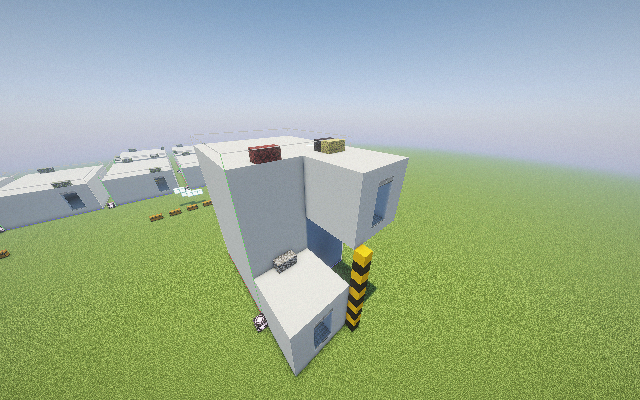
What distance_to_next means
It is the difference in Y between the floor of one story’s rooms and the floor of the next story’s rooms. It is not the amount of empty space between them.
- Each story’s rooms are placed with their lowest layer (local Y 0) at that story’s base Y, plus the piece’s yOffset.
- Story base Y is base_y, then plus or minus distance_to_next for each story above it in the list.
Example: story 1’s floor is at Y 64 and story 2’s floor at Y 40. The distance is 24, which leaves 23 blocks of air between the two floor layers.
How it applies to your stairway
The stairway is pasted with its bottom layer (local Y 0) at the lower story’s base Y plus its yOffset. So in the stairway NBT:
- Local Y 0 is the lower story’s floor layer.
- The upper story’s floor layer must sit at local Y = distance_to_next.
- The upper opening, marked by your weathered-copper guides, needs to line up with that upper floor.
To actually generate the Multi Story Rooms in a dimension you need to make a dimension JSON using the veyl:multistory generator type.
{
  "type": <your dim type>,
  "generator": {
    "type": "veyl:multistory",
    "biome_source": {
      "type": "minecraft:fixed",
      "biome": "<yourbiome>"
    },
    "cell_size": <your cell size>,
    "region_size": 16,
    "base_y": 64,
    "seed": 12345,
    "direction": <the direction on where the stories extend "up" or "down">,
    "stairway_chance": 0.02,
    "stories": [
      {
        "group": <story_one group>,
        "multi_room_chance": 0.08,
        "gate_chance": 0.4,
        "distance_to_next": 24
      },
      {
        "group": <story_two group>,
        "multi_room_chance": 0.06,
        "gate_chance": 0.4
      }
    ]
  }
}
The dimension type’s min_y and height must be big enough for all the stories. With base_y 64 and "down", story two sits at Y 40, and rooms extend upward from there.