Repository navigation

OpenCode Mobile 3.0.0+10070
The first time you open the app after updating, it refreshes the OpenCode that runs on your phone (about 130 MB) and, if you use coding agents on your phone, their helper (about 330 MB). Both wait for Wi-Fi. Everything keeps working meanwhile.
This is the first native Android release of OpenCode Mobile for everyone. It installs over the old app (2.1.5) and over the earlier 3.0.0 pre-release (build 10020), in place, and keeps your data. The long lists below say what is new, what is better and what was fixed, area by area. If you only want the headlines, read "In short" and the section that matches the version you are coming from.
In short
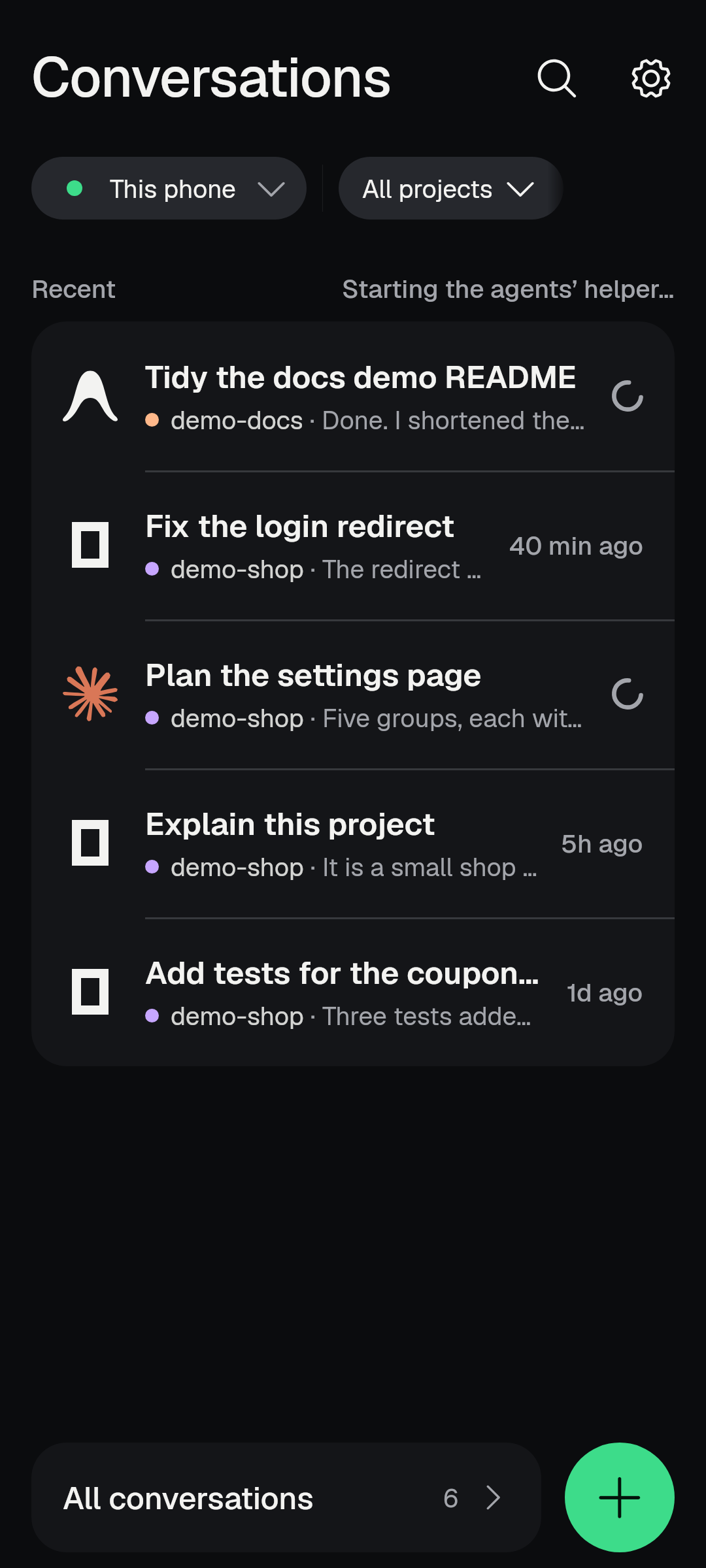
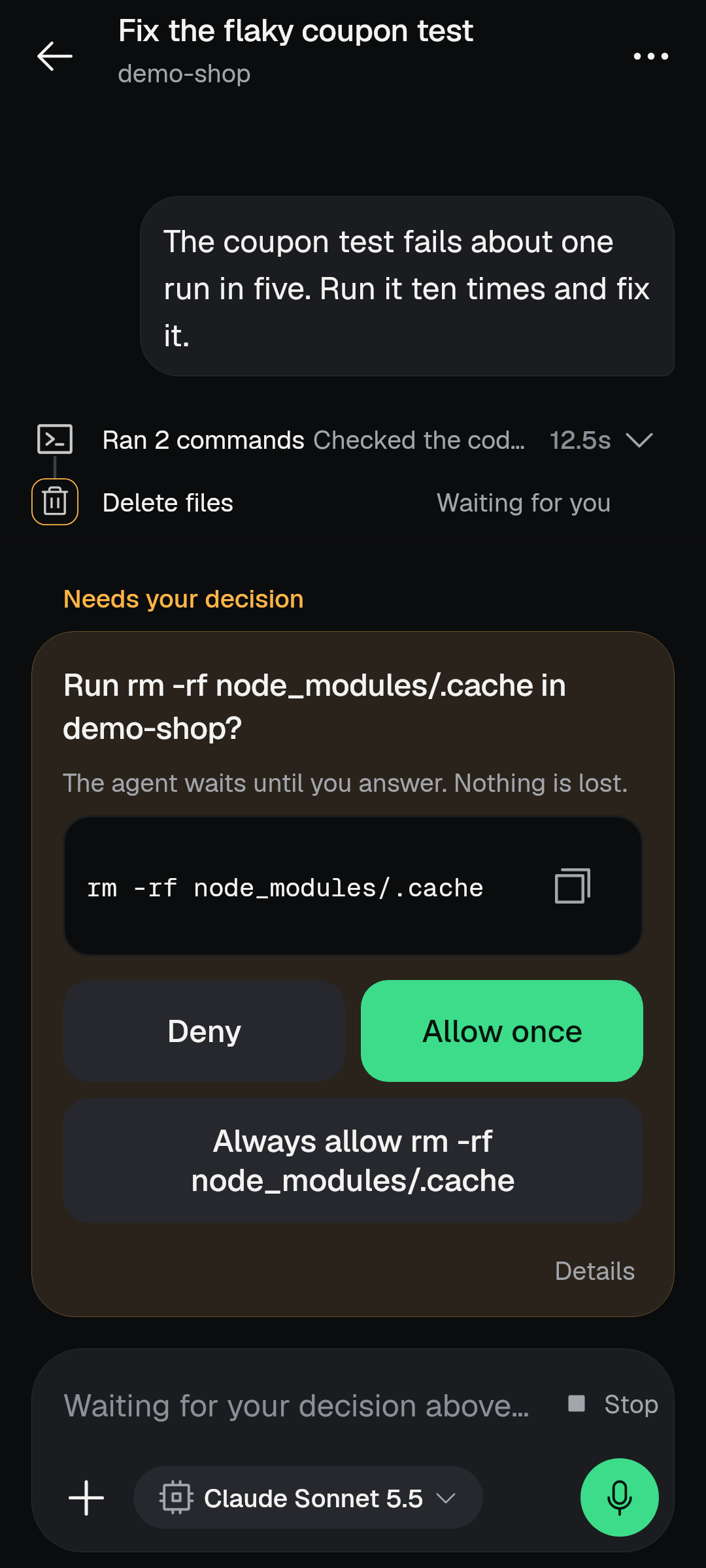
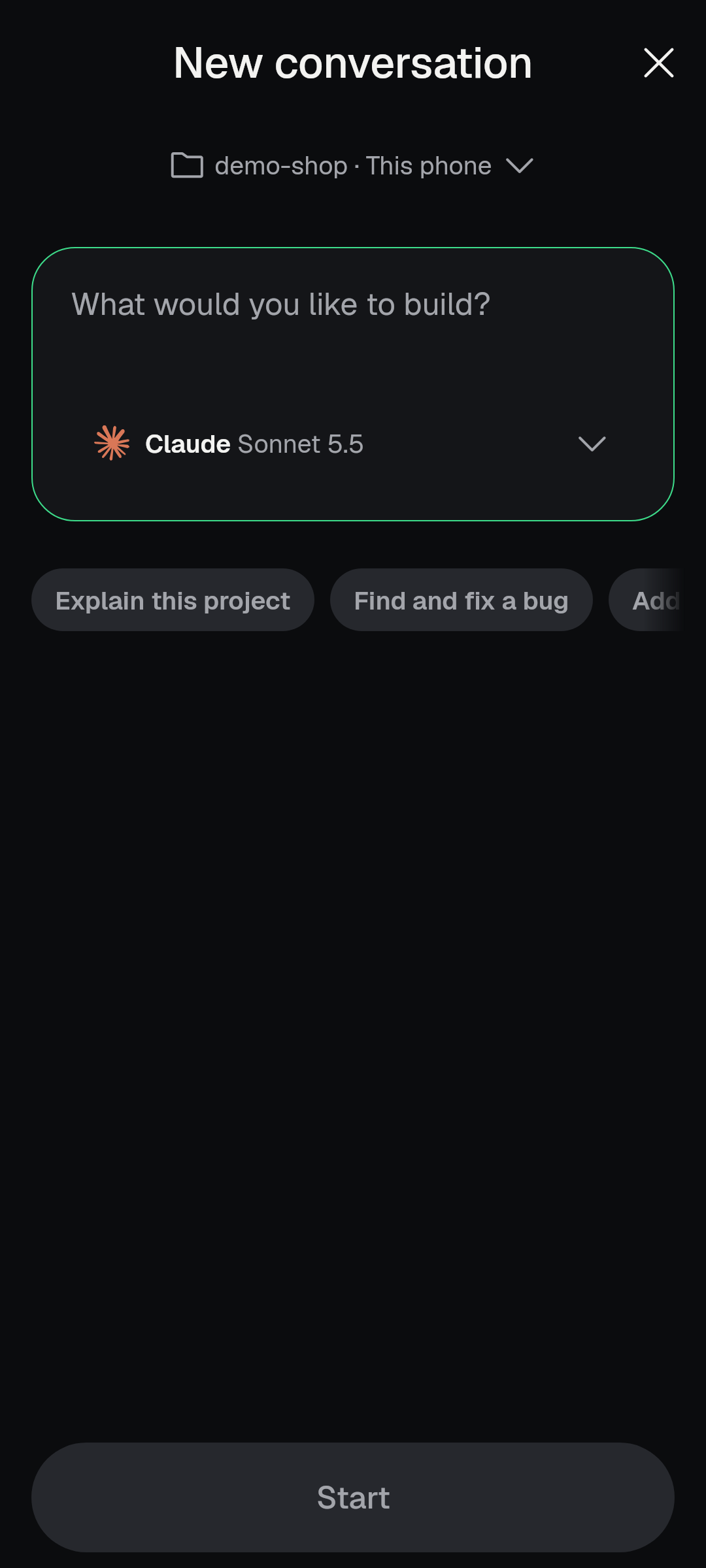
- A new app, same place. OpenCode Mobile is now a native Android app. It updates the old app in place: your servers, drafts, settings and the phone's own Linux stay.
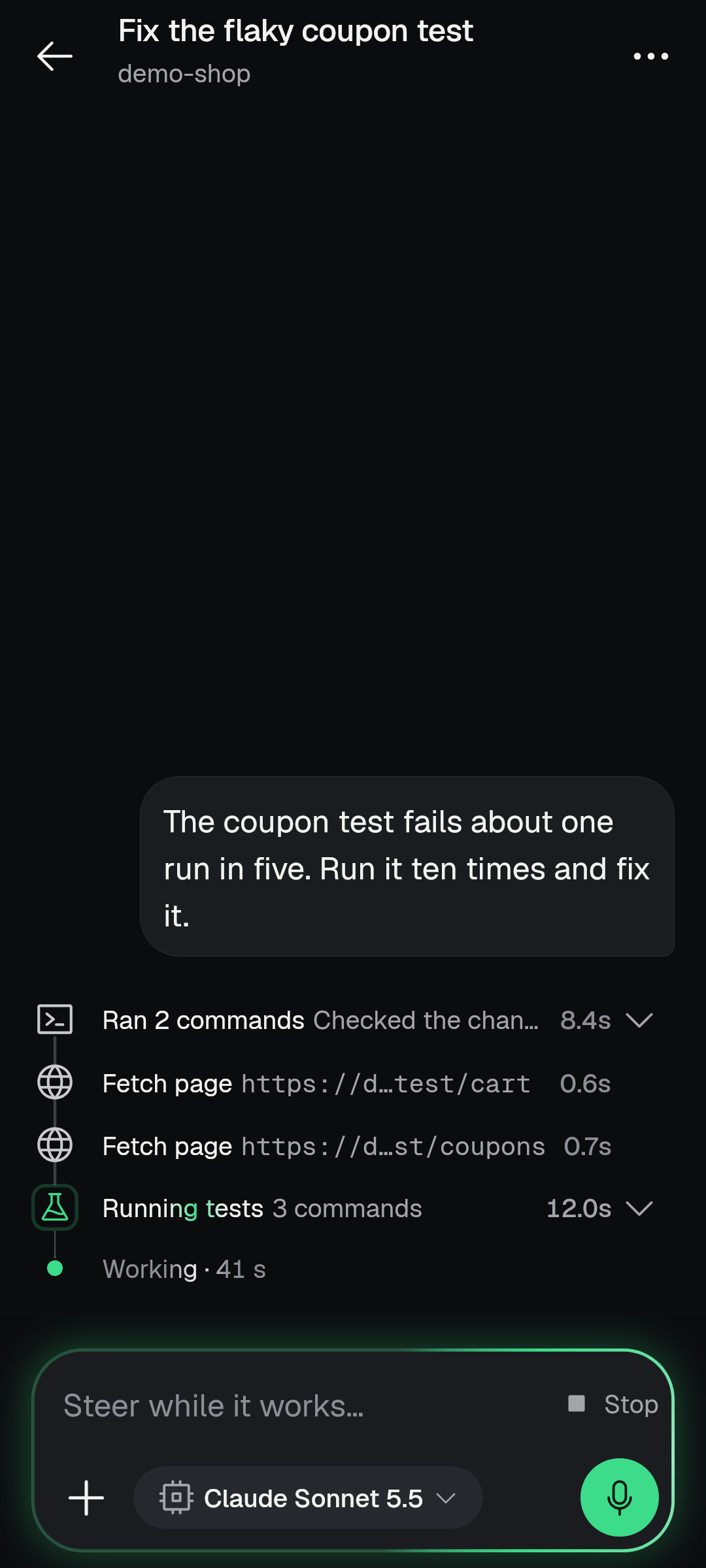
- A turn's work is one list of steps. Commands, reads, edits and sub-agents read as plain words, fold away when they went well, and stay open where something failed or waits for you.
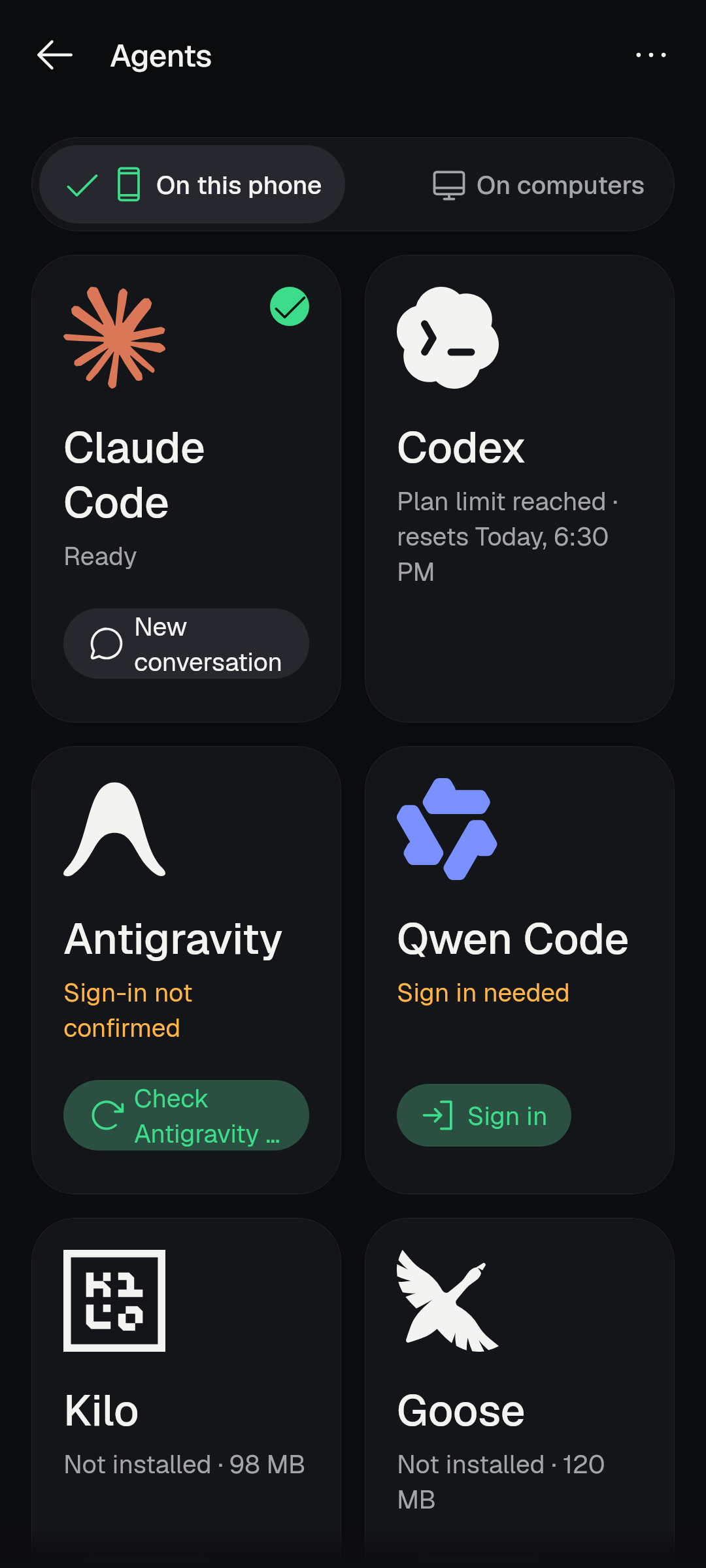
- Agents on your phone. Claude Code, Codex, Antigravity and OpenCode run on the phone itself, with their sign-in state, usage limits and updates shown in plain words. They update themselves while nothing is working.
- New conversation says where it will run and who will work on it, and it opens on your last setup.
- Phone storage for the phone's agents. Choose a folder in Android's shared storage and the agents can work in it, with Git.
- Home is the front door. Recent conversations from every connection, filters, a search that covers the phone's agents, and a quiet line that says what the phone is getting ready.
- Answer from anywhere. Approve or decline a request on its step, from its Home row or from the edge light, with Undo.
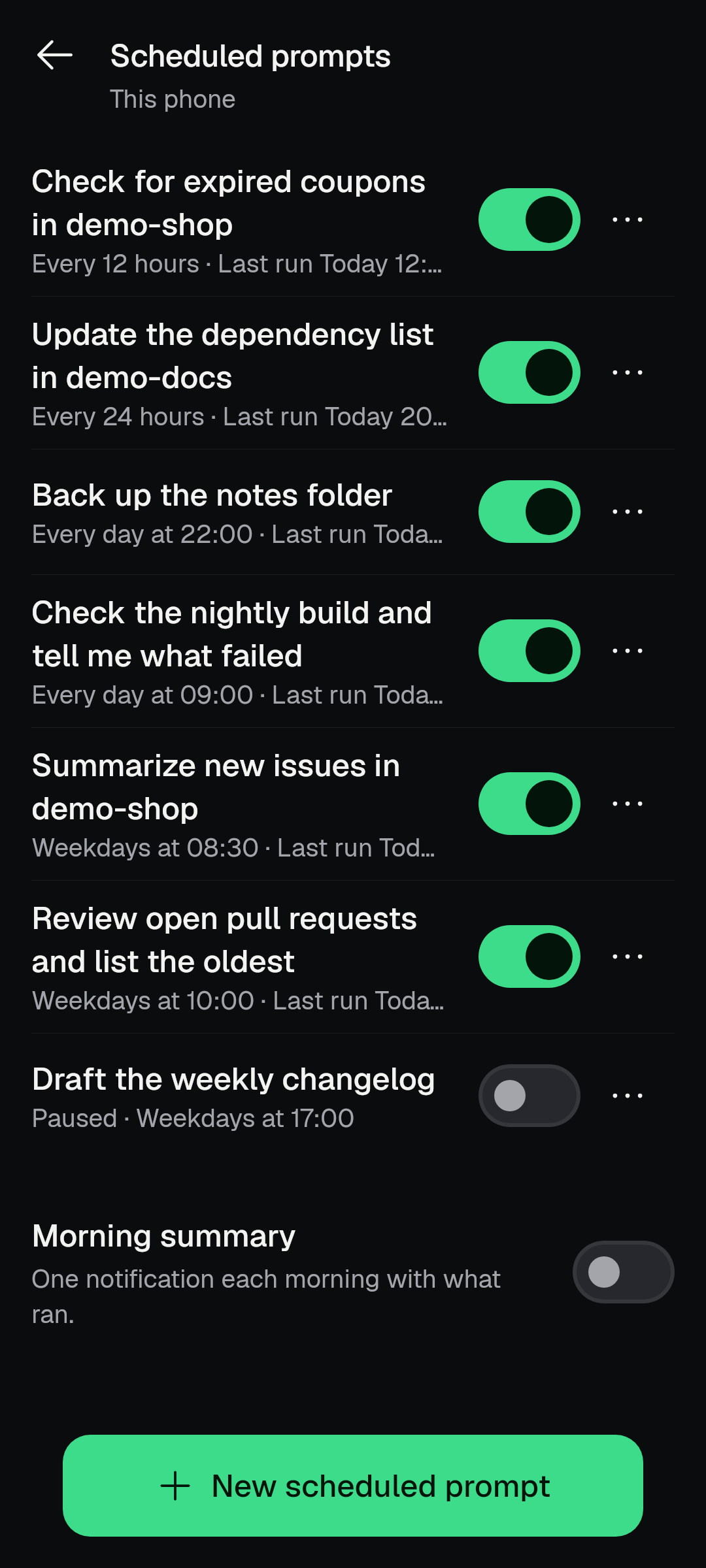
- Scheduled prompts run on the server you chose, say when they may start late, and keep running after the update from the old app (for computers).
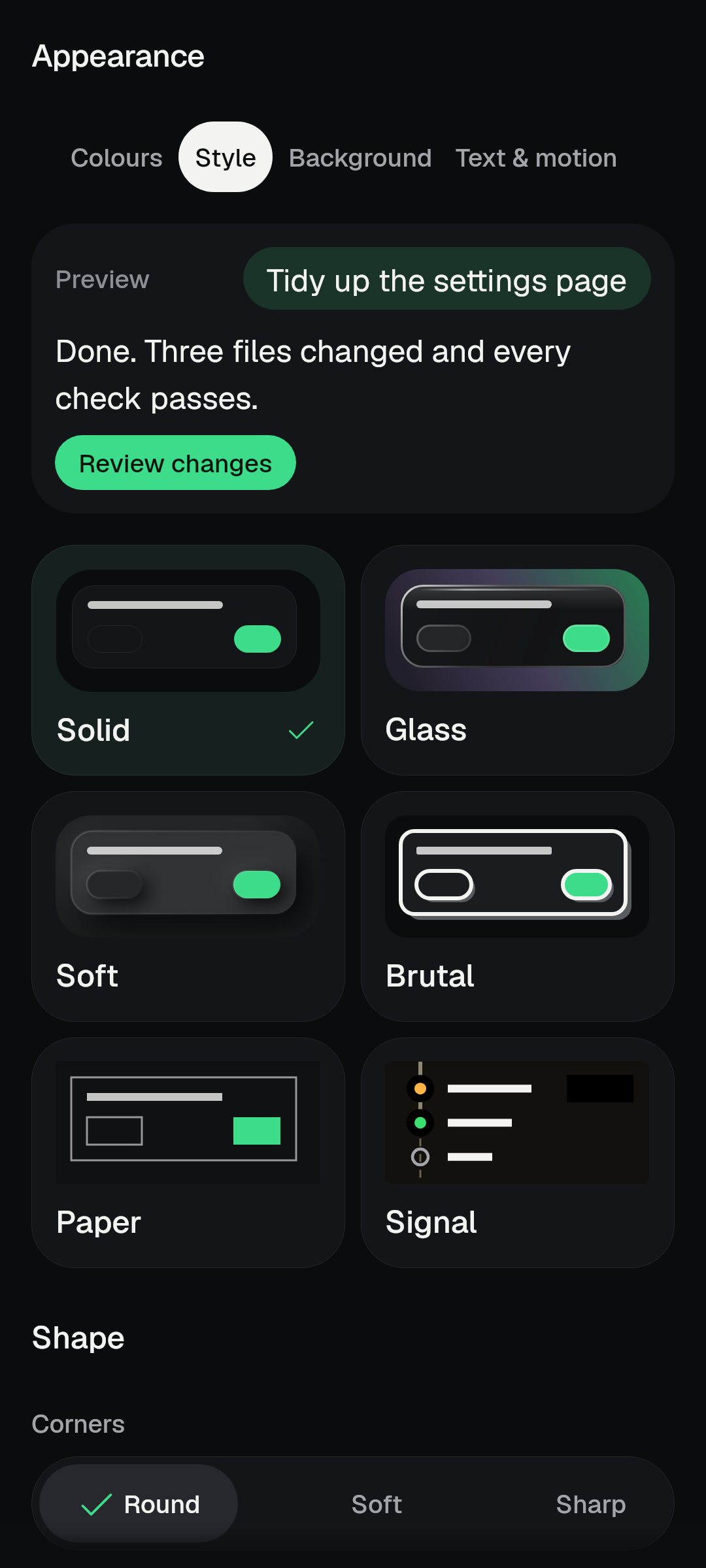
- Look and feel. Six styles (Solid is the default; Glass is one you can choose), twenty live backgrounds (off by default), one text-size rule, and a screen that stays upright on phones.
- Nine languages. English, Arabic, Spanish, French, Indonesian, Portuguese, Russian, Vietnamese and Simplified Chinese.
- Honest privacy wording. Settings › Privacy and data lists every event and field the optional reports can send, and the sharing question waits until after your first finished reply.
- Fewer crashes and stalls. A long list of start-up, update, layout and memory problems found on real phones is fixed.
Coming from 2.1.5
The old app (2.1.5) is a different, older app built with another toolkit. This release replaces it in place. You do not uninstall anything and you do not sign in to the app again.
What is kept
- Servers and their passwords. Saved servers are carried over, including This phone, and passwords stored by the old app are moved into the new app's safe storage, not left behind.
- Settings and look. The new app reads the old app's saved settings in place, so your theme, style, background and other choices are there on first open. A language you chose in the old app is carried over when the phone's own language setting does not already hold one (Japanese is not offered yet, so that choice is not carried over).
- Drafts. Unsent drafts are read from the same saved list the old app wrote.
- Pinned conversations and launcher shortcuts. Pins are kept, and pinned conversation shortcuts on your launcher are published again under the same names, so they still open the right conversation.
- Conversations. Your conversations live on your servers and come back from them; the choices you made per conversation (such as its model and agent) are kept with the saved settings.
- Scheduled prompts made for a computer are armed again on first open, so they keep running without being saved again.
- Widgets and quick tiles are asked to redraw, and notification channels keep the importance you set in Android.
- Background connection. If you had the app keeping its connection alive in the background, it is resumed after the update (an Android pause, such as the Android 15 six-hour limit, is never overridden).
- This phone's server that the old app left running is brought back by itself, and the phone's Linux is reused: there is no new setup screen and no new Linux download.
What happens on first open
- The app goes straight to Conversations, in the look you had. No sign-in, password, consent, setup or tour is asked again.
- The phone refreshes its OpenCode (about 130 MB) and, if you use agents on the phone, their helper (about 330 MB). Both downloads wait for Wi-Fi, run silently and show no progress yet. Until the refresh is done, conversations keep working on the OpenCode you had.
- If you use coding agents on the phone, the agents' helper starts by itself when you open the app, and the installed agents move to the versions this app ships with while no agent is working.
- About a minute in, one sheet may appear once: "Keep the server running?" with "Allow background running" and "Not now". It only asks; saying "Not now" changes nothing else.
What to do once
- A computer that still runs OpenCode 1 has to be updated to OpenCode 2. This app no longer supports OpenCode 1; it says so on that server and nothing on the computer is changed by the app.
- A "This phone" scheduled prompt made in the old app has to be opened and saved once before it runs again. Schedules for a computer need nothing.
- If an agent shows as signed out after updating, sign in again from its page.
Things that are different from the old app
- The app is for 64-bit phones only.
- Japanese is not offered yet; the app reads English in that case.
- Phones stay in portrait on every screen; tablets and unfolded foldables rotate.
- Other running conversations are found through Rings or the edge light, as you choose in Settings (see Notifications, widget and edge light).
- Gemini CLI is no longer offered for new installs; a copy you already have is kept.
- A server that the old app set up with its own Termux setup is kept as a server you run yourself; the new app never starts it, and when it is off Home treats it as off, not as broken (see Home).
Coming from the 3.0.0 pre-release (build 10020)
This part goes through what changed since the 3.0.0 pre-release, build 10020, area by area.
Home and the conversation list
New
- Home's title and its filter chips float as one glass bar over the list, and the list scrolls under it. The foot bar holds All conversations and the round + button, so the list ends above it and no row passes under the button; the + is there in every state of Home, including while the server opens or does not answer.
- A waiting request shows on its Home row and says what it asks: a command to run, a file to edit, a file to read, a folder to use, or a permission. A request to edit no longer says it wants to run a file.
- You can answer a waiting request, or a one-answer question, from its Home row. The answer is held for three seconds with Undo and, if it did not land, offers Try again. One Undo window is shared with the server switcher, so the same request never counts two timers.
- A run you stopped says "Stopped" on Home and in All conversations, even when you stopped it from the open conversation. A run the server interrupted or failed says so on its row.
- Rows say when an agent is updating, when an agent that stopped in the background can be resumed, and when this phone is getting ready: the end of the Recent line says "Starting Linux...", "Starting OpenCode...", "Starting the agents' helper..." or the agent's own start, so you can see what is happening.
- A tap on + while the app is still opening is kept, and New conversation opens as soon as the server answers. Home offers "Cancel New conversation" while the tap waits.
- A tap on a row that cannot open yet (its server still opening, or its list not read) is kept instead of ignored, and the row shows a turning mark while it waits. A kept tap decides once per change and opens once.
- Phone agents' rows show the turning mark while the agents' helper (or This phone's own OpenCode) starts, instead of the word "Connecting". The mark is only on phone-agent rows and on the row you tapped.
- All conversations shows time, unread and "Needs you" on its rows, offers Copy folder path (a toast says it copied) and Import a conversation, and opens with the same count its row showed.
- A pinned conversation moves to the top of Recent. Pins are kept in one ordered list shared by Home and the edge light, and a pin made on one place on Home stays in that place.
- A filter narrows every section of Home, including the "Since you were away" block and the count. The projects chip names a project only when its menu lists exactly that one, and the one-project line puts the project name in quotation marks.
- At most one notice is shown at a time. A plan limit keeps its way forward, and a limit nobody can act on is not shown. A server that does not answer says why, with what to check and the one fix.
- A rows list of saved conversations from a server that is not connected stays in one named group after the live ones, instead of looking like a broken entry in the middle.
- "Press back again to exit" is a toast and no longer pushes the page down. Mark all seen is a button.
- Home and All conversations list every project on OpenCode 2, and conversations of every phone-agent project appear in the phone's list from a cold start.
- Search covers the phone agents' conversations by title and message text, each hit opening on its own connection, and finds every conversation Home lists. Recent conversations in Search lead with the agent's mark.
- Starting New conversation from a Home row opens in that conversation's folder.
- Archive on a row works on phone-agent conversations too, and Share conversation is offered only where the server can share.
Better
- A row ends on the reply's last words after the app was closed in the middle of a run. A conversation's line shows words, not markdown marks, and the preview line no longer echoes your own words or shows list numbers.
- The phone's own server is shown in your language (Arabic Home no longer keeps "This phone" in English) and the agents on the phone are part of This phone, never a second server. Servers lists, Projects and the watched-servers lists name it once.
- Rows show the agent's own mark in the tile; Antigravity has its own mark now instead of a neutral one.
- An ordinary cold start reads as starting, not "couldn't load", and Home never says "No conversations yet" before the server has answered. A slow start reads as starting, not "isn't answering".
- A server on the phone that you run yourself and that is off raises no "isn't answering" notice on every open. It is off, not broken.
- Unreadable rows are counted instead of silently dropped, and a long OpenCode 2 list is read past the first 200 conversations to its end.
- Notice lines sit on the page gutter, an unreachable server no longer claims its conversations are hidden, and the first-run empty state of All conversations stays centred.
- A conversation with a blank title reads as the words Home uses for it, on every line of every list.
- Sub-conversations (sub-agents) are not counted as conversations in Home's counts.
- The saved list counts what Home counts (sub-conversations and archived ones are not counted) and always names its project, so the first paint no longer says 45 when the live read says 42.
- Archived's empty text no longer names a place called Work.
- The Right now card is rebuilt only when its answers go, and it drops the room of answers that are gone, so no 55 dp gap is left after Allow once.
- Foot, title and chips follow Glass: the floating bar and its chips are one body of glass over the list.
Fixed
- A row opened from All conversations or Projects now reads its whole history.
- A Details sheet opened from a Home row now opens over Home, not inside the conversation, and Back lands on Home.
- The Undo bar rides above the New button and never takes its place; a late tap on its place no longer reaches the page under it.
- A saved conversation row of a phone agent keeps its agent and folder, instead of showing the OpenCode mark and old details.
- Opening the Agents page no longer changes which server Home shows.
- The projects list on All conversations opens with the count it shows, and the All conversations list declares its project filter before the first load starts.
- A row with a held or sending answer no longer says "Needs you" as well.
- The "All conversations" row's count now matches the page it opens (it used to count conversations that page could not show).
- A conversation's Home row for a server that was stopped by you says so, and a server the phone restarted after an update is not blamed on you.
- A home filter that names one project no longer shows another project's rows under "Since you were away".
Conversations: reading, sending, steering and approvals
New
- A turn's work is one list of steps. The old summary work line and the separate Thought fold are replaced by one step list on a rail: a turn that ended well is one row that opens in place, a running turn shows its newest rows, and a failed, waiting or stopped turn stays open at that step. Older rows fold behind one row that names what was declined or failed. Sub-agents that ran together are one group.
- Steps read as plain words. A command is named by what it ran after its set-up (tests, a build, a search, a read, git) instead of the same "go to the project folder and load the toolchain" start every row shared. Commands one after another fold into one run, each kind of step has its own larger glyph, tools are named in words, and the agent's words between steps are whole, never their first streamed piece, and quieter than the steps.
- Steps arrive in one movement. The fold row ("Show 2 earlier steps") comes and goes at the same pace as the arriving step, the rows that fold behind it move with it, steps open like an accordion without a jump, an opened run's steps stand inside it, and a row you tapped stays under your finger even in a short conversation.
- Answer a waiting permission under its step. The approval card shows the command, or a preview of four lines of a change with "Show all", and names its file ("Edit this file?" now names it, as "Create ..." did). Allow once and Deny sit side by side, "Always allow" shows its scope in plain words above the technical fold, and one pair of answers is used on the card, its Details, the Home rows and the notification.
- Deny denies at once. The note you can add lives in Details, and a note sent with a Deny reaches the model as your words. The step reads "declined" immediately, and Allow stops it waiting immediately.
- A shared Undo window for permission answers, wherever you answered, and Stop in a running row's menu.
- Running work is always findable. The conversation's menu lists tasks, commands and sub-agents (including Claude Code's background tasks, which now count as background work) and says in words what a server cannot do. Send to background now works on OpenCode 2.
- Find marks every match in the transcript, brings the current one clear of the bars, shows its position, and says "Searching..." until the matches arrive. Find is one row above the message box, the phrase chips fold while it is open, and one Back closes it.
- Cost and tokens. The context sheet and Details show what the conversation cost. "Show time, tokens and cost" is a setting, and message timestamps can be shown or hidden from the conversation's commands.
- Sub-agents. A sub-agent's conversation names its parent ("Parent › sub-agent") and goes back to it without stacking it twice. Go to › Subagents is offered only where the server can list them, and it now works on OpenCode 2 (forks are left out).
- Continue with another agent from any conversation, with a plain folder check first. "Continue in a new conversation" on a conversation its agent cannot take up again opens a new conversation with the same agent in the same folder, with a short hand-over of what was done in the box.
- Open on another phone draws a QR code of the link with Copy and offers the server-address switch when the host allows it.
- Attach or save a file the agent produced when it comes as inline content: a small sheet offers Attach to prompt and Save.
- A question the agent asks can be dismissed; stop-after-step can be undone; a steer note (a message the agent reads when its step finishes) shows a Stop after eight seconds and, once stopped, the waiting words go out again.
- A request that is still waiting stays in view: a message you send meanwhile never takes it out of view, and a waiting permission card retires the moment Stop is pressed instead of staying for seconds.
- Hardware keyboard keys for a conversation: Find, F3 and F2, background, terminal and launcher, a Ctrl+K in the shell, and a help page that tells the truth about them.
- A tool call the agent formed wrongly (for example a form question with a missing field) reads as its own kind of failure, and a call you refused with a note reads as declined, not failed.
- A conversation says when a reply was cut off or lost ("The connection dropped before this reply finished"), with Send again or Continue. A retrying turn says why in plain words, such as the provider not answering, and offers another model.
Better
- A running command opens by itself, has its own clock that starts after your decision (and for agents that give no start time, from the first moment the step was seen), says "No output" when it printed nothing, "It failed before it printed anything" or its stopped words, and keeps its output readable under its step while it runs and afterwards. The live line keeps its height while steps arrive.
- The message box stops saying "Waiting for your decision above" once you have decided. While a request waits, the box says that it waits.
- The reply's footer is quiet and says when, how long, which model, tokens and cost where the server has them. Copy and More under each reply end a little before the edge, clear of the edge light.
- A conversation that is loading shows it, in every style: a placeholder prompt bubble at the end side that breathes, words after a second, and the message box drawn while it loads (only Send waits). The box keeps its place while it loads.
- A conversation opens with the ordinary page transition, shows your message at once, and names the conversation from the first frame, without placeholder rows, a "Model" placeholder or a keyboard that drops and comes back. A conversation just started from New conversation no longer opens on made-up turns.
- A reopened conversation tells the truth from its first frame: a declined step no longer reads as stopped, an edited file keeps its card, and who ended a step is known before the server answers.
- "You declined this" appears on a declined step and on the reply that ended at your refusal, stays there after later prompts, and is never replaced by "Failed", "Stopped" or "The server restarted". An older turn says it only when its own run stopped at the refusal.
- A step that you refused shows no Edited-1-file line: the work line counts only work that happened.
- The message box no longer shows raw mode names (default, auto). On a phone the approval mode is the shield alone, so the model's name keeps its room, and the model chip says the model's name only, by one rule everywhere (a bracket tag reads as the variant, such as "Opus 4.6 · 1M context"; "Free" comes from the list's own tag).
- The model sheet is pages a finger drags, with flat rows, live search, a "Loading models..." line while it reads, a favourites line ("Star a model to keep it here."), no choice from a drag, and its keyboard released on close. The default model is named on its provider's page.
- A new conversation's title ends at a word with an ellipsis instead of cutting inside one. A new phone-agent conversation takes the title its helper gives it, and a server's own rename is never undone.
- Details names a tool in plain words ("File change", "Terminal command"), not its id; a permission's Details shows the changed lines, not the diff header; a listing of the conversation's own folder asks to read the folder instead of "Read this file?" with a bare dot.
- A thought the reading does not know folds under Thought; a thought keeps the asterisks of 17*23; a turn's only thought folds under one Thought line instead of a grey paragraph with no label.
- Timeline and context rows use plain words, model changes are named by the model's name, and replies lose their list marks.
- Code lines run to the block's inner edge; every code and command output row fades at its edge and scrolls sideways (a directory listing cut inside a filename is no longer lost); a table cell never breaks inside a word ("write-tool" no longer splits as "write-to / ol").
- A file card opens the file by its place under the project. A file picked from @ on a phone agent is named in the words.
- Coming back to a conversation keeps your reading place (kept by row, so rows that arrived meanwhile do not move it), the Find view and the folds you opened.
- Earlier messages are the transcript's first row ("Show earlier messages"), replacing a pill that floated under the bar, and a timeline pick goes to its message. Long conversations are read to the end.
- Jump to latest rises out of the message box again and stands clear of text, and the transcript ends before every floating control, so no glass bends words the page hides.
- A long transcript keeps room above the Undo bar, so the newest reply is never hidden by it and the row you are reading stays put when the bar leaves.
- A failed send's Details and Try again line up with its sentences, a send refused as stale names the check that refused it, and a model that read back differently names itself in the send's Details.
- Closing Find brings the keyboard back only if it was still up.
Fixed
- A reply or code block is no longer left half drawn (a crash from the transcript composing a row ahead of the scroll is gone with it).
- A stopped turn says "Stopped" once, in the reply's footer, not three times live and twice after a reopen; a step stops saying it waits once Stop is pressed.
- A first message sent from New conversation never disappears, even when the send failed before the conversation opened.
- A reply is called cut off only after the server said nothing runs; a reply the server reopens, or a step that starts, takes the cut-off line away; a reply that carried on in words after a refusal and was then lost says the connection dropped.
- Send again sends the newest prompt once, with its files (it used to resend the words only, and each tap sent another copy), and asks first on an unconfirmed bubble.
- A letter typed on the conversation's own Tab stop lands in the message box again; typing goes to a field just opened (such as Find), never into the box under it; a letter is steered into the box only when nothing else holds focus.
- Letters typed in a burst survive a late draft, and chips close the keyboard before their sheet opens.
- A page only takes the request meant for its own conversation.
- A malformed question from an agent gets one plain line with the raw text kept under Details.
- A request card knows the conversation's folder, and a file ask with no content says so ("new file", never an empty "+0 -0" diff).
- Find never counts, marks, scrolls or steps with the previous query's hits.
- A permission card's Details takes only its own touch target, and the card is one pane (no second ring in Glass or Solid); the request stack grows to hold one whole card, so Deny and Allow once are never cut off.
- A step's time ends where the reply's Copy and More do, so no step time lies under the edge light.
- A thought line no longer loses its asterisks, and the stop-after-step note is a control message, not your bubble.
- A turn that ends on your refusal says no "Stopped", because the home row never did.
- A file card from a tool that names an absolute path opens the file under the project instead of failing.
- The first line of a Claude Code turn of eleven commands no longer reads like ten copies of the same command.
- The reply's "Copy" and "More" buttons keep a gap from the page edge in Arabic too (mirrored).
- Answered rows ("Allowed · Undo", "Sending...") sit on the page edge like the card they replace, and a note you gave with a refusal is shown on the declined step without a tap.
- Deny on a request that the server answers late no longer leaves the step "working" for fifteen seconds.
- A refusal never leaves "Edited 1 file" above a reply saying the write was declined.
Long conversations and speed
Better
- A streaming reply costs the same after 20 turns or 1,000. The transcript list redoes only the live turn, groups turns again only from the first changed one, and makes Find's text once per settled turn, not on every publish.
- Failed-turn limit offers walk the live turn and the failed turns, not every row for every footer.
- Scrolling a conversation or Home no longer redraws page-sized layers every frame, and the page's state changes only when something in it changed.
- New conversation shows the setup last read in this run at once and checks it again behind, instead of waiting five to eight round trips on every visit.
- Phone agents' model lists are read ahead and kept across starts, without starting the helper; New conversation shows the last list at once and says "loading" instead of "no models" while it reads.
- A phone agent's conversation keeps its saved turns across turns, the helper's transcript shelf is sized from the number of phone-agent conversations, and the top ten Home rows are warmed into memory once.
- A phone agent's conversation opened before opens to read at once; the first message to a phone agent waits only for that agent's own start, not for every other agent still loading.
- A live background steps at most 15 times a second, and clocks and the log poll stop while the app is hidden.
- Code blocks take an offscreen layer only while they clear something, and page edges over a flat ground draw no offscreen layer.
- The launch window shows the app's ground and mark, then an "Opening" line after two seconds.
New conversation
New
- It says where it will run. Under the title one line ("my-app · This phone") names the place and opens the project sheet (with several connections, the sheet lets you change the host); one chip in the foot of the message box names the agent and its model. The hint, phrase chips and notices scroll below the box while Start stays pinned, and the chips and Start keep one place from the first frame to the settled page.
- It opens on your last setup, offers the model's thinking effort (for example for Codex) and sends it, and a mode can be chosen in Settings so new conversations start in it.
- Start from a sentence. "New project" is offered right on the page when a phone agent has no project; on a fresh phone Claude Code no longer sits behind a greyed Start with no project to choose.
- Your own agents are offered after the catalogue's: set up at first use, or Stopped while their helper is not running.
- Choose Claude Code and the other phone agents in "Who works on it". The agent chosen on its Agents card (or with "Use ") is the one chosen here, and the chooser words an agent that is set up at first use like the Agents page ("Installed. Set it up...") instead of calling every choice Ready.
- A control that cannot be used says why when you tap it, and a notice that blocks starting hands its main action to the foot where Start was. A start refused as "not ready" offers "Check again" and then starts.
- A tap on + while the app is still opening is kept: New conversation opens as soon as the server answers.
- Words typed while the page gets ready, or typed and closed, come back next time, with the model and folder that were already kept. A saved draft's opening always ends, with a plain line if the draft could not be opened.
- Getting the page ready disables Start with "Getting ready" (naming what it reads after four seconds) instead of the generic wait line; the spinner shows only after Start.
- The folder chosen in phone storage is named in full once, with what that storage cannot do behind Why.
Better
- New conversation waits for a server that is still starting: a refused first read is read again every three seconds for about thirty, and only a read that keeps failing says it could not be read, with Try again. When the server is not answering, the page says why.
- A signed-out agent reads "Sign in needed", an agent at its limit or with an unconfirmed check reads in its own words, and the placeholder for the phone's own agent names Antigravity. "Add a server" waits until your saved connections are read.
- Start on an empty box focuses the box instead of showing a message. Menus keep out of the keyboard, a blocking notice shares the page's scroll with the box so its sentence is never out of sight with the keyboard up, and a notice with its actions is brought whole into view when the keyboard leaves little room.
- Choices wrap instead of running off the edge, the project chip is no longer cut at the screen's edge, and the Model row and chip open a sheet only when there is a model to choose.
- A new conversation keeps the old folder where the app cannot check it.
- A phone agent's model list says it is loading and shows the last one at once; models appear without a restart and read as names.
- Inside phone storage, the create row makes a folder here and says so, instead of describing the app's own projects folder.
Fixed
- A Start kept for the unread server list goes on once the list is read.
- A phone agent's start is no longer refused by an earlier start's record in its folder, and its conversation opens only once its helper made the agent, instead of leaving you on a conversation whose create failed.
- A first-use agent's card now starts a conversation too, and a finished Set up returns to New conversation instead of the Agents page.
- Typed-ahead words no longer refuse every later fill (a second starter, the clear after Start).
Agents on the phone
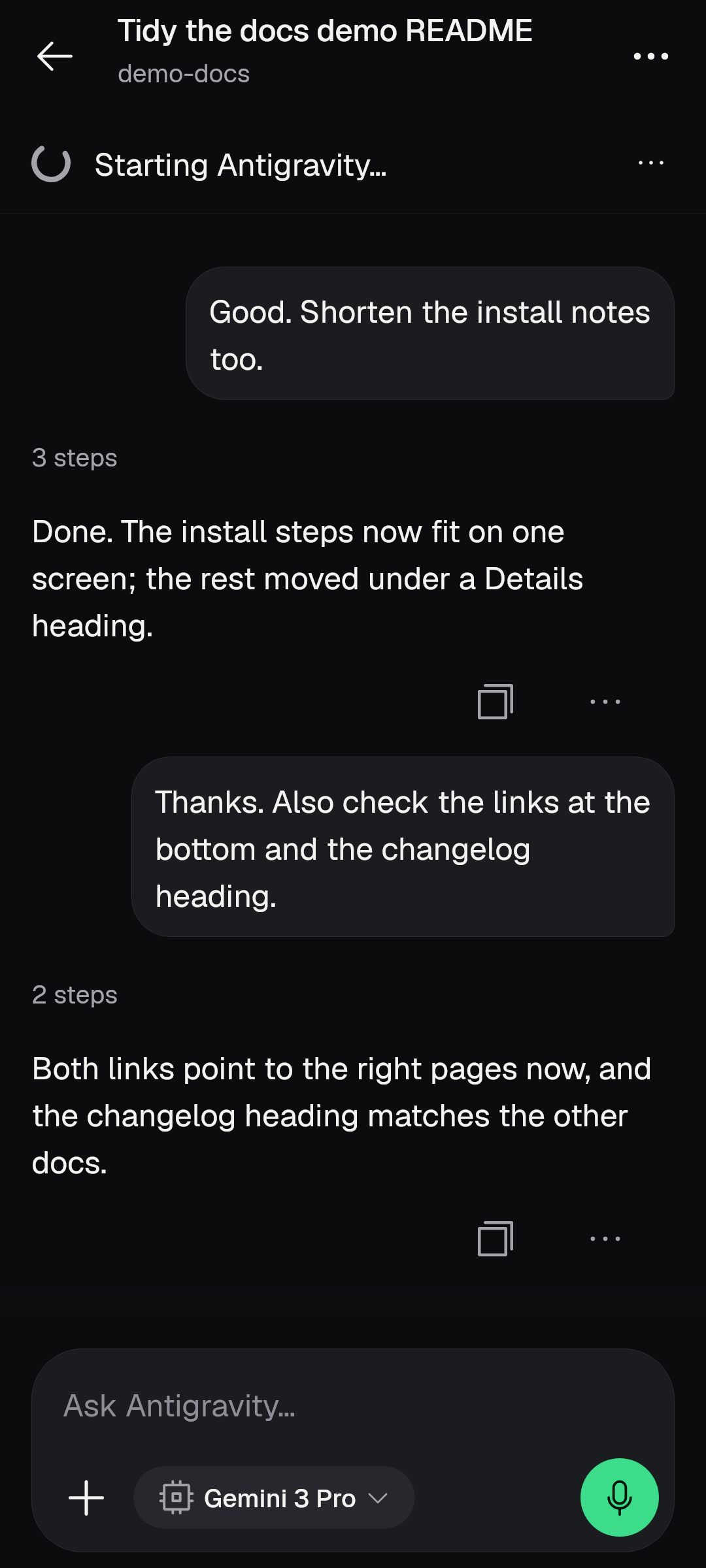
New
- Latest versions, updated by themselves. Installed agents and their helper move to the versions this app ships with when nothing is working and the network is not metered. Claude Code now offers Fable 5.2 and Mythos 5.2; Codex, Goose, Oh My Pi, Qwen Code, Kilo, Antigravity and fx are on newer versions, and the helper itself is newer.
- Updates cover every agent that is behind, not only the first, and no longer wait for you to open the Agents page. A copy that differs from the pinned version, or has no record (such as Codex installed as the bare program), is replaced by itself.
- Set up at first use. Qwen Code, Goose and Oh My Pi (and an installed Gemini CLI) are usable at once and offer Set up from their card; their first answer tells whether they work. If the first answer says a model or key is missing, the conversation offers the agent's set-up.
- Your own agent and provider. Add your own agent, use your own provider with Claude Code, and add a provider endpoint the catalogue does not list. A "How this works" sheet explains it. A saved or removed own agent reaches the helper at once when it is idle.
- Reading old conversations. A saved Claude Code conversation on This phone opens again, a phone agent's conversation opens to read after a restart (the home row no longer says "Can't reopen"), and reading earlier conversations never starts their agents.
- Check, restart, retry. "Check " runs the phone check from the tile or sheet; a tile says when the helper is stopped; Restart agent is on a phone agent's connection line, and Retry starts a stopped helper.
- Install help. An install that failed or was interrupted stays on its tile with its reason and Try again; a running one names its step. The install review counts shared parts not yet on the phone and says no before starting when there is not enough room (a bad download reads as a bad download, and a full disk is not hidden by a leftover signal).
- Antigravity has its own mark. When it ends its turn with a command still running (it waits only about ten seconds), the app asks it once to wait and continue, so it no longer "disconnects between the terminal commands".
- Codex on the phone can run commands, installed as its official package so its command host is there, and it asks before every command and every file change under Ask first.
- The phone's own OpenCode takes providers you add from the Providers page.
Better
- The waiting line names the real step. While a phone agent (or This phone's own OpenCode) gets ready, the conversation's waiting line says "Starting Linux", "Starting OpenCode", "Starting the agents' helper", "Starting " or "Opening the conversation", with a turning mark and who it connects to, and the page crosses over to the conversation when it is ready. Home's Recent line says the same.
- No false "couldn't open this conversation". A saved phone-agent conversation opened while the helper restarts or the agent is still attaching waits and then opens, instead of flashing the failure page. A conversation of This phone waits for its server while OpenCode is starting, updating or not connected yet.
- The helper starts once. After a cold start the agents' helper no longer starts twice (once at about three seconds and again at fourteen); the phone server's own start no longer drops a helper start in flight, and the start is about ten seconds sooner.
- The helper starts when needed. It starts from Home, from a conversation of the phone's agents and when the app comes to the front, not only from the Agents page; a start that did not work is tried again after 10, 30 and 90 seconds; the first connection waits for a helper that is still starting; the helper can start on an older version left by the previous app.
- One status. An agent has one status on the Agents page, in the agent list and in New conversation (Antigravity no longer reads Ready in one and asks for set-up in the other). The phone's saved agent registry is what every list reads first, so Codex and Antigravity are no longer missing from New conversation until the Agents page is opened. An installed agent that needs something stays listed with its way forward.
- Sign-in truth. A lapsed sign-in reads "Sign in needed" everywhere until a sign-in completes; sign-in state is taken from the newest evidence. A usage limit is never shown as signed out: Claude Code at its limit shows the usage-limit words with the reset time, and a check that could not finish reads "Sign-in not confirmed" with "Check again" and says why. A Mythos limit window is kept for Mythos.
- Claude Code's check keeps its answer. A check that could not run (the helper not answering yet after a cold start) keeps the last answer and says why instead of replacing Ready with an error. The app cannot break a Claude Code sign-in in the middle of a refresh.
- Plan on the phone's agents. Plan reaches each agent as its own read-only mode (Codex lists read-only, not "plan"), is offered only to agents that can hold it, and the app itself declines changes asked in Plan and says "Plan mode stopped a change".
- Antigravity names. Models with the effort in the id read as names, and a model that read back differently names itself.
- Limits and usage. Usage says it is the agent's limit or an unconfirmed check instead of "Not signed in".
- Slow Linux. Storage, Packages and Installed always end, show numbers or a plain line with Try again, and say "Linux is taking a long time to answer" instead of waiting for minutes or saying "not set up". Installed re-reads quietly while the phone settles after a start and stops 25 seconds after the first read began.
- One progress bar for the whole phone set-up, which counts the whole download and a time left that never grows and counts down from the steps' own sizes. A nearly full phone is told what set-up needs and what it has, before the download.
- Your step never waits. A press on Install, Sign in, Try again or a removal no longer waits behind the page's own read of the phone, and tiles show the last answers at once. While a step runs, the other buttons look disabled instead of doing nothing.
- A computer's New chat answers while a phone step waits for the phone, and an empty password on a computer that needs one says so instead of "That computer didn't accept the password".
Fixed
- A Claude Code conversation on This phone opens again with its history, after an update that used to leave it "Connecting" for minutes.
- An install lock left by a killed installer no longer blocks every install, and an install marker left by the old app is not read as an interrupted install.
- A create the helper refuses is not sent ("Claude Code didn't confirm this message" within three seconds, with no process running), and a lapsed sign-in says so.
- A refused agent is checked again, and a reopened cut turn says it stopped; a turn lost to a helper restart says so instead of reading as finished.
- A helper stop is news only for its latest run: Home no longer says "fx stopped in the background" right after opening, and no tile says "Ready" beside "the agent helper did not start".
- A slow first version check gets one more run and leaves no process behind, a pinned agent that is slow to print its version is installed, and a check cut short is asked again.
- On a phone where Linux needs its compatibility mode, the helper and agent sign-ins now run in that mode.
- A computer that runs Claude keeps starting a first message on Claude, and a computer's models and default runtime are offered.
- Archive on a phone-agent row reaches the helper, and an unreachable computer means "not sent", with Review never opening empty.
- A Deny on a phone agent reads "You declined this" instead of "Failed" or "Stopped", and an OpenCode 2 permission names its file so the notification can answer it.
- A command that Codex or Antigravity ran without its own sandbox no longer fails with "the execution tool failed to start".
- An agent's conversation picked from Home after an app update no longer reads "Connecting" for minutes; the helper is started for it and again when the app comes to the front.
- "Starting ..." on the connections chip no longer stays for hours after a start failed; it shows only while a start runs, with a limit and a named failure.
- A sign-in check or Install that the page's own read held up now answers the first time.
- An agent whose sign-in cannot be read reads "installed, sign-in unknown" instead of "Not available on this phone yet".
- Installed Claude Code and already-signed-in agents read as installed and ready, and installs no longer start extra processes.
This phone: Linux, OpenCode, storage and restarts
New
- Phone storage is offered. The project chooser, the project sheet, Home and Files have a Phone storage row that opens Android's file-access page and says what agents can do once you allow it. A folder list shows the folders inside it: open folders, make a New folder and use this folder.
- A folder you choose is really used. It is bound into the phone's Linux and checked from the agent's own side before Start can be tapped, it stays visible to the phone's agents across their next start, and a folder you just made no longer reads as missing from the server.
- One restart covers both sides. When the agents and the phone's own OpenCode both started before you chose the folder, one "Restart" makes it visible to both. It shows a working mark at once, says when it is done, and waits for a running reply instead of cutting it (the notice says OpenCode waits for its reply).
- Git works there. A repository in phone storage is set up for the conversation (Android's storage keeps no execute bit, makes no links and does not tell upper from lower case), and Git trusts repositories one level inside the chosen folder.
- A folder in phone storage counts as a project for agents that work only in the projects on this phone, and the page says once what that storage cannot do. A phone agent started there is told too, so it does not fail on links or scripts.
- An open conversation says when its phone-storage folder can no longer be reached (All files access taken back, the folder gone) and sends nothing there.
- The phone's OpenCode updates by itself. It waits for 30 quiet seconds, for the phone agents' work and for an unmetered network, shows an Update row that follows the job, and never refuses silently.
- This phone says when the heat guard paused or stopped it, and when it resumes.
- Terminals. The phone's terminal menu shows which terminal runs, offers a New terminal row, can open a preview, and says what another server's terminal does ("Use the terminal on "); ended terminals can be removed. New terminals are numbered ("Terminal 2") instead of carrying the server's random id.
- Export projects names the project folders and shows loose files as one Files row, with small sizes in B and KB.
- Preview opens from a running service or a found server, a phone agent's conversation previews the phone's own apps, and Preview's actions live in its menu so nothing is cut at 360 dp. It has a plain page when it fails.
- Add tools opens over This phone, not the first-run setup page, and shows its progress; the Installed row says "Installing" while it runs instead of "Could not check".
Better
- This phone's connection follows its server to the port it runs on and keeps that port across a restart; each build keeps its own port.
- Only your own Stop keeps the phone's OpenCode off and says "you stopped it"; stopping OpenCode on this phone is seen everywhere and New conversation offers Start. The restart sheet says what it does and its row shows progress.
- The phone's OpenCode is checked before Start. A start after an app update reads as starting, never "couldn't load".
- The Running page, the This phone row and its headline read one count and one memory figure, with one summary over the list and one row per process; Shared storage names "All files access" and says whether it is allowed.
- App storage measures the same way Export does and Try again measures again; its walk stops when the page that asked is gone. One size format is used on Storage, Export, Manage space and unsent work.
- Removing a component says what it loses (work not yet merged is named) and how much comes back.
- The installed check waits for a busy Linux slot, and Try again shows "Checking".
- A set-up that failed names the real cause, and blames the phone only for a kill during the run. Cleaning of leftover scratch files never touches a live process's own folder or follows a link.
- Linux's scratch folder lives where Android's cache sweep cannot take it away, so a long installation no longer fails when storage runs low.
- The phone's agents' folders and the project sheet name places without the phone's internal root, and the preview port help says what it does.
- A started OpenCode or helper never shows "Could not check what is installed" on the first open after a restart: the first check re-reads quietly while the phone settles.
- Android's shared storage is named "All files access" and says whether the app is allowed it; the page no longer promises something its row contradicts.
- Updating OpenCode waits for a quiet phone, and "Update OpenCode" shows a running or failed update.
Fixed
- A refused server start keeps its foreground promise instead of crashing the app.
- This phone answers by itself after the update from 2.x.
- A folder made in phone storage is no longer missing on both running sides after "Restart the phone's agents", and the page does not say minutes later that the agents started before the folder.
- A typed home path in the path dialog says why instead of doing nothing; a listed project whose folder is gone offers "Create this folder"; Rename is a visible pencil on each project row; Open on a folder still being read opens it; a double tap no longer opens a project twice.
- Projects lists each project once with one title and a counted row, with one This phone and its agents' folders among its projects, and a project under "Opened before" keeps its long-press Rename.
- The "Stop OpenCode on this phone" confirmation uses the same name as the action that opened it.
Servers and connections
New
- Connect on a server that needs a password opens its sign-in form with the field focused; an unreadable or refused saved password leads to its form, with a notice in plain words.
- The server switcher answers other servers' requests (Allow once with the exact command and a three-second Undo) and sends passwords to their form; removing a server names what goes.
- Move a whole server's waiting prompts to this server, with Undo; drafts waiting for other servers are said, with no Move that always fails.
- A computer's OpenCode gets a Copy update commands row.
- The address switch offers only a tailnet (.ts.net) name, and the privacy policy says Tailscale addresses ask before plain HTTP, as the app does.
- Saving a server: "Save anyway" is offered only after Save and connect failed, goes away once the save starts, and one failure message shows with readable check details.
Better
- A saved server's page shows the saved version, and the phone's own server is edited by its name without developer fields (no address or HTTPS switch).
- A read cut by closing the client is a failure rather than a finished answer.
- Conversation lists and long conversations are read to the end, and a conversation page whose rows cannot be read is not an empty list.
- A connection waiting for This phone does not hold Home's Connecting, never restarts a server that is still booting, and does not block other connections while it waits.
- A background connection you had on comes back after an app update, and the one resume waits until the app is in front.
- The app wakes a connected stream once when it returns after a while away.
Fixed
- A server named like a setting ("env" or "headers") no longer hides every other tool server's values.
- Every server you saved that is on the phone's own address is treated as This phone, so its pages say so.
- Another server's terminal and sign-in pages say what they do instead of listing a bare name.
AI Team
If you run an AI team on a computer, the AI Team page (Settings, or Search) now shows it.
New
- Connect a team on a computer (an address and an optional team name), change its address, and see its projects, scheduled jobs and the host's rules.
- Give the team a task from the phone, answer its questions, fix or stop a failed task, and merge a finished task (merge readiness, approve and merge).
- A task page shows its steps as a graph and a work sheet; the team's agents page offers Pause, Nudge, Stop, Force stop and live output.
- Notifications cover a decision, a failed task, work to review and a finished project, and a tap opens its Gate, task or team page, not a chat.
- "Report this failure" is offered on a failed team set-up, team task and dev service.
Fixed
- Closing a computer team's page closes its connection at once; an old team's connection never writes into a new address's page; an address the app cannot parse is unreachable, not a crash.
Git, Files and Changes
New
- Files opens the whole project's Changes with no conversation, and Changes review and running terminals are in the Files menu.
- A committed file's change opens its diff, and a recent commit opens what it changed. The Git page reaches a project a phone agent works in.
- Ask the agent to fix conflicts; a failed send carries its way forward.
- Review explains a slow read ("Still reading the changes"), says when the agent already made a change, and offers "Add file to the prompt".
Better
- The Git page leads with what changed and Save, the result sits under Save, and rare tools are folded last. It says what is true when it cannot read a project instead of one answer for four causes.
- Changes lists only the project's files (not a temporary folder the agent used), every listed change opens its diff, and the page never shows another folder's diff or undo words. A project with no repository says "not under Git"; a project with none says "no uncommitted changes". The Changes item reads "Changes" when nothing changed.
- A folder that is not a Git project gets no change-indicator warning, and the chat header does not say "Git" for it. The header, Changes and a new conversation read one Git answer.
- Set identity puts you in the identity field, and an unsent save message survives leaving the page.
- The file viewer is a page of the app with Back, Find and one menu; Find takes focus and one Back closes it.
Scheduled prompts
New
- A schedule says that runs may start late and offers "Allow exact timing"; the editor's last-run row opens that run's conversation.
Better
- A scheduled run no longer spends another server's time: a run's seven-minute budget starts with the run, not while it waits for the shared lane. It says "replied" only when the server did reply.
- Scheduled prompts made in the old app for a computer keep running after the update, without being saved again, and still name their server after the server's version moved.
Notifications, widget and edge light
New
- Edge light. A small light low on the edge of a conversation, Files, Changes or Git opens one list of your other conversations, with groups for Pinned, Needs you, Failed, Working, Done and Recent. Rows show real ages and an answer you can give to a waiting request ("Answer...", Allow once, Deny with Undo). Edit mode lets you pin, rename and hide a conversation (hidden ones come back with "Show again"). A "Reply in" switch takes you to the conversation with a hint, and Back returns you to the one you left.
- Other conversations in Settings chooses Rings (one ring per running conversation on the screen edge), Edge light, or Hidden. Rings is the default. A device that had turned the old dock off starts on Hidden.
- Reply watch. A reply that finishes after you leave still notifies, with a "Still working" row while the phone server runs and Stop OpenCode on a waiting row.
- Notification channel for questions, with a plain reason and a way to Android's settings when you turned it off in Android; Settings follows the live notification state.
Better
- The edge light stands down under any sheet, menu or dialog, hides while the keyboard is up, and its list shows real ages, clears its header and lists hidden conversations (idle ones too) in Edit.
- The edge light rests tucked as a whole small tab and does not lean or pulse on an alert; Back, a tap outside and its handle put an opened strip away. An untitled conversation reads as the Home words it on every line.
- The notification shade masks values the app registered; the live row says "subagent" like the rest of the app and no longer says "nothing running" while a conversation works or waits.
- Swiping away the phone server's row no longer ends a joined reply watch.
- The app-closed notice is in short plain words, with the way to start OpenCode when it is still down.
- The edge light's list is one pane a gutter in from the screen edge; its rows show the agent's own mark, never a mode name, and a quiet row says no state word.
- A ring or row stops asking once its run has ended, and Undo after Remove brings the ring back to its own place, saved across restarts.
- Removing a conversation from the rings lists keeps it out until something new happens in it; the first read after a restart drops conversations the server no longer has.
- The dock's touch area takes only what is the dock's, and a drag from its head opens the list without carrying it to the other edge.
- Sub-agents sit under their parent ring with a roll-up and seen rules, and Stop from the edge light uses the conversation's own Stop (it needs the phone unlocked).
Fixed
- A widget refresh before the app has finished starting no longer ends the app.
- A joined reply watch never leaves an orphaned "working" row.
Voice
Better
- Any "network unreachable" read error says there is no internet, instead of "Model server returned no response".
- The read-aloud voice picker keeps Not now in its corner, and "Read replies aloud?" explains that your phone's speech engine does the reading, skips code and tool details, and remembers your answer.
- Offline voice says so; the dead auto-send countdown (dictation never sends by itself) was removed.
Appearance: styles, Glass, backgrounds and text size
New
- Styles. Solid is the default. You can choose Glass, Soft, Brutal, Paper or Signal in Settings › Appearance. Brutal and Paper dress every part, including menus, sheets, the message box, chips, the pill, bubbles and code; a part nested in a pane casts no second shadow.
- Glass is one of the selectable styles. It is one material: menus and sheets are one body with the bar they come from, the message box and the Jump to latest pill are one body, the + is a drop of clear glass with the page's ink, the title bar has no outline, and the bar and its second row float as one body. The message box's working glow runs round the box and the pill together. Words on glass are held readable over a clear pane, and a Glass page that is not moving comes to rest instead of redrawing every frame.
- Backgrounds. The live background is off by default. There are twenty to choose from (Aurora drift, Breathing mesh, Dot ripple, Contour lines, Flow threads, Glow spill, Light rays, Constellation and more), each with a strength (Subtle, Normal or Bold). Choosing a style never replaces the background look you chose.
- Text size. Frame and chrome text stop growing at 1.3 times; reading text grows fully.
Better
- Menus open inside the safe area and are as wide as their widest row; a held row or message opens its menu at your finger and stays marked while it is open.
- Page edges dissolve over a short distance, never a hard line; a tall sheet rests below the page's chrome; a Half sheet grows to show its whole body; a sheet's field is brought into view above the pinned buttons.
- A field's focus outline goes round its corners in every style; text actions read as actions in every style; a destructive confirm leads with the safe answer.
- Appearance's tabs stay under the bar in every style, rest on a whole tab and open at their top; a compact preview shows what you chose.
- Settings pages scroll under a floating glass bar, and a page's content never ends in a hard line.
- At large text sizes the conversation's three-line bar keeps a step of room above its title, and a row title wraps to a second line before it is cut (Permissions and Automatic actions no longer end in an ellipsis beside their value).
- A row's trailing text action (Update, Import) ends its words on the same line as the page's cards and chevrons, rows opened inside an expander stand on the page's line instead of twice as far in, and a notice set bare in a full-width page keeps the page gutter.
- A field no longer keeps an empty line under its box, and a group with no rows draws nothing.
- Segmented controls (such as Mode and Motion) draw no lone hairline between two resting segments, and a card under one keeps the container gap.
- In every picker sheet (Servers, the server to search, Show conversations from, Projects) a chosen row has one look: the face holds the icon and the check.
- Under Glass the Home rows pass behind the foot bar instead of being cut at it, a scrolling chip row never carries a chip out of view, and a chip line's end keeps its chips' shadow room.
- Brutal and Paper corners follow the style: Paper squares its round buttons (Send, the microphone, icon discs) and clips them square too.
- A Glass menu or sheet no longer shows the page behind it as smudged words: menus and sheets hold the page's detail and show it only in their rim, and light and dark both read.
- The dark Aurora page has light in it again, a clear pane's rim is lit at its bottom end in dark, and the top pane of a page has no outline.
Fixed
- A black frame when a page slides up over Home is addressed (the shared live background now has one recorder at a time). With a live background on, opening or closing New conversation can still flash dark (see Known in this build).
- Glass no longer shows a dark frame inside a sheet, and menus and sheets show the page as colour instead of smudged words.
- A language switch no longer leaves black bars above and below the page.
Settings
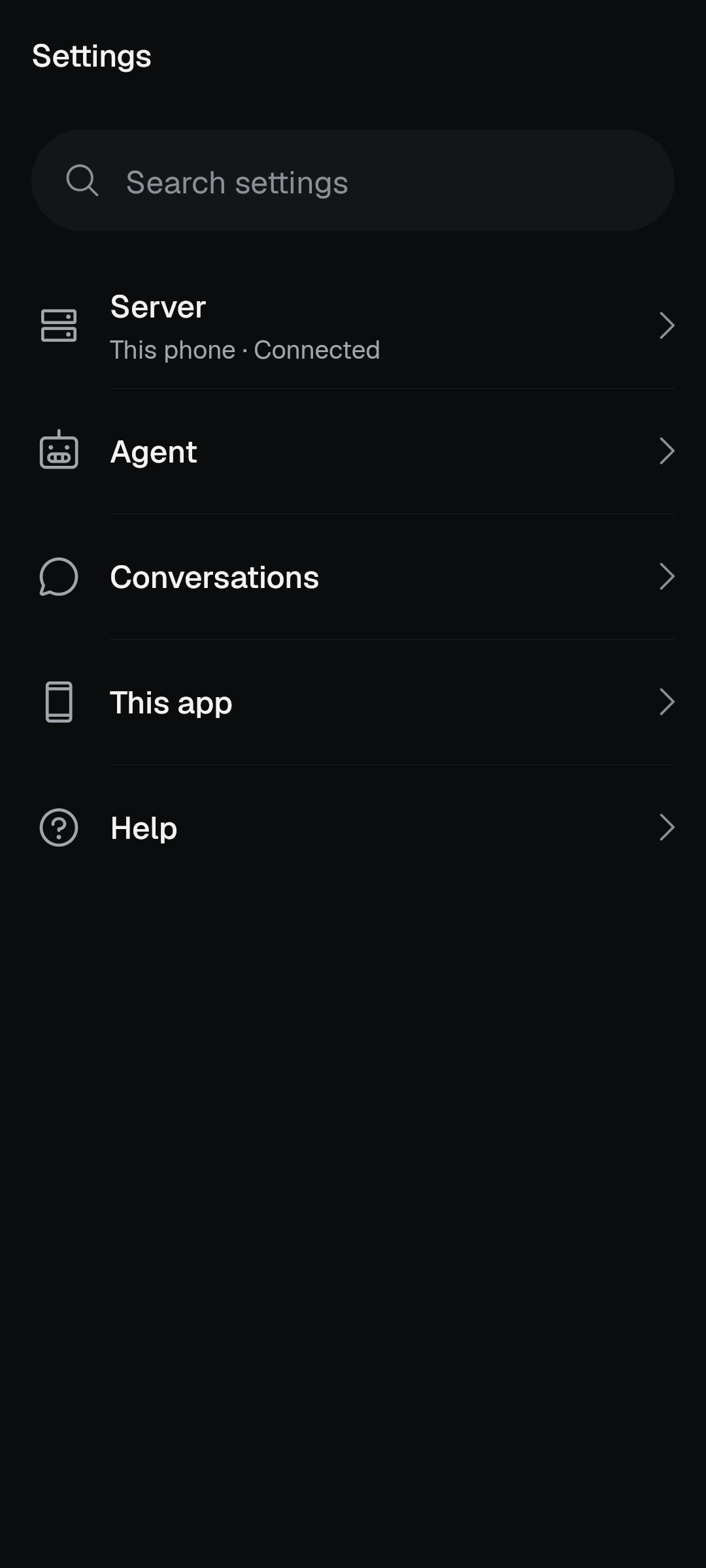
New
- Search settings reaches Linux ports, packages, storage, usage parts, Privacy, Voice, Updates, About and more, instead of only the main rows.
- Show reasoning, Show time, tokens and cost, Model and mode (opens the real model picker) and the mode new conversations start in.
- Tips: a mini tutorial's "Show me" opens the page it teaches, a tip opens in its own Help row rather than a floating card, and "Show tips again" also brings the conversation's one-time nudges back.
- Open source notices describe the native app, with an All licences page. The first visit after an in-app update says which version is now installed.
- Providers can be added from the Providers page; the key step links the provider's own key page; a provider's sign-in questions keep their choices, defaults and conditions, and a lone method opens directly.
Better
- Pages that showed developer content now use plain words: Server configuration lists its files in words with the source under Details, plugins read as names (the server's own fold into one row), a plugin's package name moves under Details.
- Commands and tools opens on Commands, a server's MCP page offers Add, and server pages keep the page margin.
- What runs by itself lists This phone once; Notifications says why a channel is off and opens Android's settings; its empty server line follows the real list.
- The Storage row opens App storage, where the real sizes and clear actions are. Tasks is no longer a dead end inside Saved prompts.
- Report a problem says what the kept errors are and how to share a report; Default shell offers one Try again, lists each shell once, and matches a saved shell through the same path rule that lists it.
- Back after a "Show me" jump returns to the caller, once.
- "Show tips again" confirms with a toast ("Tips will show again") instead of resetting silently.
- Chat, the sign-in flow and Search now open the full Providers page that Settings uses (search, sections, sign-in), not a thin page.
- "Skip the guide" is an ordinary row, and Help › Tips shows a single tip in its own row instead of a dark callout that hid the next row.
- Each model in a catalogue is chosen by its own id, so two entries of one provider that share an upstream name no longer select each other.
- A scoped plugin's raw package name no longer fills the plugin sheet; it sits under Details with its id.
- Crash choices are two clearly different rows: "Ask me after a crash" and "Send crash data automatically".
- Providers and phrase suggestions use the hub row's words as their page titles, and Providers and accounts draws only the provider rows that are on screen, so it opens faster.
- Command sheets say where a command runs and what the field is for; capability rows stop repeating; refresh is a bar icon.
- A server's "Available on this server" page offers another server, never "no server yet", and the Server row says "On this phone" for This phone.
- Notifications groups servers with section labels and room between groups; its "Questions for you" row now follows the live notification state instead of contradicting Permissions and automatic actions.
- The default-model sheet names providers and marks the server default.
- Team pages and set-up keep the page gutter, a bracket in a sentence stays in a command's description, and a rotation keeps an opened guide.
Privacy and data
New
- Settings › Privacy and data names every event and field the optional reports can send, in every language, and the website and store text match it.
- The usage-sharing question ("Help improve OpenCode Mobile?") waits for your first finished reply instead of being the first screen on a fresh install. Its buttons say what they share ("Share usage and crash reports") and you can change your answers in Settings › Privacy and data. The star question waits for three days and ten finished good replies and shows only when you are at rest, not under a running turn.
Better
- The in-app policy describes what the native app really sends, including memory, the problem-report row and the crash and analytics switches. The Privacy row no longer claims both sending switches start off.
- Safer handling of secrets: values the app registered are masked in the notification shade, in lists and in shell lines, even when a field has an ordinary name; the conversation-copy page passes both its views through the display redactor; Copy folder path goes through the redacting copy. A sign-in answer you picked from the form's own choices is not treated as a secret, so ordinary words are not hidden everywhere.
- Errors in Details and reports are named by a stable label, never by a technical class name, and the saved report keeps a count and first time for repeated entries.
- Report a problem says what the kept errors are, what is sent and how to share, and the problem-report row no longer claims a "redacted log" that reports do not hold. Copying an error log names its build and folds repeats.
- Tool server values in lists, shell lines and fragments are masked whatever they are named, but your own words and the app's own words are not.
- A sign-in form's prefilled public address (for example a Git host's default) is not hidden everywhere, and an ordinary answer such as a profile named "default" is not masked.
- The policy says plainly that a plain HTTP address on Tailscale asks first, and the bundled policy is in every language the app offers.
Accessibility
Better
- Sub-agent lines and the stop button keep a 48 dp touch target.
- Tab and arrow keys walk the whole conversation again, focus is handed back around sheets and dialogs, and a letter no longer lands in the wrong field.
- The edge light has spoken labels, and the attach tray names its buttons so help text matches what is on screen.
- Text that would be cut off at narrow widths wraps instead, buttons never end in an ellipsis, sideways rows show that they scroll, and field hints wrap.
- A caret no longer blinks in a field that typing cannot reach.
- A dismissed sheet, dialog or menu no longer eats the next tap, and one Back closes the open sheet, menu, dialog or picker and nothing else.
- An agent's stand-in letter (shown when an agent has no logo) stops growing at the largest text size, so it stays inside its box.
- Agent grids and row values wrap instead of cutting words, a long state word on a row never crushes its title ("Can't reopen old conversations" no longer cuts the title to "Build ..."), and tab strips rest on whole tabs.
- A disabled control that says why answers a tap with the reason instead of doing nothing.
- A keyboard that is gone can no longer hold the page up: the chat leaves its keyboard-up layout without a long hold after the keyboard closes.
- Closing a sheet with Back never raises the keyboard the start box had put away, and a field that takes focus in a sheet is brought into view above the pinned buttons.
- The Move... picker is a real dialog: the page dims, and Back and a tap outside close only the picker.
Performance and battery
Better
- Timers, the log poll and clocks stop while the app is hidden, and a tucked edge light draws nothing.
- A Glass pane samples its words' ink only when what lies behind it changed.
- A Glass pane asks again for an ink sample that was skipped, so its words do not stay in the wrong colour after a flip between light and dark.
- The heat guard pauses and resumes the phone's server and the AI Team when the phone is hot, and This phone says so.
- Updates that need a lot of data (the phone's OpenCode refresh, the agents' helper, agents) wait for an unmetered network, so metered data is not spent on first open.
- A background connection resumes after an update only when the app is in front.
- A hidden app no longer wakes once a second for a clock nobody sees: running-step clocks, a row's age, the waiting clock and the log panel's poll all park.
- A Glass page that nobody touched came to rest instead of drawing about 60 frames a second, and an idle Glass pane over a moving background wakes at most twice per sample.
- A Glass page with the app behind the launcher no longer burns a large share of a core.
- Frame problems are reported with how many frames missed their own deadline and at what rate (only if you share usage), so slow screens can be found.
Reliability and crashes fixed
Fixed
- A layout crash while pages open and a transcript row crash were removed.
- The automatic agent update can no longer end the app, an update cut off by the phone stopping the app picks up where it was, and a stale "busy" reading no longer holds it.
- A device that refuses the thermal listener still starts, and a failure on the Glass ink sampler is a missed sample, never a crash.
- An update, an install or a stop you asked for is no longer reported as "the battery manager closed it".
- Your own Stop is remembered across a restart.
- A Back from a conversation just after its "..." menu closed no longer ends the app in Glass (a runaway drawing loop was removed).
- One scroll up in a long Glass conversation no longer kills the app: the Jump to latest pill draws its glass from its own picture.
- A first-open "isn't responding" cluster on a Glass cold start (the screen asking for ink samples on the main thread) is gone.
- A page that left a row too early no longer ends the app with an index error while a long transcript composes.
- A tip is never drawn over an open sheet or dialog.
Tablets and rotation
New
- Phones stay upright on every screen: below 600 dp wide the app stays in portrait. Tablets and unfolded foldables still rotate.
Better
- The rail keeps out of the status bar and a short window's heading is title size.
Languages
New
- A language is offered in the in-app list (and in Android's per-app language list) when its translation covers at least 95 percent of the English lines. At this build that is English, Arabic, Spanish, French, Indonesian, Portuguese, Russian, Vietnamese and Simplified Chinese. Japanese is not offered yet.
- Every new line of this release is translated, including the step list, the agent updates and sign-in, phone storage, own agents, the edge light, Find and the privacy notices.
Better
- Arabic keeps its exact-count forms in lists; full stops and spacing follow each language.
- The phone's own server is shown in your language.
Known in this build
- With a live background switched on, opening or closing New conversation can flash dark. The default background is off.
- Plan mode with Codex still asks before an edit. You can deny it.
- On narrow phones the third filter on Home needs a sideways swipe.
- Right after a cold start, New conversation can say its lists couldn't be read until you tap Try again.
- A "This phone" scheduled prompt made in the old app must be opened and saved once before it runs again.
- The two first-open downloads (OpenCode about 130 MB, the agents' helper about 330 MB) wait for Wi-Fi and show no progress yet.
- A Gemini CLI you installed earlier is kept but not offered for new installs; its tile says "Install it again" without an install.
- After removing an agent, the size freed can be shown as a raw number of bytes.
Reporting a problem
Open Settings › Help › About for the build number, then tell us what you tapped and what you saw. Settings › Report a problem keeps the recent errors and lets you share them. Say which screen you were on, whether a phone agent or a computer was involved, and whether it happened right after the update.