Repository navigation
Releases
Releases · GaMa87/gall
Gall v0.1.3

- Usage: search scope and exclusions and WSL browsing.
- Added (Windows): browse installed WSL distributions from Drives, start stopped distributions, open a terminal there and copy Linux-format paths. File operations use the Linux trash where available; Stop terminates the distribution after confirmation.
- Added: a support card in About and Settings, with featured tips shown first.
- Fixed: batch rename no longer overwrites a file whose name collides with a temporary staging path; a failed undo stays below operations completed while it was running.
- Fixed: a cross-drive move that cannot finish removing its source preserves the destination copy in the undo journal and attempts to restore partially removed source entries.
- Fixed: a failed note save keeps the draft open for retry instead of discarding it.
- Fixed: extracting archive entries no longer aliases names that need filesystem sanitization, races with another extraction, or overwrites members named
.usedwith cache bookkeeping. - Fixed: find-in-files include patterns no longer bring back files hidden by
.gallignore; hiding an item during an on-demand folder scan no longer lets that scan restore the hidden result. - Fixed: Quick Open no longer offers Alt+I inside archives, lets a delayed coverage check override the chosen scope, or applies stale search results and errors after changing the query or closing the window.
- Fixed: Quick Open respects input-method composition and AltGr input, and no longer adds opened folders to the recent-file list.
- Fixed: Quick Open no longer offers the unusable "this folder" scope inside archives.
- Changed: Quick Open starts in the open folder and below; Tab searches everywhere (it was the other way round). With no match in the folder it says so and points to Tab.
- Fixed: a WSL folder listed in Settings › Search › Indexed folders was still read again by Quick Open instead of using the index.
- Fixed (WSL): copying, duplicating or moving a folder inside WSL was refused when a file somewhere inside it had a name ending with a dot or space, although Linux does that copy; the whole folder was also read beforehand. Only a permanent delete, a copy or move to Windows and archives still check every name.
- Fixed (WSL): undo of several trashed items stopped at the first whose place was taken again; the others now come back too.
- Fixed (WSL): undo restores the newest copy when the same path was trashed more than once within a second.
- Fixed: Alt+I in Quick Open passed Quick Open's syntax (
ext:pdf,'exact, several words) to the name search, which then found nothing. - Changed: Hide from search no longer re-indexes the whole computer for each item; the cache-folder check costs one attribute query per folder.
- Fixed: Quick Open found nothing in a WSL distribution, on a network share or in a folder outside the indexed ones. It now opens scoped to such a folder and starts reading it as soon as it opens (reused for two minutes), so results are there by the time you type. Find in files › Home inside WSL searches the Linux home instead of the Windows one.
- Added: per-project search exclusions. A
.gallignorefile (gitignore syntax, also outside git) hides files and folders from Quick Open, find in files and the name search (F3) in its folder and below, also when a search starts in a subfolder. Right-click › Hide from search adds the selected items to it (with Undo); Quick Open drops them at once. - Added: items hidden from search are dimmed in italics; right-click › Show in search again takes the line out, or adds a
!exception when a pattern hides the item. A hidden folder says "hidden from search" in its header (click to show it again). Hand edits to a.gallignorereach Quick Open without a manual re-index. - Added: Alt+I searches ignored files too: a toggle in find in files and the name search (F3), and in Quick Open it searches the current folder by name including what the index leaves out.
- Added: folders tagged as caches (
CACHEDIR.TAG, e.g. Cargo'starget) are skipped by every search. New installs also skipcoverage,.next,.nuxt,.svelte-kit,.turbo,.parcel-cache,.gradle,.tox,.mypy_cacheand.pytest_cache. - Changed: the name search (F3) skips the folders in Settings › Search › Never index or search (node_modules, target, dist, …) and, with Skip files ignored by .gitignore, what
.gitignoreleaves out, like Quick Open and find in files.
Linux and Windows are supported; macOS builds are experimental and unsigned.
Gall v0.1.2
The first public release of Gall, a keyboard-first file manager for Linux, Windows and macOS.
Gall is new on GitHub but not a new project: it was developed and tested locally for a long time, on Linux and Windows alike, before this repository went public.
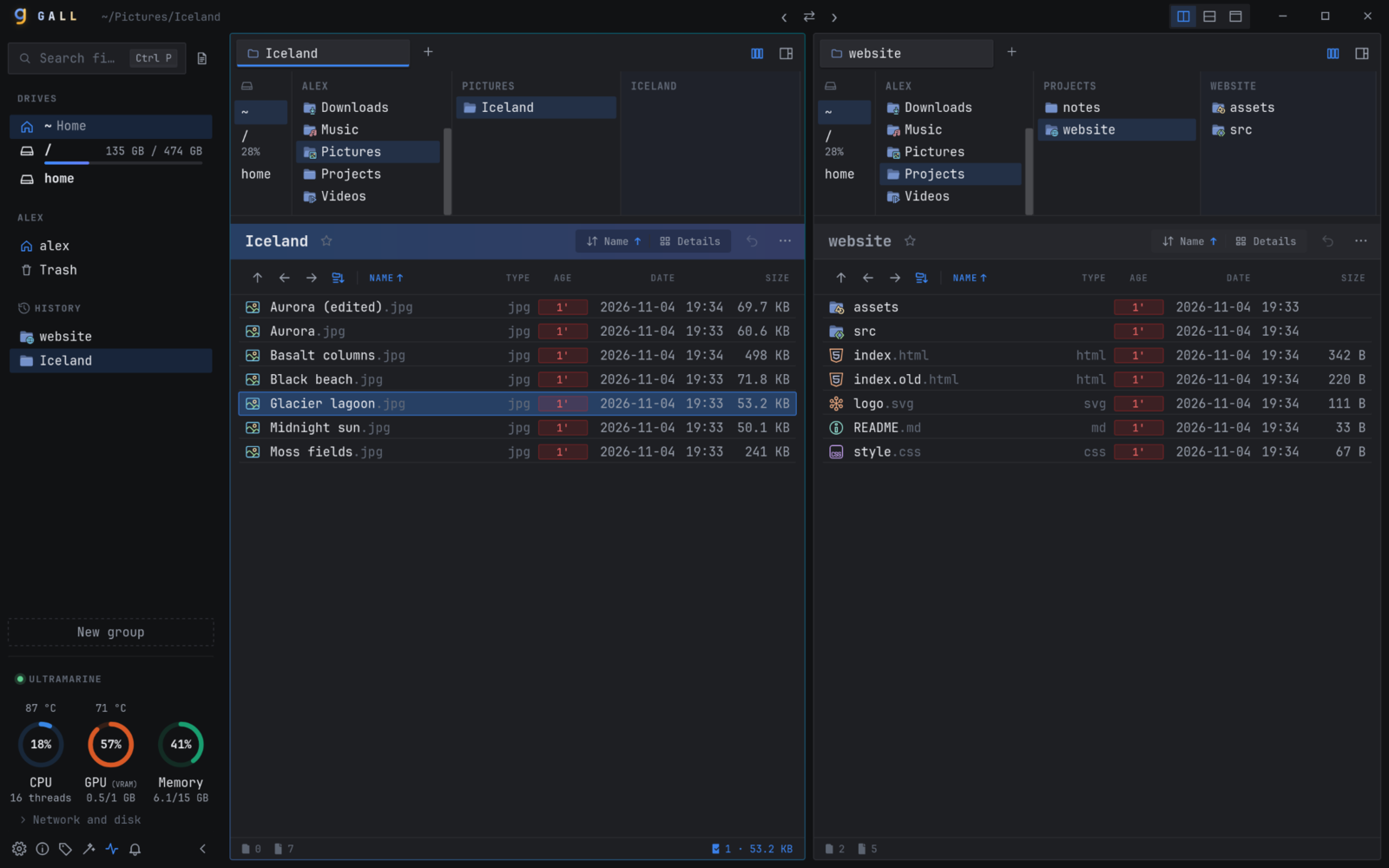
What you get
- ⚡ Find any file as you type: fuzzy search over every file name on the computer (
Ctrl+P) - 🔎 Find text inside files with the ripgrep engine: a folder, your home or the whole drive (
Ctrl+Shift+F) ↔️ Compare code and text, Excel/ODS/CSV cell by cell, images and whole folders (Ctrl+Shift+D)- 🌿 Git status in the file list, previews with syntax highlighting, a machine monitor in the sidebar
- ⌨️ Vim keys, a which-key menu on
Space, every shortcut rebindable - ↩️ Undo for copy, move, rename, batch rename and delete to trash
Download
| System | File |
|---|---|
| Any Linux | Gall_0.1.2_amd64.AppImage |
| Fedora, openSUSE | Gall-0.1.2-1.x86_64.rpm |
| Debian, Ubuntu, Mint | Gall_0.1.2_amd64.deb |
| Windows 10/11 | Gall_0.1.2_x64-setup.exe or Gall_0.1.2_x64_en-US.msi |
| Windows, portable | Gall-0.1.2-windows-x64-portable.zip (unzip and run gall.exe) |
| macOS Apple silicon / Intel | Gall_0.1.2_aarch64.dmg / Gall_0.1.2_x64.dmg (experimental) |
Checksums are in SHA256SUMS. The Windows and macOS builds are not code-signed yet: on Windows choose More info › Run anyway in SmartScreen; on macOS allow Gall in System Settings › Privacy & Security › Open Anyway.
Everything that went into 0.1.0 to 0.1.2 is in the changelog. Bug reports and ideas are welcome in Issues. If Gall saves you time, a ⭐ helps others find it.