Repository navigation
Releases
HexAnima 1.9.4-v73 (Snapdragon 8 Gen 2)

HexAnima is the work of ayanoby: the NPU kernels, the on-device server, the app and the NPU model packs. This fork ports it to the Snapdragon 8 Gen 2. Thank you, ayanoby!
Install: download HexAnima-1.9.4-v73.apk and install it over 1.6.0-v73 or newer. Your models, LoRAs and pictures are kept.
New in 1.9.4-v73
Mage-Flow without a size limit (port of upstream 1.7.1 to V73)
- The DiT runs in windows on the NPU, with the keys streamed through VTCM (the shared
flux3kernel tree, built for V73 with the convert-unit HMX store). The old limit of about 6400 tokens is gone: pictures up to 2048×3072, e.g. 1536×1536 in about 72 s. - Reference pictures now go in at the full size of the result instead of shrinking it. The runner retries a call when the HMX self-test fails.
Anima without a size limit (port of upstream 1.7.1 to V73)
- Chunked attention, and windows above 16384 tokens: sizes up to 4096×4096 (65536 patches), e.g. 1536×1536 in about 50 s with a turbo model. Bigger sizes are in the list. Models are trained at about 1 Mpx, so very large pictures can look soft.
Smaller things
- Edit a photo: tap the How much it changes number to type the percentage.
- The step counter of an edit of a photo counts the steps that really run (no more jumps).
Novedades (español)
- Mage sin límite de tamaño: trabaja por ventanas en la NPU, hace imágenes de hasta 2048×3072 (1536×1536 en ~72 s), y las fotos de referencia entran a tamaño completo.
- Anima sin límite de tamaño: hasta 4096×4096 (1536×1536 en ~50 s).
- Cuánto cambia: toca el número para escribir el porcentaje. El contador de pasos con foto cuenta los pasos reales.
Instalación: se instala encima de 1.6.0-v73 o posterior sin perder nada.
Non-commercial use only. The models and LoRAs keep their authors' licenses; license texts in the app (Info → Licenses).
SHA-256 of HexAnima-1.9.4-v73.apk: a31a7ae00f503eb13ab3d260325e587c429c5153646f4212b00dd5ff556eaf2b
HexAnima 1.9.3-v73 (Snapdragon 8 Gen 2)
HexAnima is the work of ayanoby: the NPU kernels, the on-device server, the app and the NPU model packs. This fork ports it to the Snapdragon 8 Gen 2. Thank you, ayanoby!
Install: download HexAnima-1.9.3-v73.apk and install it over 1.6.0-v73 or newer. Your models, LoRAs and pictures are kept.
New in 1.9.3-v73
Outfit swaps that keep the quality (Qwen; Mage too, less faithfully)
- Add the photo (image 1) and the picture with the clothes (image 2), paint the clothes with ✎ Area to edit (now allowed with reference pictures) and generate. Only the painted area takes the result: the face, body, hands, pose and background keep their exact pixels.
- With a reference picture Qwen always uses High fidelity (the reference at the output size), so the garment comes out much closer. Name its colour and pattern in the prompt, e.g. "Replace the bikini of the girl in image 1 with the exact bikini from image 2: black with white polka dots, white frills and a white bow". Paint everywhere the new garment goes (shoulders too, if it has sleeves).
- 👗 Copy its outfit and 🧍 Copy its pose read image 2 with the tagger and write the prompt, then edit photo 1 alone at full size. With Qwen, Copy its pose gives a clean new pose. With Mage, large pose changes still deform the body.
Smaller things
- Anima's Edit a photo and Pose sections fold away.
- Prompt from a picture: Character only keeps nudity and body traits, and the sentence mode names them.
- The LoRAs button opens each model's library (Qwen's for Qwen; Mage takes none). LoRA strength goes up to 5.
Novedades (español)
- Cambiar ropa con calidad (Qwen; Mage, menos fiel): pon la foto y la imagen de la ropa, pinta la ropa con ✎ Área a cambiar y genera. Solo cambia la zona pintada: cara, cuerpo, manos, pose y fondo quedan iguales. Con imagen de referencia, Qwen usa Alta fidelidad sola. Nombra el color y el estampado de la prenda en el prompt.
- 👗 Copiar su ropa y 🧍 Copiar su pose leen la imagen 2 y escriben el prompt. Con Qwen, la pose sale limpia.
- Editar una foto y Pose de Anima se pliegan. Solo el personaje conserva la desnudez. El botón LoRAs abre la biblioteca de cada modelo, y la fuerza llega a 5.
Instalación: se instala encima de 1.6.0-v73 o posterior sin perder nada.
Non-commercial use only. The models and LoRAs keep their authors' licenses; license texts in the app (Info → Licenses).
SHA-256 of HexAnima-1.9.3-v73.apk: c072814f4ea6b61fa3b05ffad738f34d7005323e80f89ad11eddc18a2828b22d
HexAnima 1.9.2-v73 (Snapdragon 8 Gen 2)
HexAnima is the work of ayanoby: the NPU kernels, the on-device server, the app and the NPU model packs. This fork ports it to the Snapdragon 8 Gen 2. Thank you, ayanoby!
Install: download HexAnima-1.9.2-v73.apk and install it over 1.6.0-v73 or newer. Your models, LoRAs and pictures are kept.
New in 1.9.2-v73
Configuration templates (⋯ menu)
- Save everything that shapes a picture under a name, for example "3D Style": model, prompt, negative, steps, CFG, sampler, scheduler, size, seed, pictures per run, quality prefix, LoRAs and extras. Tap it later to load it all back.
Pose for Anima (experimental)
- In Edit a photo → POSE, pick a picture (or use the last one): a pose detector on the NPU finds the person's skeleton, and new Anima pictures follow that posture (roughly: arms and legs, not every detail) without copying the look.
- It uses Anima Control – Pose by Claquasse (non-commercial). It is made for Anima Base 1.0 (best with 20+ steps and CFG 4; strength 2.0 by default); few-step turbo models follow it less. One download of 227 MB the first time.
Novedades (español)
- Plantillas de configuración (menú ⋯): guarda modelo, prompt, negativo, pasos, CFG, tamaño, semilla, LoRAs y extras con un nombre (p. ej. «3D Style») y cárgalo todo con un toque.
- Pose para Anima (experimental): en Editar una foto → POSE elige una imagen o la última generada y las nuevas siguen su postura (de forma aproximada: brazos y piernas, no cada detalle). Adaptador de Claquasse (no comercial), hecho para Anima Base 1.0. Descarga única de 227 MB.
Instalación: se instala encima de 1.6.0-v73 o posterior sin perder nada.
Non-commercial use only. The models and LoRAs keep their authors' licenses; license texts in the app (Info → Licenses).
SHA-256 of HexAnima-1.9.2-v73.apk: 845fb61241e9fb272b30d1f85ac2aeccddb2351f3ace8b37a8e289968701e227
HexAnima 1.9.1-v73 (Snapdragon 8 Gen 2)
HexAnima is the work of ayanoby: the NPU kernels, the on-device server, the app and the NPU model packs. This fork ports it to the Snapdragon 8 Gen 2. Thank you, ayanoby!
Install: download HexAnima-1.9.1-v73.apk and install it over 1.6.0-v73 or newer. Your models, LoRAs and pictures are kept.
New in 1.9.1-v73
Copy a pose without copying the person (Qwen and Mage)
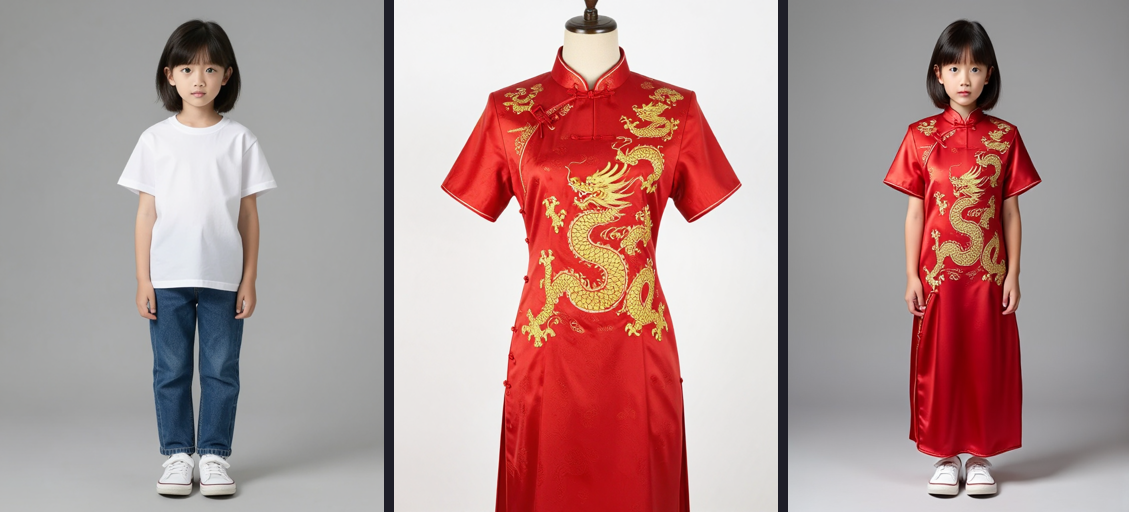
- Tap a reference picture → Use only its pose (silhouette): it becomes a flat figure, so the edit takes the pose and not the clothes or the face. Write, for example, "the character from image 1 in the pose of image 2". Works best with a plain background; tap again to go back to the whole picture.
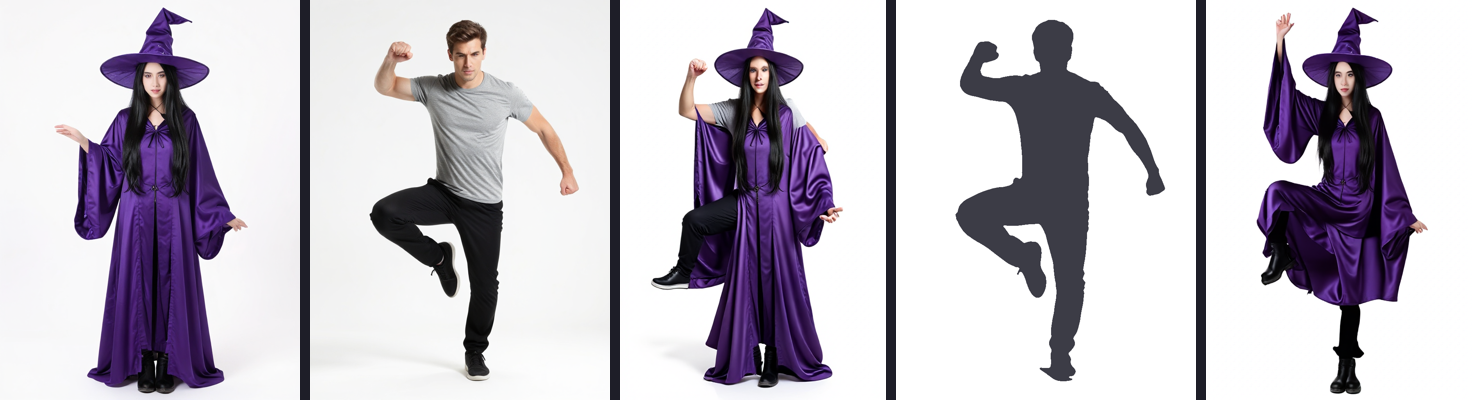
Left to right: the character, the pose picture, the edit with the pose picture (its clothes leak in), the silhouette, the edit with the silhouette.
Prompt from a picture: Character only
- Keeps the tags that describe who it is (hair, eyes, clothes, accessories, character names) and drops the pose, framing and place, so you can write a new pose, style or scene around them. Handy for Anima and MOSS, which take no reference picture.
Smaller things
- Negative prompt Templates: save the current negative, pick a saved one or a recently used one.
- Settings: a GitHub row with the app version.
Novedades (español)
- Copiar una pose sin copiar a la persona (Qwen y Mage): toca una imagen de referencia → Usar solo su pose (silueta). La edición toma la pose y no la ropa ni la cara. Funciona mejor con fondo liso.
- Prompt desde una imagen → Solo el personaje: pelo, ojos, ropa y accesorios, sin pose ni fondo, para escribir una pose o un estilo nuevos (Anima y MOSS).
- Plantillas del prompt negativo y una fila de GitHub en Ajustes.
Instalación: se instala encima de 1.6.0-v73 o posterior sin perder nada.
Non-commercial use only. The models and LoRAs keep their authors' licenses; license texts in the app (Info → Licenses).
SHA-256 of HexAnima-1.9.1-v73.apk: df8e3cc40ccc8d67ad169fc7bb2697266672a89444769093241b24ad62293e66
HexAnima 1.9.0-v73 (Snapdragon 8 Gen 2)
HexAnima is the work of ayanoby: the NPU kernels, the on-device server, the app and the NPU model packs. This fork ports it to the Snapdragon 8 Gen 2. Thank you, ayanoby!
Install: download HexAnima-1.9.0-v73.apk and install it over 1.6.0-v73 or newer. Your models, LoRAs and pictures are kept.
Coming from 1.5.x-v73 or older? Those were signed with another key: save your pictures (History → ZIP), uninstall, install this one and download the models again.
New in 1.9.0-v73
Prompt from a picture (⋯ menu)
- Pick a picture and the app writes its prompt: Danbooru tags (best for Anima) or a sentence (best for MOSS, Qwen and Mage), short, medium or long. Edit it, then Use, Add or Copy.
- WD ViT Tagger v3 by SmilingWolf (Apache-2.0) on the NPU: about 0.1 s per picture, almost no heat. Downloaded once (190 MB) from hexanima-packs, checked by SHA-256.
Mage with reference pictures
- Add up to 3 pictures and write, for example, "the girl from image 1 wearing the dress from image 2". About 25 s on the Snapdragon 8 Gen 2.
- The ✎ under a Mage picture edits it with Mage.
Anima: Edit a photo
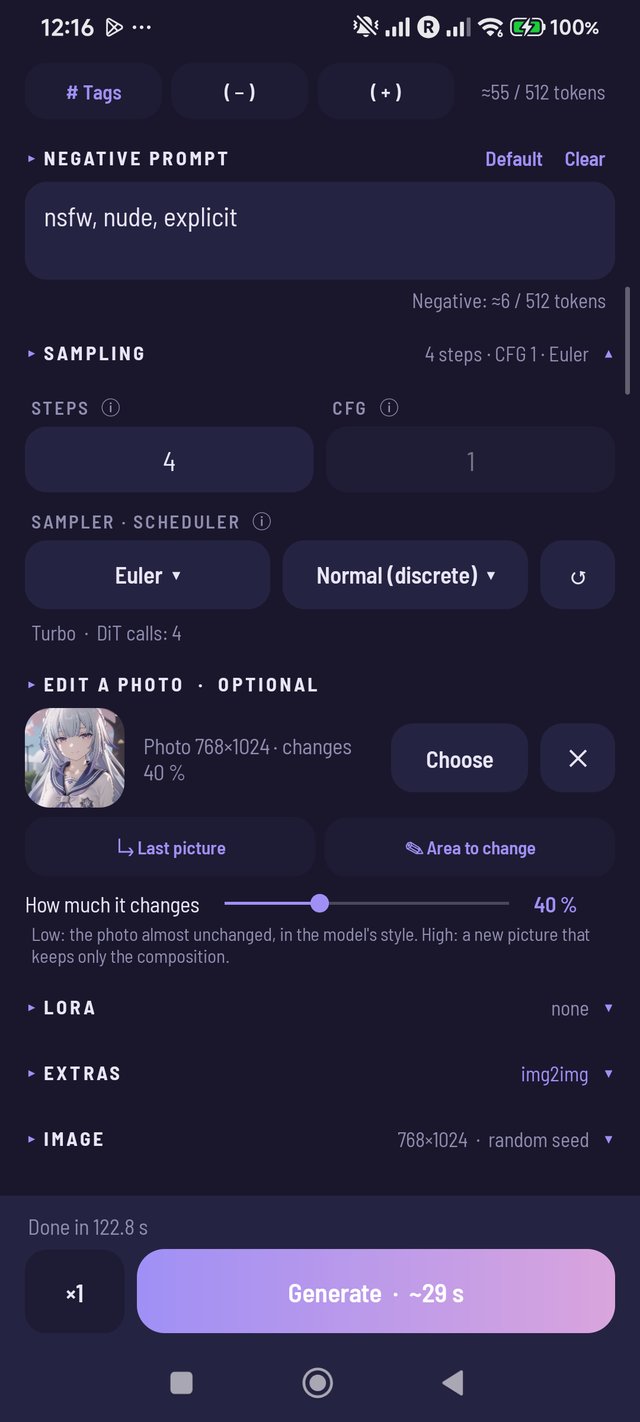
- img2img and inpainting now have their own box, like Qwen and Mage: the photo, Last picture, Area to change and a How much it changes slider.
Generating
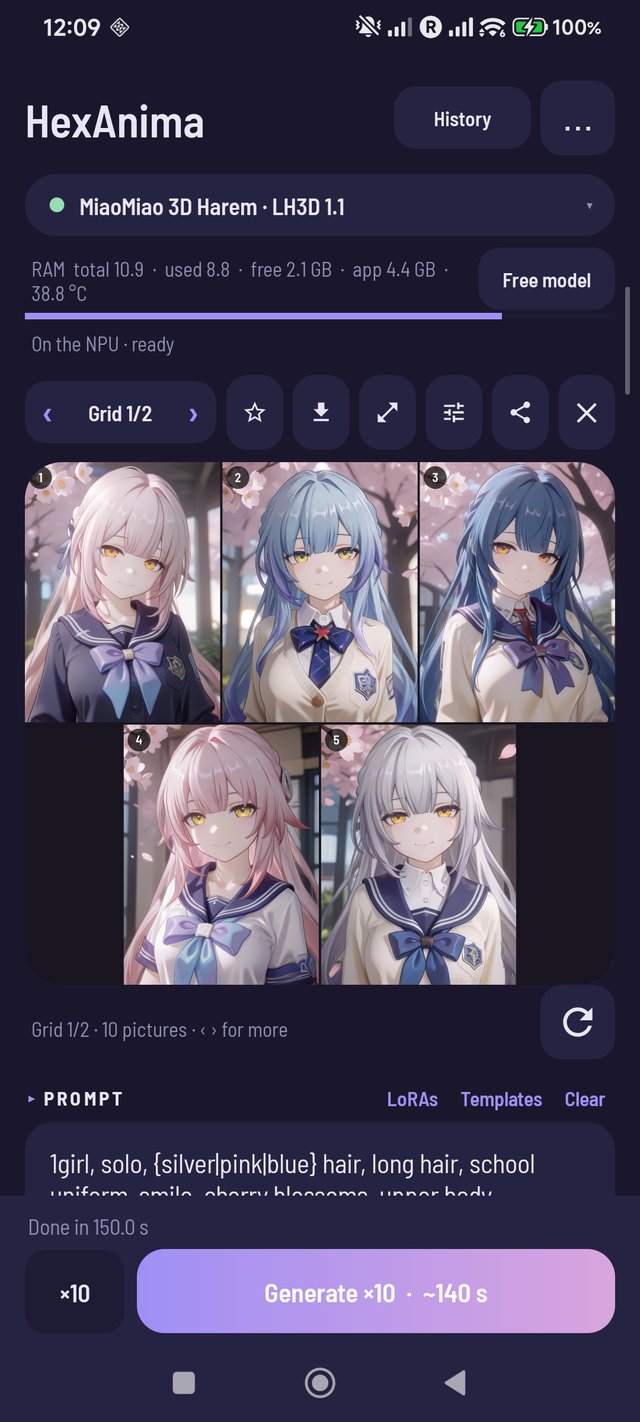
- Time left for every model ("~30 s left"), also for the whole batch; the app learns the real time per model and size.
- Prompt wildcards:
{red|blue|green}picks a different option for each picture of a batch. - Variations: long-press ↻ → new seeds, or (Anima) pictures close to the shown one; choose how many.
- Large batches go in contact sheets of 9; ‹ › to go from one to the next.
- Size and quality tags are remembered per model.
Corrections
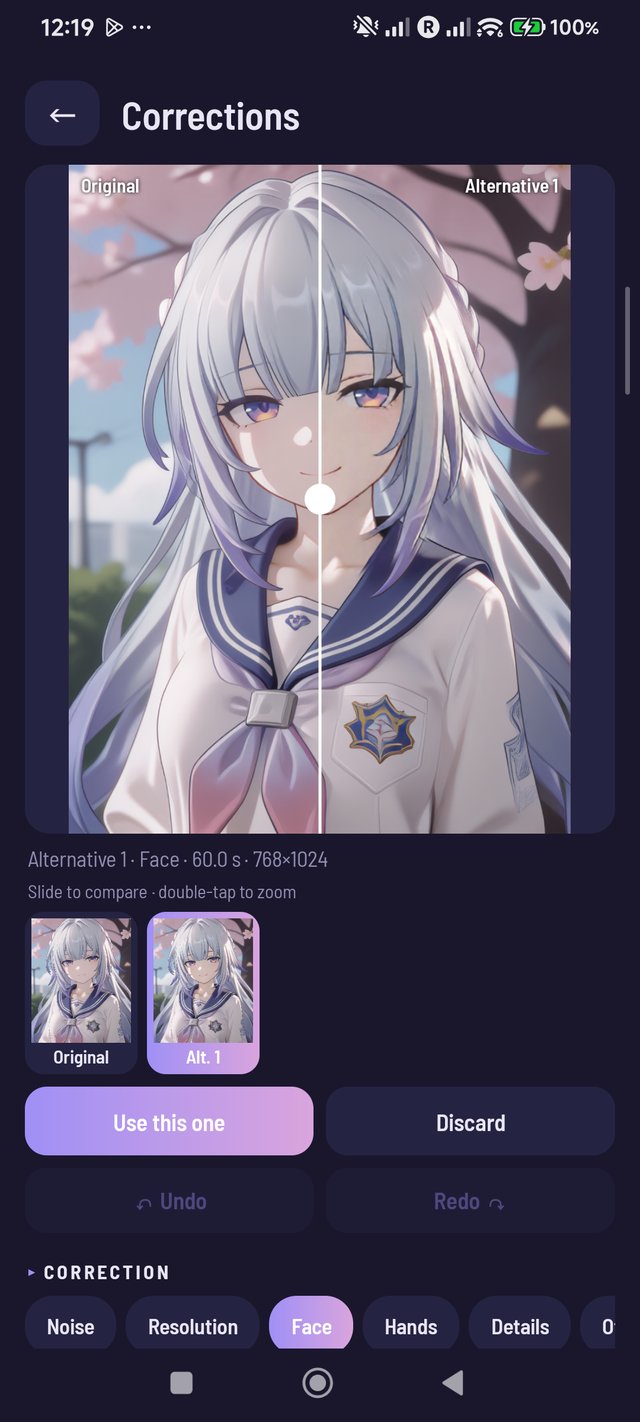
- Detect and fix every face / hand (optional): finds each one and redraws it in turn, kept as an alternative to compare.
Pictures, LoRAs, phone
- Enlarge a picture from the gallery (⋯ menu).
- Before/after also for enlarged and corrected pictures, from the main screen, the viewer and a ⇆ badge in the History.
- The Qwen LoRA library now works like the Anima and MOSS ones: filter, categories, rename, Select.
- Civitai marks everything you already downloaded with ✓ (also the ChatGPT-style LoRA, converted checkpoints and Qwen LoRAs).
- Battery temperature next to the free RAM, and a notification when a batch pauses to cool down.
- Settings → Export logs: a ZIP (no pictures, prompts or keys) to report a problem.
- What's new appears once after each update; icon buttons are larger, with TalkBack labels.
Novedades (español)
Prompt desde una imagen (menú ⋯)
- Eliges una imagen y la app escribe su prompt: etiquetas (mejor para Anima) o una frase (mejor para MOSS, Qwen y Mage), corto, medio o largo. Lo editas y lo usas, añades o copias.
- WD ViT Tagger v3 de SmilingWolf (Apache-2.0) en la NPU: unos 0,1 s por imagen, casi sin calentar. Se descarga una vez (190 MB).
Mage con imágenes de referencia
- Hasta 3 imágenes: «la chica de la imagen 1 con el vestido de la imagen 2». Unos 25 s.
Anima: Editar una foto
- El img2img y el inpainting tienen su propia sección, como en Qwen y Mage, con el deslizador Cuánto cambia.
Generar
- Tiempo restante en todos los modelos y para toda la tanda.
- Comodines
{rojo|azul|verde}: una opción distinta en cada imagen. - Variaciones (mantén pulsado ↻): semillas nuevas o imágenes parecidas (Anima), las que quieras.
- Tandas grandes en cuadrículas de 9. Tamaño y etiquetas de calidad recordados por modelo.
Correcciones
- Detectar y corregir todas las caras / manos de un toque (opcional).
Más
- Ampliar una imagen de la galería. Antes/después también para ampliadas y corregidas, y desde el Historial (⇆).
- La biblioteca de LoRAs de Qwen ahora es como la de Anima y MOSS. Civitai marca con ✓ todo lo descargado.
- Temperatura junto a la RAM y aviso cuando una tanda se pausa por calor. Ajustes → Exportar registros.
Instalación: se instala encima de 1.6.0-v73 o posterior sin perder nada.
Non-commercial use only. The models and LoRAs keep their authors' licenses. Real-ESRGAN: BSD-3-Clause. 4x-UltraSharp by Kim2091: CC BY-NC-SA 4.0. face/hand_yolov8n (Bingsu/adetailer) and WD ViT Tagger v3 (SmilingWolf): Apache-2.0. Mage-Flow-Edit-Turbo by Microsoft: MIT. License texts in the app (Info → Licenses).
SHA-256 of HexAnima-1.9.0-v73.apk: 6fe76241dc7a2026edee9ab24d80a5194b1b960c4141a268114c29d0d74ab99e
HexAnima 1.8.0-v73 (Snapdragon 8 Gen 2)
HexAnima is the work of ayanoby: the NPU kernels, the on-device server, the app and the NPU model packs. This fork ports it to the Snapdragon 8 Gen 2. Thank you, ayanoby!
Install: download HexAnima-1.8.0-v73.apk and install it over 1.6.0-v73 or newer. Your models, LoRAs and pictures are kept.
Coming from 1.5.x-v73 or older? Those were signed with another key: save your pictures (History → ZIP), uninstall, install this one and download the models again.
New in 1.8.0-v73
Mage-Flow on the Snapdragon 8 Gen 2
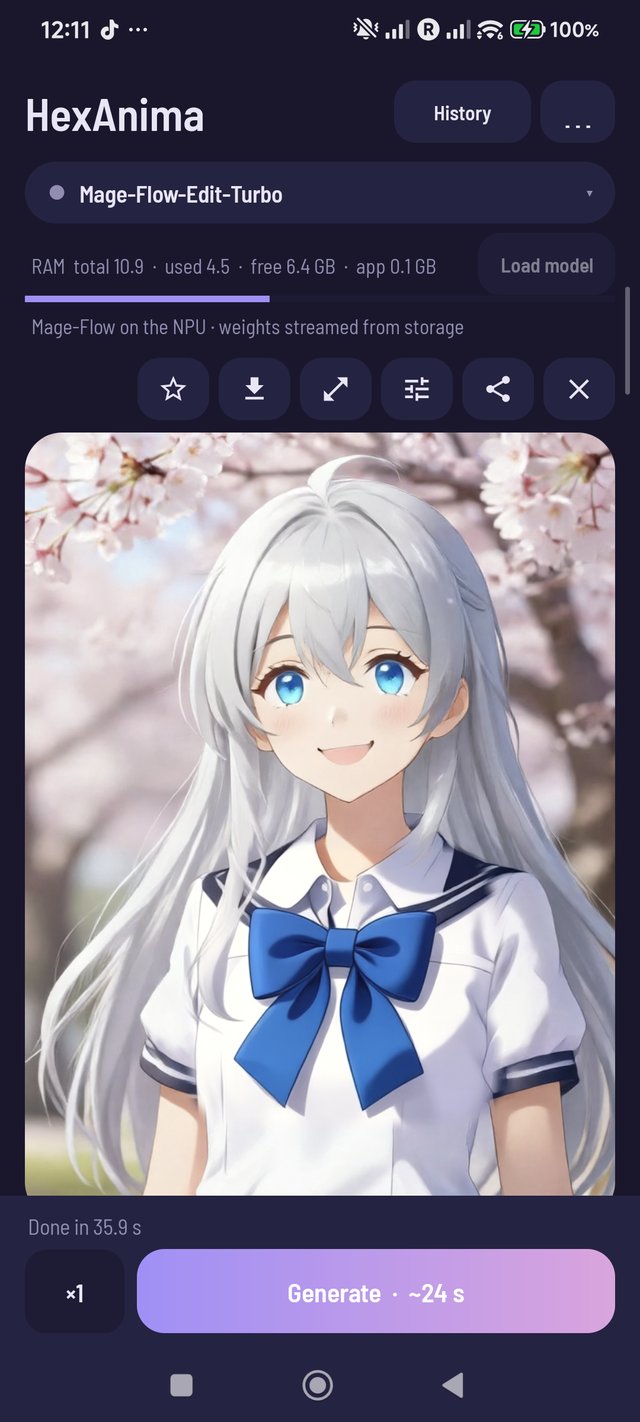
- ayanoby's Mage-Flow kernels, ported to Hexagon V73: Mage-Flow-Edit-Turbo now shows in the model picker and in Models (about 8.7 GB). A 512×512 picture takes about 10 s, 768×1024 about 19 s, an edit about 36 s.
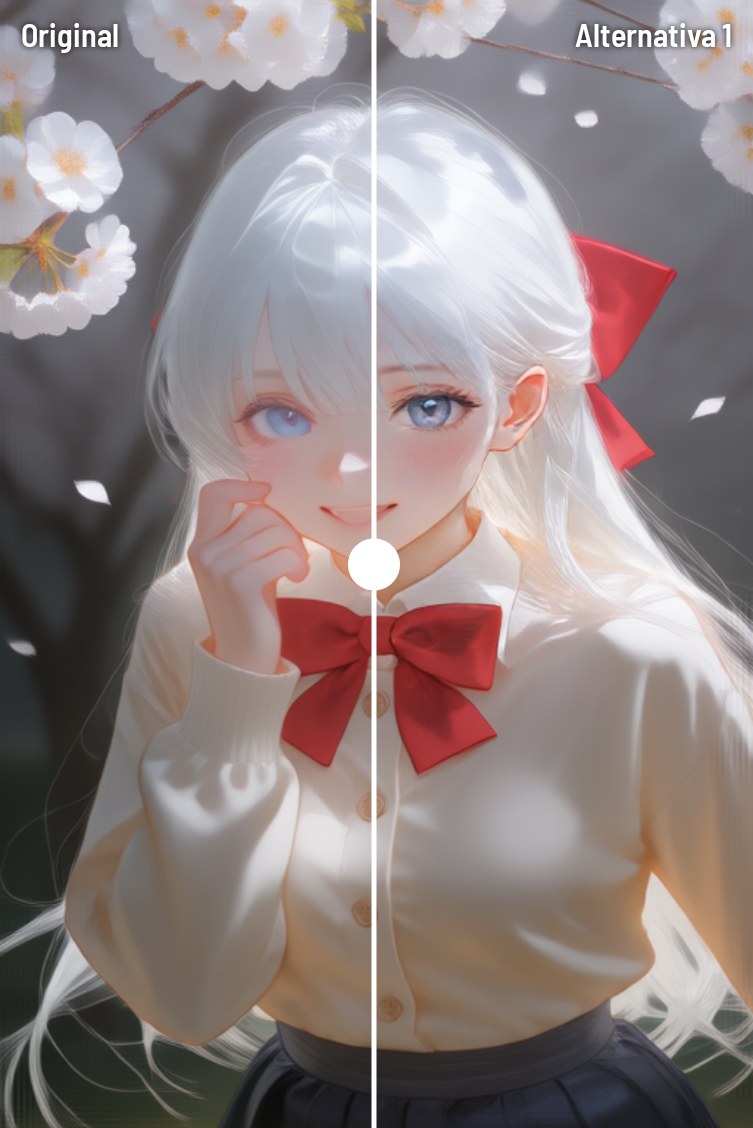
- Photo edits keep the original: before/after slider, ⇆ in the viewer and the optional side by side, as with Qwen. Edits keep the photo's shape.
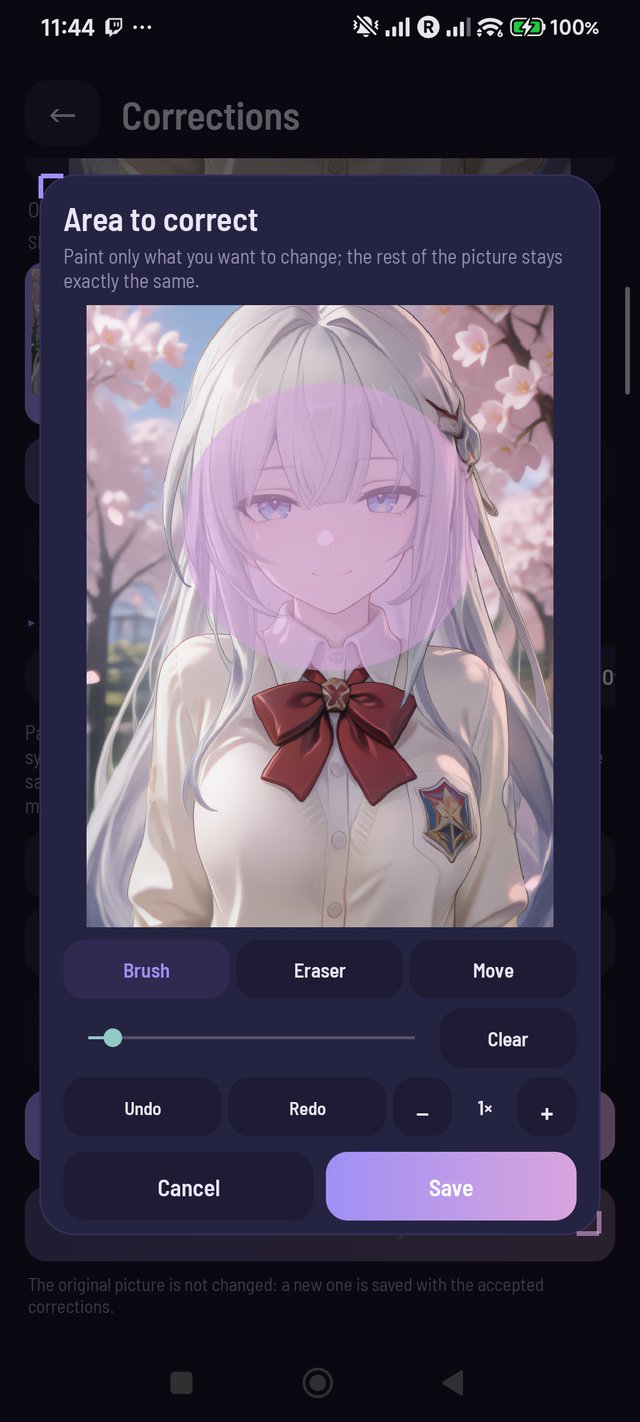
- Area to edit: paint what to change and the rest keeps its exact pixels.
- The ✎ button under a Mage picture edits it with Mage (before, it always switched to Qwen-Image).
Enlarge: Fast or Detailed
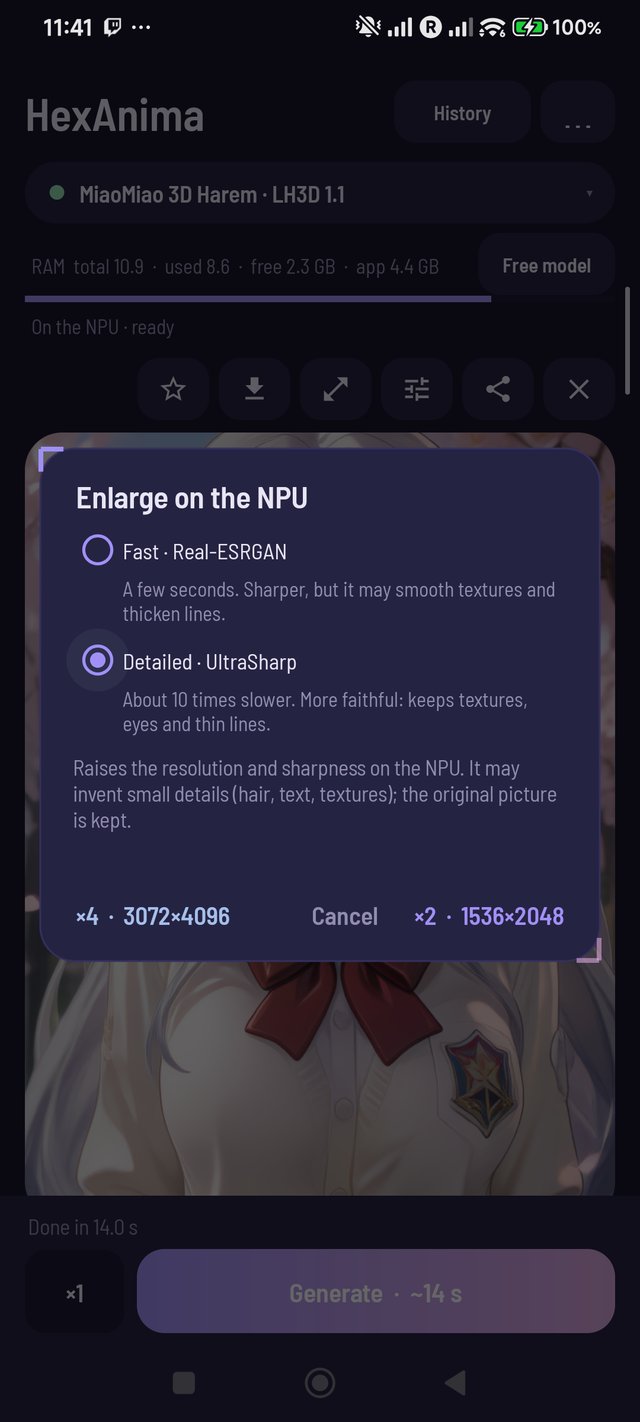
- Detailed uses 4x-UltraSharp on the NPU: about 10 times slower than Fast (Real-ESRGAN), but it keeps textures, eyes and thin lines. ×2 of a 768×1024 picture takes about 9 s. The choice is remembered.
Corrections: detect faces and hands automatically
- In Face and Hands, one button finds them and paints the area for you (face_yolov8n / hand_yolov8n on the NPU, 6 ms). Then make an alternative as usual.
ChatGPT style
- One tap in the Anima LoRA panel downloads the gpt-image-2 style LoRA (23 MB, checked by SHA-256) and adds its trigger and tag to the prompt; tap again to remove it.
- Qwen and MOSS work with the GPT-Image style LoRAs from Civitai too (tested: "GPT-Image-2 Anime Illustration Style" for Qwen 2.1, "GPT Image 2 Girls" for MOSS).
Storage
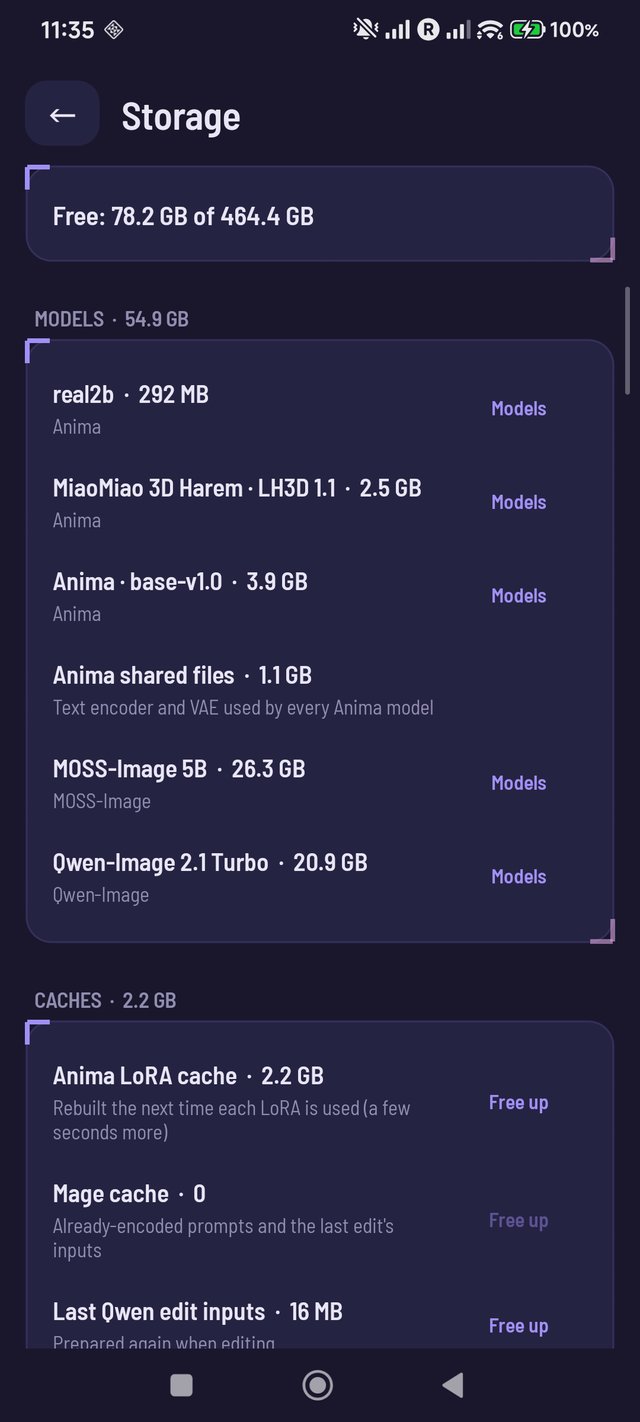
- Settings → Storage: free space, the size of every model, cache and picture folder. Free up caches, empty the trash and the before/after originals (it asks first).
Smaller things
- Qwen LoRAs can be renamed (long-press → Rename), like Anima and MOSS LoRAs.
- Repeated prompts skip the text encoder: a batch, again and the negative prompt reuse it (0.29 s → 0.001 s).
Novedades (español)
Mage-Flow en el Snapdragon 8 Gen 2
- Los kernels de Mage-Flow de ayanoby, portados a Hexagon V73: Mage-Flow-Edit-Turbo ya aparece en el selector y en Modelos (unos 8,7 GB). Una imagen de 512×512 tarda unos 10 s, una de 768×1024 unos 19 s y una edición unos 36 s.
- Las ediciones conservan la foto original: deslizador antes/después, ⇆ en el visor y el lado a lado opcional, como con Qwen. Respetan la forma de la foto.
- Área a editar: pintas lo que quieres cambiar y el resto queda igual, píxel por píxel.
- El botón ✎ bajo una imagen de Mage la edita con Mage (antes siempre cambiaba a Qwen-Image).
Ampliar: Rápido o Detallado
- Detallado usa 4x-UltraSharp en la NPU: unas 10 veces más lento que Rápido (Real-ESRGAN), pero conserva texturas, ojos y líneas finas. ×2 de una imagen de 768×1024 en unos 9 s. La app recuerda tu elección.
Correcciones: detectar caras y manos automáticamente
- En Cara y Manos, un botón las encuentra y pinta la zona por ti (face_yolov8n / hand_yolov8n en la NPU, 6 ms).
Estilo ChatGPT
- Un toque en el panel de LoRA de Anima descarga la LoRA de estilo gpt-image-2 (23 MB, verificada con SHA-256) y añade su activador al prompt; otro toque la quita.
- Qwen y MOSS también funcionan con las LoRAs de estilo GPT-Image de Civitai.
Almacenamiento
- Ajustes → Almacenamiento: espacio libre, tamaño de cada modelo, caché y carpeta de imágenes. Libera cachés, vacía la papelera y los originales de antes/después (pregunta antes).
Detalles
- Las LoRAs de Qwen se pueden renombrar (mantener pulsado → Cambiar nombre).
- Los prompts repetidos no vuelven a pasar por el codificador de texto (0,29 s → 0,001 s).
Instalación: se instala encima de 1.6.0-v73 o posterior sin perder nada.
Non-commercial use only. The models and LoRAs keep their authors' licenses. Real-ESRGAN: BSD-3-Clause. 4x-UltraSharp by Kim2091: CC BY-NC-SA 4.0. face/hand_yolov8n (Bingsu/adetailer): Apache-2.0. Mage-Flow-Edit-Turbo by Microsoft: MIT. License texts in the app (Info → Licenses).
SHA-256 of HexAnima-1.8.0-v73.apk: 41ffcf72ea0710aa0df615616b2d0354d46010ad7b8180c8c5998461eb2b76ee
HexAnima 1.7.1-v73 (Snapdragon 8 Gen 2)
HexAnima is the work of ayanoby: the NPU kernels, the on-device server, the app and the NPU model packs. This fork ports it to the Snapdragon 8 Gen 2. Thank you, ayanoby!
Install: download HexAnima-1.7.1-v73.apk and install it over 1.6.0-v73 or 1.7.0-v73. Your models, LoRAs and pictures are kept.
Coming from 1.5.x-v73 or older? Those were signed with another key: save your pictures (History → ZIP), uninstall, install this one and download the models again.
New in 1.7.1-v73
Corrections → Face
- Face is no longer "coming later". Paint the face (or only the eyes or the mouth) and Qwen-Image redraws only that area: a clean face with symmetric, detailed eyes, keeping the same art style, hair, skin tone and expression. The rest of the picture stays pixel for pixel.
- An optional text adds what you want (for example: blue eyes, a soft smile).
- About a minute per alternative on the Snapdragon 8 Gen 2; needs Qwen-Image installed. Works for anime and for photos. Make a few alternatives and keep the best.
Fixes
- With the new Enlarge and Corrections buttons, the ✕ that hides the shown picture could leave the screen. The buttons under the picture now shrink together when they do not fit, so the ✕ is always visible.
Novedades (español)
Correcciones → Cara
- Cara ya está disponible. Pintas la cara (o solo los ojos o la boca) y Qwen-Image redibuja solo esa zona: una cara limpia, con ojos simétricos y detallados, con el mismo estilo, peinado, tono de piel y expresión. El resto de la imagen queda igual.
- Puedes añadir un texto opcional (por ejemplo «ojos azules, sonrisa suave»).
- Alrededor de un minuto por alternativa; necesita Qwen-Image instalado. Sirve para anime y para fotos.
Arreglos
- La ✕ para quitar la imagen mostrada ya no se sale de la pantalla: los botones se achican cuando no caben.
Instalación: se instala encima de 1.6.0-v73 o 1.7.0-v73 sin perder nada.
Non-commercial use only. The models and LoRAs keep their authors' licenses. Real-ESRGAN: BSD-3-Clause (license text in the app, Info → Licenses).
SHA-256 of HexAnima-1.7.1-v73.apk: 847eee92c63f921881584a5480a3e955551a312e839f48c44aca60aebd8c79dd
HexAnima 1.7.0-v73 (Snapdragon 8 Gen 2)
HexAnima is the work of ayanoby: the NPU kernels, the on-device server, the app and the NPU model packs. This fork ports it to the Snapdragon 8 Gen 2. Thank you, ayanoby!
Install: download HexAnima-1.7.0-v73.apk and install it over 1.6.0-v73. Your models, LoRAs and pictures are kept.
Coming from 1.5.x-v73 or older? Those were signed with another key: save your pictures (History → ZIP), uninstall, install this one and download the models again.
New in 1.7.0-v73
Enlarge on the NPU
- A new ⤢ button under every picture and in the History viewer: ×2 or ×4 with Real-ESRGAN General x4v3 (BSD-3).
- About 2 s for ×2 and 5 s for ×4 on a 512×768 picture, on the NPU, so the CPU does not heat up.
- Lines in hair and eyes come out sharp instead of blurry. It can invent small details; the original is kept and the result is saved as a new picture with the same prompt.
Corrections
- A new screen (sliders button) to fix a finished picture without touching the original.
- Make alternatives from the accepted version, compare them with a slider (double-tap to zoom 3×), keep one or discard it, undo / redo, and save the result as a new picture with the list of corrections.
- Noise: cleans grain and artefacts at the same size, with a strength. About 1.5 s.
- Resolution: ×2 / ×4. About 2–5 s.
- Hands, Details, Other: paint an area and Qwen-Image redraws only that area, with a soft edge; the rest stays pixel for pixel. Hands needs no prompt (it asks for natural hands with five fingers). About a minute per alternative; needs Qwen-Image installed. Perfect anatomy is not guaranteed, so make a few alternatives and keep the best.
- Face is listed as coming later: it needs a face restorer converted to the NPU.
Fixes
- Swiping up or down over the Corrections comparator scrolls the screen (only a sideways drag moves the line).
- The mask editor is shared by img2img, Qwen editing and Corrections.
Novedades (español)
Ampliar en la NPU
- Botón ⤢ nuevo en cada imagen y en el visor del Historial: ×2 o ×4 con Real-ESRGAN.
- Unos 2 s para ×2 y 5 s para ×4 en una imagen de 512×768, en la NPU y sin calentar la CPU.
- El pelo y los ojos salen nítidos. Puede inventar detalles pequeños; la original se conserva y la ampliada se guarda como imagen nueva.
Correcciones
- Pantalla nueva (botón de controles) para arreglar una imagen sin tocar la original.
- Generas alternativas, las comparas con un deslizador (doble toque para acercar 3×), te quedas con una o la descartas, deshaces y rehaces, y guardas el resultado como imagen nueva.
- Ruido: limpia grano y artefactos sin cambiar el tamaño.
- Resolución: ×2 / ×4.
- Manos, Detalles, Otros: pintas una zona y Qwen-Image redibuja solo esa zona; el resto queda igual. Alrededor de un minuto por alternativa; necesita Qwen-Image instalado.
- Cara llegará más adelante.
Instalación: se instala encima de 1.6.0-v73 sin perder nada. Si vienes de 1.5.x-v73, guarda tus imágenes (Historial → ZIP), desinstala, instala esta y vuelve a descargar los modelos.
Non-commercial use only. The models and LoRAs keep their authors' licenses. Real-ESRGAN: BSD-3-Clause (license text in the app, Info → Licenses).
SHA-256 of HexAnima-1.7.0-v73.apk: 135f775d8b076ac23b1bbc46ffc6660e4274a6b7111b3a9676945487c7c122fa
HexAnima 1.6.0-v73 (Snapdragon 8 Gen 2)
HexAnima is the work of ayanoby: the NPU kernels, the on-device server, the app and the NPU model packs. This fork ports it to the Snapdragon 8 Gen 2. Thank you, ayanoby!
Important
1.6.0-v73 is signed with a new key: it does not install over 1.5.x-v73.
- In the old app, open History → ZIP to save your pictures.
- Uninstall HexAnima 1.5.x-v73 (and the original HexAnima, if installed).
- Install
HexAnima-1.6.0-v73.apkand download your models again from the catalog.
Future versions will install over 1.6.0-v73 and keep your data.
New in 1.6.0-v73
Three model families on the Snapdragon 8 Gen 2
- MOSS-Image (base 5B, RealSkin, Harem) on V73: realistic pictures from plain sentences, about 30–45 s at 512×768.
- Qwen-Image 2.1 Turbo on V73: text to image and photo editing with words, about 45–55 s.
Qwen photo editing
- The edit keeps the photo's shape (portrait, landscape or square). A switch uses the picked size instead.
- Area to edit limits the change to a painted zone with soft edges. High fidelity keeps more detail.
- A before/after slider compares the result and can save both side by side.
- Up to 3 reference pictures, each one its own input: "the character of image 1 wearing the outfit of image 2", "the girls from image 1 and image 2 hug under cherry trees" (about 70 s with two).
LoRAs
- One LoRA panel for every family: Library, Import and Civitai.
- Qwen LoRAs (.safetensors, also from Civitai) are converted on the phone in a few seconds. Set the strength with the slider or type it.
- MOSS LoKr: full 4×4 LoKr adapters are baked into a copy of the weights (about 20 s, only the last one kept).
- Categories (character, clothing, pose, style, concept, background, object) in the libraries and the Civitai search.
- Long-press a LoRA to edit its trigger words, add them to the prompt, change its category or delete it.
Civitai
- Search for Anima, MOSS and Qwen. A ✓ Downloaded mark shows what you already have.
Interface
- Load model / Free model sits right under the model picker.
- The negative prompt sits right under the prompt, and steps, CFG and sampler come right after it.
- The size and seed fold into an Image section.
- Your own wallpaper (from upstream 1.6.0): pick a picture, place it, and set the block transparency and dimming.
- Themed dialogs and menu. A new Welcome screen presents the three families.
- Complete Spanish translation. The build fails if a string is missing.
Fixes
- Civitai search could list the results twice.
- The LoRA check text now follows the app language.
- The catalog no longer calls the 20-step base models "fast".
- Mage, which does not run on V73 yet, is no longer offered for download.
Not yet: Mage-Flow on V73 (see docs/MAGE_V73_PORT.md). Long thermal runs of MOSS and Qwen have not been measured.
Novedades (español)
Important
Esta versión está firmada con una clave nueva y no se instala encima de 1.5.x-v73.
Guarda tus imágenes (Historial → ZIP), desinstala la versión anterior, instala esta y vuelve a descargar los modelos. Las próximas versiones ya se instalarán encima sin perder nada.
Modelos
- MOSS-Image y Qwen-Image 2.1 Turbo funcionan en el Snapdragon 8 Gen 2.
- Qwen puede editar tus fotos con palabras:
- La edición conserva la forma de la foto, y puedes limitarla a una zona pintada.
- Un deslizador compara el antes y el después.
- Admite hasta 3 imágenes de referencia.
LoRAs
- Un solo panel de LoRA para todas las familias.
- Las LoRAs de Qwen se convierten en el teléfono.
- MOSS acepta LoKr.
- Las LoRAs tienen categorías, y con una pulsación larga editas sus activadoras.
Civitai
- Marca con un ✓ lo que ya tienes descargado.
Interfaz
- «Cargar modelo» queda bajo el selector.
- El prompt negativo va bajo el prompt, y el muestreo justo después.
- Puedes poner un fondo de pantalla propio.
- La traducción al español está completa.
Arreglos
- La búsqueda de Civitai ya no repite resultados.
- El texto de compatibilidad de las LoRAs sigue el idioma de la app.
- El catálogo ya no llama «rápidos» a los modelos base.
- Mage ya no se ofrece para descargar mientras no funcione en V73.
Non-commercial use only. The models and LoRAs keep their authors' licenses.
SHA-256 of HexAnima-1.6.0-v73.apk: 850a97fa1344f1ac1ae19518a272ab8e6436c9d2afd8f1478c2f8c24e529575f
HexAnima 1.5.2-v73 (Snapdragon 8 Gen 2)
HexAnima is the work of ayanoby: the NPU kernels, the on-device server, the app and the NPU model packs. This fork ports it to the Snapdragon 8 Gen 2. Thank you, ayanoby!
Install: download HexAnima-1.5.2-v73.apk and install it over 1.5.x. Your models, LoRAs and pictures are kept. If the original HexAnima is installed, uninstall it first (different signing keys).
New in 1.5.2-v73
- CFG only at the start (Sampling, shown when CFG is above 1; off by default):
-
Choices: every step (normal), the first 80 % or the first 70 % of the steps.
-
How it saves time: the later steps skip the negative-prompt pass. They only refine details, so the picture stays nearly the same.
-
Tested: Anima base, 20 steps, CFG 3.5, ER-SDE, 3 seeds, a close-up with both hands open and the face:
CFG on Time Result 100 % of the steps ~86 s reference 80 % ~77 s (−10 %) no visible change 70 % ~74 s (−14 %) minimal change 60 % ~70 s (−19 %) small details lost, so it is not offered No extra fingers or deformed eyes or faces at any of these settings.
-
- Comparison grid: a 4th mode, "CFG on 100 · 80 · 70 · 60 % of the steps", to check it with your own prompts and LoRAs.
- Fix: the live preview every 2nd / 4th step on long runs now works. The 1.5.0 and 1.5.1 builds updated every step.
Novedades (español)
- CFG solo al principio (Muestreo, apagado por defecto): CFG en el primer 80 % o 70 % de los pasos, 10–14 % más rápido. En las pruebas con manos y caras no salió ningún defecto.
- Cuadrícula de comparación: compara 100 · 80 · 70 · 60 %.
- Arreglo: la vista previa cada 2 o 4 pasos ya funciona.
Non-commercial use only. The models and LoRAs keep their authors' licenses.