Repository navigation
Releases
v0.5.2 — 完整区域截图与历史图片恢复

修复“修改前/修改后图片无法显示”和框选截图不完整的问题。
- HTML 横线分隔注释不再破坏快照转换。
- 框选保留完整的对应元素;预览变窄、文字换行、元素移动后,截图跟随元素重新定位。
- 预览重新加载时,失败或旧版的修改后图片自动更新一次,持续失败不会循环重试。
- 缺少修改前图片时,可从真实的历史 HTML 恢复;会核对原文字与元素,保留时间并标注恢复来源。恢复时禁用页面脚本与联网。
- 图片不完整时明确显示原因。
安装包内置依赖和接入脚本。安装后重启 DSH;无需修改网页源码。既有意见、备份和原始时间保持兼容。
验证:严格 TypeScript、11 项单元测试、10 项原生预览浏览器场景;GitHub CI 覆盖 Windows 与 Ubuntu 的完整套件。实际模型发送不属于这些测试。
v0.5.0 · 原生预览标注与自动对比
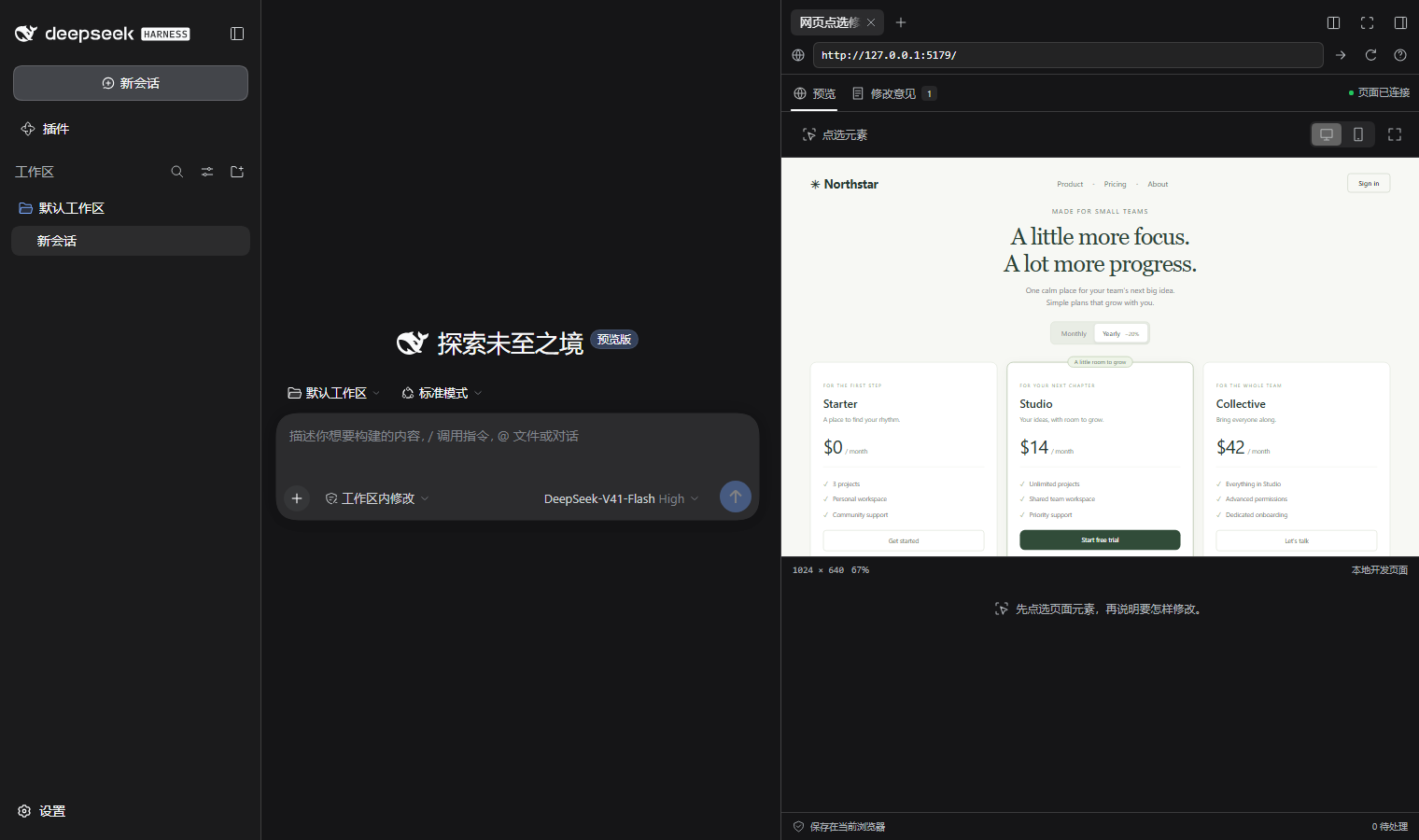
在右侧预览里标注并自动对比
- 入口移至 HTML 预览和桌面浏览器工具栏,移除会话标题栏按钮。
- 元素、箭头、自由框选三种方式。
- 一键保存意见并加入 DSH 输入框;发送后,页面更新时自动展示前后效果。
- 修复重新加载后的选中状态、手动获取结果、删除元素和视口变化等问题。
- 安装包内置原生预览接入脚本与依赖;保留旧版记录、批量反馈和备份恢复。
安装说明与真实 DSH 截图见 中文文档。完整验证范围见 验证记录。
意见插入输入框后仍由用户发送;“确认结果”由用户判断。DSH Web 已验证真实文件更新、输入框插入与自动对比。2026-10-01 另在 Windows 桌面端安装并重启了最终版本,确认会话顶部入口已移除、原生 HTML 旧意见自动获得正确的修改后画面;真实 Electron 浏览器成功接入无 Vite 插件的本地页面,显示三种标注方式并完成元素选取。桌面浏览器的完整自动对比由方法契约测试覆盖,未把它写成 Electron 实机端到端测试。
下载 dsh-visual-edit-0.5.0.tgz。SHA256SUMS.txt 用于核对安装包。
验证:11 项单元检查、20 个 Chromium 场景通过;Windows 与 Ubuntu CI 通过。客户端 225,351 字节,低于 DSH 的 256 KiB 限制。
v0.3.0 · Batch feedback and backup restoration
Collect several changes on a local webpage, combine their requests in the native DSH composer, and restore feedback from a backup.
What's new
- Save and pick another: keep the live page state while recording several elements.
- Batch feedback: select unconfirmed notes and add or copy one combined prompt. Each request retains its source location, and the existing composer draft stays intact. Submission remains in DSH's native composer.
- Restore backups: preview v1 JSON exports, retain notes and snapshots, and skip existing IDs. Previously queued notes become drafts in the destination session.
- Native appearance: compact controls follow DSH fonts and light/dark themes. Batch mode emphasizes its primary action; restoration uses a focused preview dialog.
- Conflict and failure handling: selected revisions stay fixed across background updates; queued statuses and imported notes are written atomically. Failed imports report the reason inside the dialog.
本次更新
- 保存后继续点选下一个元素,集中记录页面上的多个问题。
- 勾选多条意见,合并加入 DSH 原生输入框,保留已有草稿和各条源码位置。
- 支持恢复旧版 JSON 备份;导入前查看新增和重复数量,保留前后快照。
- 批量操作按需展开,沿用 DSH 的字体、颜色和控件样式。
- 多窗口修改发生冲突时保留已选版本并提示重新选择;恢复失败不留下部分导入记录。
Install or upgrade
dsh plugin --profile web add https://github.com/Han-1413141/dsh-visual-edit/releases/download/v0.3.0/dsh-visual-edit-0.3.0.tgzIn the Vite project:
npm install -D https://github.com/Han-1413141/dsh-visual-edit/releases/download/v0.3.0/dsh-visual-edit-0.3.0.tgzRestart DSH Web and Vite, then refresh the browser. Existing notes remain available at the same DSH origin and browser. Version 0.3 retains the existing storage and bridge formats. Distribution is through this GitHub tarball.
Validation
Eight unit tests and eleven Chromium scenarios cover the workflow, storage conflicts, backup validation and failures. Type checking, all builds, and the production-output check pass. GitHub Actions runs these checks on Windows and Ubuntu.
An isolated DSH 0.2.0-rc.2 Web run verified continuous picking, combined native composer insertion, draft preservation, restoration of a 0.2 backup, duplicate handling, both locales and host themes, with zero page errors. The client bundle is 86,293 bytes (limit: 262,144).
Verified web project scope: Vite 6.4 + React. Live model submission and the Electron desktop shell were not tested. See the validation record, English guide, and 中文说明.
The attached SHA256SUMS.txt records the installable tarball's SHA-256 checksum.
v0.2.0 · Native DSH UI and smoother reviews
更贴近 DSH 的界面
Visual Edit 现在沿用 DSH 的字体、中性色、圆角和紧凑控件,随宿主的浅色、深色设置切换。去掉独立品牌抬头,把预览与修改意见分开,切换时保留已打开的页面。
- 意见搜索、待处理/已确认筛选,支持窄侧栏。
- 实际大小预览、快照放大和叠加比较。
- 复制源码位置和接入配置,键盘保存,条目内确认删除。
- 多窗口更新时保留未保存文字,阻止覆盖新版本。
- 修复隐藏预览导致图片生成暂停的问题;获取结果时短暂显示预览,再返回意见页。
- 更新中英文说明、升级步骤和真实 DSH 截图。
Install / 安装与升级
DSH Web 侧栏:
dsh plugin --profile web add https://github.com/Han-1413141/dsh-visual-edit/releases/download/v0.2.0/dsh-visual-edit-0.2.0.tgz在网页项目目录安装 Vite 接入:
npm install -D https://github.com/Han-1413141/dsh-visual-edit/releases/download/v0.2.0/dsh-visual-edit-0.2.0.tgz升级后重启 DSH 和 Vite。0.2.0 沿用 0.1.0 的本地存储格式,同一浏览器、DSH 地址和会话中的意见与图片继续保留。
Changes
- DSH theme tokens and compact controls, with separate Preview and Feedback views.
- Search, status filters, actual-size preview, enlarged snapshots, and an overlay slider.
- Inline deletion, source/config copying, save shortcuts, and explicit conflict recovery.
- Unsaved edits retain their starting revision when another tab broadcasts an update. Concurrent actions are guarded; successful composer insertion and a failed status write are reported separately.
- Capture reveals the live preview temporarily to avoid hidden-frame animation throttling.
Validation
Type checking, four unit tests, seven Chromium workflow scenarios, the production-output check, and Windows/Ubuntu CI passed. Native DSH 0.2.0-rc.2 Web was verified with package installation, English/Chinese, explicit light/dark settings, existing note restoration, real composer insertion, actual source-edit HMR, overlay comparison, and confirmation. The native page reported no runtime errors.
The native source edit was made by the test driver. Live model execution, other DSH versions, and Electron's desktop shell were not part of this validation. The download includes SHA256SUMS.txt for package verification.
v0.1.0 — Point, explain, compare
Point at a webpage, give your DeepSeek Harness agent feedback, and compare the result.
DSH Visual Edit v0.1.0 provides a native sidebar for local Vite + React projects:
- Element selection with JSX source file, line and column.
- Feedback insertion into the current DSH composer, preserving existing draft text.
- Local before/after DOM snapshots and measured text/style changes.
- Explicit confirmation, session-scoped storage, conflict detection, and JSON export.
- English and Chinese UI, runnable demo, setup guide, and troubleshooting.
Install
dsh plugin --profile web add https://github.com/Han-1413141/dsh-visual-edit/releases/download/v0.1.0/dsh-visual-edit-0.1.0.tgzThe same package must be installed as a development dependency in your Vite project, followed by visualEdit() in its Vite configuration. Follow the English guide or 中文说明.
Verified scope
DSH 0.2.0-rc.2 Web, Vite 6.4.3, React 18.3.1, Node 24.19, and Chromium. The real DSH check covered package installation, native sidebar/composer integration, actual source-file hot reload, and before/after confirmation. The code edit in that check was performed by the test driver; no live-model performance claim is made.
DOM snapshots are not pixel-perfect browser screenshots. Electron, other DSH versions, remote websites, and other frameworks are outside this release's verified scope. The package declares the tested DSH peer requirement.
中文
首版已完成“点选网页元素 → 填写意见 → 加入 DSH 当前对话 → 获取修改前后快照 → 手动确认”。包含中英文文档、真实 DSH 截图、演示项目和自动检查。
通过下方 .tgz 安装;SHA256SUMS.txt 可用于核对文件。源代码与文档采用 MIT 协议。