Repository navigation
Releases
USB-IP-Bridge v0.2.0

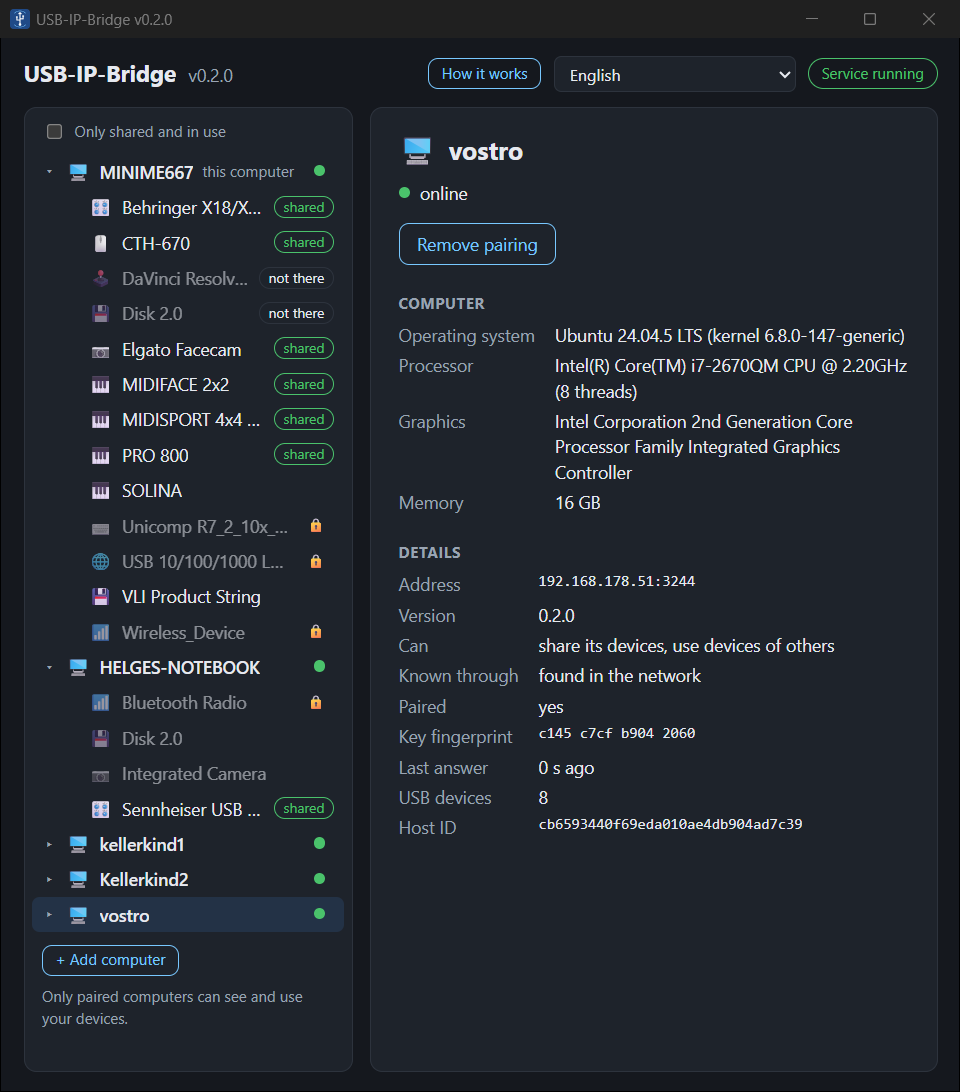
Every computer can now share its USB devices and use those of others – between Windows and Linux in all directions: Windows → Linux, Linux → Windows, Windows → Windows, Linux → Linux.
Install
- Windows 10/11 (x64): run
USB-IP-Bridge_0.2.0_x64-setup.exe. It installs the app, the background service, firewall rules for private networks and – if missing – the signed USB drivers of usbipd-win (to share devices) and usbip-win2 (to use devices of other computers). - Linux (Debian/Ubuntu, x64):
sudo apt install ./USB-IP-Bridge_0.2.0_amd64.deb
Updating from 0.1.1 keeps the pairings and shares. New here? Open the app on both computers, pair them once with the 6-digit code, and share or use devices. See the README (deutsch).
What's new
- Linux shares its devices. A shared device stays usable locally until another computer takes it, and gets its normal driver back afterwards. Drives are unmounted first. A device a program is using (recording, playback, video, open files) is not taken away – the app says which program holds it.
- Windows uses devices of other computers through usbip-win2: use here, give back, give to, take back. Drives are ejected safely before they go back; while a file is open the device stays and the message names the drive. An audio device from another computer does not become the Windows default device.
usbipb panel: the app's functions in the terminal (plain ASCII, also over SSH).- The app opens where its window was last time.
- Shared devices keep their name while they are not plugged in.
- Fixes: "in use by" shows the paired computer's name, quieter logs while a device waits, clearer "busy" messages, the Linux app asks to reload audio only when needed, the Windows installer copes with the app being open during update and uninstall.
Known limitations
- Windows using an audio interface of another computer: microphones, headsets and USB sound adapters work; a high-speed interface recording and playing many channels at once (like the XR18) is not proven yet.
- A camera on an older Linux computer (EHCI controller with small DMA buffers) cannot be used by Windows; between Linux computers it works.
- The USB/IP data itself is not encrypted; only paired computers are accepted. Use it in your own network or over a VPN.
- Windows: the network has to be set to private.
Full list of changes: CHANGELOG.md. Checksums: SHA256SUMS.
USB-IP-Bridge v0.1.1
First public version of USB-IP-Bridge: use USB devices of another computer over the network as if they were plugged in locally – for example the audio interface of a Windows PC in a DAW on a Linux PC.
Install
- Windows 10/11 (x64): run
USB-IP-Bridge_0.1.1_x64-setup.exe. It installs the app, the background service, firewall rules for private networks and – if missing – usbipd-win for its signed USB drivers. - Linux (Debian/Ubuntu, x64):
sudo apt install ./USB-IP-Bridge_0.1.1_amd64.deb
Then open the app on both computers, pair them once with the 6-digit code, and share or use devices. See the README (deutsch).
What's in it
- Windows shares its USB devices, Linux uses them – audio and MIDI interfaces (isochronous, full duplex), cameras (USB 3), tablets, synthesizers, drives
- Computers find each other in the local network; others can be added by name or address
- Pairing with a 6-digit code (SPAKE2) and an encrypted control channel (Noise); only paired computers see and use devices
- Share, give to, take back, use here, give back – in the app or on the command line (
usbipb), andusbipb run --device D -- PROGRAMto use a device only while a program runs - Device profiles with warnings; keyboards, mice, network and Bluetooth adapters are locked automatically, any device can be locked or unlocked
- Programs that hold a device (e.g. a vendor control panel) can be closed from the app and are started again afterwards
- Linux: PipeWire/WirePlumber rule so attached audio devices never become the default device
- English and German
Known limitations
- Windows can only share, Linux can only use devices (other directions are planned).
- The USB/IP data itself is not encrypted; only paired computers are accepted. Use it in your own network or over a VPN.
- Windows: the network has to be set to private.
Full list of changes: CHANGELOG.md. Checksums: SHA256SUMS.