Repository navigation

Peakmeter for FM-DX-Webserver
The plugin displays the current audio level. The box provided also integrates the SignalMeterSmall Plugin.
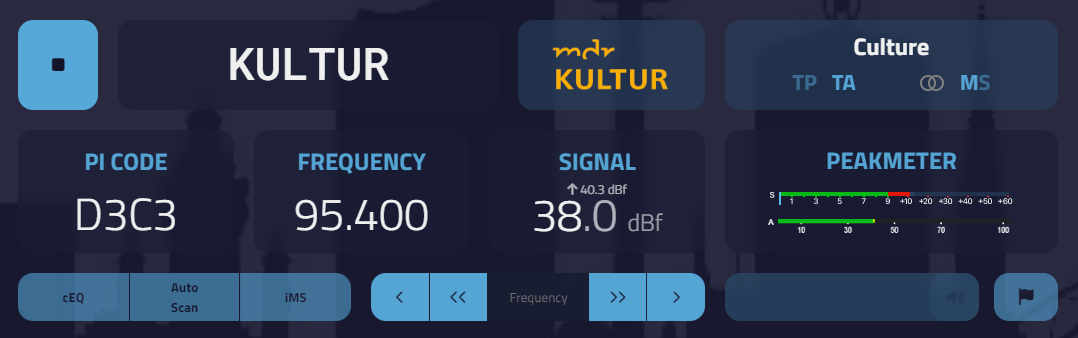
v1.1a
- Improved look: adjusted font size for PI code, frequency and signal strength
Installation notes:
- Download the last repository as a zip
- Unpack the PeakMeterPlugin.js and the PeakMeter folder with the peakmeter.js into the web server plugins folder (..fm-dx-webserver-main\plugins)
- Restart the server
- Activate the plugin it in the settings
- Calibrate the volume with volume rotary control (only Receiver with display)
Important notes:
- You can download an adapted version of the SignalMeterSmall for correct display in the peak meter box here: https://github.com/AmateurAudioDude/FM-DX-Webserver-Plugin-S-Meter
- If you use the volume slider to recalibrate the volume, you should save the determined reference volume in the web server settings under Tuner as the starting volume. This will restore this setting for all users when the website is accessed.
Configuration options:
The following variables can be changed in the header of the script:
  volumeSliderValue               // Set the value 0.1-1.0 to reduce the input volume/sensitivity (default: 1.0)
  volumeSliderEnable              // set to 'true' to activate the manuel volume control (default: false)
  ConsoleDebug                    // set to 'true' to activate console information for debugging
  minVolumeThreshold = 0.5        // Threshold for audio display activation
  riseRate = 1.93                 // Rate of increase (the higher, the faster)
  amplificationFactor = 0.21      // Amplification factor
  bassReductionFactor = -10       // Reduction of bass frequencies (in dB)
  highPassCutoffFrequency = 1000  // Cutoff frequency for high-pass filter (in Hz)
History:
v1.1
- Set the value 0.1-1.0 to reduce the input volume/sensitivity into the header of the script (useful for Receivers with volume control)
- Low-pass filter (low-shelf) and high-pass filter (high-pass) integrated
- Volume display algorithm revised
v1.0a
- Activation of the volume control slider built into the header of the script
v1.0
- Make the boxes for PI code, frequency and signal smaller
- Show audiopeakmeter in a new box with space to display the SignalMeterSmall (see important notes!)
- set volume to 100% an disable volume slider