Repository navigation
TeXDeck v0.7.0: Learn — study notes, questions and mock exams

TeXDeck now helps you study a PDF as well as present it. The app has two halves, Learn and Presentation, switched from the top bar.
Study notes, linked to the source
Learn → Study notes turns one or more PDFs, or pasted text, into a few pages of boxed notes typeset in LaTeX (PDF, TeX and an Overleaf zip). The notebook shows the source on the left and the notes in the middle, with several documents as tabs.
- Every heading records the source pages it came from. Double-click a part of the notes and the source scrolls to its page; double-click a source page and the notes scroll to the part covering it.
- Ask AI: select text on either side, or drag an Area box around a figure or table, and ask. The model gets the notes, the source text and images of the quoted pages, answers with page numbers and rendered maths, and takes follow-ups.
- Each question leaves a numbered mark on the page to reopen it. Open several question cards at once and drag them into any half-column. New session starts a clean conversation without losing earlier marks.
- Add to notes turns an answer into an edit request for the right box of the notes.
- A progress rail marks parts as learnt and shades them green, in the notes and on the source pages they cover.
Mock exams
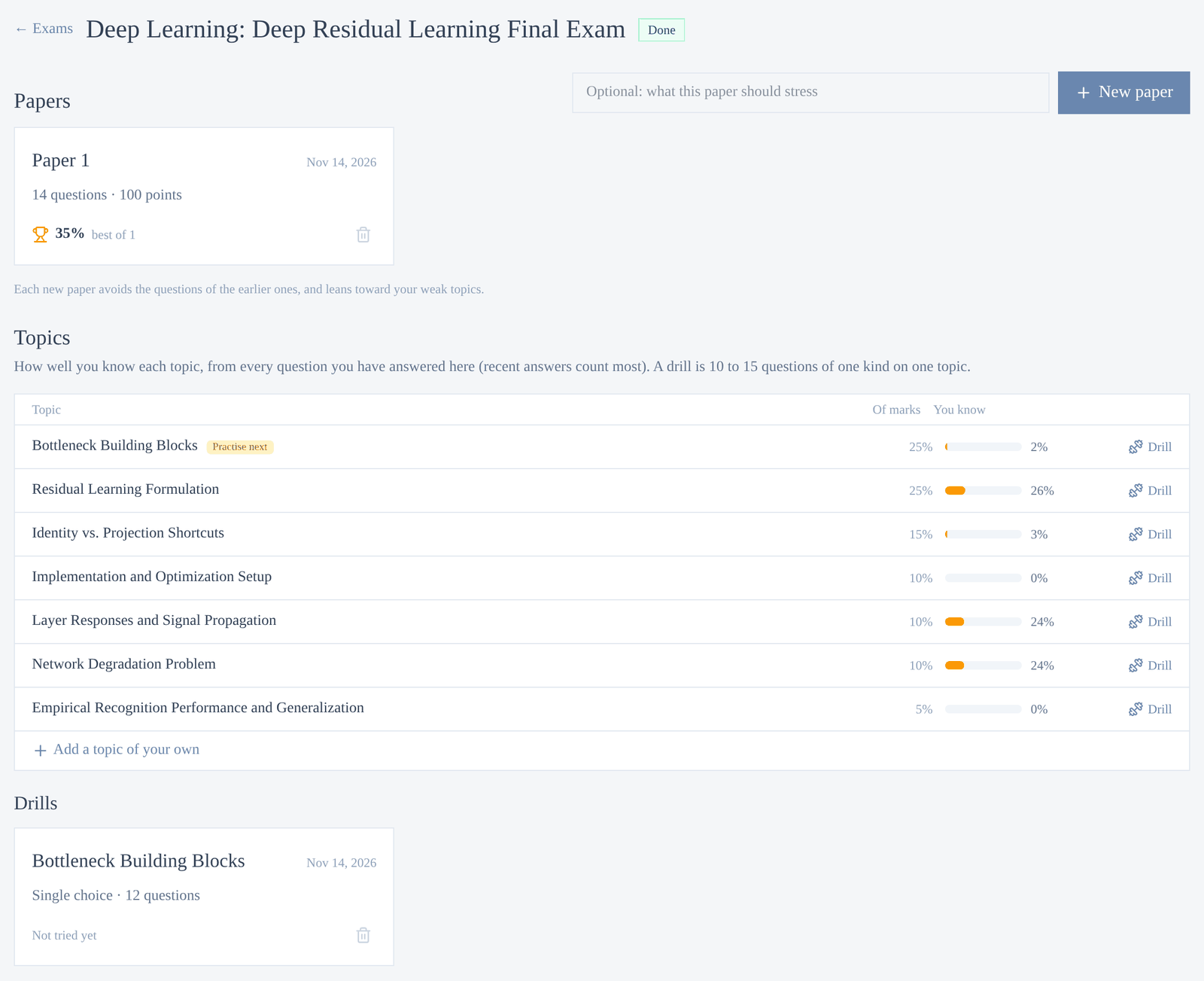
Learn → Practice exam builds an exam from your material plus whatever you know about the real one: a description, a table of question types, the time allowed, and up to ten past papers (PDF or photos).
- The model drafts an exam profile (sections, topics with their share of the marks, question style, marking habits) that you can edit.
- New paper writes a full mock exam with an answer key, typeset in LaTeX, avoiding earlier papers' questions. Add an optional focus for a paper.
- Practise in the browser one question at a time. Choice, true/false and fill-in questions are marked on the spot; short answers and calculations are marked by the model, or by you against the model answer.
- Per-topic mastery from every answer, with recent answers weighing most; the weakest high-value topic is flagged Practise next, and later papers lean toward weak topics.
- Drill: 10 to 15 questions of one type on one topic, easy to hard. Add topics of your own with example questions.
Presentation
- While an edited deck recompiles, the current slide stays on screen with a status badge, and the result is shown only once the job has really finished (edits with attached images could show the old PDF before).
- Speaker notes in the edit panel are a fixed four lines that fold out.
- Downloads (PDF, TeX, zip, PPTX) are named after the deck title.
- The model is told not to write disclaimers, hedges, image credits or one-line summary boxes on slides.
- The PDF viewer renders CID fonts such as Fandol correctly.
Server and accounts
- Up to five jobs run at once; TeX engine runs are capped at two.
- Invites → Copy link copies a sign-up link that opens the registration form with the code filled in.
License
From this release TeXDeck is source-available under the PolyForm Noncommercial License 1.0.0: free for personal, educational and other noncommercial use; commercial use needs a license from the author. v0.6.1 and earlier remain under MIT.
Download
macOS (Apple silicon), Windows and Linux builds are below. They bundle their own TeX engine. The builds are unsigned: on macOS right-click the app and choose Open; on Windows choose More info, then Run anyway.
中文说明
TeXDeck 现在不光能把 PDF 做成幻灯片,也能帮你学懂它、备考它。顶栏分成 Learn 和 Presentation 两部分。
学习笔记:一份或多份 PDF(或粘贴的文字)生成几页带框的 LaTeX 笔记,可导出 PDF、TeX、Overleaf zip。笔记本左边原文、中间笔记,多份材料用标签页切换。每个标题记着出处页码,双击笔记跳到原文对应页,双击原文跳到讲它的笔记。在任意一边选中文字或用 Area 框住图表即可提问,回答带页码和公式,可以追问;每个问题在页面上留编号,可同时打开多张问题卡片并拖到任意半栏;New session 开新对话而不丢旧批注;Add to notes 把回答变成对笔记的修改请求。左侧进度栏标记已学部分,笔记和对应原文页罩成浅绿色。
模拟考试:用材料加上你对真实考试的了解(文字描述、题型表、时长、最多十份往年题,PDF 或照片)新建考试。模型起草考试画像(结构、考点及分值占比、出题风格、评分习惯),可修改。New paper 出一整张 LaTeX 排版的模拟卷和答案,避开之前的题,可以指定侧重。浏览器里逐题练习:客观题当场判,主观题由模型判或对照答案自评。每个考点按作答记录计算掌握度,最近的作答权重最高,分值高又没掌握的考点标为 Practise next,之后的卷子偏向弱项。Drill 针对一个考点出 10 到 15 道同题型、由浅入深的题;也可以自加考点并附例题。
幻灯片:修改后重新编译期间当前页保持显示并带状态标签,任务真正结束才显示结果(以前带图修改可能显示旧 PDF);编辑面板的演讲者备注固定四行、可展开;PDF、TeX、zip、PPTX 下载按标题命名;提示词要求模型不写免责声明、限定语、图片来源和一句话总结框;PDF 查看器能正确显示 Fandol 等 CID 字体。
服务器与账号:最多同时运行五个任务,TeX 引擎同时最多两个;Invites 菜单可以直接复制注册链接,打开即填好邀请码。
许可证:从本版起改为 PolyForm Noncommercial 1.0.0,个人、教学等非商业用途免费,商业用途须取得作者授权;v0.6.1 及以前的版本仍是 MIT。
下载:下方有 macOS(Apple 芯片)、Windows、Linux 安装包,自带 TeX 引擎。安装包未签名:macOS 右键选“打开”,Windows 点“更多信息”再点“仍要运行”。