Repository navigation

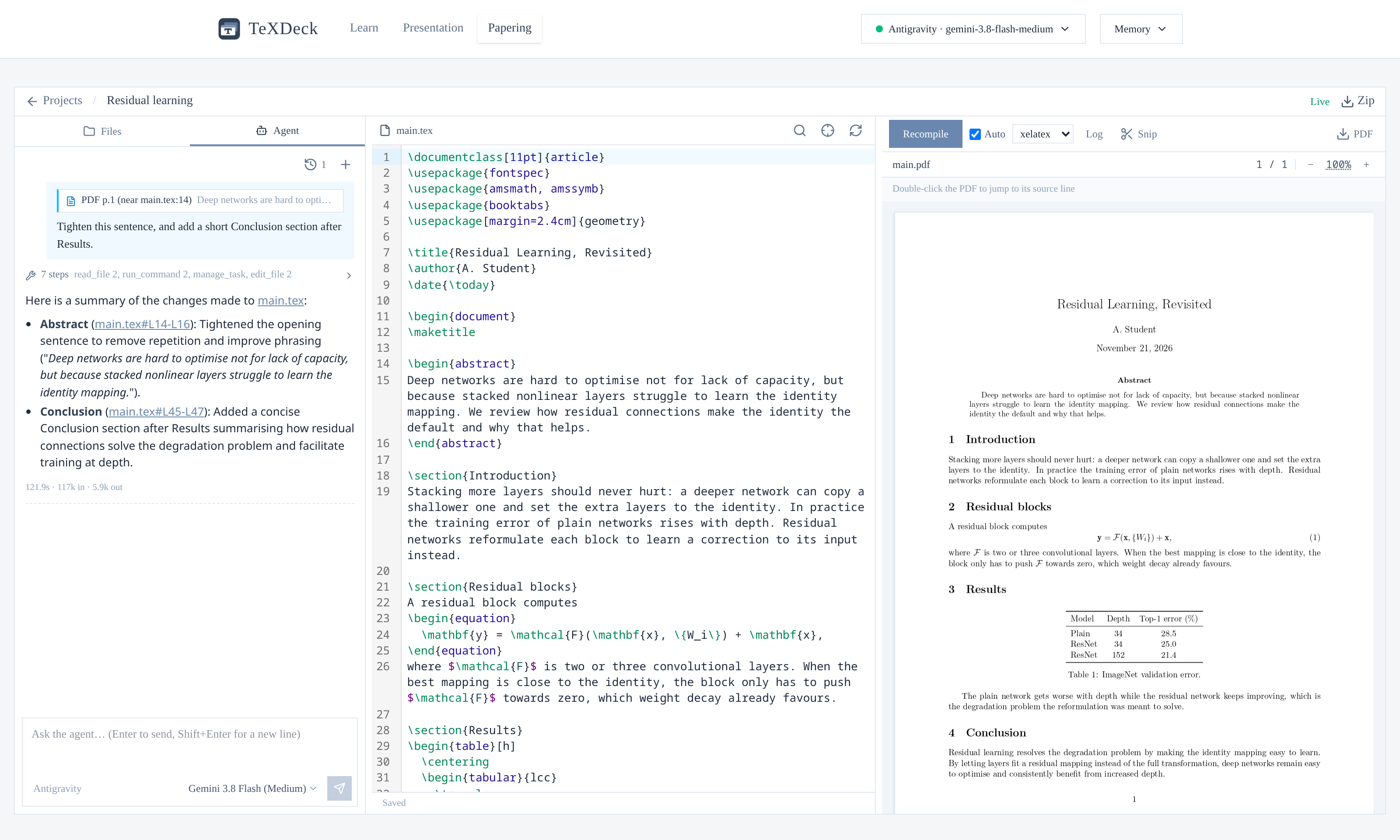
TeXDeck now has a third part, Papering: a LaTeX workspace where a coding agent edits your paper with you.
Papering
- Projects with a file tree, an editor and the PDF side by side. Panes are resizable and become tabs on a narrow screen. Start from a blank article (English or Chinese) or import a zip, for example from Overleaf; download the PDF or the project as a zip.
- The project recompiles shortly after you stop typing. Errors show with their file and line while the last good PDF stays up. Choose pdflatex, xelatex or lualatex when a TeX installation is present.
- SyncTeX both ways: double-click the PDF to jump to the source line, or press the crosshair to go from the cursor to the PDF.
- Agent: Claude Code, Codex, Antigravity, or an API key through Claude Code or Codex, picked per session, with the model picked per message. The agent edits the project's files; the editor shows each change as it lands and the project recompiles when it is done. Codex signs in from the panel with a device code.
- Add to chat: select text in the editor or the PDF and send it with your message as a card that names its source line. Snip sends a region of the PDF as an image.
- Runs of tool calls fold into one line. Sessions keep their history, resume where they left off, and can be deleted from the clock menu.
Where the agent runs
On a Linux server, compiles run in bubblewrap with no network and no shell escape, and the agent runs in bubblewrap behind pasta, seeing only the project and its own sign-in, with no route to private addresses.
The desktop app has no such sandbox. It compiles with your TeX installation (latexmk) if you have one, else with its bundled Tectonic, and starts the agent CLI on your computer, as you would in a terminal. The agent is told to stay in the project folder, but nothing enforces that. Antigravity is offered only on a Linux server. On macOS the app now reads your shell's PATH, so MacTeX, Homebrew and npm installs are found when it is started from Finder.
Other changes
- SyncTeX is read by TeXDeck itself, so the desktop builds need no
synctexprogram. - The Docker image installs latexmk and the recommended TeX fonts (the Navy template could not be built in it before).
/healthcounts running agent runs, so a deploy waits for them.
Download
macOS (Apple silicon), Windows and Linux builds are below. They bundle their own TeX engine. The builds are unsigned: on macOS right-click the app and choose Open; on Windows choose More info, then Run anyway. For the agent, install Claude Code or Codex on the same computer first.
中文说明
TeXDeck 新增第三部分 Papering:一个由编程 agent 陪你改论文的 LaTeX 工作区。
工作区:左边文件,中间编辑器,右边 PDF,三栏可拖宽,窄屏变成标签页。可以从空白文章(中文或英文)开始,也可以导入 zip(比如从 Overleaf 下载的项目),PDF 和项目 zip 都能下载。停止输入片刻后自动重新编译,出错时显示文件和行号,PDF 保留上一次成功的版本;装了 TeX 时可以选 pdflatex、xelatex 或 lualatex。SyncTeX 双向跳转:双击 PDF 跳到源码行,点准星从光标跳到 PDF。
Agent:Claude Code、Codex、Antigravity,或经 Claude Code、Codex 调用的 API key,每个会话选一种,每条消息可以换模型。agent 直接改项目文件,编辑器实时显示改动,结束后自动重新编译。Codex 在面板里用设备码登录。在编辑器或 PDF 里选中文字后点 Add to chat,这段内容会以注明源码行的卡片随消息发出;Snip 把 PDF 上框选的区域作为图片发出。连续的工具调用折叠成一行;会话保留历史、可以接着上次继续,也可以在时钟菜单里删除。
运行环境:在 Linux 服务器上,编译在 bubblewrap 里进行,断网且禁止 shell escape;agent 运行在 bubblewrap 加 pasta 里,只能看到项目和它自己的登录,连不到内网地址。桌面版没有这层沙箱:装了 TeX(latexmk)就用你的 TeX,没装就用自带的 Tectonic,agent 命令行直接在你的电脑上启动,和你在终端里运行它一样;TeXDeck 会要求它只在项目目录里活动,但无法强制。Antigravity 只在 Linux 服务器上提供。macOS 版从 Finder 启动时会读取你 shell 里的 PATH,MacTeX、Homebrew 和 npm 装的命令都能找到。
其他:SyncTeX 由 TeXDeck 自己解析,桌面版不再需要 synctex 程序;Docker 镜像补装了 latexmk 和常用 TeX 字体(此前镜像里 Navy 模板编译不过);/health 把正在运行的 agent 计入任务数,部署会等它们结束。
下载:下方有 macOS(Apple 芯片)、Windows、Linux 安装包,自带 TeX 引擎。安装包未签名:macOS 右键选“打开”,Windows 点“更多信息”再点“仍要运行”。要用 agent,请先在同一台电脑上装好 Claude Code 或 Codex。