Repository navigation
Releases
MF-1 1.12.0

35a527b  IanButterworth
Ian Butterworth
Claude:
MF-1 1.12.0 adds Rhymes, nursery rhymes for small children to learn on the keys, in the app and on the FM-1 itself.
Rhymes
View › Rhymes Mode turns MF-1 into a first keyboard for children of about four.
- The next key lights up, blinking, and the screen shows the next notes as coloured beads with the words under them and a little keyboard of the song's keys.
- A right key plays the next note and moves the song's picture on. A wrong key is silent: the song waits, and the right key lights steadily for a moment.
- Three levels: Magic (any key plays the next note), Guide (press the lit key) and Solo (the light helps only when the child waits).
- Rewards: a finished song earns up to three stars, with confetti, a light show across the keys and a fanfare, then plays itself back in full with a bass and chords under the tune.
- Eleven traditional songs, from Hot Cross Buns (three notes) to Happy Birthday, each with its own picture and sound: buns come out of the oven, the lamb walks to school, a star lights for every note of Twinkle, Twinkle.
- LISTEN plays a song through first, and LINE moves to a line to practise it. Every sound is made of DX7 voices and the FM-1's effects.
See docs/rhymes.md for every control.
The modes firmware
Rhymes is the seventh mode in the FM-1 firmware: hold a piano key while switching on, let go, then press E. Its songs, game, sounds and pictures are the same code as the app's. It has been installed on one FM-1 and starts there. The chooser now fits seven modes on the screen; before, a seventh fell below it.
Install
MF-1 1.11.0 offers this update itself (MF-1 › Check for Updates…). Otherwise open the DMG and drag MF-1 to Applications. It is a universal app for macOS 14 or later.
Written with Claude Code (Claude Opus 5.5).
MF-1 1.11.0
42b7029
IanButterworth
Ian Butterworth
Claude:
MF-1 1.11.0 adds Arpeggi, two arpeggiators playing one pool of notes, in the app and on the FM-1 itself.
Arpeggi
View › Arpeggi Mode turns MF-1 into a pair of arpeggiators, A and B, playing the notes you give them.
- Filling the pool. Hold plays the keys held down, Latch keeps a chord after you let go, and Ring has 1 to 8 slots where each new key replaces the oldest, so a loop changes one note at a time.
- Each lane has a shape (Up, Down, Bounce, Order, Converge, Thumb, Spiral, Walk, Shuffle, Chord, Strum), a rate down to 1/32 with dotted steps, triplets, fives and sevens, a rhythm (Euclidean patterns, Ratchet, Gallop, Skip, and Fall, a bouncing ball) and a gate up to 200%.
- The lanes meet in one of six ways: side by side, Hocket (one line shared between them), Answer (a bar each), Canon, Mirror, or Trade (swapping shapes every two bars).
- Eight scenes, from the bone-dry Clockwork and Gears to the washes of Nebula and Falling Light, each with its own sound, room and echo. All of it uses only DX7 voices and the FM-1's effects.
- The screen is a night sky: every note is a streak at its pitch, amber for A and blue for B.
See docs/arpeggi.md for every control.
The modes firmware
Arpeggi is the sixth mode in the FM-1 firmware: hold D while switching on. Its lanes are the same code as the app's and play the same notes. It has been installed on one FM-1 and starts there; its CPU load hasn't been measured yet.
Install
MF-1 1.10.0 offers this update itself (MF-1 › Check for Updates…). Otherwise open the DMG and drag MF-1 to Applications. It is a universal app for macOS 14 or later.
Written with Claude Code (Claude Opus 5.5).
MF-1 1.10.0
4047af9
IanButterworth
Ian Butterworth
Claude:
MF-1 1.10.0 adds Piano, a grand piano made from measurements of a real one, in the app and on the FM-1 itself.
Piano
View › Piano Mode turns MF-1 into a grand piano. It isn't built from DX7 voices or samples. Every third key of a Steinway model B was measured at three dynamics, partial by partial, and Piano plays those measurements back with an engine of its own.
- Each note sounds its measured partials, slightly sharp of whole multiples as a stiff string's are, and each dies away fast and then slowly, with the slow beat of a key's two or three strings.
- The partials grow in over the few milliseconds the hammer is on the string, and the knock of the hammer rings a soundboard.
- Softer notes are darker as well as quieter. The dampers and the sustain pedal behave as on a grand.
- Eight voicings of the one piano: the concert grand as measured, brighter and mellower hammers, a felt piano, a dry studio, a concert hall, a honky-tonk and an old upright.
- TOUCH sets how hard the panel's keys play. Notes from a MIDI keyboard play at their own velocity, and its sustain pedal works.
- The screen shows the open grand from above, its strings glowing as they ring.
See docs/piano.md for how it was measured and how close it comes.
The modes firmware
Piano is the fifth mode in the FM-1 firmware: hold C while switching on. It plays the same samples as the app. On the FM-1's own speaker the deepest bass is filtered out so it can't overdrive the speaker; with headphones in, the full bass comes back. Piano has run on one FM-1. Its CPU load there hasn't been measured yet, so if a big pedalled chord is too much, it drops its quietest partials rather than breaking up.
Install
MF-1 1.9.0 offers this update itself (MF-1 › Check for Updates…). Otherwise open the DMG and drag MF-1 to Applications. It is a universal app for macOS 14 or later.
Written with Claude Code (Claude Opus 5.5).
MF-1 1.9.0
Claude:
MF-1 1.9.0 lets you open several emulators at once.
Several windows
- File › New Window (⌘N) opens another window, in the same mode or any other: MF-1 beside Phase, or two Phase windows playing different pieces.
- Each window plays on its own. A second window of the same mode is numbered ("Phase 2"), with its own settings and MIDI port, and starts from what the first one last saved.
- The sound follows the window: drag one towards the left of the screen and its sound leans left. With one window open, nothing changes.
- With more than one window open, each has a small close button in its top left corner. ⌘W also closes the window in front.
Resizing
Drag any corner of the case to make the window larger or smaller. The panel keeps its shape.
Install
MF-1 1.8.0 offers this update itself (MF-1 › Check for Updates…). Otherwise open the DMG and drag MF-1 to Applications. It is a universal app for macOS 14 or later.
Written with Claude Code (Claude Opus 5.5).
MF-1 1.8.0
Claude:
MF-1 1.8.0 lets Phase's score fill the screen.
Phase
Leave the buttons and knobs alone for five seconds and Phase shows its score alone, larger, with the process and how far the parts have moved apart underneath. Touch any button or knob, or click the screen, and the pages and values come back. Playing the keys doesn't count, so you can play along over the big score.
The modes firmware
The FM-1 firmware does the same, and its score now moves much more smoothly. Measured on a real FM-1, Phase drew 17 to 18 frames a second before; now it draws 31 to 33 with the full layout and 38 to 39 with the score alone. Phase has now been played on hardware.
Install
MF-1 1.7.0 offers this update itself (MF-1 › Check for Updates…). Otherwise open the DMG and drag MF-1 to Applications. It is a universal app for macOS 14 or later.
Written with Claude Code (Claude Opus 5.5).
MF-1 1.7.0
Claude:
MF-1 1.7.0 adds Phase, a mode for process music.
Phase
View › Phase Mode turns MF-1 into a player for slowly changing patterns. Play a short phrase on the keys and it becomes a process:
- copies of it drift apart and lock into new patterns, or jump ahead a step at a time;
- they fill in their rests, follow each other in canon, or pulse together as a chord;
- they stretch into long notes, or loop at slightly different lengths, like tape.
There are eight pieces, each an original phrase with its own sound: marimba, wood block, glockenspiel, voices, electric piano, organ, vibraphone and bells. The screen is a graphic score: each part is a ring of its notes, turning under a red line, so you can watch the parts move apart. Like the other modes it has its own settings and MIDI port, and its sounds use only what a real FM-1 has.
The modes firmware
The firmware for the FM-1 itself now has Phase as its fourth mode: hold B while switching on. Its notes are timed in the audio interrupt, and a parity test checks it plays the same notes and sounds as the app. It has been installed on one unit, but Phase has not been played on hardware yet.
Install
MF-1 1.6.0 offers this update itself (MF-1 › Check for Updates…). Otherwise open the DMG and drag MF-1 to Applications. It is a universal app for macOS 14 or later.
Written with Claude Code (Claude Opus 5.5).
MF-1 1.6.0
Claude:
MF-1 1.6.0 is signed and notarised by Apple, and keeps itself up to date.
The app
- Opens normally: the app is signed with a Developer ID and notarised, so macOS opens it without a warning or a trip to System Settings.
- Updates: MF-1 › Check for Updates… looks for a new release at once. MF-1 also checks once a day, after asking you on its second launch. Updates download, are checked against MF-1's signing key, and install when you quit. This works in every mode.
- Built by CI: releases are now built, tested, signed and notarised on GitHub from the release tag, not on a laptop.
The engine, the modes and the firmware are unchanged from 1.5.0.
Install
Open the DMG and drag MF-1 to Applications. It is a universal app for macOS 14 or later. 1.5.0 and earlier cannot update themselves, so install this one by hand once; later releases arrive through the app.
Written with Claude Code (Claude Opus 5.5).
MF-1 1.5.0
Claude:
MF-1 1.5.0 puts iScream, Almanac and Woof into one firmware for the FM-1.
The modes firmware
firmware/fm1-modes replaces the three single-mode firmwares.
- Choosing a mode: switch on and the last mode used starts. Hold any piano key while switching on for a chooser, let go, then press F for iScream, G for Almanac or A for Woof.
- Settings: each mode keeps its own, so switching loses nothing.
- Smaller: the modes share the engine, the panel code and the screen. All three fit in a 211 KB image and 83 KB of RAM, against up to 167 KB and 81 KB for one mode alone, so more modes can follow.
- Checked: each mode's sound is still tested against the desktop app, value by value.
It runs on one unit, installed through TransitFM1. No firmware package is attached to this release; see firmware/fm1-modes/README.md to build and install it, and back up the FM-1 first.
The app
The app is unchanged from 1.4.0.
Install
Open the DMG and drag MF-1 to Applications. It is a universal app for macOS 14 or later. The app is ad-hoc signed, not notarised: on first launch, right-click MF-1 in Applications and choose Open, or run xattr -dr com.apple.quarantine /Applications/MF-1.app.
Written with Claude Code (Claude Opus 5.5).
MF-1 1.4.0
Claude:
MF-1 1.4.0 adds Woof, a dog show with every key a bark.
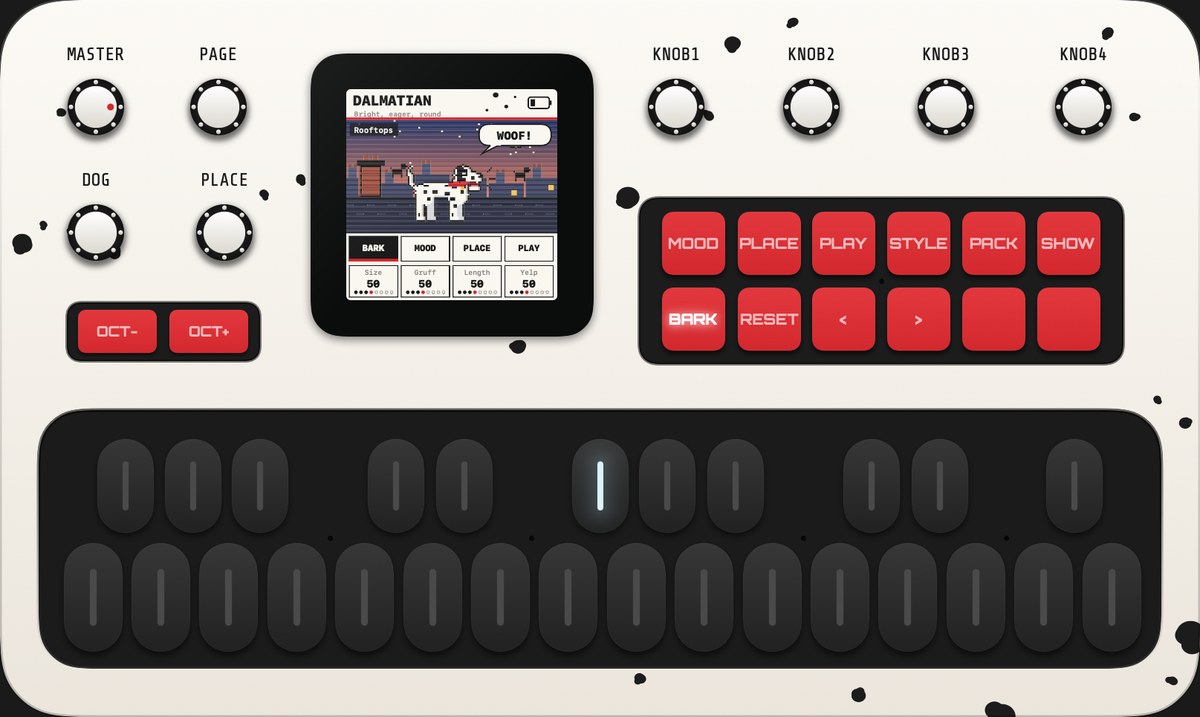
New: Woof mode
View › Woof Mode turns MF-1 into Woof, alongside iScream and Almanac. Switching relaunches the app.
- Thirteen dogs: Dalmatian, Labrador, Chihuahua, Beagle, Husky, Bulldog, Poodle, Corgi, Dachshund, Shepherd, Great Dane, Pug, and Otto the brown cockapoo. DOG and
<>step through them; SHOW brings on a new dog every ten seconds. - Barks you can play: each dog is one FM voice, with a throat pitched by the key, a mouth at a fixed formant and a rough breath, and a pitch that jumps up and falls away. The shapes were matched by measurement against recordings of real barks, from a 100 ms yip to a 300 ms boom, plus a bay and a howl.
- Knob pages: Bark (size, gruff, length, yelp), Mood (mopey to zoomies, howl, growl, breath), Place (park, parlour, rooftops, farm, river) and Play (single barks, repeats, the pack in chorus, or a chase).
- Dry by default: no echo, and reverb only indoors.
- The look: a white case with black spots and collar-red buttons, and a pixel-art cartoon of each dog that barks, howls and wags, with what it says in a speech bubble.
MF-1, iScream and Almanac are unchanged.
Woof firmware
firmware/woof builds Woof for the FM-1 itself, on the same engine port as iScream and Almanac, and runs on one unit. No firmware package is attached to this release; see firmware/woof/README.md to build and install it.
Install
Open the DMG and drag MF-1 to Applications. It is a universal app for macOS 14 or later. The app is ad-hoc signed, not notarised: on first launch, right-click MF-1 in Applications and choose Open, or run xattr -dr com.apple.quarantine /Applications/MF-1.app.
Written with Claude Code (Claude Opus 5.5).
MF-1 1.3.1
Claude:
MF-1 1.3.1 gives each Almanac month its own way of playing.
Changed
- Each month opens in its own playing style, instead of single notes everywhere:
- January and December play open chords: bells over the ice, a choir.
- June and August play wide chords: lush strings, brass stabs.
- March and November split the keys, with a drone under the left hand.
- April, July, September and October play patterns: rain drops, a lazy arpeggio, a harp strummed upwards, leaves falling.
- February and May stay on single notes.
- Months you have already played keep the style you left them in. Device › Every Month as Composed, or holding RESET on a month, brings in the new ones.
MF-1 and iScream are unchanged.
Almanac firmware
firmware/almanac has the same change and runs on one unit. No firmware package is attached to this release; see firmware/almanac/README.md to build and install it.
Install
Open the DMG and drag MF-1 to Applications. It is a universal app for macOS 14 or later. The app is ad-hoc signed, not notarised: on first launch, right-click MF-1 in Applications and choose Open, or run xattr -dr com.apple.quarantine /Applications/MF-1.app.
Written with Claude Code (Claude Opus 5.5).