Repository navigation
v1.8.0-beta.1
Pre-release

WaveFlow 1.8.0-beta.1
Pre-release on the beta channel. To get it from 1.7, turn on Settings → Diagnostics → Beta channel; once you are on 1.8, the switch lives under Settings → Maintenance → Updates. Stable users are unaffected.
This is the first beta of the 1.8 cycle, and it is a big one: it carries everything merged since 1.7.0, almost two months of work. The headline is audio output — exclusive mode now reaches Linux and macOS, and native DSD arrives on all three systems — but tag editing, ReplayGain, lyrics and the library have all moved a long way too.
Because so much changed at once, the Notes for testers at the bottom matter more than usual. If you only have ten minutes, start there.
🎧 Audio output
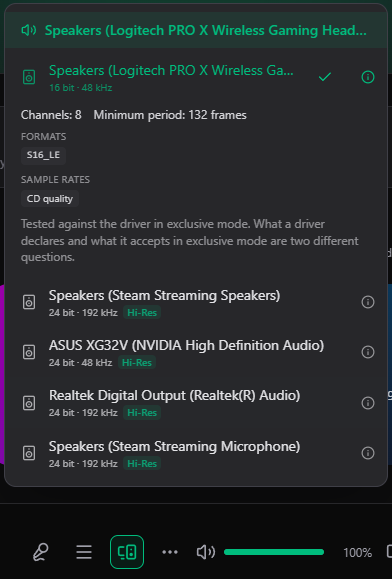
- Exclusive output on Linux and macOS, not just Windows. WaveFlow can now take the sound card for itself on all three systems — ALSA on Linux, CoreAudio on macOS — and not only for DSD: for ordinary playback too.
- Native DSD via DoP (DSD over PCM). Instead of converting DSD to PCM, WaveFlow can send the DSD stream as-is to a DAC that understands it. Off by default — see the tester notes, because this one needs your hardware. (#495)
- Follows your system's default output device when you have not pinned one, instead of staying on the device that was default when the app started. (#627)
- Plays each track at its own sample rate, when you ask it to, rather than resampling everything to one rate.
- The output device menu tells the truth. It now shows what each device actually accepts, and reports the device that really opened — not the one that was asked for. (#612)
- A silent fallback is no longer silent. When playback has to drop out of exclusive mode, or falls back in any other way, you now get told instead of the change only reaching the log.
- Losing a device is handled better: a paused session stays paused, rather than resuming on whatever output is left. (#611)
🔊 Playback
- ReplayGain, brought up to the standard. Album gain, a pre-amp, a fallback level for untagged tracks, and clipping prevention — all adjustable. R128 tags are now read from your files, and loudness analysis follows ITU-R BS.1770-4.
- Album gain applies when a whole record plays through, and album shuffle shuffles whole records instead of individual tracks. (#587, #618)
- Opus and AIFF files now play. (#581)
- WaveFlow remembers where you were. The resume point was, in practice, never written — it is now saved on exit and every ten seconds, including when playback is started from MPD or your system's media controls. (#624, #609)
- Clicking quickly no longer plays the wrong track. A slow-to-prepare track could overwrite a newer choice; the most recent one you asked for now always wins. (#622)
🎤 Lyrics
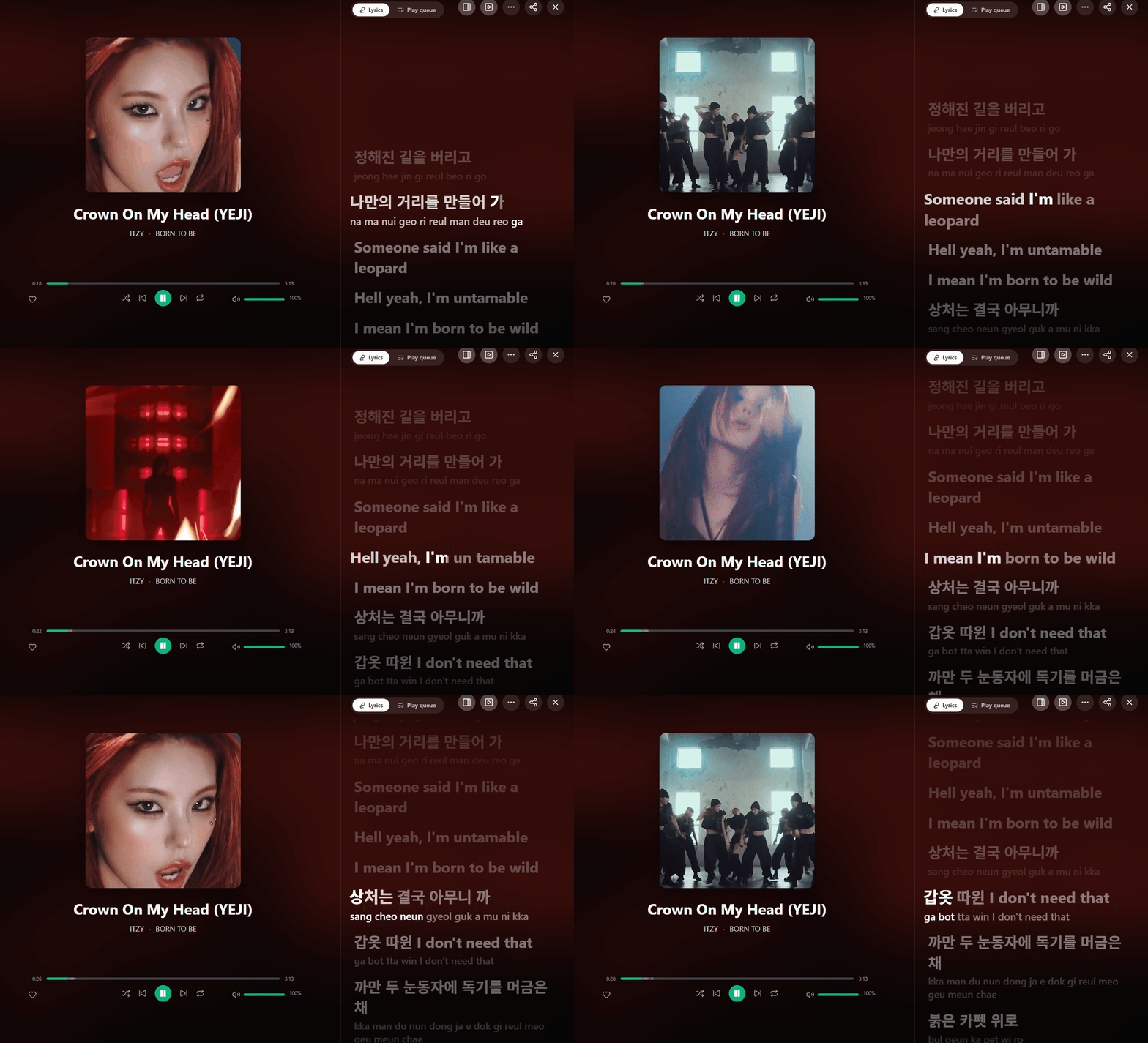
- A floating desktop lyrics window that sits on top of everything, karaoke-style. Turn it on from Settings → Appearance. (#582)
- Lyrics in the mini-player. (#580)
- Progressive karaoke fill on the word being sung, instead of the whole word lighting up at once. (#491)
- Lyrics plugins can now provide word-level timing, and a romanization or translation under each line. (#585)

📚 Library
- Choose, reorder and resize the columns in track lists. Columns that do not fit now hide instead of making the page scroll sideways. (#588)
- Browse by folder, and find Chinese titles by their pinyin — or just by the initials. Search also matches the middle of a title now, not only the start. (#578, #579)
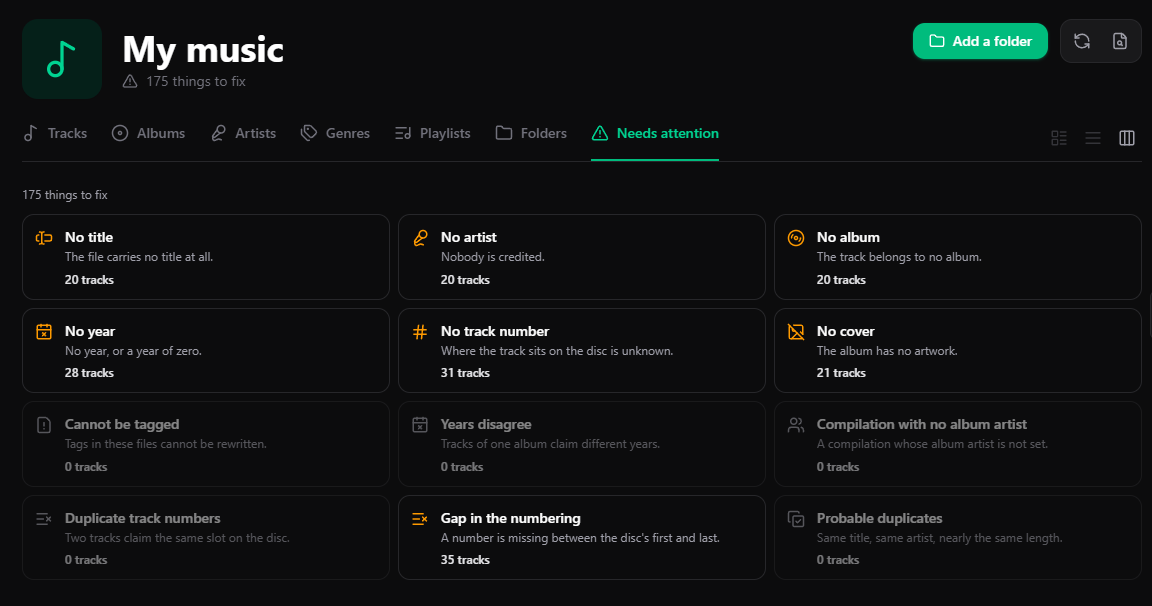
- A "Needs attention" tab that lists what is wrong with your library in one place: missing covers and tags, albums whose tracks disagree on the year, duplicate track numbers, gaps in the numbering. (#589)
- One status bar for long-running tasks, with a cancel button, instead of each task reporting in its own corner. (#601)
- Smart playlists gain more rule fields, a live count of matching tracks as you edit, ready-made templates, and a plain-language summary of what a rule does. (#591)
- Mood radio is ranked by how well each track fits, and album tags can be fetched online for you to review before they are written. (#616, #599)
- Choose where artwork and caches are stored. (#619)
- Rescan the whole library in depth, not one folder at a time — which also picks up tag changes a normal rescan could miss. (#457)
🏷️ Tag editing — safer
Editing a tag could damage the file it was editing. If a write was interrupted at the wrong moment, the original could be left truncated. That is fixed at the root: edits now go into the free space already reserved inside the file wherever possible, a write survives an interruption, and one file is only ever written by one writer at a time. The same editor now reaches DSD (DSF) files too. (#590, #592, #598)
Along the way: star ratings reach ID3v2 files again, and the year is written where older ID3v2.3 readers actually look for it.
✨ Interface
- Settings, reorganised into categories with a searchable sidebar.
- A high-contrast mode that works across every theme and skin. (#596)
- Windows: playback buttons under the taskbar thumbnail. (#583)
- A full-bleed backdrop behind the artist page header. (#482)
- A per-track Canvas — a short looping video that takes the cover's place while the track plays — and a crossfading slideshow between the cover and the artist. (#442, #466)
- Pick the spectrum visualizer's colours, and a volume slider in the mini-player. (#468, #511)
🖥️ Startup
- If a launch never paints anything, typically a graphics driver problem, the next launch falls back to software rendering on its own instead of opening to a blank window again. (#595)
- Opening a library made by a newer version now explains what happened, instead of stopping on the splash screen. (#526)
🔌 Plugins and connections
- MPD server: existing MPD clients on your network can now drive playback. Off unless you turn it on. (#471)
- Plugin descriptions and options are translated into your language. (#440)
- If you run a WaveFlow server, its catalogue now merges into your library: browse both sources from one list, keep a server track on disk, import one into a scanned folder, and correct its tags without touching a file.
🌍 Languages
All 17 languages were reviewed by native speakers, and several hundred strings changed as a result — wording that was translated literally, terms that did not match between screens, and a few sentences that said the opposite of the English. (#670)
⚠️ Removed: the Spotify integration
The Spotify integration is gone in this release. It needed you to register a developer application before anything worked at all, it worked unevenly, and very few people ever got that far. (#680)
If you had connected an account, the stored token is deleted when you update — you don't need to do anything. Nothing else changes: Daily Mix and On Repeat are WaveFlow's own playlists and stay, and per-track Canvas videos never depended on the integration.
📝 Notes for testers
Most wanted, in order:
- Exclusive output on Linux and macOS. This depends entirely on your hardware and I could only test a few setups. Pick your DAC in the output device menu and check that playback starts, that the sample rate shown matches the file, and that switching tracks at different rates works.
- Native DSD (DoP), under Settings → Playback and audio. This has never been confirmed on a real DoP-capable DAC, which is exactly why it ships switched off. If you own one, please turn it on, play a DSF or DFF file, and tell me whether your DAC shows DSD — or PCM, or noise.
- Tag editing on your own files. The rewrite is designed to be safer than before, but it is new code writing to your files. Try it on copies first, especially FLAC, MP3 with ID3v2 and DSF.
- The resume point. Close WaveFlow mid-track and reopen it: it should come back to the same track and position.
- The desktop lyrics window on Wayland, if that is your setup.
What I need in a report: your OS, the exact steps, and your logs — Settings → Maintenance → Diagnostics → Copy logs puts them on your clipboard, ready to paste.
Full changelog: v1.7.0...v1.8.0-beta.1