Repository navigation
v2.0.0-beta.1
Pre-release
WaveFlow 2.0.0-beta.1
Pre-release on the beta channel. To get it from 1.9, turn on Settings → Maintenance → Updates → Beta channel; the beta is then offered like any other update. In 2.0 the switch is in the same place. Stable users are unaffected.
This is the first beta of WaveFlow 2.0, and the biggest release I have made: a new interface, an audio engine that plays 5.1 and 7.1 on the right speakers, WebDAV and SMB shares, podcasts, a tag workshop, and a library that can fill its own gaps from MusicBrainz. The fixes that already reached you in 1.9.2 to 1.9.8 are in here too, but they are not listed again.
The plan is a short beta, about three days, to catch what breaks on machines that are not mine before 2.0.0 goes stable. If you only have ten minutes, read Before you update and the Notes for testers at the bottom.

⚠️ Before you update
2.0 upgrades your library's database the first time it opens it. Before it does, WaveFlow writes a copy of the database next to it and reads it back to check it. If that copy cannot be made or does not check out, nothing is migrated until you choose: try again, continue without a backup, or quit. (#946)
1.9 cannot open a library that 2.0 has upgraded — it will say the library was made by a newer version. If you want a way back, export your profile first from Settings → Storage and backups → Profile backups → Export.
🎨 A new interface
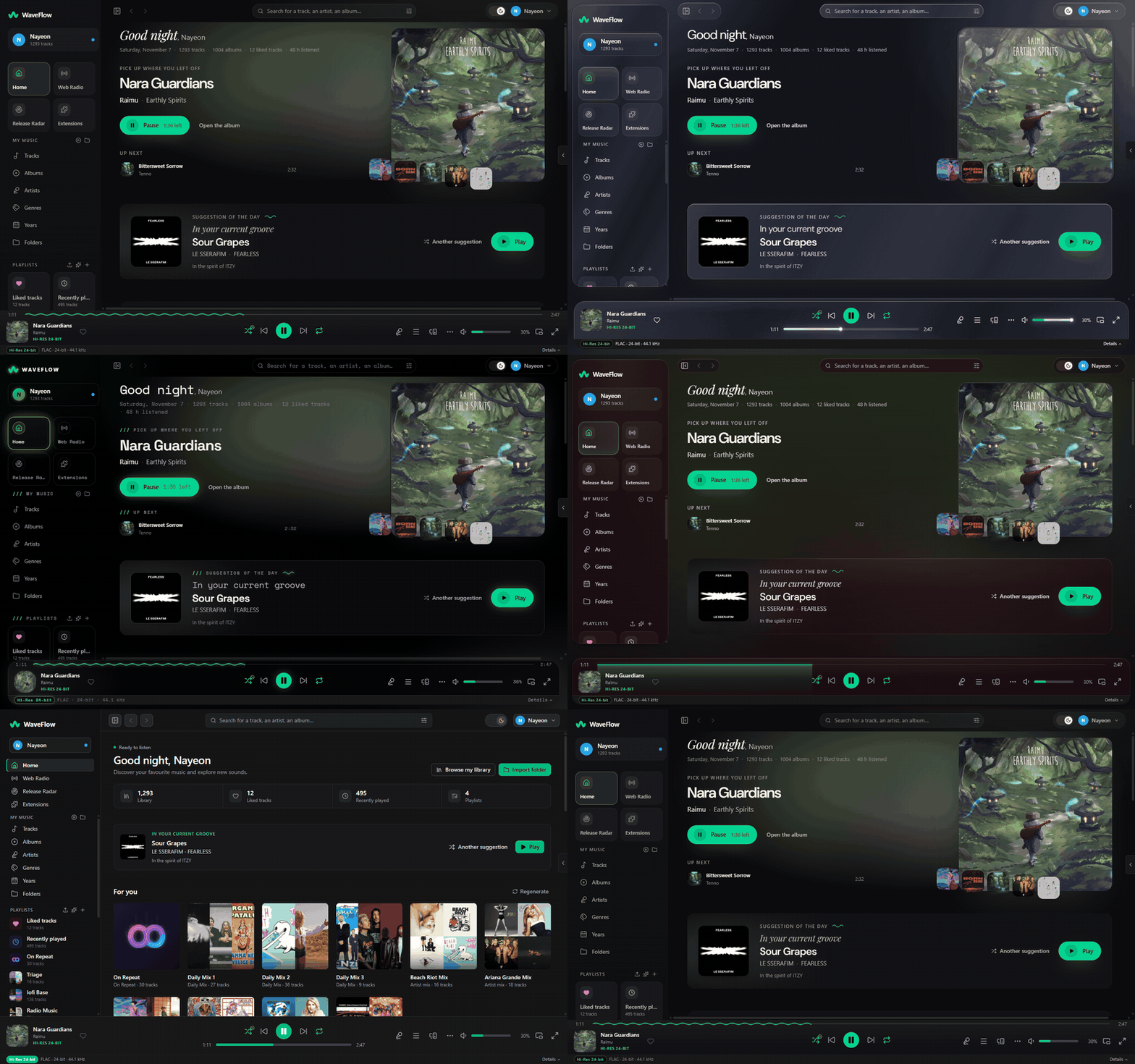
- Fluid is the new default. Navigation on a rail, a Home rebuilt around what you are listening to — where you left off, what plays next, and a suggestion of the day with the reason it was picked — the cover's light behind the music, and one side panel with Details, Lyrics and Queue as tabs. (#924, #904)
- Five materials on that layout: Fluid, Liquid (aurora glass), Pulse (neon), Editorial (a broadsheet on paper) and Lounge (a listening room lit by the record). Studio keeps the classic layout, now flat and precise, and stays the light choice for a machine without graphics acceleration. (#928, #930, #951, #952, #1036)
- Coming from 1.9, you open where you were: 1.9 saved your skin, so if you never changed it you start in Studio. The first page of the What's new panel takes you to Settings → Appearance → Skin.
- Visual effects: Automatic, Full or Reduced. Reduced draws every surface flat so the interface stays smooth without a GPU; Automatic, the default, chooses it on such a machine. (#957)
- Your own accent colour over any of the fourteen themes, or the colour of the playing track's cover. (#895)
- Theater mode for a screen across the room: the immersive view full screen and scaled up, the tracklist beside the cover, controls that fade, and the display kept on while music plays. Off by default; the TV button in the immersive view turns it on. (#970)
- The audio quality strip speaks plainly, and is now on by default under the player bar; its popover shows each stage the sound goes through and what it does to it. A Lossless badge joins Hi-Res and DSD. If you had turned the strip off, it stays off. (#1035, #1048)
- A new mark, the W of the name drawn as a wave, on the app icon; on the rail it breathes while music plays. (#953)
- Settings as groups of cards, with a count of what you changed on each page and a reset. Extensions is now a page of its own in the sidebar. (#959, #947)
- A What's new panel opens once after an update, with a "Try it" for each feature; new installs get a first-run journey instead; and a profile can have a picture. (#1000, #999, #1042)
- Pin albums, artists and playlists to the sidebar. (#962)
- Linux: a GNOME-style window frame as a choice under Wayland, and the desktop's own file pickers. (#960, #971)
🎚️ The audio engine
- 5.1 and 7.1, on the speakers they name. Every channel is now routed by speaker, not by number, so a surround file plays on the right speakers, and one with more channels than you have is folded down by the broadcast standard (ITU-R BS.775) — quieter rather than distorted. On Linux, shared output opens at your sink's full width instead of stopping at stereo. Multichannel AAC files that were listed but would not play now play, and HE-AAC keeps its upper band. (#1009, #1012)
- WavPack and Monkey's Audio play, seek, get analysed and have their tags edited like a FLAC. (#1016)
- Speed without the chipmunk. At any speed, the pitch now stays where it is (the old behaviour is still an option), and you can transpose by up to 12 semitones either way. (#1020)
- AutoMix lands each crossfade on the beats of both tracks, and lets an album play through without fading. Off by default, in Settings → Audio → Track transitions; it needs a crossfade length and analysed tracks, and falls back to the usual fade otherwise. (#993)
- Balance and stereo width, which leave the sound bit-perfect at their neutral values. (#949)
- Test your output: a beep on the left, the right, then both — or on each speaker of a surround setup — with the format the device really runs at, in Settings → Audio → Audio output. (#888)
- An EQ boost no longer clips on a loud master, and 16-bit exclusive output is dithered instead of rounded. (#906)
- The spectrum follows the sound you hear, without trembling, and quiet passages stay quiet. (#1043, #890)
- Play files without importing them: drop them on "Play now", press Ctrl+O, or use your system's Open with (WaveFlow makes itself the default for nothing). QuickPlay can also hand its queue over at the same spot. (#927, #929, #931, #942)
- Pause live radio for up to 30 minutes and catch up, HLS stations play, and Ogg stations show the song's title. (#972, #1021)
- Autoplay keeps the music going with related tracks from your library when the queue ends. Off by default. (#949)
📚 Library
- WebDAV and SMB shares as library folders, read without the system mounting them, from Settings → Storage and backups → Folders and caches. Read-only, streamed through a local cache (5 GB by default), and a share that is away greys its tracks out instead of losing them. SMB 2 and 3 only. (#1007)
- A Quality tab sorts your files by what their audio says, and flags lossless files that appear to come from a lossy source. Track properties can show the spectrogram behind the verdict. (#1038, #886, #964)
- Replace a file with a better copy and keep its plays, likes and playlists. Deleting duplicates moves them to the trash, so a rescan no longer brings them back. (#887, #879, closes #878)
- Analysis reads more of the music: a tempo that knows when it is unsure, an energy measure, the key when no tag gives one, and where the beats fall. Daily Mix now sorts by energy. The next analysis pass measures again the tracks 1.9 had analysed. (#864, #865, #877, #882)
- An album page names its missing tracks, and album artist and composer can now be edited. (#948)
- The scanner stops guessing wrong: an unplugged drive no longer hides its tracks, every credited artist is read, two albums that share a title are no longer merged into Various Artists, a moved file keeps its history, and a file with deeply nested chapter frames no longer crashes the scan. (#1022, #1033)
- Dropped files are copied into a WaveFlow folder in your Music folder, instead of adding the folder they came from. (#929)
- Also: ratings survive a rescan, format filters find Ogg, ALAC and DSD files, a track on a NAS no longer cuts off the one playing before it, and single-click play works in every list. (#1010, #1011, #926, #935)
🏷️ Tags, enrichment and Release Radar
The tag workshop edits the tags of an album, a folder or a selection in one table: fill, find and replace (regex included), change case, renumber, or start from a MusicBrainz release. Nothing is written before you have seen every change, field by field, and every batch can be undone — a file changed since is left alone. (#992)
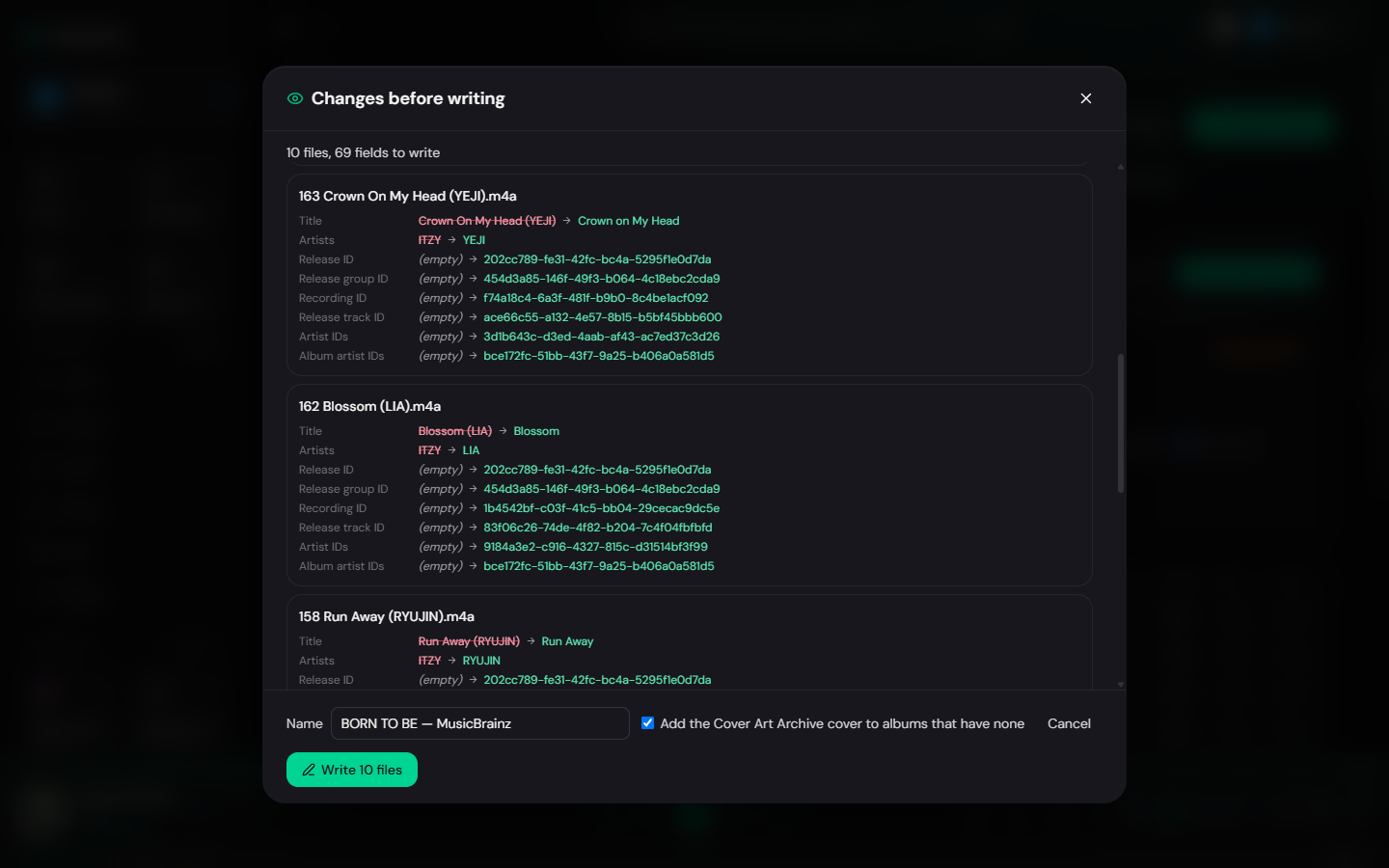
- Library enrichment fills what is missing — genres, release dates, credits, covers, artist facts — from MusicBrainz, in WaveFlow's database only, never in your files. Doubtful matches wait for your review, and all of it can be undone. Off by default, because it sends album titles and artist names to MusicBrainz: Settings → Library → Enrichment. (#983)
- Release Radar is built in: recent releases by the artists in your library, with what you already own gathered in a playlist. It takes the place of the Release Radar extension in the sidebar. (#987)
- Adding a cover or longer tags to a FLAC works. An edit that outgrew the file's reserved space used to be refused. (#1031)
🎤 Lyrics
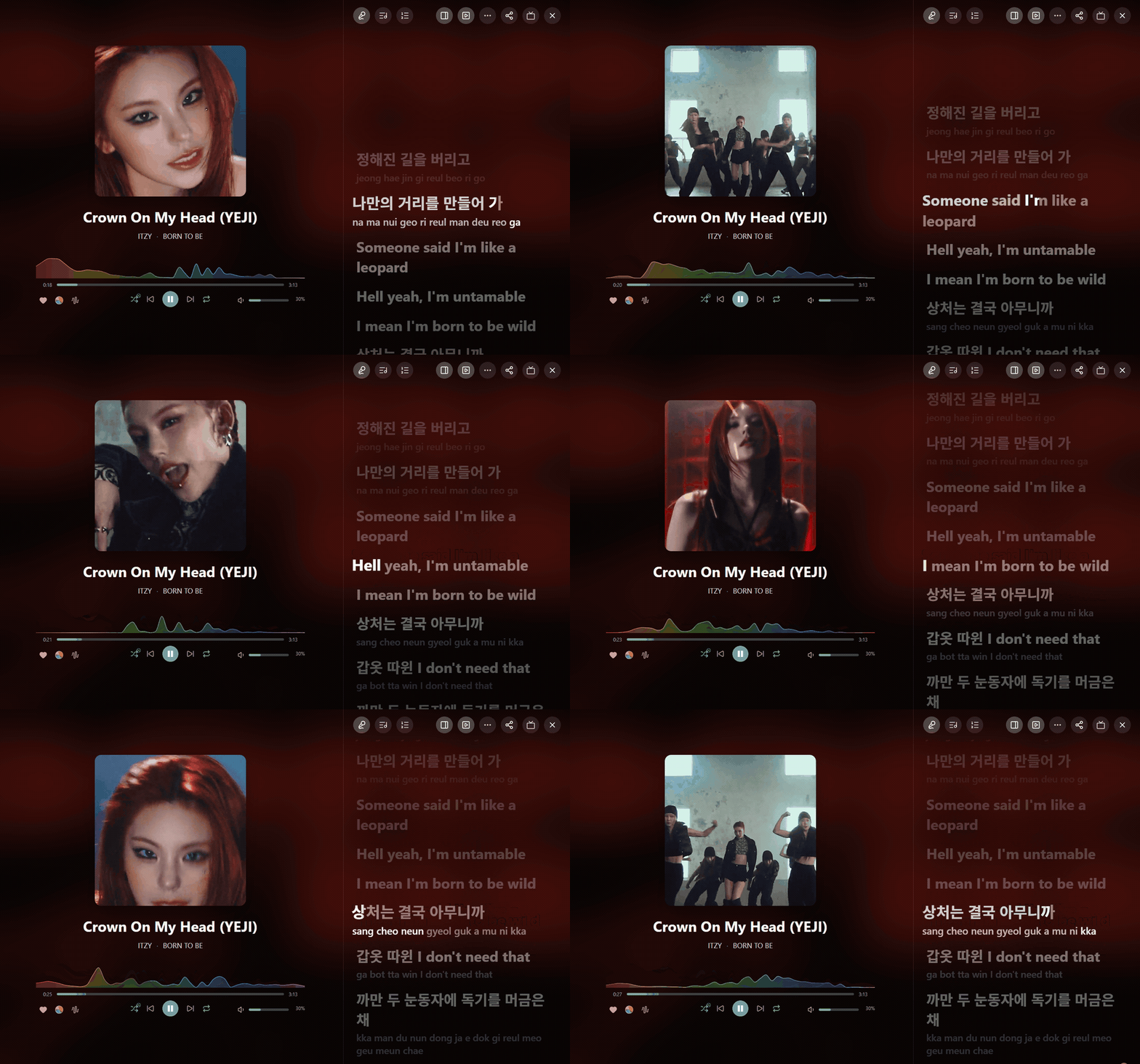
- A lyrics editor rebuilt from scratch, in three steps: edit, sync by line or by word with the space bar while the song plays, then check the result. Singers, backing vocals, translations and romanization, saved as LRC, Enhanced LRC or TTML — and a
.ttmlfile next to a track is now read. (#994, #949) - Share a lyrics excerpt as an image card. (#962)
- The extension store can be searched, and when several lyrics extensions answer, the richest answer now wins — word timing over line timing — and the translations they send alongside are shown. (#986, #962)
- When LRCLIB is unreachable, the other providers are asked instead of leaving you with "retry". (#943)
- Chinese and Japanese lines timed per character no longer get a space between each one, and Arabic word-by-word lyrics read right to left. (#950, #1046, closes #1044)
🎙️ Podcasts
Podcasts arrive, and they stay off until you say yes, after a warning that says plainly what changes: an episode comes straight from its host, which sees what you play. Then: subscriptions and OPML, a check every six hours while WaveFlow runs, downloads under a quota (10 GB by default), resume, each show at its own speed, chapters and transcripts. A WaveFlow Server you are linked to (2.1 or later) shows its own channels on the same page. Turn them on from Settings → Library → Podcasts, or from the podcasts page of the What's new panel. (#1023, #1024, #1026, #1027, #1028, #1029)
🔌 Playlists, connections and system
- Import a playlist from an M3U, CSV or JSON file, or a public Deezer link. Tracks you do not have keep their place, greyed out, and slip in once they reach your library. (#972)
- Global shortcuts for play/pause, next, previous, like and volume, from any application — none bound until you record one, in Settings → Keyboard shortcuts. On Wayland they go through the desktop portal. (#964)
- DLNA shows genres, playlists and folders, titled in your language, and answers more clients correctly. (#971, #907)
- MPD offers to generate a password when you turn it on, and a profile archive is previewed before anything is imported. (#963)
- Updates are read from two places: GitHub and a mirror at
download.waveflow.app. The newest valid version wins, and every build you download is signed and bound to the version it announces. The automatic check now has its own switch in Settings → Maintenance → Updates, next to Check now, and offline mode stops it too. (#1037, #1050) - Safer underneath: text from a tag, a lyrics line or an extension can no longer run as code, a page that fails to load offers Retry instead of taking the window down, and an interrupted backup can no longer replace a good one. (#980, #981, #909)
📝 Notes for testers
What helps most is a report from hardware or a setup I do not have.
Most wanted, in order:
- The first launch. Check that your library, playlists, likes and settings are all there. If the backup dialog appears, tell me what it said.
- Exclusive output, now with more than two channels. Pick your device under Settings → Audio → Audio output, run Test the output, and check that each beep comes from the speaker it names. 5.1 and 7.1 files, and stereo on a surround system, in shared and exclusive mode, on all three systems.
- Native DSD (DoP) on a DoP-capable DAC, in the same group, and speed or transposition during exclusive playback: neither has been checked on hardware like yours.
- WebDAV and SMB shares, against a real NAS: adding one, a scan, playback, and what happens when the share goes away mid-track.
- Podcasts: subscribing, downloading, resuming, and a feed that does something unusual.
- The skins on Linux, especially under WebKitGTK without a GPU or in a virtual machine. If one stutters, tell me which skin, and what Settings → Appearance → Readability → Visual effects says it resolved to.
- The next update. 1.9 only knows GitHub, so it fetches this beta from there. From beta.1 on, WaveFlow reads both sources — when beta.2 is out, tell me whether it is offered and installs.
- The tag workshop and WavPack / Monkey's Audio tag editing — on copies of your files first.
- AutoMix, once your library is analysed: transitions that land off the beat.
About the translations: the new features were translated quickly, and every language will be read by native speakers before 2.0.0. If a sentence in your language sounds wrong, odd or machine-made, tell me — the screen and the exact text are enough.
What I need in a report: your OS, the exact steps, and your logs — Settings → Maintenance → Diagnostics → Copy logs puts them on your clipboard, ready to paste. For anything visual, add the skin, the theme and a screenshot.
Full changelog: v1.9.8...v2.0.0-beta.1