Repository navigation
Impact Analysis
"What breaks if this box goes down?"
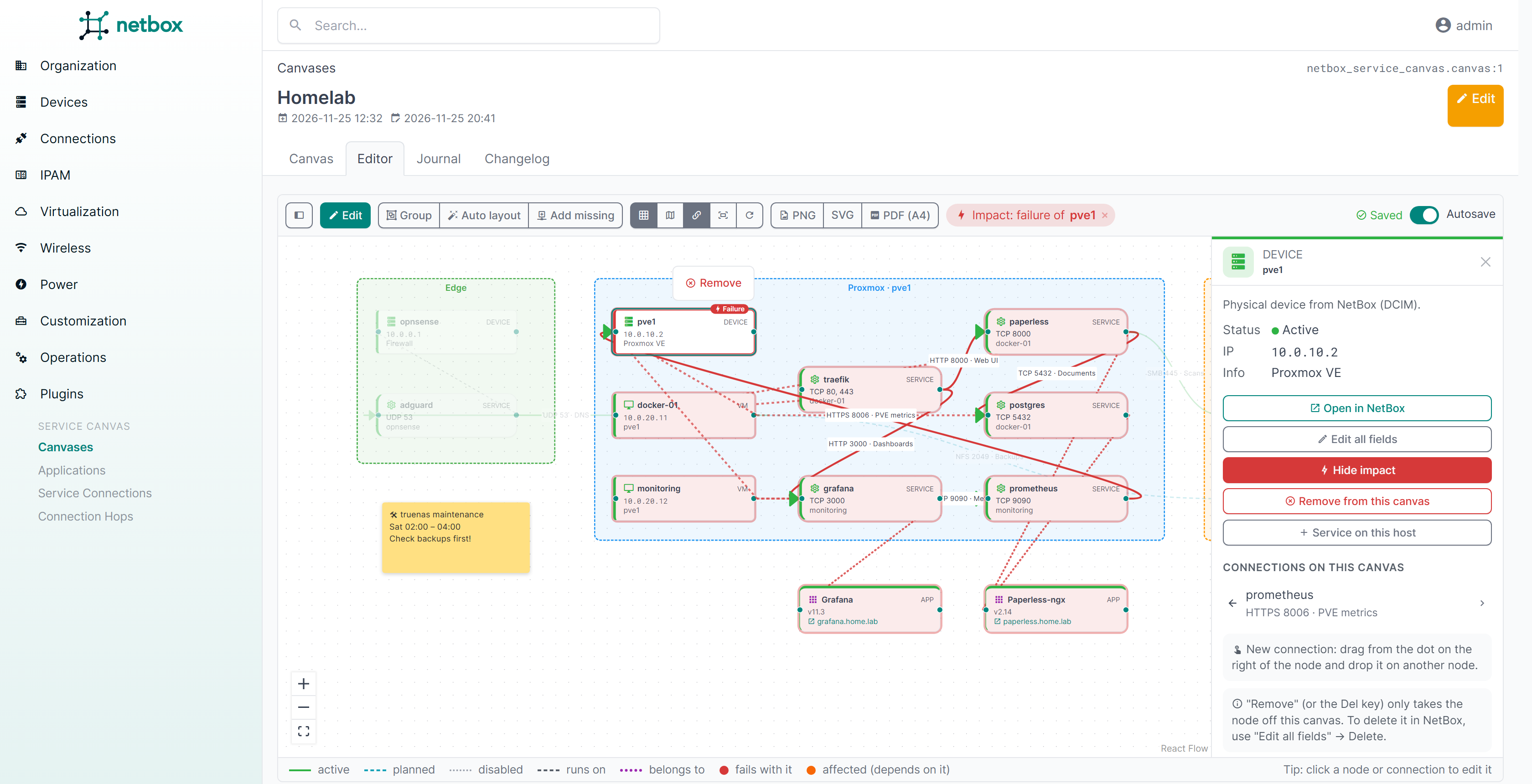
- Click a node (device, VM, service or application).
- In the node panel, click ⚡ "Impact analysis".
- Everything else fades out. A chip in the toolbar shows Impact: failure of …. Click × to end the analysis.
| Colour | Meaning |
|---|---|
| 🔴 Red | Fails with it: the object itself, the VMs pinned to a failed device, the services running on a failed host, and the applications of failed services |
| 🟠 Orange | Affected: anything that sends data to a failed object, transitively (if A → B → failed C, then A and B are marked) |
Bidirectional flows count in both directions.
- Only what is on the current canvas is analysed. Use "Add missing" first for a complete picture.
- A VM fails with a device only if the VM is pinned to that device in NetBox (the VM's Device field). A VM that only belongs to a cluster is not marked, because NetBox doesn't know which cluster member it runs on.