Repository navigation
Releases: JulioCacko/The-Order-1886_pc
Release list
The Order: 1886 — v0.2.7

The Order: 1886 — v0.2.7
Builds on v0.2.6 and adds the button prompts from #135. If you are on v0.2.5 or earlier, this release also carries every v0.2.6 fix.
Xbox and keyboard button prompts (#135)
Controls → Button prompts chooses the buttons the game draws in prompts, menus, quick-time events, stealth takedowns and Lycan evades:
- PlayStation (original): the game's own artwork.
- Xbox: A, B, X, Y, LB, RB, LT, RT, LS, RS, Menu and View. Each original texture is kept; only its PlayStation marking is replaced by the matching letter, in the original's own ink and softness.
- Keyboard and mouse: keycaps, mouse buttons and a WASD cluster. Choosing it also applies the matching key layout (Space vault, C cover, R reload, E interact, Q Blacksight, Shift sprint, mouse aim and fire), so the prompts show keys that act. It replaces any custom keyboard buttons.
Every button marking the UI draws is covered: 131 bitmaps change for Xbox and 185 for keyboard, including the weapon HUD's R1/R2 labels, button-mash and takedown prompts, and the sticks printed L3/R3. Still PlayStation: pictures of the DualShock 4 itself (the Controls diagrams, the pause-menu touchpad icon and one tutorial drawing), which need new controller illustrations. Coverage record.
The first launch with Xbox or Keyboard and mouse builds the prompts from your own game files: a few seconds for Xbox, about a minute for keyboard. The result is cached under your player data and mounted like a mod, after any enabled mods. Your game files are not changed, and the release ships only this project's own artwork. Guide: Button prompts.
From v0.2.6
- Launcher (#131): Open installation, logs and player data open their folders; Check for updates says Up to date on the latest release; downloads show progress and can't be started twice.
- Runtime executable (#127): a wrong pick is refused when you choose it, with the reason; Use installation runtime clears it. A closed game window is named as the reason a session ended.
- GPU-library stops, exit 23 (#133): invalid shader pointers read zero as on the PS4, and seven crash fixes come from SpartanPort, including the command-buffer reuse that stopped a 4K run here with "Unimplemented PM4 type 0". Not confirmed against the reporter's crash.
- CPU use (#134): audio threads above normal, GPU waits that back off, and a per-thread CPU report in the boot log. No measured drop in total CPU use yet.
- Linux: the package builds again after a warning in the #134 code stopped it.
- Windows packaging: the worker no longer runs with Control Flow Guard, which crashed it while building Xbox or keyboard prompts (exit 127). v0.2.6 has no prompts and was not affected.
Details: v0.2.6 release notes.
Unchanged
60 FPS and above are still experimental, and the published 60 FPS patch warns of QTE softlocks in Chapters 6 and 9. Render sizes other than Original, and turning post effects off, remain experimental. The launcher window on SteamOS still needs WebKitGTK 4.1.
Downloads
| File | Size | SHA-256 |
|---|---|---|
order1886-go-windows.zip |
145,973,499 bytes | ea5629eecab403f00ce0b9348ed49d66b6f971413114373a9feb3a9b1cf4f2ef |
order1886-linux-x86_64.tar.gz |
187,282,101 bytes | 50d8c0d55886c78ebde7439e38cfa84fc51f4663c0834c81afdd4b919d1eba08 |
Both packages are built from 8b628d9 (Linux: workflow run 41304227003).
Check each download against its .sha256 file. release-verification.json records how each package was built and checked. To install this release from inside the launcher, use System → Updates. On Linux, extract the new archive and copy your user folder into it.
The Order: 1886 — v0.2.6
The Order: 1886 — v0.2.6
Builds on v0.2.5. A fix release for #131, #127, #133 and #134.
Folder buttons and updates work (#131)
- Open installation, Open logs and Open player data open the folder in Explorer (or your file manager on Linux). They did nothing before, without an error.
- Check for updates now says Up to date when you already have the latest release, and the update banner goes away. Before, v0.2.5 reported itself as an update forever.
- The "Checking for updates…" footer clears when the check finishes, the download shows its progress from the first second, and both buttons stay disabled while either runs. A second click can no longer break a running download.
- A download no longer fails after 10 minutes on a slow connection; it fails only when no data arrives for a minute, with a message saying so. Downloads are refused while the game runs.
A wrong runtime pick is refused when you choose it (#127)
System → Runtime executable used to accept any .exe and fail only at Play with "not a verified dedicated Order runtime". Choosing the launcher's helper (order1886-worker.exe), a runtime without its runtime-build.json, or files from different builds is now refused when you save it, with the reason. Use installation runtime clears the setting. Leaving it empty is still the right choice for almost everyone.
When the game window is closed (close button, Alt+F4 or a system quit), the log now says so and the launcher shows it as the reason the session ended. Before, the session ended with exit 0 and no explanation.
Fewer GPU-library stops (exit 23) (#133)
- A shader that reads through a pointer outside GPU memory, or into memory nothing maps, now reads zeros, as the PS4's GPU does. Before, it stopped the game with "STOP: GPU library assertion failed". The only exit 23 recorded at 3840×2160 was this stop.
- Fixes ported from SpartanPort PR FelipePrado0#1124 close other exit-23 paths: recording data larger than one 128 KiB chunk, a draw-queue race on CPUs with 8 or more threads, texture views past the end of their image, cached images missing layers, padding-only overlaps, out-of-range image slots, and packet sizes read after the packet ran.
- The crash reported in #133 did not reproduce on our hardware, so these fixes are not confirmed against it. If you still see exit 23, attach the boot log from
user/order1886/logs; to add a crash dump, setORDER1886_FATAL_DUMPto a new file path (for exampleC:\order1886-crash.dmp) before starting the launcher.
CPU use on 6-thread processors (#134)
- The game's audio threads run at above-normal priority, the GPU thread backs off instead of spinning while it waits, and the game's job threads sleep after long runs of yielding.
- The boot log now ends with CPU time per thread and yield counts. On a 6-core CPU with high CPU use, attach that log: it shows which threads take the time.
- On our test CPU limited to 6 and 4 threads, total CPU use did not measurably drop. Treat this as a first step, not a fix. Details: thread priority verification.
Unchanged
60 FPS and above are still experimental, and the published 60 FPS patch warns of QTE softlocks in Chapters 6 and 9. Render sizes other than Original, and turning post effects off, remain experimental. The launcher window on SteamOS still needs WebKitGTK 4.1.
Downloads
| File | Size | SHA-256 |
|---|---|---|
order1886-go-windows.zip |
113,103,745 bytes | 6483695d52a537637649bad5afc87620994e7978973b78d5dd54998144e3f9fa |
order1886-linux-x86_64.tar.gz |
125,993,124 bytes | 48b00d06efbe4195097cd089a257d5df316e1bde5d691f4855366dccecfa2547 |
Both packages are built from f45149e (Linux: workflow run 41266810207).
Check each download against its .sha256 file. release-verification.json records how each package was built and checked. To install this release from inside the launcher, use System → Updates. On Linux, extract the new archive and copy your user folder into it.
The Order: 1886 — v0.2.5
The Order: 1886 — v0.2.5
Builds on v0.2.4. From #128, #125, #124 and #123.
Native 4K, with no upscaler (#3)
Graphics → Render resolution makes the game itself draw a larger frame. Choose Original (1920 wide), 2560, 3840 or a custom width: a multiple of 16 from 1280 to 4880, or up to 4192 with 16:9 framing. At 3840 the game renders 3840×1600 (letterboxed into 3840×2160), or the full 3840×2160 with 16:9 framing. Every screen-sized pass runs at that size, and the frame reaches the screen 1:1.
- At any size other than Original, upscaling is set aside and the image is presented as drawn.
- The game's executable is patched only in the prepared copy, and every site is byte-checked first. Your game files are not changed.
- The render-target memory and the guest memory grow with the size automatically.
- Measured on an RTX 3070 at 3840×1600 in 30 FPS mode: 30 FPS in the street and on the Chapter I rooftop, with drops to 27 FPS in the Chapter II Council cutscene. This release's package held 30 FPS on a night rooftop loaded from a save. 60 FPS at 4K is not reached. Shadow maps and MSAA still use their original sizes. Update 1.02 only for now; base 1.00 follows. Evidence: native resolution verification.
Borderless stays borderless (#121)
On Windows, Borderless and Windowed could be taken into exclusive full-screen by the driver, so Borderless behaved like Fullscreen. Both now ask the driver not to. Switching display mode from the in-game menu recreates the swapchain. With G-Sync set to "full screen only", G-Sync does not engage in Borderless; set it to "full screen and windowed mode".
Linux: mixed-case game folders (#124)
On ext4 and btrfs, a dump whose folders differ in case from the names the game asks for (for example ps4/GPU/) crashed at boot. The runtime now matches each missing path component without case, as the PS4 and Windows do.
Credits (#112)
TOport (IgorAugustoHH/The-Order-1886-PC-Port) is credited in the READMEs, the bundled attribution notice and the verification records for the renderer fixes ported from it.
Unchanged
60 FPS and above are still experimental, and the published 60 FPS patch warns of QTE softlocks in Chapters 6 and 9. The launcher window on SteamOS still needs WebKitGTK 4.1.
Downloads
| File | Size | SHA-256 |
|---|---|---|
order1886-go-windows.zip |
112,462,599 bytes | c19e2e303279e2eaa4a83d346d4f737a488e76c1186ad64155a09c78cfc7dd2c |
order1886-linux-x86_64.tar.gz |
125,916,758 bytes | 9cd1d254c8ca6602fe0e3c4b7deeafaa83c99126d2f37c8374ce1f482152a4ec |
Both packages are built from 69b9f58 (Linux: workflow run 40978220705).
Check each download against its .sha256 file. release-verification.json records how each package was built and checked. To install this release from inside the launcher, use System → Updates. On Linux, extract the new archive and copy your user folder into it.
The Order: 1886 — v0.2.4
The Order: 1886 — v0.2.4
Builds on v0.2.3. From #117, which fixes #114.
Linux without WebKitGTK 4.1 (SteamOS, Steam Deck)
Before this release, the Linux package did not start at all on a system without WebKitGTK 4.1, such as SteamOS. Both The Order 1886 and Play The Order 1886 were the launcher window's own binary, so the dynamic linker refused both:
libwebkit2gtk-4.1.so.0 => not found
Both entry points are now a separate build that links no WebKitGTK and no GTK. The launcher window moved to bin/order1886-launcher.
The Order 1886opens the launcher window when the system has WebKitGTK 4.1. When it does not, it names the missing library and then plays with the saved settings. The message also goes to a desktop dialog or notification when one is available, and touser/order1886/logs/launcher-entry.log.Play The Order 1886starts the game directly, as on Windows.--game-dir /path/to/gamesets the game folder without the launcher window, for example in the Steam launch options. The folder is checked and saved; a folder that is not a game is refused and the saved one is kept.- A game folder of any name next to the package folder is found without setup.
The new QUICKSTART.txt in the Linux package covers SteamOS and Steam step by step.
Linux: the game would not start from the package
Testing this release showed a second fault in every earlier Linux package: the game stopped with "Order runtime not found in this installation", because the backend looked for the runtime one folder too deep. This is fixed. Windows was not affected.
Unchanged
The launcher window on SteamOS still needs WebKitGTK 4.1; issue #114 describes a Homebrew workaround. 60 FPS and above are still experimental, and the published 60 FPS patch warns of QTE softlocks in Chapters 6 and 9.
Downloads
| File | Size | SHA-256 |
|---|---|---|
order1886-go-windows.zip |
112,453,317 bytes | 8c22ef7f644a4b3f52c0d5bf7270799945447b9f8a64ef7d1543a75da12701e1 |
order1886-linux-x86_64.tar.gz |
125,892,840 bytes | ed2bf93594217a807d486e5089267ecc4250774777bc9638e1900f3c1348b911 |
Both packages are built from a3c035c (Linux: workflow run 40672600009).
Check each download against its .sha256 file. release-verification.json records how each package was built and checked. To install this release from inside the launcher, use System → Updates. On Linux, extract the new archive and copy your user folder into it.
The Order: 1886 — v0.2.3
The Order: 1886 — v0.2.3
Builds on v0.2.2. From #115, which fixes #113.
60 FPS and 16:9 with update 1.02
Before this release, a game with update 1.02 applied could only start at 30 FPS with the original framing. 60 FPS, 90 FPS, Unlocked, 16:9 and turning a post effect off were all refused:
Experimental 60 FPS metadata mismatch for APP_VER: expected 01.00, found 01.02.
The executable was never the problem. Update 1.02 ships the same eboot.bin that these options were built and tested on. Only the version numbers in param.sfo differ.
Each of these options now checks the game's own code at every place it changes, not a file hash or a version number. A game with or without update 1.02 works. A build whose code differs is refused, and the message names the address.
Measured on the base game with update 1.02 laid over it, at 60 FPS and 16:9 (RTX 3070): 59.3 FPS from the intro to the title screen, and the picture fills the whole 16:9 frame.
Every edition of the game
The launcher now accepts all six editions of The Order: 1886, in any folder:
| Edition | Status |
|---|---|
| CUSA00076 | tested |
| CUSA00035, CUSA00070, CUSA00100, CUSA00670, CUSA00785 | experimental: no real dump of these was available, so please report how they run |
All six share the same saves. Trophies are kept per edition. Brazilian Portuguese voices and text exist only in CUSA00785. On CUSA00035, CUSA00070 and CUSA00076 the game uses Portugal Portuguese, where it previously fell back to English.
Save import
- A decrypted save export with no title ID in its
param.sfois now refused, like another game's save. - A folder holding both runtime saves and decrypted exports now imports both. Before, the exports were skipped.
Unchanged
60 FPS and above are still experimental. The published 60 FPS patch warns of QTE softlocks in Chapters 6 and 9. Short black flashes still appear during gameplay, and their cause has not been found yet.
Downloads
| File | Size | SHA-256 |
|---|---|---|
order1886-go-windows.zip |
112,447,547 bytes | b8cb9608c6390ec374168fe32b66500f924b0054aa723694695aa339985cc818 |
order1886-linux-x86_64.tar.gz |
127,049,833 bytes | c2ad063c741d7c179fd2aa03e7bc651687e830df44b401cd8643245c9f4b8ef3 |
Both packages are built from e019b0f (Linux: workflow run 40629623066).
Check each download against its .sha256 file. release-verification.json records how each package was built and checked. To install this release from inside the launcher, use System → Updates.
The Order: 1886 — v0.2.2 (launcher hotfix)
The Order: 1886 — v0.2.2 (launcher hotfix)
A launcher-only hotfix on top of v0.2.1. The runtime is unchanged.
Import decrypted PS4 saves
Import saves… (Game & Content → Saves) now accepts the folder layout that decrypted PS4 saves come in, such as the output of Apollo Save Tool: <id>_CUSA00035_Playthrough00 folders holding the save's files and sce_sys\param.sfo. In v0.2.1 this layout was refused.
Choose the folder that holds those save folders (for example CUSA00035) or one save folder. The launcher converts each save into the layout the runtime reads: the save's files, plus its title, subtitle and icon taken from param.sfo. Your current saves are backed up first and only saves with the same name are replaced. Then start the game and choose Continue or Load.
Still refused, with a message that says why: encrypted saves copied straight off a PS4 (a save image next to a .bin key file), and saves of another game.
The bundled QUICKSTART.txt now explains save import.
Unchanged
The runtime and its known issue: short black flashes still appear during gameplay, and their cause has not been found yet.
Downloads
| File | Size | SHA-256 |
|---|---|---|
order1886-go-windows.zip |
143,436,712 bytes | 52867c7122e903b0bdc6a3b61aa30edfc051efc400135986199df8d5ec3c52a7 |
order1886-linux-x86_64.tar.gz |
127,042,184 bytes | c44394f0dbfb9ea33e4de085ac73c2f8ab9d3b9d6e6996aaea890d03ed2f8b8b |
Both packages are built from 27d5147 (Linux: workflow run 40131985756).
Verify each download against its .sha256 file. release-verification.json records how they were built and checked. System → Updates installs this release from inside the launcher.
The Order: 1886 — v0.2.1 (launcher hotfix)
The Order: 1886 — v0.2.1 (launcher hotfix)
A launcher-only hotfix on top of v0.2.0. The runtime is unchanged.
Saves you can find and bring in
Game & Content → Saves now shows where your saves are kept and has two new buttons:
- Open saves folder opens
user\order1886\savedata(it is created if the game has not saved yet). - Import saves… lets you choose a folder and copies its saves in. It accepts another installation's
savedatafolder, itsCUSA00035folder, a save backup, or a single save folder (Playthrough00besidePlaythrough00.sce_sys). Your current saves are backed up first, and only saves with the same name are replaced. Then start the game and choose Continue or Load.
Saves copied straight off a PS4 are encrypted (a save image next to a .bin key file). The launcher now says so instead of failing silently: decrypt them first, for example with Apollo Save Tool on a PS4.
Only options that work are shown
Settings that are not available yet are hidden instead of shown greyed out: FSR 4 and XeSS, upscaler quality presets, frame generation, vibration, input remapping, separate text and voice language, and the cheat toggles. They will appear when they work.
Unchanged from v0.2.0
The runtime and its known issue: short black flashes still appear during gameplay, and their cause has not been found yet.
Downloads
| File | Size | SHA-256 |
|---|---|---|
order1886-go-windows.zip |
143,434,370 bytes | 8c565ed7551c3e6fe65542f8552779b98a7a52f6aeff32af31c3b0e7008b12b1 |
order1886-linux-x86_64.tar.gz |
127,040,163 bytes | 2524d47ca1c705b56aac422ea7994205f2c55690e5526732e0583a2af66bb407 |
Both packages are built from f6fc185 (Linux: workflow run 40129775484).
Verify each download against its .sha256 file. release-verification.json records how they were built and checked. System → Updates installs this release from inside the launcher.
The Order: 1886 — v0.2.0
The Order: 1886 — v0.2.0
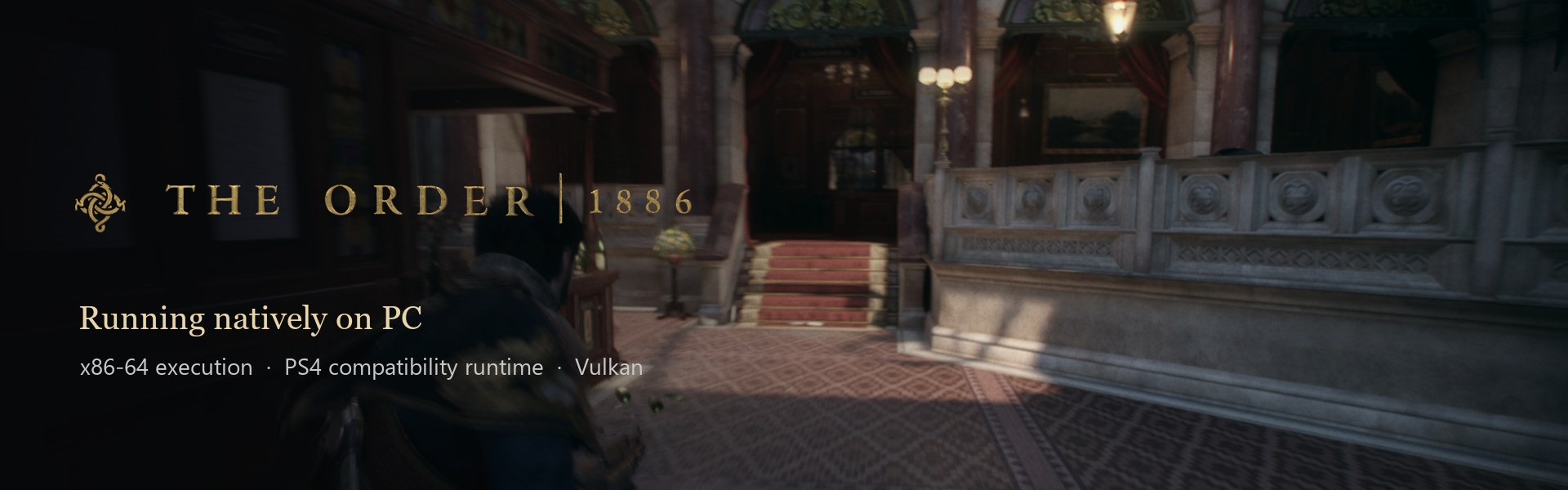
The first full release of the Go launcher. The geometry that exploded while aiming is fixed, the smoke grenade draws its cloud, black flecks are gone from faces, the game no longer freezes mid-fight on a runaway draw, and new shaders compile in the background instead of stalling the game. The launcher adds AMD FSR 3.1 and NVIDIA DLAA in place of the game's own anti-aliasing, and shows trophy names from your own game.
This release ships the Go launcher only; the old Tkinter launcher and its files are gone. It is still compatibility software: full progression, long sessions and 4K/60 are not accepted yet, and short black flashes still appear during gameplay (see the end of these notes).
Fixed — before and after
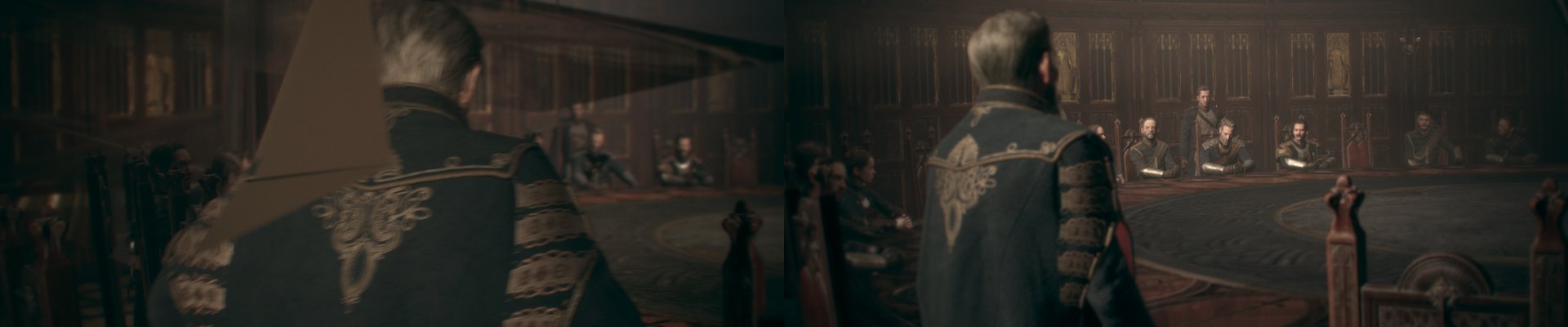
Aiming no longer explodes the scene (#106). Aiming used to throw stretched, garbage geometry across the screen, which is why v0.2.0 was held. The aim-focus readback now publishes its result without stopping the GPU mid-frame, so CPU-written vertices are no longer lost.
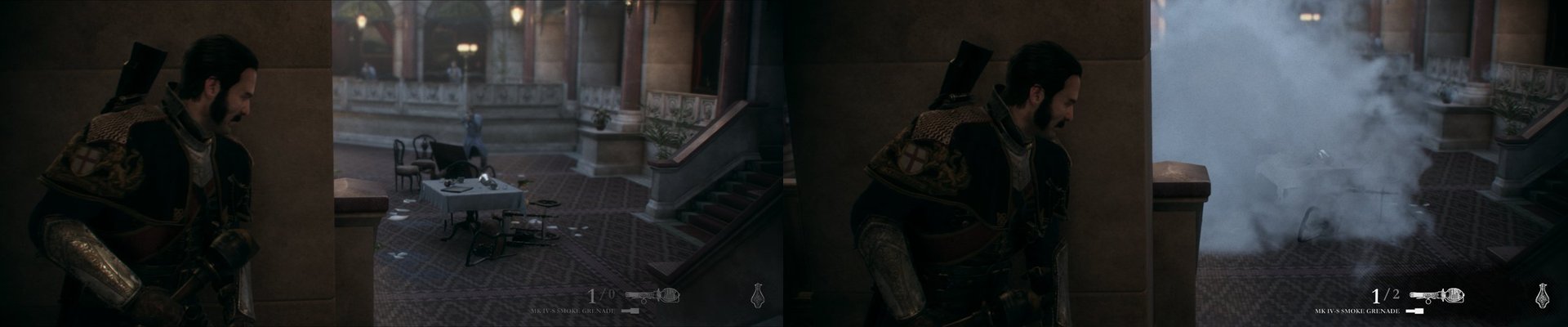
The smoke grenade draws its cloud (#107). The MK IV-S smoke grenade went off with no smoke. Its tessellated particles were lost to three shader-translation gaps (passthrough hull shaders, the instance base, and 64-bit-address buffer loads).
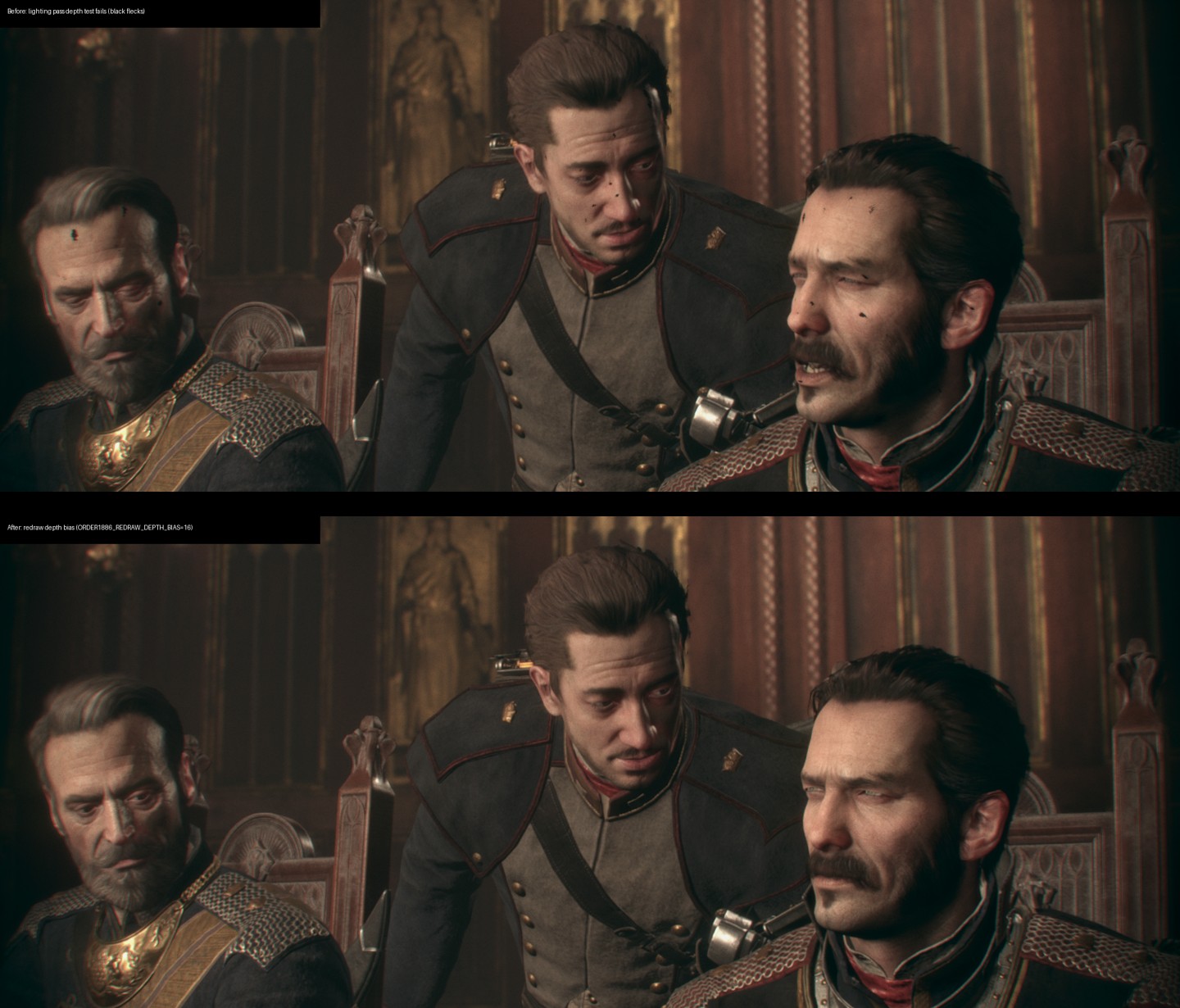
No more black flecks on faces (#101). Close-ups in chapter II showed black specks on skin: the lighting pass never shaded those pixels. Re-drawn surfaces now get a small depth bias.
Other fixes
- The game no longer stops presenting mid-fight (#103). An indirect draw asked the GPU for about 4.3 billion indices; index counts are now clamped to the bound index buffer.
- Aiming keeps the target sharp (#100): the autofocus buffers are read back fresh, so depth of field focuses where you aim.
New
- AMD FSR 3.1 and NVIDIA DLAA (#97, #98) replace the game's temporal anti-aliasing at native resolution, then FSR 1 scales to your output. Choose them on Graphics → Upscaling. DLAA needs a GeForce RTX GPU.
- Shaders compile off the GPU thread by default (#105). New effects no longer stall the frame; a draw whose shader is still compiling is skipped for that frame. Turn off Performance → Asynchronous shaders to wait instead.
- Trophy names (#99). Enter your own console trophy key on Achievements and the launcher decrypts trophy names and descriptions from your game.
- Go launcher only (#108). The retired Tkinter launcher's files, the leftovers inherited from the God of War project, and its stale documents were removed. The bundled QUICKSTART.txt now describes the current launcher.
Proof
The packaged Windows runtime from this release, RTX 3070, Windows 11, 60 FPS mode with VSync, from a copied save (tools/order1886_step1_evidence.py --runtime <package>/bin/order1886-runtime.exe --continue-save 30), measured over the run after the save loaded:
| Settings | FPS | p50 ms | p99 ms |
|---|---|---|---|
| Launcher defaults (FSR 1, async shaders on) | 52.4 | 17.4 | 32.0 |
The Linux package was built and smoke-tested by workflow run 40123947700. Gameplay on Linux was not run.
Downloads
| File | Size | SHA-256 |
|---|---|---|
order1886-go-windows.zip |
143,432,245 bytes | 70f4c8f480e7a38445c82a0ea9aa8cafbe3f4a906ee3491c709e4b6d45d68afb |
order1886-linux-x86_64.tar.gz |
127,039,306 bytes | c58a7e17d078aa82a2991d09927758d0258b8ddc4eb60a61eeb0e04c27b388fe |
Both packages are built from c716b01. Verify each download against its .sha256 file. release-verification.json records how they were built and checked.
Updating: System → Updates installs this release from inside the launcher, or extract the new ZIP to a new folder and copy your user folder next to the new EXE.
Known issue: black flashes
During gameplay the screen sometimes flashes black for a moment. It was seen in every test session with the launcher defaults. Whether another setting avoids it was not established, and the cause has not been found; a geometry (vertex) problem is suspected.
What this release does not claim
- Not accepted yet: full progression, long-session stability, Chapter 6/9 QTE timing above 30 FPS, and sustained 4K/60.
- Smoke and aiming together: each fix was verified on its own; a played session that throws smoke while aiming with both fixes was not recorded.
- Linux: the package starts; gameplay on a Linux GPU driver is untested.
- Upscalers: FSR 3.1 and DLAA run at native size. DLSS quality modes, XeSS and FSR 4 are not offered yet.
The Order: 1886 — preview 9: playable frame rate, working graphics options, Linux that starts
The Order: 1886 — preview 9
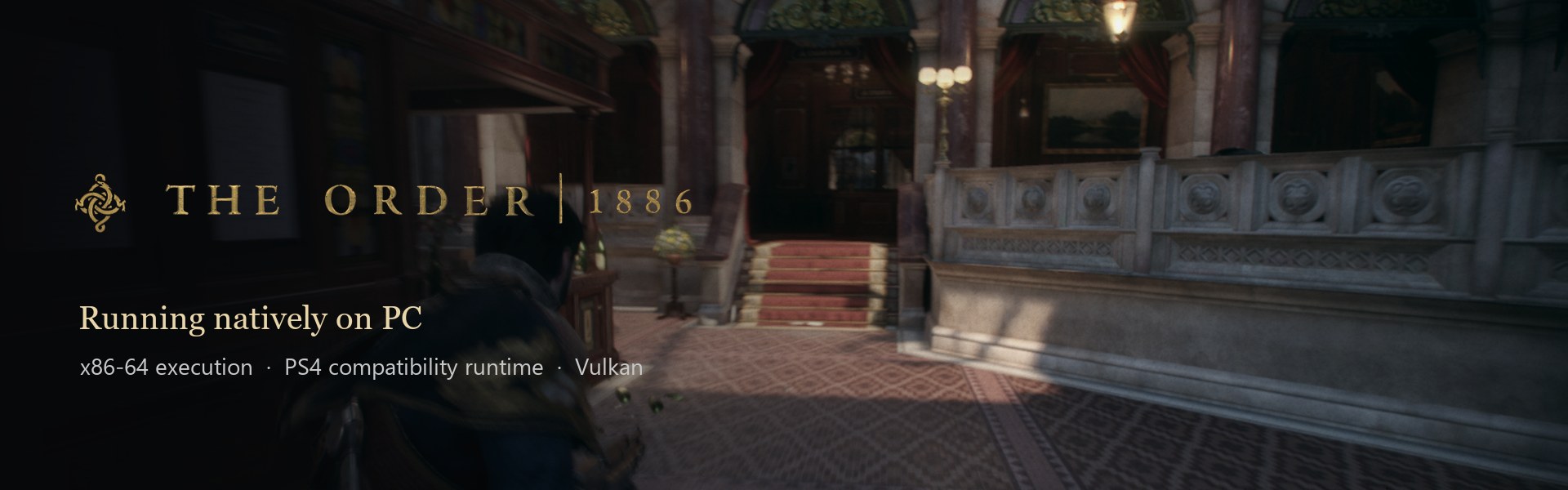
Gameplay runs at a playable frame rate, the launcher's graphics options now do what they say, and the Linux package actually starts on a system other than the one that built it. This is still a development preview: full progression, long sessions, the Chapter 6/9 QTE timing and 4K/60 are not accepted.
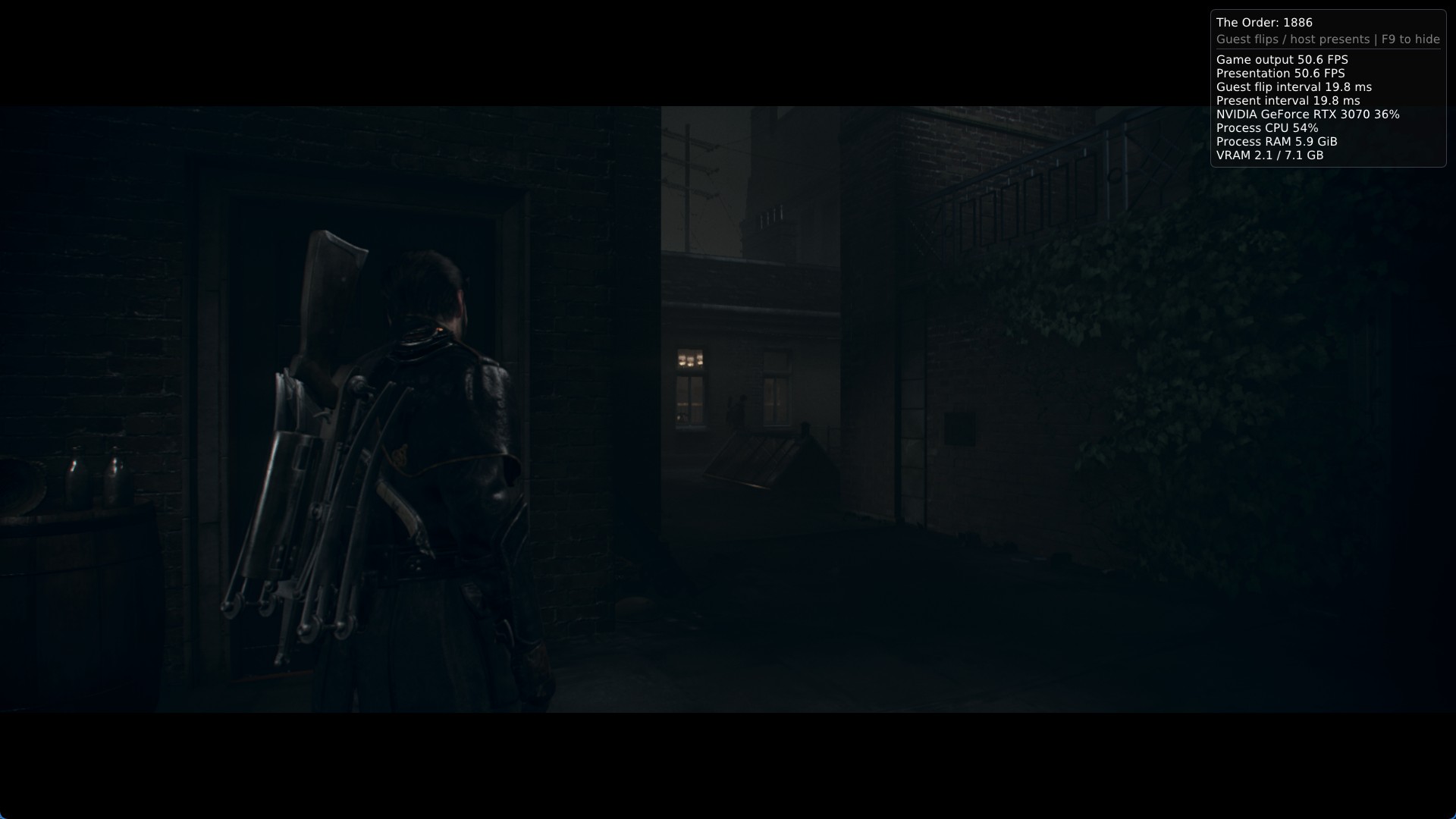
Proof on both platforms
| Windows 11 · RTX 3070 | Ubuntu 26.04 (WSL) |
|---|---|
 |
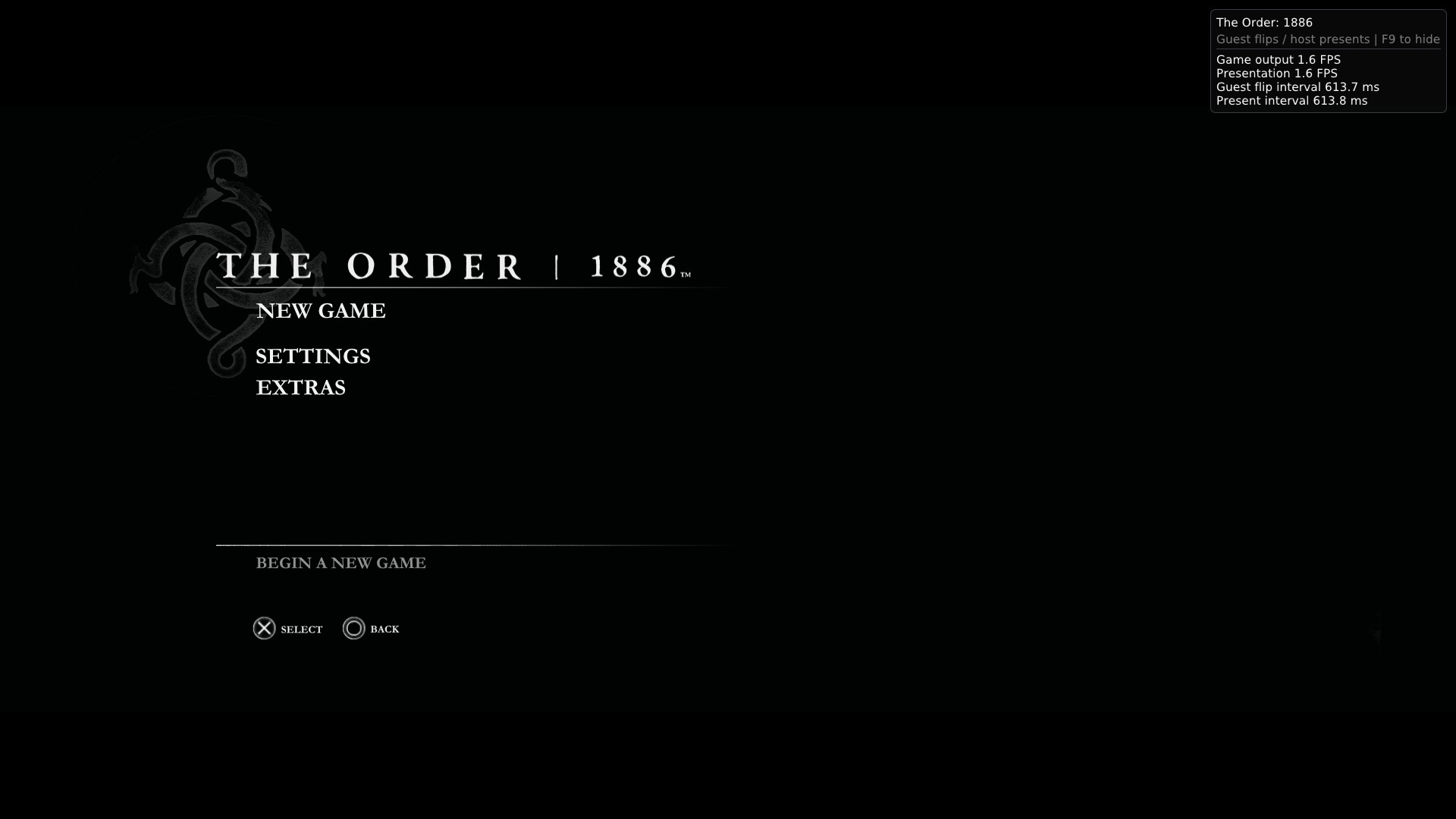 |
| This package, from a copied save, 60 FPS mode: 53.2 FPS, p99 23 ms in the night courtyard; 38 FPS average in the hotel lobby fight. | This package's runtime on a clean Ubuntu 26.04 reaches the title menu and takes keyboard input. WSL offers only software Vulkan (lavapipe), so it runs at 1–2 FPS and the menu background stays dark. Gameplay on a Linux GPU driver is not tested yet. |
What changed since preview 8
Performance (#93). The slow courtyard went from 7.2 to 54.8 FPS in the development build (53.2 in this package). Three changes were ported from IgorAugustoHH/The-Order-1886-PC-Port, with credit: a Windows SRW lock for the memory table, deferred buffer readbacks, and the two-stage draw pipeline with its drain fix. ORDER1886_DRAW_PIPE=0 and ORDER1886_DEFER_BUFFER_READBACK=0 turn the last two off.
Graphics options that work (#90, #91, #92).
- Output resolution, sharpening (RCAS), anisotropic filtering, overlay items, frames queued, async shaders, background and parallel warm-up, and speculative readbacks now reach the runtime, which logs each value.
- 90 FPS and Unlocked engine timing come with a presentation cap from 30 to 240.
- Film grain, motion blur, depth of field and chromatic aberration switch off through hash-verified patches. Model detail had no real switch and was removed.
Temporal upscaling groundwork (#94). The game's temporal resolve is mapped, and its velocity was validated in the runtime. An upscaler provider (FSR 3.1 tested) can replace the resolve at native resolution. The launcher does not offer this yet; that is the next step.
Fixes
- Gameplay no longer renders flat blue after a depth-buffer clear (#88).
- Starting with async shaders no longer corrupts the heap: the IRQ controller's map was raced at startup.
- The Linux package bundles the libraries it needs (FFmpeg, SDL3, fmt, Zydis and their dependencies). Before, the runtime only started where the CI runner's exact versions were installed.
- Launcher text that had no colour of its own was near-white on the light theme (Linux WebKitGTK, or Windows with a light theme).
release-verification.jsonagain carries the archive fields the in-launcher updater checks. Preview 8's receipt lacked them, so updating to preview 8 from inside the launcher failed.- The frame-rate help no longer says the tested scene runs at 5 FPS.
Downloads
| File | Size | SHA-256 |
|---|---|---|
order1886-go-windows.zip |
107,332,965 bytes | 61df772b5177fe52b065fd1cbc870b0d2a501cdb2dc7998c61a9edb79410ce67 |
order1886-linux-x86_64.tar.gz |
120,550,075 bytes | 887dea5d34ce94435da423fbb1cfae53c4526594da7c201a918867e5e75b3776 |
Both packages are built from b19c604. Verify each download against its .sha256 file. The full record of how they were built and checked is in docs/verification/2026-10-21-preview9-release.md.
What this release does not claim
- Not accepted yet: full progression, long-session stability, the Chapter 6/9 QTE timing above 30 FPS, and sustained 4K/60.
- Linux: gameplay on a GPU driver is untested.
- Vendor upscalers: DLSS, FSR 3.1, FSR 4 and XeSS are not selectable in the launcher.
The Order: 1886 — Go launcher preview 8
The Order: 1886 — Go launcher preview 8
This preview removes the last of the old launcher, restores a Linux package, and makes every
rendering option say exactly why it is or is not available. It is a prerelease: gameplay, visuals,
performance and the Gold gates remain open.
The Go launcher is now the only launcher
The Python/Tk window and everything that existed only to build or verify it are gone:
launcher/order1886_launcher.py, its packaging scripts, the Linux packager, and two CI workflows.
Shortcuts and the Steam entry already pointed at Play The Order 1886.exe, which is the Go launcher.
What this means at the sharp end: there is no second launcher to fall back to. If the Go launcher
cannot start, repair the installation or restore a previous version from a working one.
Linux is back, and honest about what it is
A portable Linux package is built again — the native runtime (libps4gpu.so + order1886-runtime),
the Wails Linux launcher, and the Python worker in a relocatable tar.gz:
bin/order1886-runtimeand its GPU library inbin/gpu/, matching the runtime's$ORIGIN/gpu
rpath and the path the backend resolves.- The build needs clang, not GCC 13: the shader compiler uses C++23 explicit object parameters.
- noble ships Vulkan-Headers 1.3.275; the renderer needs 1.4.x, so the job builds 1.4.357 from source
— the same version the Windows build uses.
The Linux artifacts have never run the game. They are built and smoke-tested in CI only: manifest
hashes, both entry points, the update helper, the worker protocol, update preflight and the patch
catalogue, in a relocated directory with a space and non-ASCII characters. Treat Linux as a starting
point for testing, not as a working port.
Every rendering option now states its blocker
DLSS, FSR 3.1, FSR 4, FSR 4.1.1, Intel XeSS, native temporal AA, 30/60/90/unlocked frame rates and
the presentation cap are all present. None of the vendor upscalers can run yet, and the reasons now
say why instead of blaming one thing:
- The FSR 4 and DLSS providers do ship in this tree; the Order temporal integration is the
disabled baseline, and DLSS additionally needsorder1886_dlss.dll/nvngx_dlss.dll, which are
built separately and never committed. - XeSS has no identifier in the runtime at all, so even a qualified renderer could not select it.
- Sharpening was described as "wiring pending"; the wiring exists and the profile forces RCAS off.
- 90 FPS and Unlocked need more than a recipe: the backend accepts 30/60 and pins vblank to 60 Hz.
- The runtime now records those capability reasons at init. Before,
fsr4_problemanddlss_problem
were never set because nothing called the gates — the answer to "can this GPU do DLSS?" was silence.
A saved frame rate is no longer silently rewritten
A settings file holding 90 FPS used to be rewritten to 30 without a word. It is now a named,
launch-blocking error that states what is supported and why.
Also in this build
Nineteen runtime and shader defects fixed against upstream shadPS4 and the game's own import table —
cube image descriptors that aborted, over-budget allocations, PRT array modes, a command packet
declaring five words while writing six, unresolvable page faults, eviction floors above a small GPU's
whole budget, undefined sampler fields, index-buffer bounds, stencil sizing, four GnmDriver entry
points, fp64 opcode coverage, and subgroup memory barriers for multi-wave workgroups. Each carries a
native check; the record is in docs/verification/2026-10-20-runtime-hardening.md.
What this release does not claim
No gameplay, stability, performance or visual acceptance — on Windows or Linux. The 60 FPS path still
needs the Chapter 6/9 QTE checks, HTILE remains off and unqualified, and the frame-generation,
upscaler and in-game-menu paths stay disabled because they are not qualified for this title.
Verify the downloads against the published SHA-256 files.