Repository navigation
Releases
NeoPedal 0.29.1

A Modern Grey theme, and RaceOS no longer read: the online races come from the public RaceControl site, your online results from the game's files.
New
- Modern Grey theme, for the window and for the overlays: neutral gray surfaces, without the blue tint of Modern Dark, and the blue accent kept for selection, buttons, switches and links; overlay previews in neutral gray and, with the overlay theme, the web dashboard, the stream editor and the Broadcast Director page in the same grays. The themes are now
Modern Dark(default),Modern Grey,Modern WhiteandLegacy Grey, each for the window (window_color_theme) and for the overlays (overlay_theme), chosen separately.Modern LightbecameModern White;Legacy DarkandLegacy LightbecameLegacy Grey(classic look, dark): the theme you had is converted once,Modern Darkstays as it is.
Improvements
- Contrast of the four themes: the outline of fields, combo boxes and switches reaches 3:1 against the page, the cards and the menus in every theme (it was 1.4 to 2:1 in Modern Dark, Modern White and Legacy Grey); the blue of Legacy Grey is lighter on menus (4.5:1); gains, losses, warnings and the best purple reach 4.5:1 on every surface. A switch that is on also shows a check mark. Fields, combo boxes and check boxes of the Qt dialogs (editors, configuration) get the same outline, the disabled text of Modern White is readable (3.9:1 instead of 2.9:1), and the colors of values on Modern White overlay panels (gain, loss, warning, best, accent) are darkened to 4.5:1 (3.0 to 3.7 before). The web dashboard, the stream index and the layout editor are light with the Modern White overlay theme. Card borders and dividers of the three modern themes are visible against the card (1.8:1 instead of 1.1 to 1.5), a hovered control stands out more (1.4:1 instead of 1.2 to 1.3), and the small labels of the overlays (
FUEL,LAPS...) reach 4.5:1 on the panels (3.6 to 4.4 before). - Choosing a window theme offers the same theme for the overlays (a separate setting, which stayed on the former theme with its previews and web pages): a message with a button, from Settings or the command palette. The theme choice of Settings shows the colors of the theme.
- Grays of lap maps, ranks, badges, the personal best card and the exported lap reports are neutral in every theme.
- Upcoming Races: Hosted Races and Community Events tabs, from the public pages of RaceControl (no sign in, read with the daily races, once an hour): the races hosted by players and communities (date, track, classes, sessions, places taken) and the community series of Le Mans Ultimate (organizer, next start, every week, rounds). A card opens its page on the RaceControl site, where you register.
- Session overlay:
Field pace(show_field_pace, modern design, off by default): the community level of the middle best lap of the drivers of your class (lap times sheet of Driver Stats, from shared memory, no request), in place of the field Driver & Safety Rank average that needed RaceControl. - Badge column and Broadcast Director cards: only your badge and your team members' (game menu file): the game gives no badge of the other drivers (its menu asks RaceOS). The Race notifications overlay no longer keeps room for the RaceControl messages (server ready, race cancelled, registration removed) that can no longer come: it is a little narrower.
- Online requests (Upcoming Races, Home): the page tells when the races were last read (
Last read: 5 min ago, also on theNext Racescard of Home), and aRequestsbutton lists the requests sent since the app started to GitHub, the lap times sheet, the public RaceControl site and the game's image server for badge icons (route and answer only, never a name or an address; how many in the last hour; kept in memory, nothing saved). - Pages open faster: a tool page opened outside the navigation bar (Stream, Data Editors, Performance...) stays ready for 10 minutes once left (3 at most, freed while the window is hidden), so coming back to it is instant instead of building it again; the Python code of the tools of the navigation bar is loaded ahead while the app is idle (never while you drive), which spares 20 to 60 ms on their first opening; the first opening of a page shows
Loading page…at once instead of an empty page.
Fixes
- RaceOS is no longer read (the online service of Le Mans Ultimate, signed in with the game's Steam ticket): a developer of the game said third-party apps must not call it, only shared memory and the game's files are fine.
enable_online_driver_ranksandenable_online_requests_economyare removed (setting version 2.51.13), and so are the files they kept in the config folder (.raceos_ranks.json,.raceos_block.json,.online_results.json,.race_schedule.json, removed at start). What changes:- Upcoming Races shows the daily races of the public home page of RaceControl (www.racecontrol.gg), as a web browser shows it, once an hour (
enable_public_race_schedule, on by default; no ticket, no account, nothing about you sent): title, level, length, track, start times, your personal best and community level on each card, reminders, calendar export. Registration is done in the game (Register in the Gamebrings it to the front). Weekly & special events, championships, co-op, hosted servers, fields, practice servers, leaderboards, your places, friends and profiles are gone with RaceOS, and so are registration, leaving and the server ready notice from the app. - Results & Replays,
Online: your online races come from the results files of the game (classification, lap times and positions, no request); rank changes and the kind of event only came from RaceOS. - Driver & Safety Rank: yours and your team members' come from the game menu file only (last ranks seen, the game writes them when it closes); the
Refreshbuttons of Home and Driver Stats are removed. Ranks of the other drivers of an online session are no longer known: the strength of field of Standings class headers (show_class_sof) and the field level of Session (show_field_level) are removed, the Driver & Safety Rank column and the Broadcast Director cards show yours and your team members'. - Nationality of the drivers of an online server: the nationality the game gives for them (local Rest API,
/rest/multiplayer/teams). - Online results are simpler: the Driver & Safety Rank changes, their reasons, the rank lines and the split, which only RaceOS gave, are removed (the CSV export loses its
DRandSRcolumns), andOpen Local Sessionopens the race's own results file. A results file that cannot be read no longer ends the list (More Resultswas hidden while older races were left). - Upcoming Races: what only RaceOS told about a race (registrations, Safety Rank needed, weather, sessions, cars and classes, setup and tyre warmers) is removed from the cards, the list and the
Next Racescard of Home;Owned Cars & TracksbecomesOwned Tracks(the public page names no car), and the car list of the game is no longer asked (one local request less). About 110 French texts that nothing showed any more are removed.
- Upcoming Races shows the daily races of the public home page of RaceControl (www.racecontrol.gg), as a web browser shows it, once an hour (
- Development: the durations and limits of the requests to online services are in one module,
neopedal/net_policy.py, each with its reason. - Updates: a check that gets no answer (offline, GitHub rate limit or error) no longer erases the update notice, installer and notes found by the previous check; a changelog that could not be read (offline, error) is no longer kept as the release's changelog until you restart: it is read again at the next check (a release without a translated changelog is still remembered).
- Updates (GitHub): one request per check instead of two when GitHub does not answer 200; a rate limit or refusal (403, 429,
Retry-After) is waited for, also after a restart, and an automatic check that got no answer is tried again after 5, 15 then 60 minutes (it waited the whole interval, 12 hours). The last answer is kept on disk with itsETag: starting the app again within the interval asks nothing, a check by hand asks withIf-None-Match(a 304 does not count against the 60 requests an hour of GitHub). The signed manifest of a release already verified is no longer downloaded again at each check. - What's New screenshots: the
changelogimagefolder keeps 40 pictures and 80 MB at most (the oldest are deleted, they are downloaded again when a changelog shows them), and a picture that is not there (404) or not downloaded is not asked again for an hour or five minutes. - Community lap times (Driver Stats): after a failed download of the sheet, opening the page no longer tries again (3 attempts each time) for an hour, even after a restart.
- Console log: with Le Mans Ultimate closed, a read of the race schedule (Home, race watch, Upcoming Races) no longer writes
race schedule took 3.0 severy 5 minutes: that wait is the game not answering, not a slow job (still in the log at debug level). - Game closed: the game status of Home and of the bar said the game was running when Le Mans Ultimate was closed but the plugin had left an
unknownversion in shared memory; it now tellsnot running, like the checks. - Navigation bar: when every page is in the bar,
Moreand its divider no longer show empty, nor theShow pages not in the barentry of its menu. - Maximize button of the title bar did nothing when clicked (
MaximizeandRestore), and so did the Snap Layouts flyout it opens: Windows gave the click to a window handle Qt had replaced since the start. Double-clicking the bar always worked. - Window position remembered: with the title bar drawn by the app, the window came back one caption lower (about 30 px) at each start and saved that position, so it slid down a little more every time; it now starts where it was left.
- Home...
NeoPedal 0.29.0
An Upcoming Races page and your online races in Results & Replays, a modern title bar on Windows, a reviewed French translation, and fixes from bug audits of the whole app and of the VR overlay.
New
-
Upcoming Races (Le Mans Ultimate,
Racesin the navigation bar, right under Home, also added there to bars set up before, or the command palette): the online races to come as the game menu shows them, read from RaceControl with the game sign in (the game must run; the last races read are kept and shown while it is closed, with the time they were read and aStart Le Mans Ultimatebutton). TabsDaily Races(cards, list or a timeline of the next 3, 6 or 12 hours),Weekly & Special,Championships(Safety Rank needed, rounds, attempts,Sessions & Practice),Co-op(leaderboard of the teams) andHosted Servers. Each race tells its next start and the time to it, the track, the classes with your personal best and level in each class you drove there (from Driver Stats), the sessions, the time on track and the weather of the race, setup, tyre warmers, drivers registered and grid size. Filters: search, classes,Owned Cars & Tracks,Open to Me(races your Safety Rank opens, servers neither full nor locked). -
Upcoming Races, menu of a race: Driver Stats, recorded laps and
Prepare Racein the Race Calculator for each class you drove on the track;Remind Me 5 / 10 / 30 min Before(notification of the app and message of the tray icon over the game, kept after a restart);Show Field(drivers registered by class and rank);Export to Calendar…(.icsof the next start or of every round of a championship);Weekly Leaderboard(Round Leaderboardfor a championship) with every page, one class or all,Show My Place,Friends,Find a driver…, the driver profile and CSV export;Register…andLeave This Race…(Le Mans Ultimate started first when closed; joining the server stays in the game). Each race you drove this week shows your place in its weekly leaderboard. -
Home page
Next Racescard: the three next races your Safety Rank opens, each with its start and the time to it, track and logo, classes, tier and length, your place this week, the reminder set and your registration; a click opens Upcoming Races. Online reading followsenable_online_driver_ranks, and nothing of the other players (names, server addresses, passwords) is kept on disk. -
Online races in
Results & Replays(Le Mans Ultimate,Onlinelist): the online races you drove, read from RaceControl, with your place, class place, grid, best lap, why your Driver Rank and Safety Rank changed, the positions lap by lap of you, the winner and the cars around you, the whole classification and CSV export.Open Local Sessionopens the results file of the same race on this computer (replay, events, recorded laps), andYour Online Racessums up wins, podiums, average finish, clean races and your ranks race after race. -
Driver Stats import from game results: sessions you drove before installing NeoPedal, or with the Stats module off, are still in the results files Le Mans Ultimate keeps (
UserData/Log/Results). The Driver card (All Tracks) tells how many are missing from your stats, andImport…adds them to your stats and session history: valid and invalid laps, personal, qualifying and race bests, distance and driving time, race starts, finishes, wins, podiums, retirements, penalties, grid and finish position, tyre compound of the best lap, game version and online or offline. Cars are named as the Stats module names them (vehicle_classification). A session already in your history, or with a stint recorded on its track while it ran, is never added twice, nor is an older session of a track & car whose stats count laps recorded before session history existed. Fuel and road conditions are not in these files; distance and driving time are estimated from the laps. The stats file and history are backed up first, andUndo(orCtrl+Z) takes the import back. -
Driver Stats import from mysimrace:
⋯>Import From mysimrace…reads the data export of mysimrace (.json) and adds its Le Mans Ultimate sessions to your stats and session history: valid laps, driving time, personal, qualifying and race bests, distance when a game results file gives the track length. A session already in your history, or in a results file of the game (import it from game results instead), is never added twice. The export has no invalid laps, race results, fuel nor road conditions. Backed up first,Undo(orCtrl+Z) takes it back. -
Car number column in Relative and Standings (modern design, Le Mans Ultimate,
column_car_number, off by default): the number the game shows for each car (#4). Online, the server gives every car of a split its own number, whatever its livery (a McLaren in livery#397can be#4), the number the game standings show: it is read from the game Rest API every 5 seconds while the column is shown, a dash while the game does not answer (rFactor 2, menus). Your own number is brighter; the column sits before the driver name and moves like the others in the Columns list (header#). -
Team names in Standings, Relative and Rivals (modern design, option
show_team_nameof the driver name column, off by default): the team of each car right after the driver name, in a smaller and dimmer font, for endurance and team races. With Le Mans Ultimate it is the team name the game shows, read from its Rest API every 10 seconds while shown: online cars with a custom livery show the team their players chose, notCustom Team. Until the game answers (and with rFactor 2) it is taken from the livery name (BMW M Team WRT 2025 #15:LMgivesBMW M Team WRT).team_name_widthsets the room added for it; a longer name is cut with an ellipsis. -
Nationality column in Relative and Standings (modern design,
column_nationality, off by default): the flag of each driver's country, right before the driver name (headerNat). Yours comes from your game profile; other drivers of an online race from their RaceControl profile, read with Driver & Safety Ranks (no extra request); AI drivers, who carry the names of real WEC, Le Mans and ELMS drivers, from a list of 464 of those drivers' nationalities bundled with the app (2023 to 2026 entry lists). No flag when the nationality is unknown. Flags are from flag-icons (MIT). -
Your flag next to your country on the Home driver card and the Driver Stats driver card, and next to the nationality of a driver's profile in Upcoming Races.
-
Modern title bar (Windows, on by default, option
enable_modern_title_barinSettings>Application): one bar in the colors of the window theme holds the menus in a menu button (☰, alsoF10orAltpressed alone),BackandForward, the app version, the name of the page shown in the middle, the update chip and the app tools (command palette, notifications, settings, help), then flat minimize, maximize and close buttons. The menu bar and the status bar are gone, pages no longer repeat their name at the top, and the page shows inside one frame with rounded corners. The navigation bar keeps the overlay switches and the API state: itsMorebutton is replaced by the menu button (pages and tools inTools). Windows behaviors are kept: drag, double-click, snapping, Snap Layouts when hovering maximize, resizing from every edge, shadow and rounded corners. Other windows (setup wizard, messages) get their title bar in the window colors on Windows 11. Turn the option off (restart) to get the Windows title bar, menu bar and status bar back. -
Ko-fi: you can now support NeoPedal on Ko-fi too (https://ko-fi.com/neopedal), from the
Support NeoPedalmenu, theAboutwindow and the README. -
Driver Stats automatic lap time goal: without a goal of your own, the
Lap Time Goalcard aims at the limit of the next community level above your personal best (to the millisecond), a message tells you once a new personal best reaches it (Level reached) and the goal moves to the level after.Set…still keeps a lap time of your own,Automaticgoes back.This Weekand the Home debrief use the same goals. -
Driver Stats in one view: no more
Overview,ProgressionandComparetabs. The table, the progression chart of the selected car (the daily activity on All Tracks) under it, and every card in the column beside it. -
Race reminders (Upcoming Races,
Settings>Notification):number_of_minutes_before_race_reminder(10 by default) sets the reminder of a registration and adds its time to theRemind Me Beforemenu,number_of_minutes_before_last_race_reminderadds a last one (30 then 2 minutes before for example,0= none, the default). A reminder offersRemind Me in 2 Minand flashes the app button in the taskbar until you use the window.race_reminder_soundplays a sound with reminders andServer ready:When Windows Hides Notifications(the default: full-screen game, presentation mode, locked screen; the Windows 11 Do Not Disturb mode is not detected),AlwaysorNever; the Windows information sound, or a file of your own inrace_reminder_sound_file_name(WAV, MP3, OGG, FLAC). -
App messages over the game and on your phone: the Race Notifications overlay shows race reminders,
Server ready, cancelled races and removed registrations, and the errors and warnings of the app (show_app_messages, on by default). The Web Dashboard shows the same messages in a banner at the top of the page, with a vibration on phones. The same message is shown again only after 5 minutes.
Improvements
- Navigation bar shaped in place: drag entries to arrange the bar, drag one onto
Moreto take it out. A discreetMore ⌄pill under the last entry unfolds every page left out of the bar (Broadcast, Stream, Calculator, Data Editors, S...
NeoPedal 0.28.1
A faster restart and startup, less memory used while you race, race results read only once, and a tidier Home page.
Improvements
- Faster restart: the new app starts loading while the old one closes, and the window disappears at once when you quit or restart instead of staying frozen while the last lap, replay and data are saved.
- Faster startup: only the tool page shown when you quit is opened again; the other navigation bar tools left open (race calculator, telemetry viewer...) open when you click them (
remember_open_pages). A click on a navigation bar tool showsLoading page…at once. - Less memory used while you race: with the window hidden or minimized, pages left unused for 2 minutes are freed (10 minutes while the window is shown), then the memory goes back to Windows (up to about 400 MB once every page was opened), for the game.
- Race results read once: the Home driver card, Driver Stats and Race Results keep a summary of each results file (
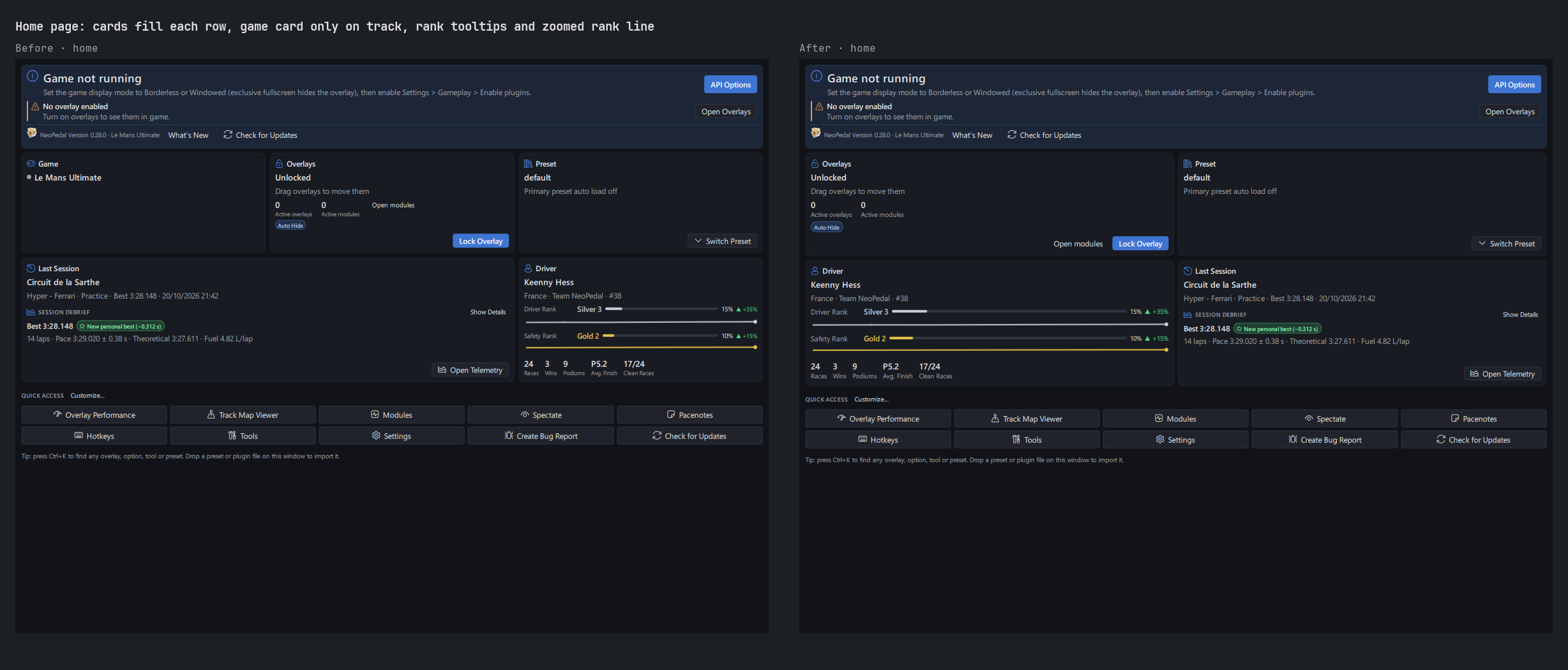
results_summaries.cachein the config folder) and only read new or changed files, even after a restart. - Home page: the cards fill each row whatever cards are shown, the game card only shows on track (the banner tells the game state otherwise),
Open modulesmoved to the overlays card footer, larger logos. Driver ranks: a tooltip tells how far the next rank is, the rank line is zoomed on its values and hidden when the rank never moved, ranks remembered for over a week are marked with a clock. - Support NeoPedal on Patreon: in the
Helpmenu, theAboutdialog and the README. - Development: Checks install exact tool versions (
requirements-dev-lock.txt, the same astools/check.pyexpects),tools/ci_preflight.pyruns Checks on work not pushed yet, and a release commit is refused when its code never passed Checks. The roadmap page was removed.
Fixes
- The log no longer repeats
unable to resolve local hostnameevery minute for hours while the game is closed: warned once, again only after the game answered. - Settings saved while the app quits no longer log an error.
- Checking the nesting depth of a JSON text full of unclosed quotes is no longer slow.
Import Settings…no longer copies cache files of the other computer.
Commits
Changed
- Faster restart and startup, less memory while racing, results summaries cache, Home page review, CI preflight (8b478d8)
SHA256
fe889f2e384f3db6eb1639f4d90133eea118bd545db290629f494efad846f42c NeoPedal-0.28.1-windows-setup.exe7ac8638f8a58f42d5436b26baebb03cdd3b3234e72bc8195a37f4dc962296f9b NeoPedal-0.28.1-setup.zipdc455996c581f4cd4adc75f517ffeede44e5eef54b126257f2b42c05dbd14794 NeoPedal-0.28.1-source.zip
NeoPedal 0.28.0
Hotkeys on your wheel and button box, signed updates, a command palette and a notification center, dialogs inside the app, a Team tab to plan an endurance race with its drivers, a class square and values you switch one by one in the overlays, and hundreds of fixes from full audits of the overlays, pages, performance and security.
New
Hotkeys on game controllers and mouse buttons
- Any button of a wheel, button box, joystick or gamepad, alone or with
Ctrl/Shift/Alt: up to 16 devices, 128 buttons and the d-pad each (Joy1 Button 5,Joy2 Pov Up), virtual controllers included (SimHub Control Mapper, vJoy). The mousemiddle,backandforwardbuttons too. - A switch or rotary held when the key binding dialog opens is ignored until released. Controller buttons also work on Linux.
Command palette, notifications and shortcuts
- Command palette (
Ctrl+K, or the search button of the navigation bar): results grouped by pages, tools, menu commands, settings, overlays, modules, presets and options, recent commands first. Start with>for commands only,@for options,#for presets. - Notification center: a bell in the navigation bar with the number of unread messages and their history (
Clear All). Problems in the background (an overlay that crashed, a file that could not be saved) land there withView LogandCreate Bug Report. While the window is in the tray, Windows shows the notification. Keyboard Shortcutssheet (Ctrl+/orF1) with a search box. Back / Forward like a browser (Alt+Left/Alt+Rightor the mouse buttons).Ctrl+Fsearches the page shown,Ctrl+Shift+Ffinds any option.- Every page has a header with its path (
Tools › Brake Editor); theToolspage is redrawn with aPagessection, and the bar has aMorebutton.
Race Calculator: Team tab
Line-up: type the name of each driver before the race (Add Driver,Remove Driver); a removed driver takes its pace, driving times and stints with it.Stint Plan: the driver of each stint, orAutoto let the plan choose;Keep RotationandAll Autoset every stint at once (input_stint_drivers). The names show in the plan, the timeline, theDriving Timecard and the exports.- Le Mans Ultimate names: the real team names of the game replace the typed ones; a close name keeps its place (
KeennybecomesKeenny Hess) and its planned stints. Plan a Race in 3 Questionson first use: race length, pit stop time and where the data comes from, then the whole calculator (Skip,show_quick_setup).
Other pages
- Presets:
Preset Comparison,Preset Transfer,Restore BackupandRecently Deleted Presets(Restore,Empty Trash) are now inside the page.Set Primary for Classasks for every session, practice, qualifying or race only. - Telemetry viewer: a summary band with
Analyze My Last Lapand the corners where you lose time (Shift+[/Shift+]to go through them), and aCompare Lapsmenu. TheImported Lapslibrary, the track notes editor and the session recorder are redrawn. - Race Results: session comments under the key figures: your race pace against the class median, places gained or lost on lap 1, lap time trend of each stint.
- Driver Stats in three tabs (
Overview,Progression,Compare) with filter chips; aThis Weekcard on Home; a streaming step in the setup wizard.
Overlays
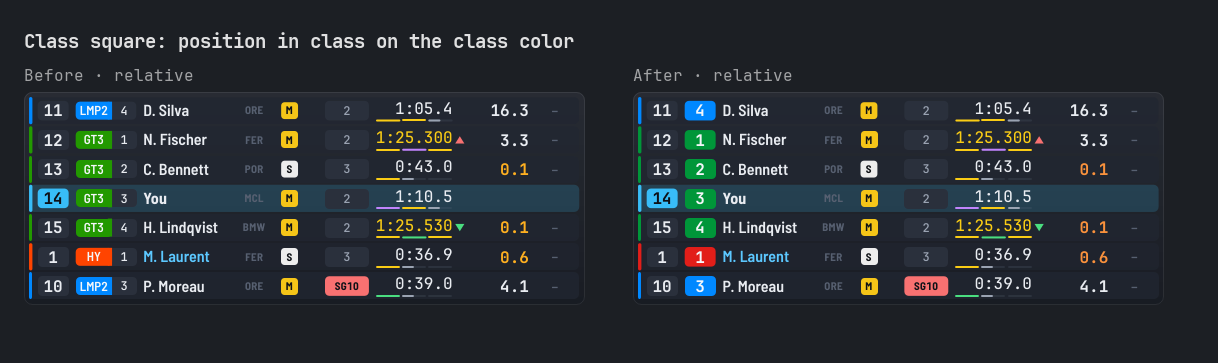
- Class square (Relative, Standings, Rivals, modern design): with
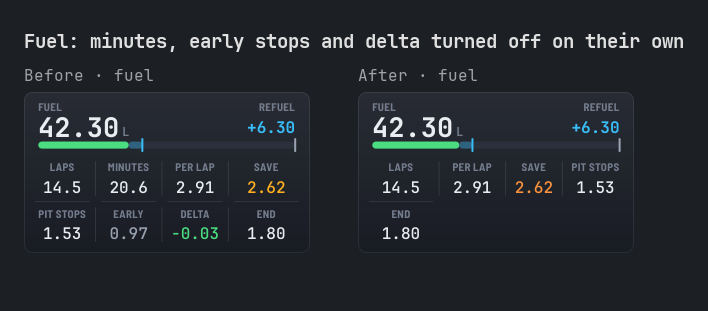
show_class_nameoff, the class column shows only the position in class on a square in the class color, narrower. Driver Badgecolumn (column_driver_badge, off by default): the game badge of each driver in its own column, shown without the ranks and moved on its own.- Fuel and Virtual Energy: each value on its own (both designs):
show_remaining,show_refueling/show_refilling,show_estimated_laps,show_estimated_minutes,show_estimated_consumption,show_saving_target,show_early_pitstop_count,show_delta_consumption,show_end_remaining,show_fuel_ratio,show_fuel_biasreplace the options that switched values in pairs (your settings are converted). - Pace Notes (modern design) on the Track Notes card: the note in bold, comments under it.

Improvements
- Repository renamed
Keenny38/NeoPedal(it wasKeenny38/ModernTinyPedals). GitHub redirects the old links, apps since 0.23.0 follow the redirect when they check for updates, and anupdate_repositorystill set to the old name is read as the new one. Apps before 0.23.0 no longer see new versions: install this one once from the releases page. - Dialogs inside the page: confirmations, alerts and text or number inputs open in the page instead of Windows pop-ups;
Enterruns the action, actions that erase something are red with the focus onCancel.Undoinstead of a confirmation wherever a message offers it (Overlays page, Stream, Broadcast Director, tyres, Driver Stats, laps). File pickers remember the last folder. - Settings:
Changed Onlyfilter, search highlighted, anApplybar and a prompt for unsaved changes.Applyno longer reloads the whole app: application and notification settings apply at once, overlay style restarts only the overlays, remote control, web dashboard, stream and VR restart only their own server. Global hotkeys, preset auto load, overlay previews, remote control, web dashboard, stream overlays and VR switches apply as soon as you switch them. Units, API options and a global font moved into Settings. - Table editors (Brake, Heatmap, Track Info, Tyre Compound, Vehicle Brand, Vehicle Class) share one table: sort, filter, type in the cells, units of your choice, live heatmap preview,
Ctrl+Ssaves. - Hotkeys page redrawn: search,
Assigned only,Clear Allwith undo. - Overlays page: the screen view works from the keyboard, follows locks and snapping, one screen at a time;
Profile,ThemeandFiltersmenus. Turning many overlays on at once can be undone (show_confirmation_for_batch_toggleremoved). - One look everywhere: title bar in the app theme, card shadows, smaller page titles, the same lists, menus and switches on every page, lap times in one style, numbers, dates and units in your locale, colorblind status colors the same in the app, overlays, OBS pages and web dashboard. One name per page (
Calculator,Driver Stats,What's New) andCarinstead ofVehicle. - Overlays: values not known yet show a dash instead of
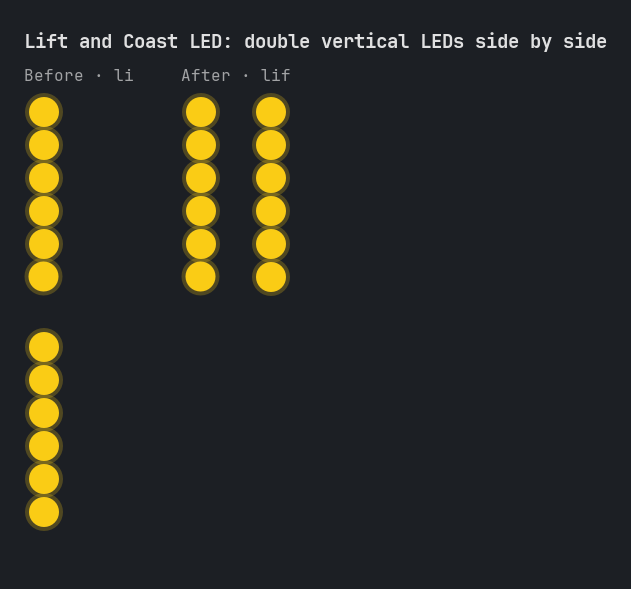
0.00(battery without hybrid, power to weight before calibration, speedometer, downforce...), no more-0.00. Engine and Engine Temperature: the game overheating warning is one option for both designs,show_game_overheating_warning. Tyre Load: same gauge scale in both designs. Lift and Coast LED (modern): double vertical LEDs side by side. Modern designs followshow_compound_color_by_type,suffix_brake_migrationand the Onboard Setting captions. - Previews closer to real values: tyre temperatures (inner edge hottest) and their trend, downforce ratio, stint consistency, toe and slip angle signs, regeneration.
- Fewer freezes of the window: turning every overlay or module off, deleting or restoring many laps, opening large tracks, reloading a preset while a file is held by OneDrive or an antivirus, stopping the recorder, restarting the API or a server, and saving delta, fuel, sectors and stint data now run in the background. Overlays repaint only when their text changes, telemetry laps load with much less memory.
- Standings: a space between the top places and the places around you when places in between are left out (combined mode, both designs); with the class column kept beside the class headers, the position badge shows the overall position;
Gap Trendcolumn centered. The options Standings and Rivals inherit from Relative now show their help on the Overlay Options page and in the option search (55 and 67 options); help fortime_interval_widthandmixed_compound_symbol.
Fixes
- Telemetry viewer: the lap cache size limit also removes files written in the same tick of a coarse clock.
- System Clock overlay: an unknown directive in the clock format (
%Q) sizes the overlay from the format itself on Linux too. - Hotkeys: modifiers must match exactly (
Cno longer runs withCtrl+C,Ctrl+Ano longer withCtrl+Shift+A); while you bind a key, app shortcuts (Ctrl+K,Ctrl+1...9,Ctrl+S,Alt,Enter,Space) no longer run, so any combination can be bound; a short press of a wheel button or a rotary step is no longer missed. - Electric Motor (Le Mans Ultimate): power was about 6.7 times too high; it now comes from the game, and
Regenshows the power recovered. - Flag:
pit closedunder full course yellow, blue flag gap and class from the same car, yellow flag distance without cars stopped in the pit lane, no traffic chip in the garage. Pit Lane Helper: no false limiter alarm at pit exit. Spotter and Radar leave out cars in the pit lane or garage. - ...
NeoPedal 0.27.0
A new Home page with a debrief of your last session, a richer What's New page, a livelier Overlays page, the official circuit of Le Mans Ultimate on the track map from the first meters, a race calculator that follows the real race (drivers, penalties, pit menu), new telemetry channels, goals and road conditions in Driver Stats, and smoother animations on fast screens.
New
Track map from the first meters (Le Mans Ultimate)
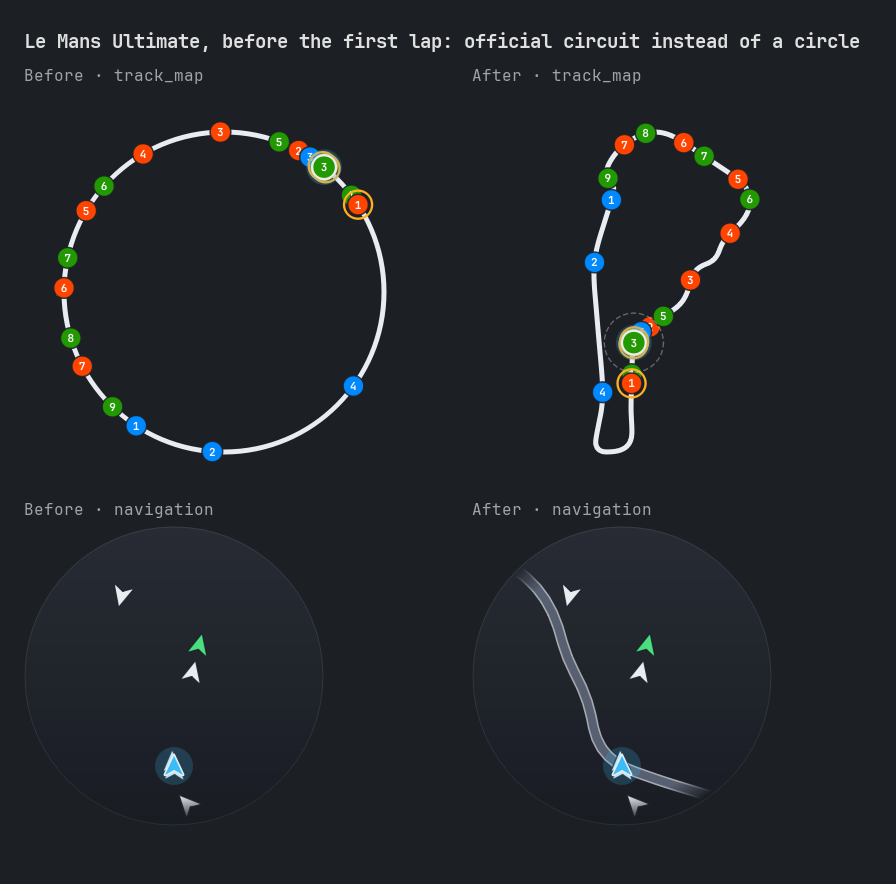
- Track Map and Navigation show the official circuit of the game as soon as it answers, without driving a lap first (
enable_restapi_access, on by default):- the shape at once, with the cars on it;
- the start line (and the Elevation profile, Corner Coach) once a car drives on track;
- the sector lines once you cross them, then it is saved as the track map.
- A short freeze of the app or the game while recording a lap no longer loses it: the lap is shown with its gap and the next lap without a gap is saved. A real jump (back to the garage, part of the lap skipped) is still not kept.
- Without any map yet, Track Map shows
Track map after one lapinstead of a made-up circle. - rFactor 2, or Rest API off: one complete lap is still needed.
Home page
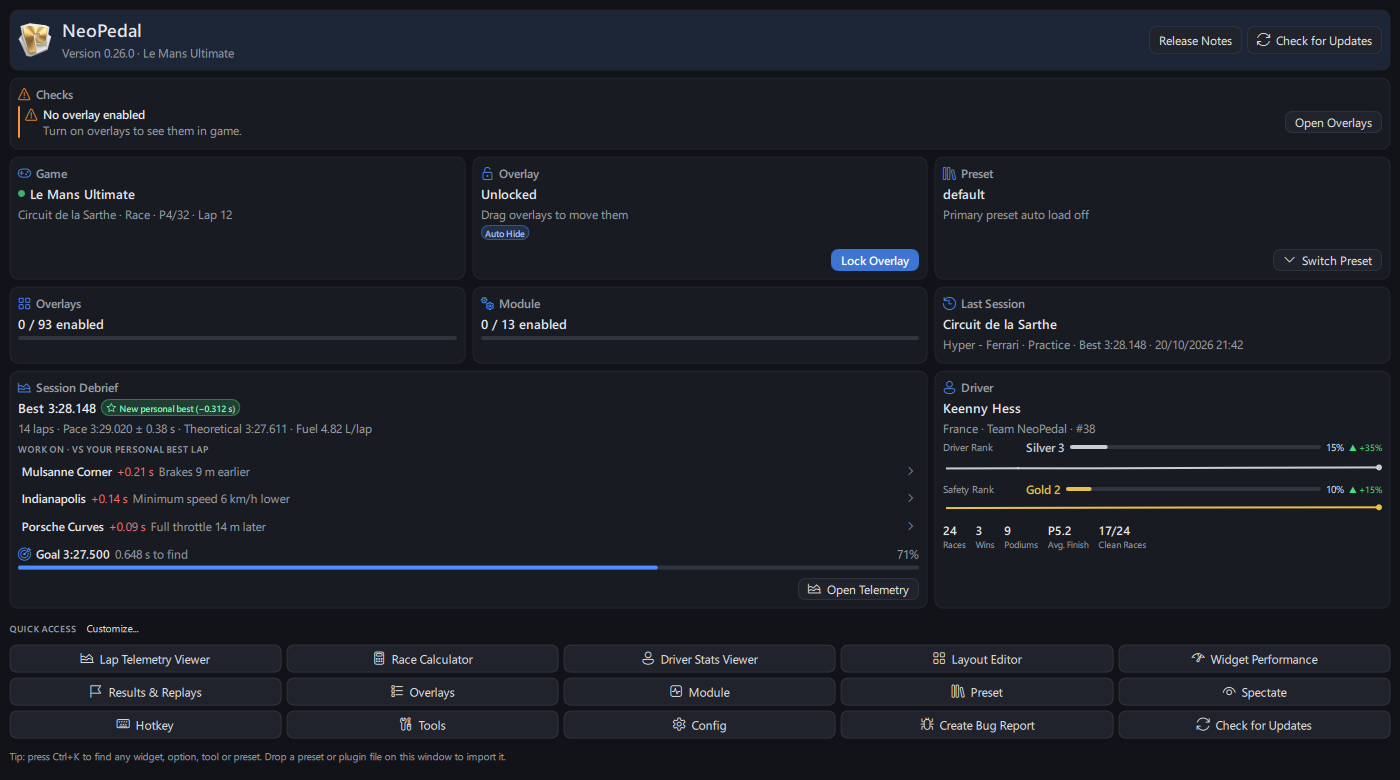
- Checks: what keeps overlays from showing right, most important first, each with a button to fix it:
Game running without data(Le Mans Ultimate open with plugins off),Game not running,Active State Override is on,No overlay enabled,Spectate Mode Enabled,Lap recording is off,Update Available. While you drive with nothing wrong:Ready. - Session Debrief of your last session: best lap against your personal best, pace and consistency, theoretical best, fuel per lap, and
Work on: the three corners where you lose most time, with the likely cause (Brakes 6 m earlier,Minimum speed 4 km/h lower...). Click a corner to open the telemetry on it, charts zoomed;Open Telemetryopens both laps. Your lap time goal (Driver Stats) with a progress bar. Switch Presetfrom the preset card, the last session opens its track and car in Driver Stats, the game card opens the API options.- Driver card: change since your previous Driver & Safety Rank and a line of each rank over time.
- The page is now drawn in Qt Quick (1 to 3 columns) and reads the game and files only while it is shown.
What's New page
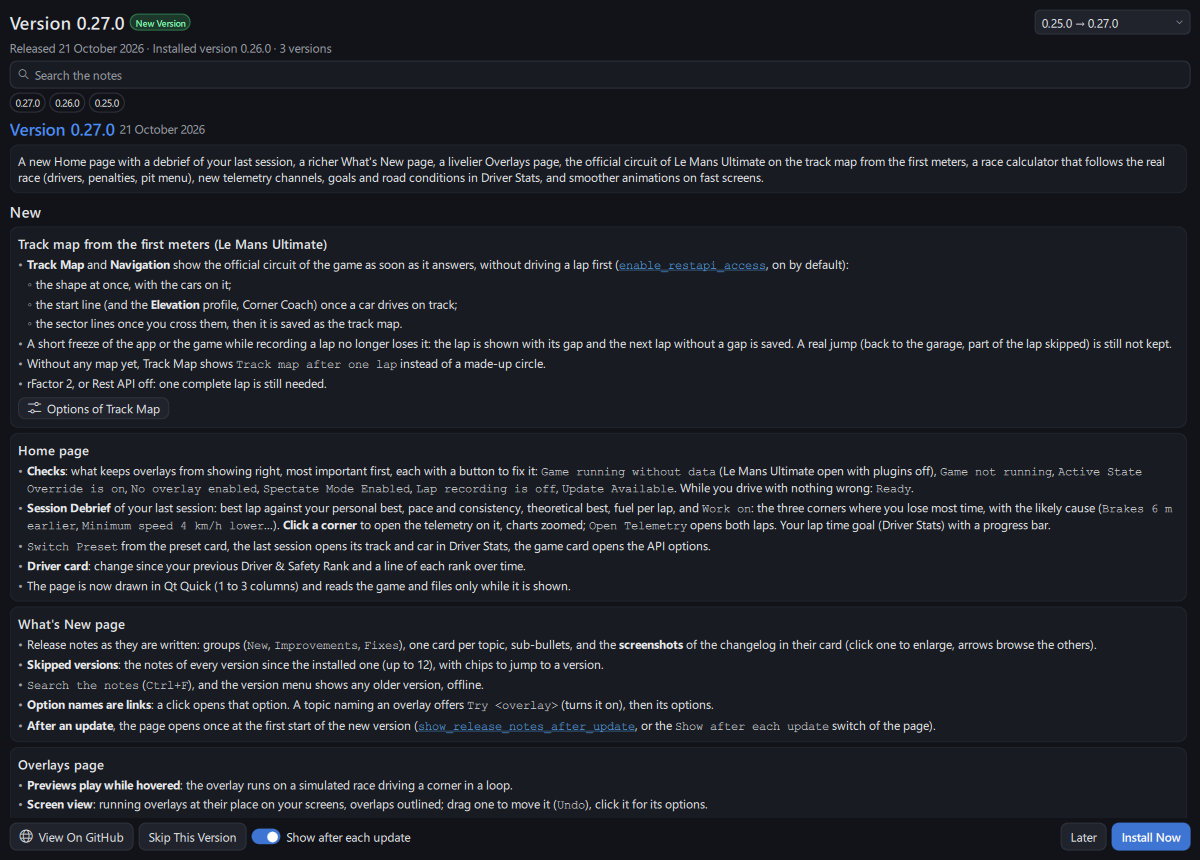
- Release notes as they are written: groups (
New,Improvements,Fixes), one card per topic, sub-bullets, and the screenshots of the changelog in their card (click one to enlarge, arrows browse the others). - Skipped versions: the notes of every version since the installed one (up to 12), with chips to jump to a version.
Search the notes(Ctrl+F), and the version menu shows any older version, offline.- Option names are links: a click opens that option. A topic naming an overlay offers
Try <overlay>(turns it on), then its options. - After an update, the page opens once at the first start of the new version (
show_release_notes_after_update, or theShow after each updateswitch of the page).
Overlays page
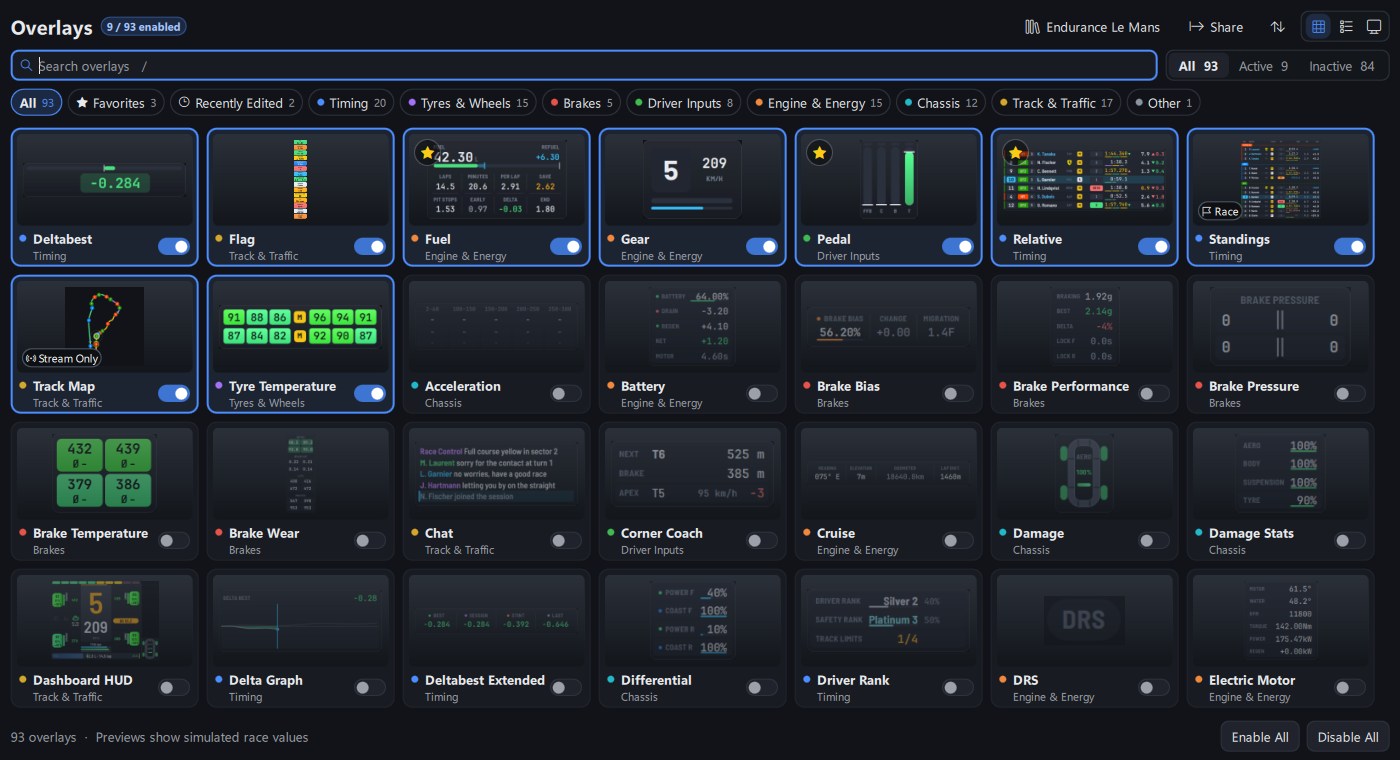
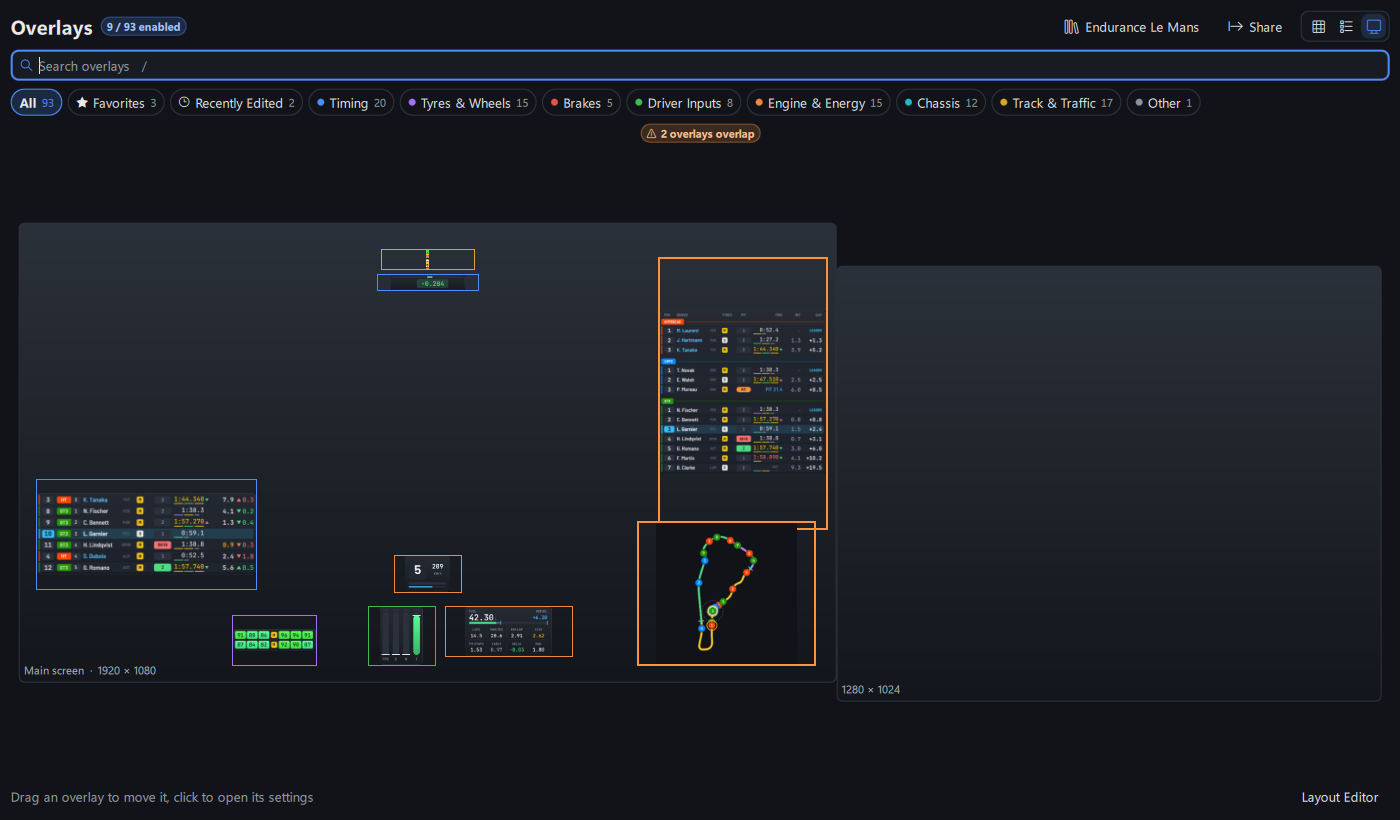
- Previews play while hovered: the overlay runs on a simulated race driving a corner in a loop.
- Screen view: running overlays at their place on your screens, overlaps outlined; drag one to move it (
Undo), click it for its options. - Favorites (star of a card,
Ctrl+F) and Recently Edited chips, a sort button (name, enabled first, category); a switched overlay stays where it is. - What each overlay shows, in its tooltip and in the compact list; badges for overlays shown only in some sessions (
Race,In Pits...) or only on stream or screen. - The loaded preset at the top: click it to load another one.
- Enabling or disabling many overlays at once is a single step (one save, one restart of the modules).
- Overlay Options: the preview plays the overlay on the simulated race (inputs, speed, gear, G force, brakes heating up, loads), with a play / pause button under it; overlays showing a fixed sample stay still.
Race Calculator
- Live race with the real drivers: the driver in the car and the driving time of each stint come from the race (LMU team order), with penalties to serve and a pending repair in the replan.
- Where you rejoin (under
Class Rivals): class place and gaps if you stop at the end of this lap. Pit Menu(LMU, in a session): sets the refill of the next stop in the game pit menu (virtual energy for a car using it, else fuel).Safety Car Risk: chance of a safety car over the race, the part of the race where it saves a stop, and for each stint whether to stop under it (Safety Cars per Hour).- Tyre pace:
Used Tyre Pace Loss(tyres changed when it pays), lap time difference of each compound (gear button of the tyre stock), andCompound Comparisonof the whole race on Soft, Medium, Hard. - Temperature:
Lap Time per °Cwith theTemperature Trendof the weather forecast (Livetab). - Driver minimums that cannot fit in the race are shown on the
Driving Timecard instead of being planned in one-lap stints; a driver short of its minimum drives whole laps up to it. - Race plan overlay:
enable_live_consumption(on by default) plans the rest of the race with the lap time and consumption of your latest race laps, even with the page closed. - Saving target, strategy and compound comparisons and safety car risk are calculated on a worker thread: typing stays smooth on a long race.
Telemetry viewer
- New channels: throttle and brake cut by the driving aids, aero balance, rake, damper velocity (presets
Driving AidsandAero), and bottoming marks on the map. enable_100hz_lap_recording(off by default): a sample every 10 ms instead of 20 ms; newer laps also keep the pedals after driving aids, front and rear downforce and camber.- Track notes:
Add Track Note Hereon the charts; notes are those of the Track Notes overlay (a note added here shows in game). Share Lap...: one.csv.gzfile for another driver, who adds it withAdd File...(shown "shared by" you).- Session tab: sector times, or for one corner the minimum speed, braking point or corner time of every lap.
- Exports
CSV, Visible Part...,CSV, Passage A ↔ B...and MoTeC between the markers. - A lap read from its binary copy loads only the channels shown: about half the memory per lap.
Driver Stats
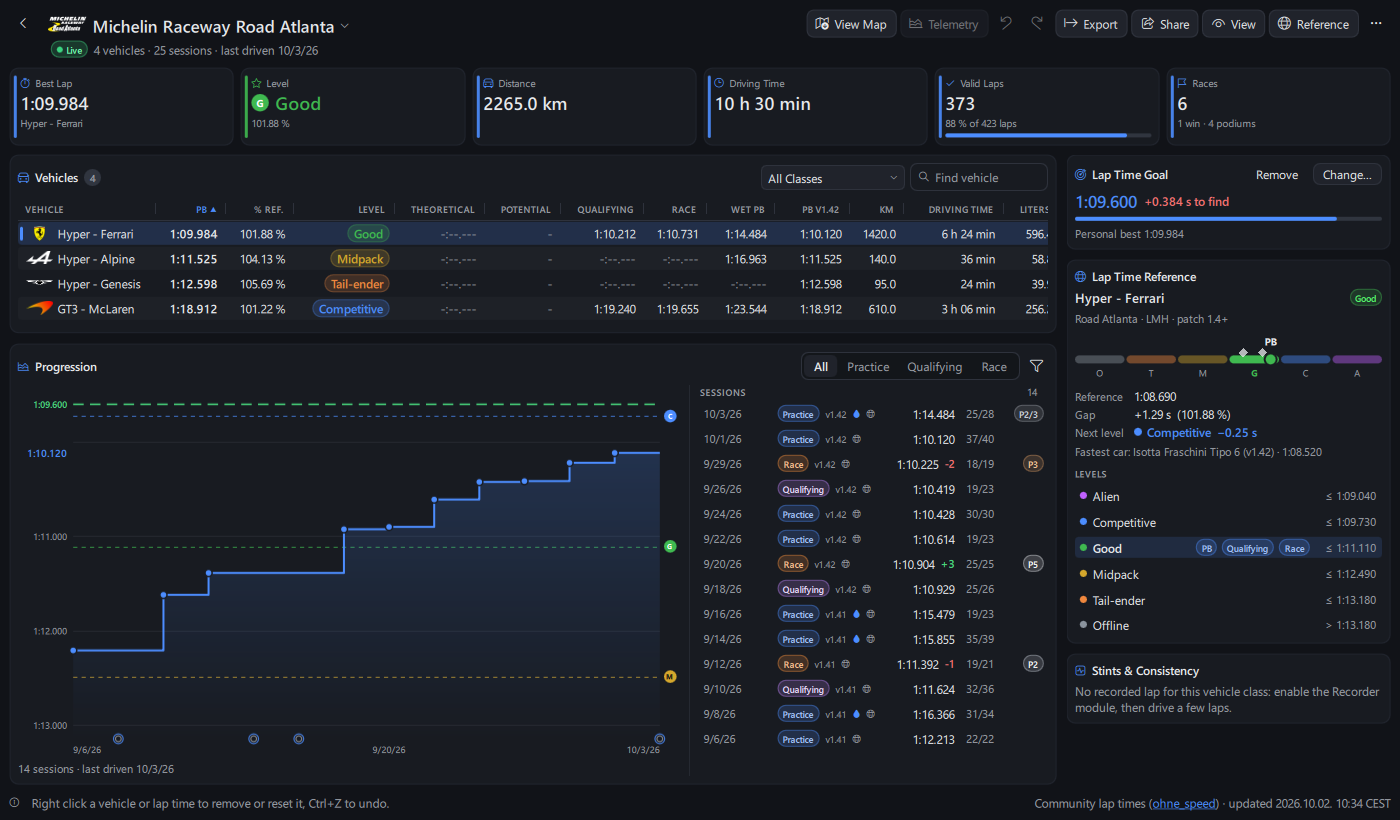
- Road conditions of each session (dry or wet road, track temperature, tyre compound), start position and online or offline: filter by road, server or since a game version, with a wet PB and a PB of the latest game version.
Lap Time Goalper car (suggested from the next community level): progress bar, goal line on the progression chart, a message once beaten.- Places gained, clean race rate and streak,
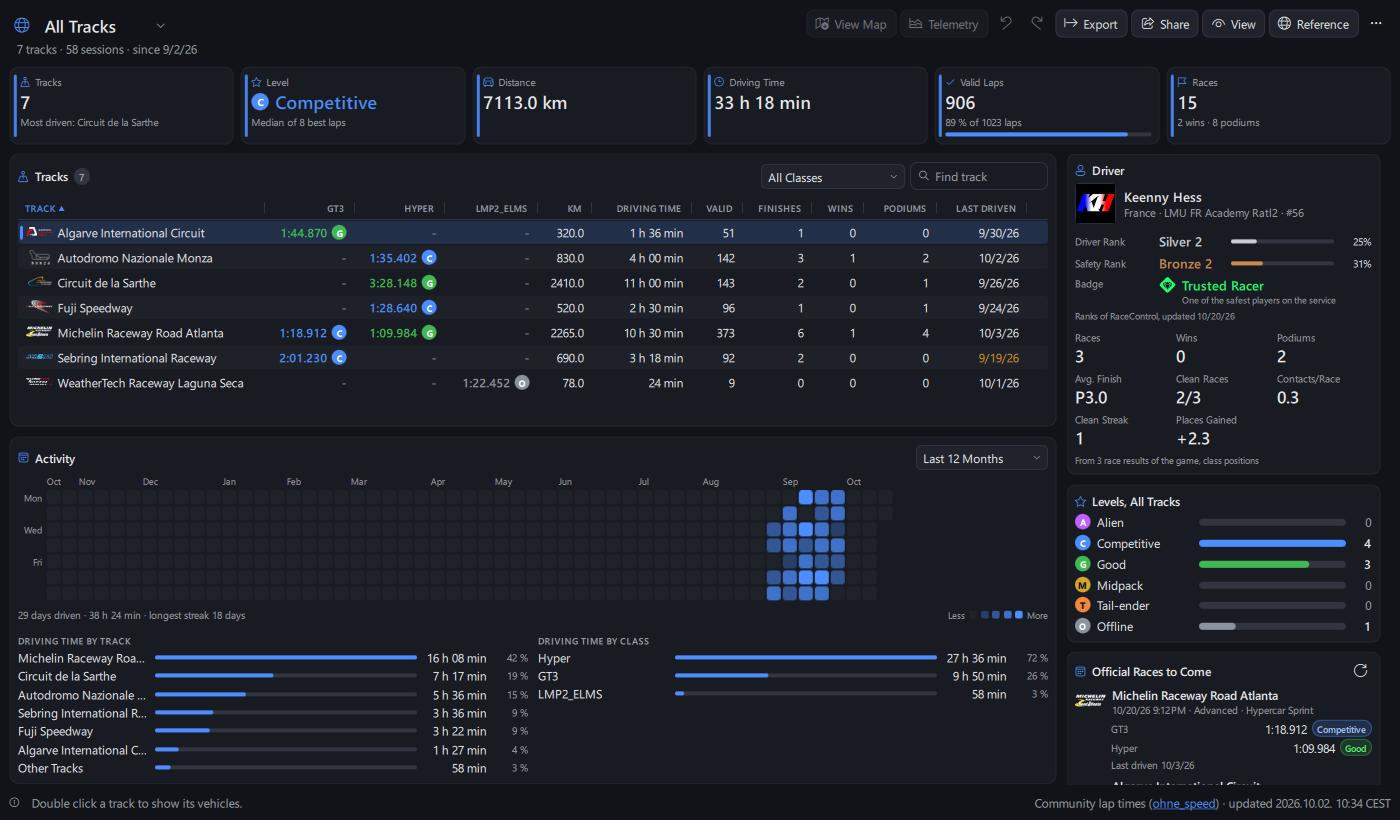
Rivalsmet in several online races, rank history. - Table search, class filter,
Group Vehicles by Class; combos not driven for 30 days marked; activity of any year with driving time by track and class (Breakdown). Official Races to Come (RaceControl)(off by default) with your best laps on their track.- Share your personal best as a picture card or a code to paste in a chat (
Copy Personal Best Card,Copy Personal Best Code,Compare a Personal Best Code...).
Improvements
- Smoother animations: pages animate and scroll at the refresh rate of the screen (up to 125 images per second on a 240 Hz screen, 143 on 144 Hz) instead of 62 (Windows).
- Lap and sector time colors (modern Standings, Relative, Rivals and Track Map sectors): purple for the best of the class, now including sectors of the lap being driven, so a sector beaten mid-lap is at once the only purple one; green for a personal best as soon as it is set; a slower valid last lap is yellow.
- Running lap time for every car, also those without telemetry, and while your own telemetry is frozen (garage, monitor, spectating).
- Real game sessions replayed in the automated tests through every data module and overlay, checked against the game values.
Fixes
- Fuel: the lap you joined mid-lap (app started or preset loaded on track) was counted as a full lap, with a partial consumption in the history and the race calculator.
- Flag: in a timed race, the last lap alert also comes on the extra lap when the leader crosses the line after you.
- Track Map, Navigation, Elevation, Corner Coach: the map is read as one piece, never half of an old map and half of the new one while...
NeoPedal 0.26.0
A corner coach, the Driver Rank and Safety Rank of every driver online, new flag alerts, darker panels, two overlays from TinyPedal 2.51, and three audits of bugs, performance and interface.
New
Corner Coach overlay
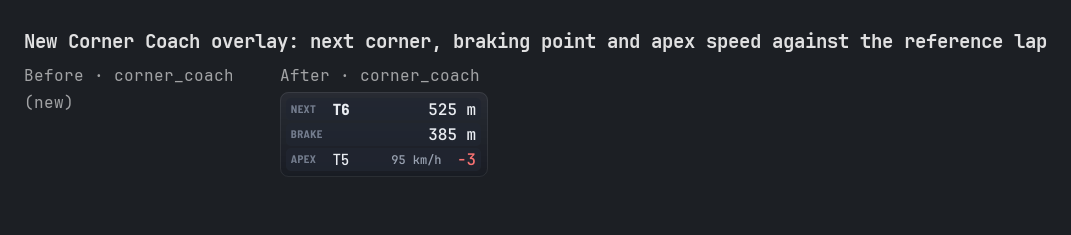
- Coaching corner by corner against the same reference lap as Telemetry Compare (
reference_lap_source:Viewer,BestorLast), off by default,Driver Inputscategory:- Next: the next corner, with its official number or name (
T5,Tertre Rouge), and the distance to its apex (show_next_corner). - Brake: distance to the braking point of the reference lap, then once you brake
On point,8 m earlyor8 m late(show_braking_point,braking_point_tolerance3 m by default), orNo brakingfor a corner taken flat. - Apex: minimum speed of the corner you just left and its difference to the reference lap, green when faster (
show_apex_speed).
- Next: the next corner, with its official number or name (
Online Driver Rank and Safety Rank (Le Mans Ultimate)
- Recent game versions no longer keep ranks in their menu file while the game runs: with
enable_online_driver_ranks(Config>Application>Online, on by default) the app reads them from RaceControl the way the game menu does (Steam ticket of the running game, ranks only, nothing saved), at start, after each session and every 5 minutes. - On an online server (practice, race, private server), the ranks of every driver of the session are read too, by name:
Driver & Safety Rankcolumn in Relative, Standings and Rivals (column_driver_ranks, off by default):S2 P3in rank colors, with the game badge of each driver;- strength of field of each class in Standings class headers (
show_class_sof) and field average in the Session overlay (show_field_level); - Driver Rank and Safety Rank on the Broadcast Director driver cards.
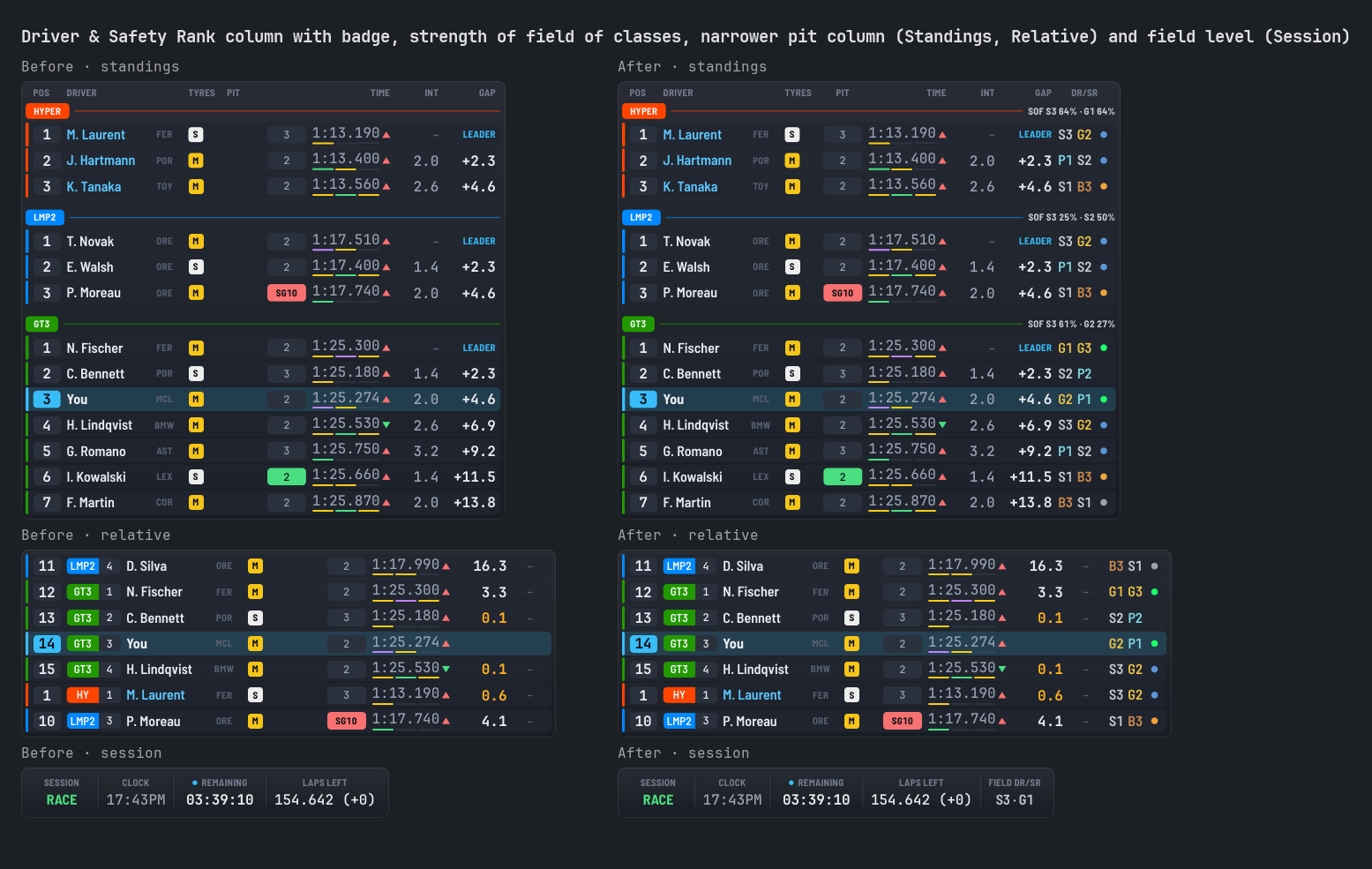
Flag: new alerts
- Penalty to serve (
DT,SG10,PEN×2), last lap (timed races too) and heavy damage (aero %), both designs. - Under blue flag, the gap of the car lapping you.
- Speed limiter against the pit speed limit: green when on, red when over the limit in the pit lane, and an alert when the pit lane is driven without it.
- Modern design:
enable_new_flag_flash(alerts flash when raised),enable_urgency_order(most urgent first), and the overlay takes only the room of the alerts shown. show_sector_yellow_flags_for_race_only: sector yellow flags have their own race only option (taken from the yellow flag one in your presets).
Darker panels and opacity of all overlays
enable_black_background: panels of the modern dark themes in neutral black instead of blue-tinted slate (issue #5).background_opacity_percentage: opacity of the modern panels (92 by default, as before; 100 solid).overlay_opacity_percentage: every overlay more see-through at once, on screen, stream and VR. It multiplies the opacity of each overlay, which keeps its own.
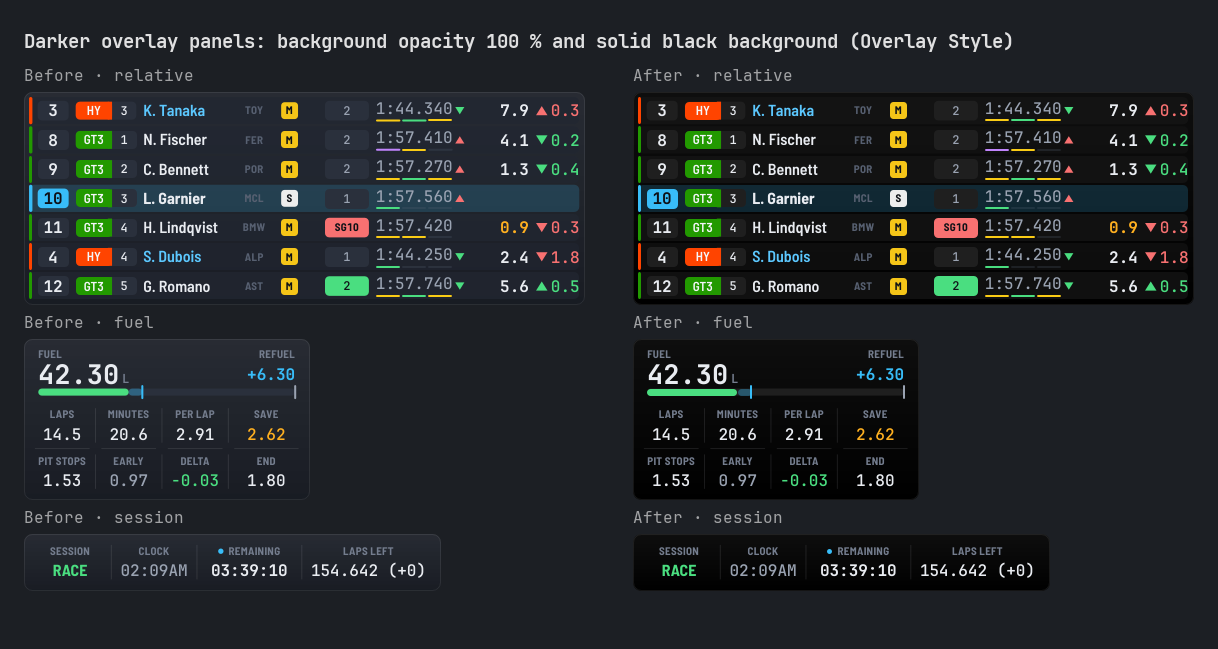
From TinyPedal 2.51
- Wind Direction overlay: compass turning with your car and arrow of where the wind blows (up: tailwind), colored by wind strength; a dot while calm.
wind_speed_unit(m/s,KPH,MPH) also used by Weather. - Wheel Dimension overlay: front and rear tyre radius measured while driving (Wheels module
enable_wheel_dimension_measurement). - Track Map:
Orient (°)column of the Track info editor turns the map of one track. Mapping:minimum_node_distancebetween recorded points (5 m by default), a lap with a jump (back to the garage) is no longer recorded. - Instrument:
warning_color_engine_off, ignition red while ignition and engine are off. - Heatmaps: new default heatmaps
tyre_optimal_80(new compounds) andbrake_optimal_400(new brakes);tyre_defaultis nowthermal_infrared. Your heatmaps and choices are kept.
Overlays
- Corner numbers: the official corner numbers (or names) on the Track Map and under the Elevation profile (
show_corner_numbers, off by default). - Relative: lap time delta column (
column_delta_laptime), as in Standings and Rivals.
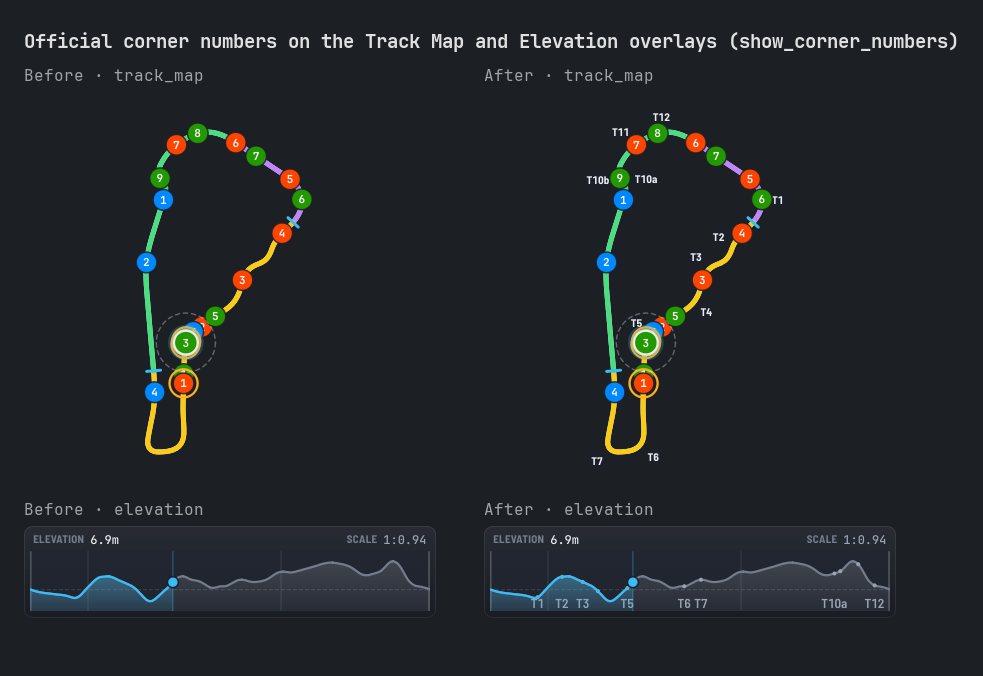
App
- Undo everywhere: lap trash with 20 levels and
Recently Deleted Laps...to restore older laps (kept 30 days);Ctrl+Z/Ctrl+Yfor the switches of Find Option;Configundo goes back pastApply. - Recent files in the race calculator (
Load File,Open Recentfor race plans and tyre plans), and.consumption,.race-planand.tyre-strategyfiles dropped on the page or the main window..svgmaps dropped on the Track Map Viewer, with a search in the recorded maps. Streampage in the navigation bar, afterBroadcast(added to customized bars too).- Overlay Editing options (edit mode, snapping, grid, guides) moved to
Config>Overlay Style(still saved in the same place). - Keyboard:
/jumps to the search,Deletedeletes the selection. - Actions that erase something ask first, with a button named after the action; toolbars of the lap viewer, track map viewer, stats, replays and results fold into a menu when the window is narrow.
- Exports name their file with
Show in Folder;Clear Filterson the Results page when nothing matches; a results file that can't be read is flagged.
Improvements
- Sectors: times and gaps wait for the sector time given by the game, so they match the game HUD; the out lap and in lap count for best sectors (only the sectors through the pit lane are left out), personal best sectors never come from a lap through the pits.
- Standings:
show_pitstop_duration_while_requested_pitstopoff by default (the Time column keeps lap times when a pit stop is requested), also in existing presets. - One copy of the app per settings folder with a system lock, released even after a crash (no more
pid.log); a restart waits for the previous copy to close. - Lighter and smoother: hidden pages no longer refresh, fewer refreshes when the followed car changes (Broadcast Director, spectate), lap viewer playback texts at 10 Hz, lighter lists, charts and gauges.
- Telemetry viewer: changing a setting (time axis, smoothing, channels...) no longer waits for the disk: up to hundreds of milliseconds on a busy disk.
- Replays: deleted replays go to the recycle bin in the background, with progress and
Stop. - Updates: the installer is downloaded into a private temporary folder and checked again as it is extracted; it is deleted when you decline the install or when it fails to start.
- Interface review: consistent sizes, spacings and colors, French labels fitting at every width (Race Calculator header), focus and keys in the Broadcast Director.
Fixes
- Auto Hide: overlays hide again in the garage while stream overlays are on air (OBS keeps them); while spectating they stay on the stream only.
- Web dashboard: sign-in cookie per port (
np_session_<port>): sign in once again after the update. - Stream overlays: WebSocket only accepted from NeoPedal's own pages while their server runs; a new access token asks first; a layout reset can be undone.
- VR overlay: shared layer folders protected (owner check and access rights).
- Instrument & Dashboard HUD: ignition read correctly while cranking.
- Wheels module: radius measurement no longer shows a fake wheel lock while it starts.
- Wind Direction & Weather: wind arrow exact at 0° and 360°.
- Stint timer: overlay previews no longer change the live driving times.
- Standings: strength of field counted on the cars of the session only.
- Race calculator: consumption history saved and deleted safely while the live session writes to it.
- More than 100 fixes from three audits (bugs, performance, interface), across overlays, pages and connections.
Removed
maximum_loading_attempts: a damaged settings file is no longer read again and again: it is kept as a backup and defaults are used at once (a file locked by an antivirus or cloud sync is still retried).
Commits
Added
- Add Corner Coach, online ranks of every driver, flag alerts, darker panels & 0.26.0 changelog (d15848d)
Fixed
- Fix lap viewer settings saved with a disk flush on the UI thread (20 ms to hundreds of ms on a busy disk) (8c116cb)
- Fix CI budget test: garbage collected before each timed slot (full GC pause of Python 3.11 counted in the slot) (03df744)
- Fix Windows CI test: shared layer root owned by the Administrators group when the runner is elevated (475ab90)
- Fix Linux CI tests: VR layer owner check mocked off Windows, toolbar modes as QJSValue, show list scrolled within bounds (048f24c)
SHA256
be96c8eae8b840f4eeeae6706cd09b7d8d3be1e5d8468914e970ed408f84a0db NeoPedal-0.26.0-windows-setup.exe9ca2af9d3325c9162eb1f27f8f5f15266ff012d844f9c9addec0a78bfb964ceb NeoPedal-0.26.0-setup.zip- `43b0ee0d80b80ed8dc94adf080e2ed72ec73d278...
NeoPedal 0.25.0
Safer options everywhere: every number has limits you can see, presets are repaired as they load, and the Overlay Options page shows race situations and both designs.
New
Overlay Options
- Race situations in the preview:
Racing,Yellow & Blue Flags,In Pits,DamageandRainshow flags, pit timer, limiter, damage or wet weather without driving. - Test on Screen: the overlays on screen show the chosen situation for 10 seconds (saved values), to set their colors and thresholds.
- Other Design: the same values drawn by the other design (modern or classic), with the number of options of each design.
- Used only filter: hides the options doing nothing with the current values (greyed out).
- Allowed values in the tooltip of every number (
Allowed: 0 - 4000). - Options used by several parts (a Dashboard HUD label shown by its chip and by the setting pop-up) are greyed out only while every part is off:
Used only with one of: ....
New Tyre Overview overlay
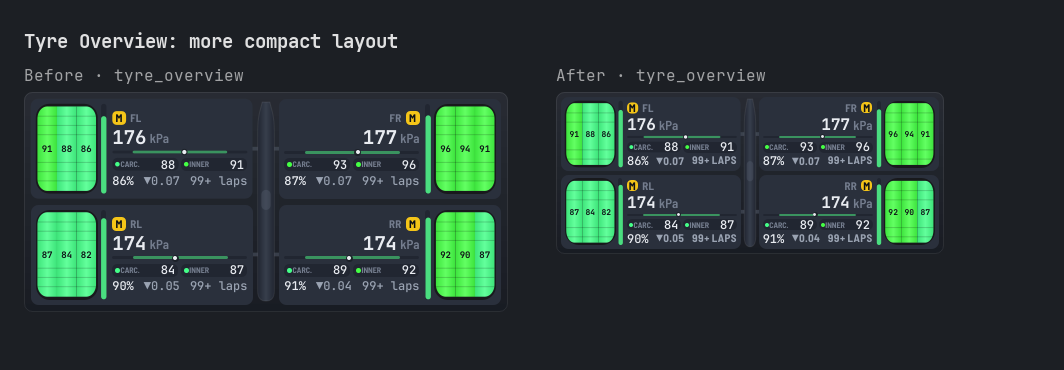
- Every tyre reading in one card per tyre (off by default,
Tyres & Wheelscategory), placed as on the car seen from above (modern design: car body in the middle, each tyre drawn at its corner): inner / center / outer surface temperatures on the tyre in heatmap colors, compound badge or alert (detached wheel, puncture, flat spot) with the tyre highlighted, carcass & inner layer temperatures, pressure in blue below and red above the target range with its place on a target scale (same ranges as the Dashboard HUD, per compound too), tread gauge, wear per lap and laps left. Every part has its own on/off option, the car body and tyre drawing too.
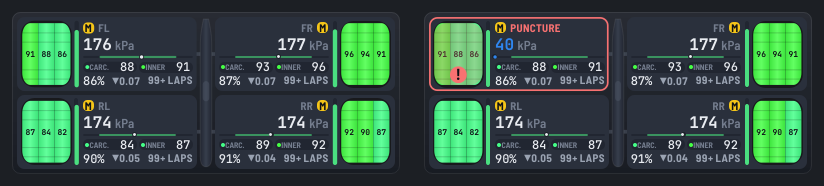
Presets and options
- Check Preset (Presets page menu): lists the unknown, invalid and out of range options of a preset, and repairs it.
- Standings:
show_class_column_with_class_headerkeeps the class column with the class headers (off by default). - Flag:
low_energy_percentage_threshold, low energy alert at a percent of energy left (100 by default: laps threshold only, as before).
Improvements
- Every number option has limits: a value out of range in a preset file, an imported preset or a package is brought within them as the preset loads (written in the log), instead of drawing an overlay of tens of thousands of pixels.
- An overlay too big is cut to 8192 pixels with a message, instead of freezing the computer.
- Import Overlay Settings: each option left out or corrected is listed with the reason, and numbers out of limits are brought within instead of skipped.
- Import Settings: tried again at the next start (up to 3 times) when files are in use (other instance closing, antivirus).
- Broadcast Director: closing the page no longer waits for the events log to be written.
Fixes
- Standings, Relative and Rivals: column order and columns on or off follow the page every time; the classic design no longer lists the orders of modern only columns (gap trend, track limits, energy per lap).
- Overlay Options:
UndoandRedowhile a field is being edited show the restored value; options greyed out wrongly, or not greyed out, on many overlays. - Driver Rank: ranks saved before 0.24.0 (without their Steam account) are shown again while the game menu file has none: they go to the account in use when no other account has saved ranks, never to a second account.
- French translation reviewed in full: the app speaks to you with « vous » everywhere, one word for vehicle classes (« catégorie »), about 200 labels, help texts and messages corrected (agreements, power/weight ratio, missing words), and texts still in English translated (Flag, Engine, Force, System Performance overlays, error messages).
- Overlays, found by reviewing every option: radar fade radius, brake average temperature and Speedometer top speed reset with the session, Dashboard HUD impact cone after a restart, overlay brought back on screen staying there, low fuel or energy alert with an unknown consumption, global scale no longer turning on options set to 0,
100%no longer cut, lap times like1:60.0, Sectors after a reset, Trailing time scale, Heading decimals, Tyre Pressure average, Track Notes timers, Steering Meter marks, and many more.
Commits
Changed
- Compact Tyre Overview, ranks saved before accounts kept & 0.25.0 changelog (f60431d)
- Audit fixes, option checks, French review & new Tyre Overview overlay (511544c)
Visuals
Tyre Overview: more compact layout
SHA256
d049910cc7ae92e60f3ee92ca07fb0735ffe12e87051d1da39a4c727d5c9c6fb NeoPedal-0.25.0-windows-setup.exe93b12b44d28f949bae6960ae6c206b65bc6394e0727fa4db725ca689d00a1c5f NeoPedal-0.25.0-setup.zipc8d40b2a9dd2d84cdbeeeb68b770b0dffd8e92c7525e293f3718315d3f120002 NeoPedal-0.25.0-source.zip
NeoPedal 0.24.0
Your Driver Rank and Safety Rank everywhere, Standings like a timing tower, the Black box renamed Dashboard HUD with a setting pop-up, Results & Replays in one page, one look per meaning in every overlay and page, and a lighter app.
New
Driver Rank & Safety Rank (Le Mans Ultimate)
- New
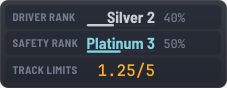
Driver Rankoverlay (off by default,Timingcategory): your Driver Rank (DR) and Safety Rank (SR) as the game menu shows them (Silver 2, progress to the next tier40%), and your track limits points against the session limit (1.25/5). - On your driver cards:
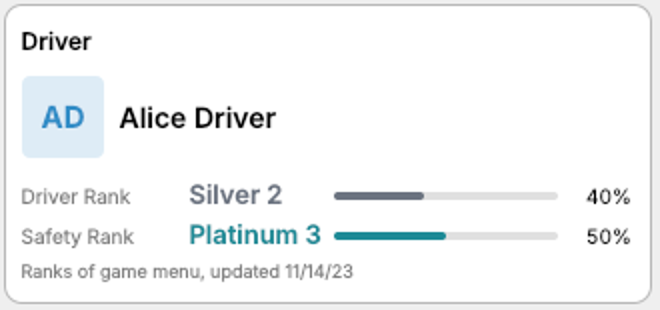
Driver Stats Viewer, the Home page and theBroadcast Director(you and your teammates, those of the events you registered for included). Each rank in its color, with the progress to the next tier and the change since your previous rank (▲ +10%), and your badge with its icon, name and description as in the game menu. - Last ranks kept: when the game rewrites its menu file without your ranks (it did with its update of October 13), your last ranks are shown with their date instead of nothing. Every change is kept in
driver_ranks.history. - Several Steam accounts on one computer: ranks and badge are kept per account, the account signed in to Steam is followed live, and your other accounts are shown below your driver card. The ranks of one account are never shown as those of another.
- Ranks are only read from the game folder (
coherent_local_storage.json): nothing is sent anywhere, no sign-in.
Home: driver card
- New
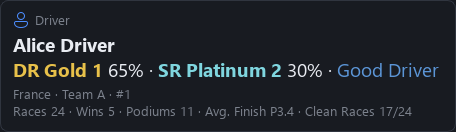
Drivercard on the Home page: your name, ranks, badge, country, team and number, and your race record from the game results files (races, wins, podiums, average finish, clean races). Click it to openDriver Stats Viewer.
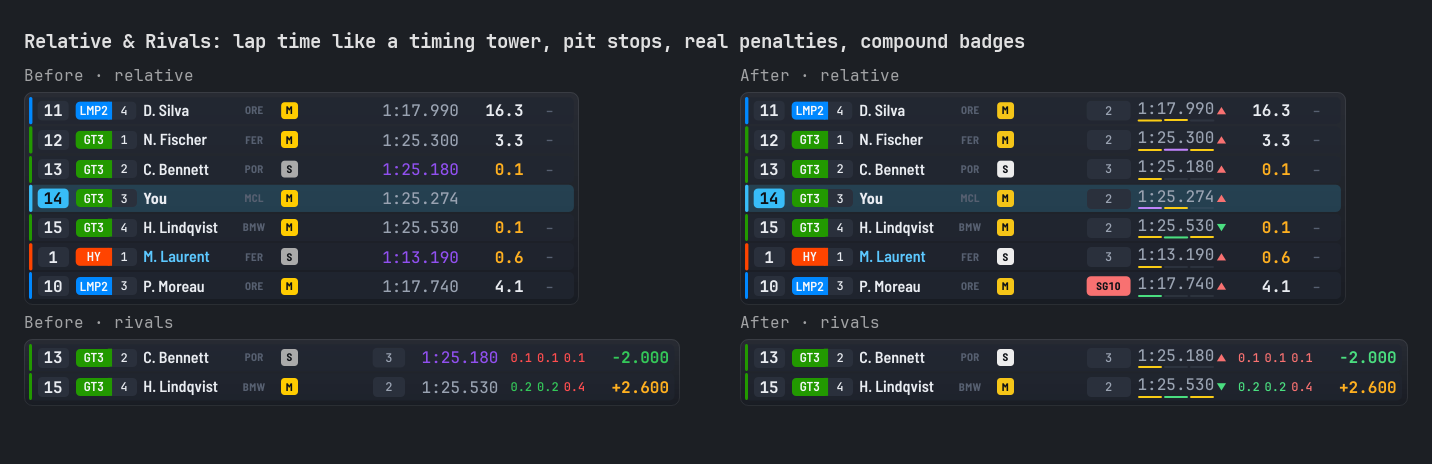
Standings, Relative and Rivals like a timing tower
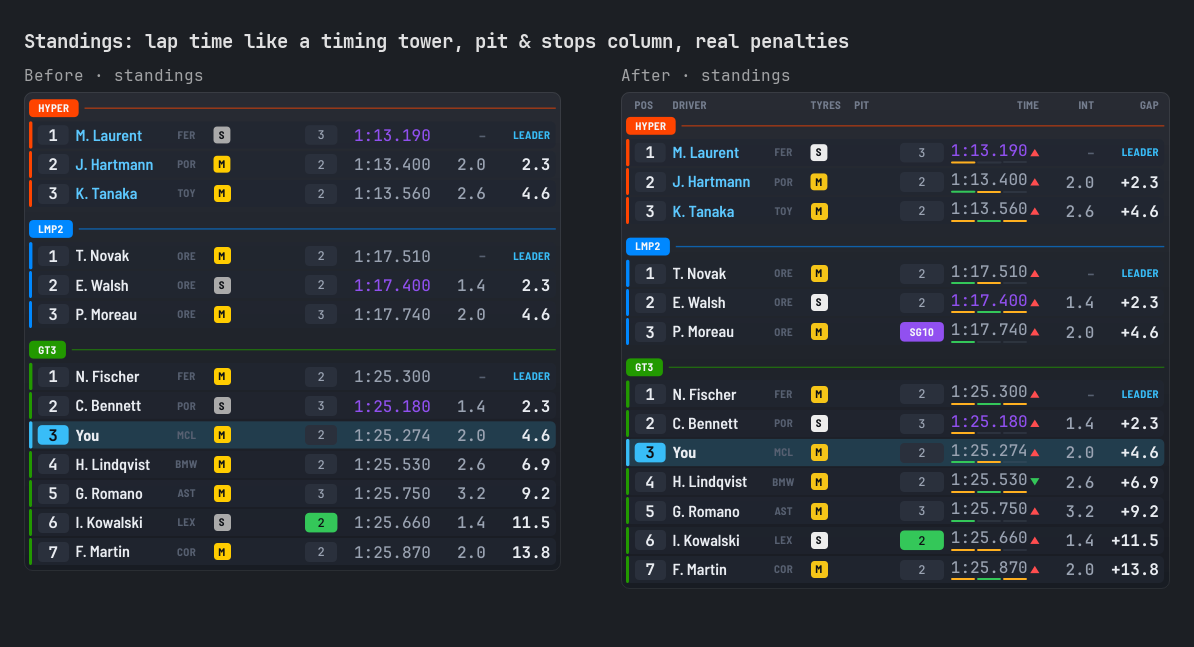
- Time column like on TV (modern design, each part can be turned off): the running lap time, then the completed lap with its colors and the gap to the driver's best (
+0.345),OUT/INlaps, invalid lap in red and a trend arrow. Three sector bars under the time, colored like the game live timing: purple best of the class, green personal best, orange slower. - Real penalties (Le Mans Ultimate, both designs):
DTdrive through,SG10stop & go,+10stime penalty,SG×2several to serve,DQdisqualified, instead ofPENor-1. - Pit status and pit stops in one column: the
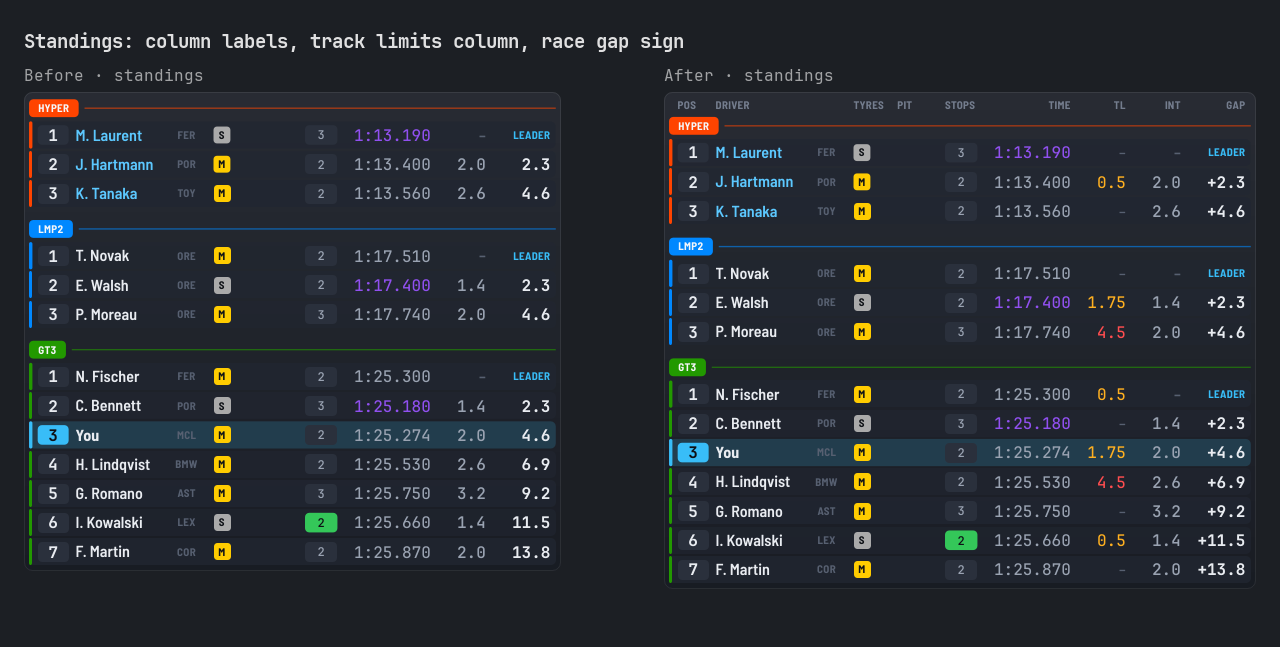
PIT,GAR,SLOW,FINpill, then the stops count or the penalty. - Column labels above the cars (
Pos,Driver,Tyres,Pit,Time,Gap...), on by default. - New
Energy per Lapcolumn (Le Mans Ultimate, off by default): virtual energy each driver used in the last lap, or the average of the last 5 laps. - New
Track limitscolumn (Le Mans Ultimate, off by default): track limits points of each driver, amber once any, red one point before the penalty. - Race gap with its sign (
+12.3,+1L), last lap in green when it is the driver's personal best.
Dashboard HUD (formerly Black box): setting pop-up, new readings, your own profiles
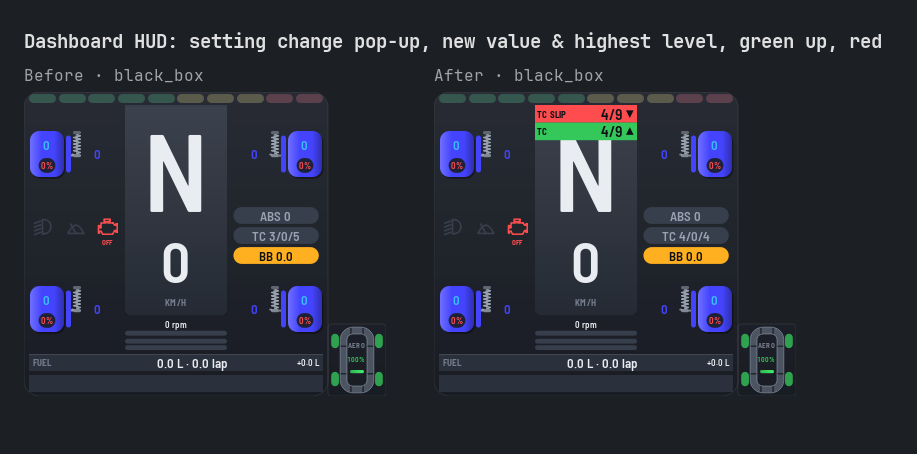
- The Black box overlay is now called
Dashboard HUDeverywhere in the app. Your settings, presets and incidents are kept. - Setting change pop-up (on by default): change TC, ABS, brake bias, brake migration, engine map or an anti-roll bar in the car and the center column shows it for 2 seconds (
TC 4/9 ▲), green going up, red going down. Pit limiter, headlights and wipers too (LIM ON). Position, duration and colors can be set. - New readings (Le Mans Ultimate, off by default): track limits points (
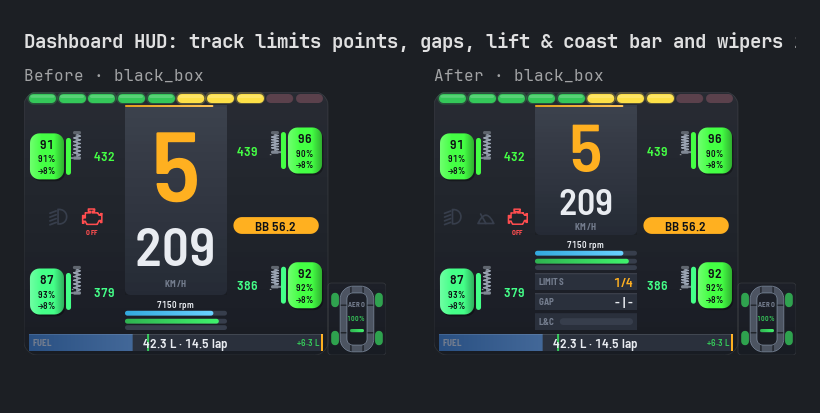
LIMITS 1.25/5), gap to the car ahead and behind (GAP 1.2 | 3.0), a lift & coast bar, and a wipers icon next to the headlights. - Tyre compound and wear together: the compound badge is drawn next to the wear (
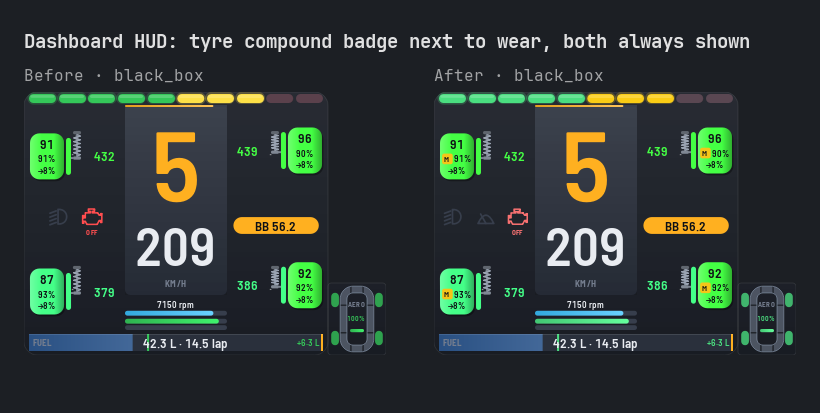
[M] 91%), so turning onshow_tyre_compoundno longer hides the wear, or the compound, for lack of room. - Your own display profiles:
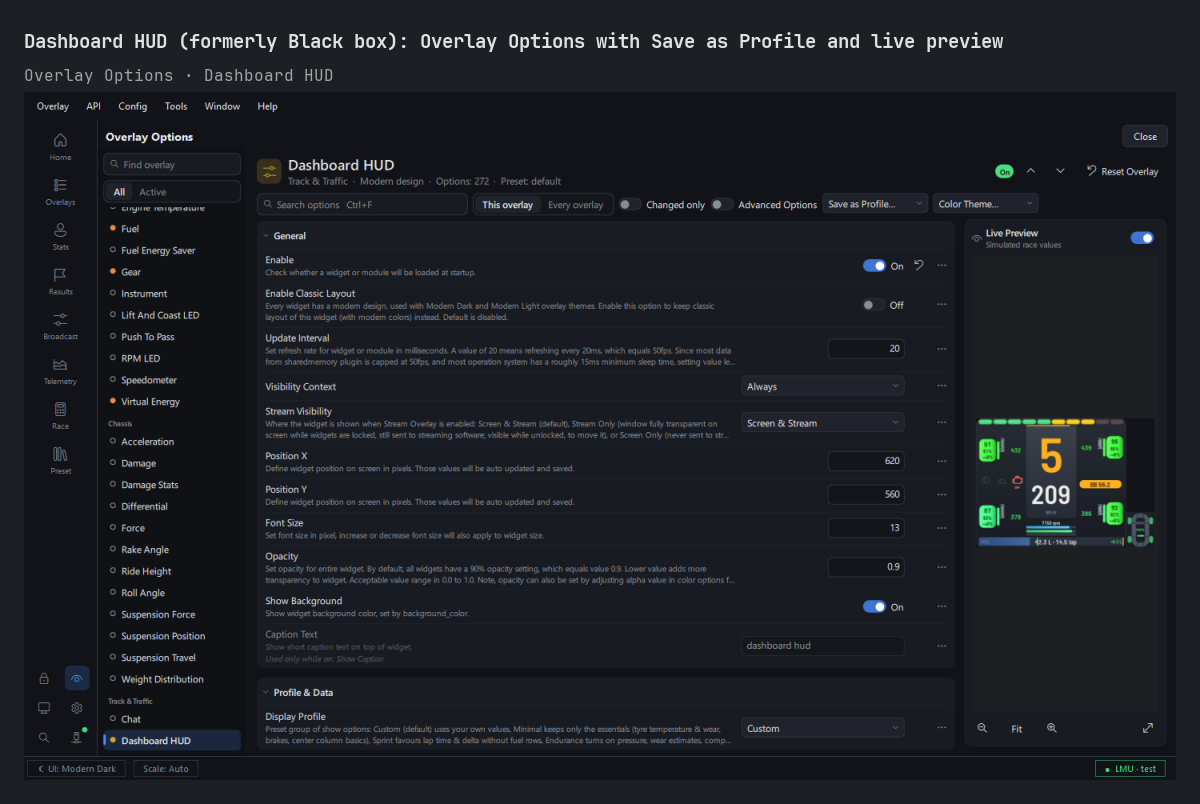
User 1,User 2andUser 3, saved withSave as Profile.... Changing an option of a profile now switches it toCustominstead of locking the option. - Overlay Options: click a part of the Dashboard HUD picture (tyre, center column, damage, trace...) to jump to its options. Simple mode shows the main items only (46 options instead of 89).
Results & Replays: one page
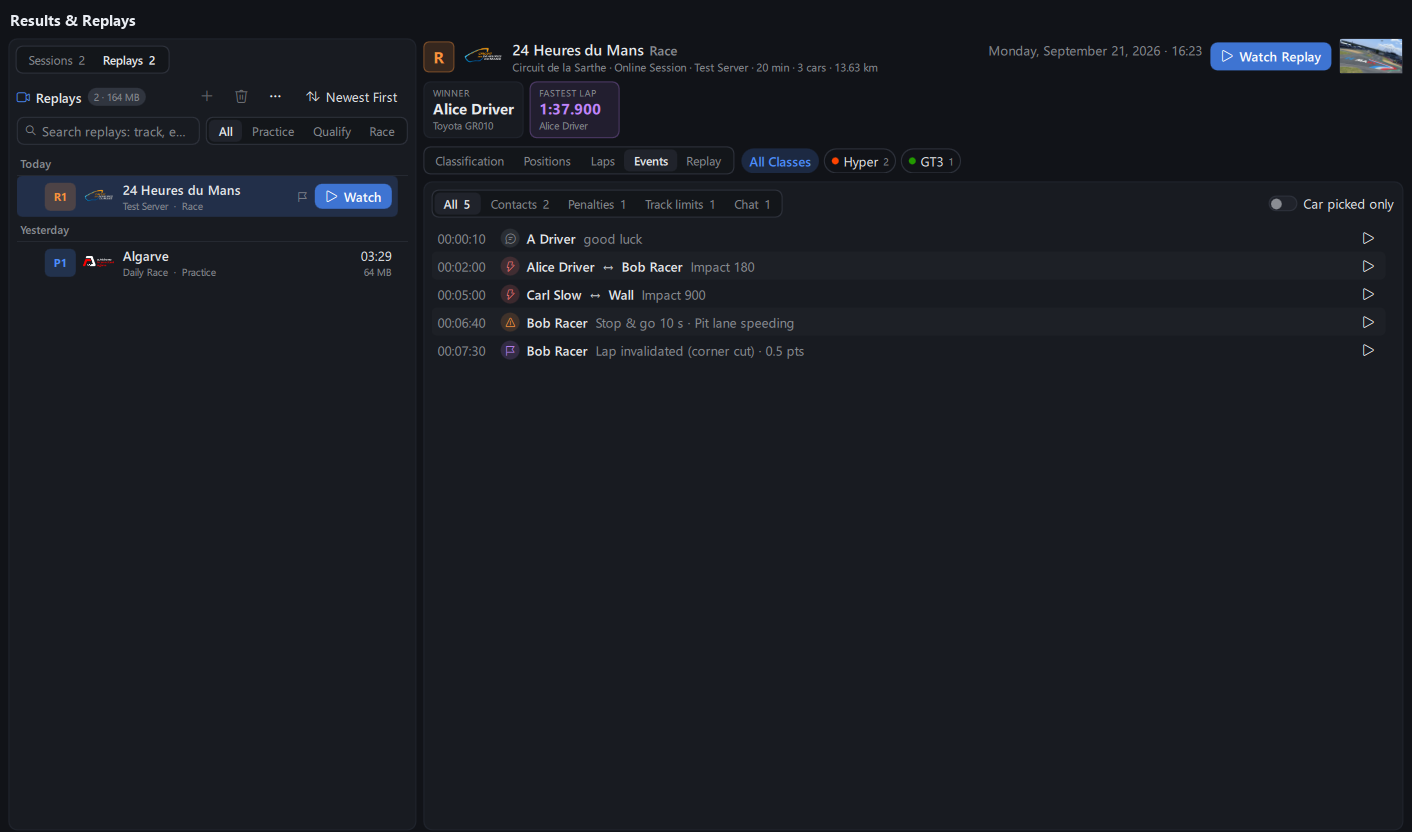
Race ResultsandGame Replaysare now one page,Results & Replays(Resultsin the navigation bar). The switch at the top of the list shows the sessions of the results files or the replays saved by Le Mans Ultimate; theReplaytab has everything the replays page had.- Each replay is linked to its results: a flag on replays that have a results file,
Show Resultsin their menu, and the replay of a session picked with it. - Watch an event or a lap: the play button of an event (contact, penalty, track limits) opens the replay a few seconds before it, camera on the car concerned; the play button of a lap opens the replay at the start of that lap.
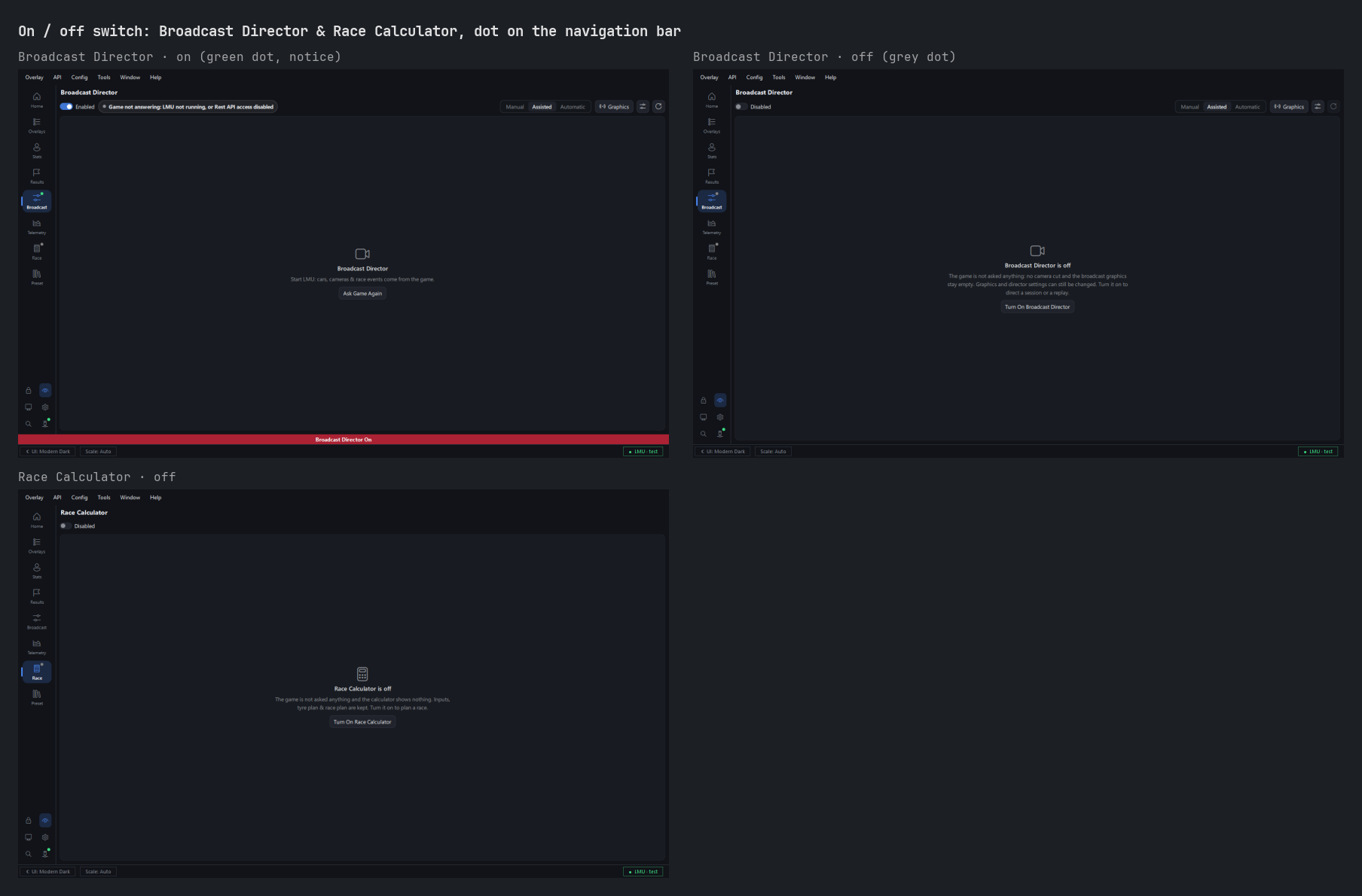
On / off switch for the Broadcast Director and the Race Calculator
- Switch at the top left of both pages (on by default, remembered): off, the page asks the game nothing, cuts no camera, and is freed after 10 minutes hidden. Turn it back on with the switch or the button in the page.
- Dot on their navigation bar entry: green on, grey off. New
director_toggleandrace_calculator_togglehotkeys (remote control too) and command palette entries (Ctrl+K). NewBroadcast Director Onnotice at the bottom of the main window.
Broadcast Director: standings tower carousel and game HUD
- Standings tower carousel: up to 70 cars (was 30), the tower slides page after page every 10 seconds, class after class if you want, with a bar showing which part of the field is on screen.
- Game HUD menu on the camera desk: hide the whole game UI for clean pictures (
middle click), or each part (chat, MFD, car HUD, timing, track map).
Trailing: pedal bars
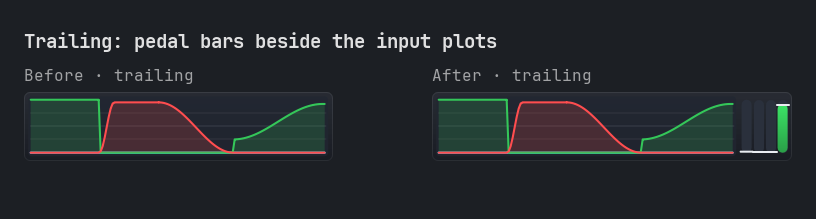
- Pedal bars beside the plots (off by default): throttle, brake, clutch and force feedback, raw and filtered side by side, with peak marker and optional readings.
Share overlay settings
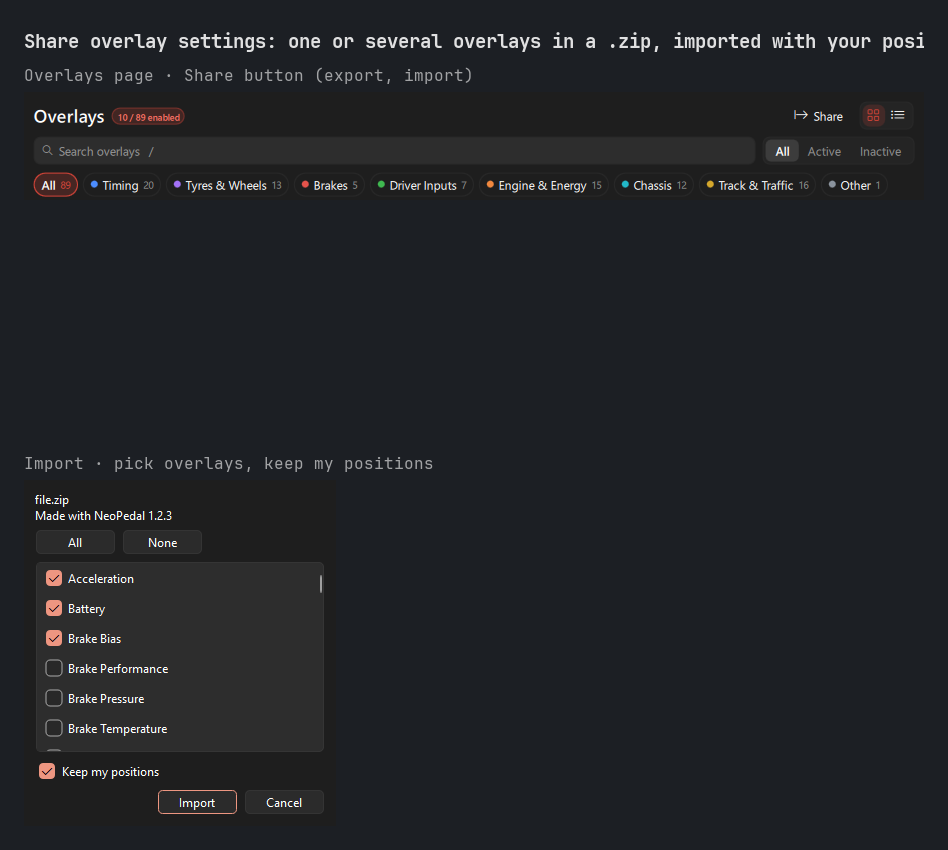
- Share the settings of one overlay or of several you pick, as a
.zipfile:Share>Export Overlay Settings...on theOverlaysandOverlay Optionspages (orExport Settings...in the menu of an overlay card), tick the overlays, save. Only options changed from default are written, so your friend gets exactly your look. - Import with
Share>Import Overlay Settings...or by dropping the file on the window: untick the overlays you do not want,Keep my positionsis ticked by default (else positions are scaled to your screen). Settings are applied as pending changes ofOverlay Options, kept withApply, undone withCtrl+Z.
Import Settings
- New
Config>Import Settings...: copies the global settings of another copy of the app (options, hotkeys, driver stats, language packs, Dashboard HUD incidents) from the folder you choose, after a restart. Your curren...
NeoPedal 0.23.0
New name: NeoPedal
- The app is now called NeoPedal, everywhere: window, menus, installer, Start menu, Task Manager, web dashboard, VR overlay and documentation. It stays a modified version of TinyPedal, with the same license and credits.
- Settings separate from the original TinyPedal: the global config folder is now
%APPDATA%\NeoPedal(Linux:~/.config/NeoPedaland~/.local/share/NeoPedal). Until now the app shared%APPDATA%\TinyPedalwith the original TinyPedal, so each app could change the other's settings, and both can now be used side by side. - Your settings come along: update from the app as usual. On first start, your
TinyPedalfolder (config, shortcuts, driver stats, language packs, Black box incidents) is copied once to the new one and left unchanged, so the original TinyPedal keeps working. If the copy fails, the app uses the old folder for this run and tries again next time. Presets and data next to the executable do not move, the install folder is kept and the shortcuts are renamed. - Your choice: after the copy, the app asks once whether to keep the imported settings or start with default settings (the imported ones are set aside, never deleted). Later,
Config>TinyPedal Settingsimports them again or starts over with default settings, each time keeping a backup of the current settings.
New overlay, new columns and track map colors
- New
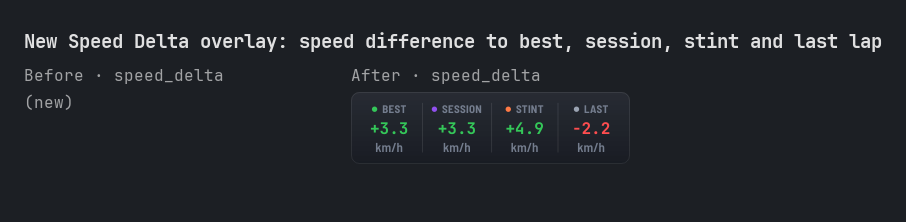
Speed Deltaoverlay: your speed difference to four reference laps at the same place of the lap (all time best, session best, stint best and last lap), positive when you are faster, smoothed (speed_delta_smoothing_samples). Each reference can be shown or hidden, with its own prefix and colors. A dash while there is no reference lap yet, on an out lap or in the pit lane before the start line. Off by default: turn it on in theOverlayspage.
- Relative:
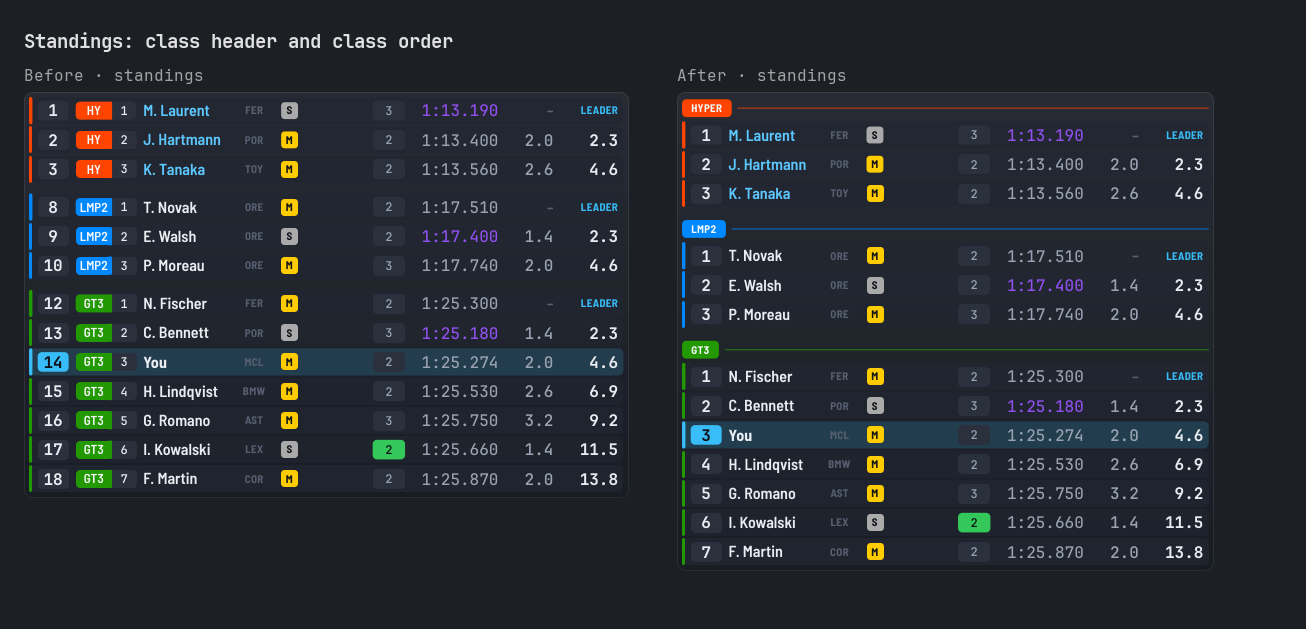
Gap Trendcolumn (modern design,column_gap_trend, on): how the gap to each car changes per lap, averaged over about 30 s. Green arrow when you gain (closing on the car ahead, pulling away from the car behind), red when you lose, a dash when steady (under 0.05 s per lap) or for a car in the pits. - Standings: class header (modern design,
show_class_header, on): in multi-class split mode, or with one class shown, each class starts with its name in a colored pill; the class column goes and the position badge shows the place in class. - Standings: class order (
class_order, both designs): classes of multi-class split mode in the order you choose (Hypercar, LMP2, LMP3, GT3... by default), set inOverlay Optionsby dragging them or with the arrows (Default Orderputs the default back). Classes found in no list come after, fastest first, as before.maximum_vehicles_per_split_othersnow takes any value,0hides the other classes.
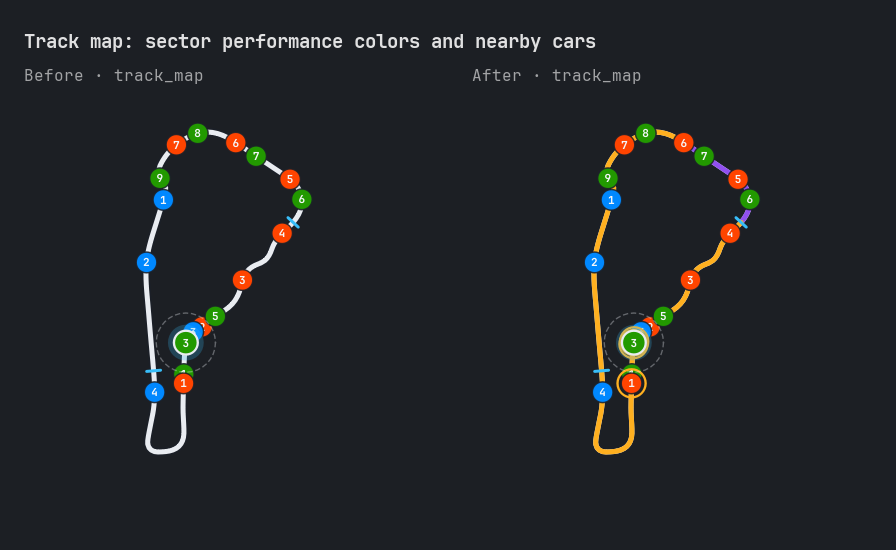
- Track map: sector performance and nearby cars (modern design): each sector of the road is colored by your last time there (purple session best, green faster than your best lap, amber slower;
show_sector_performance), and cars less than 1 s ahead or behind get a ring (show_nearby_vehicle_highlight,nearby_vehicle_threshold). Both on by default.
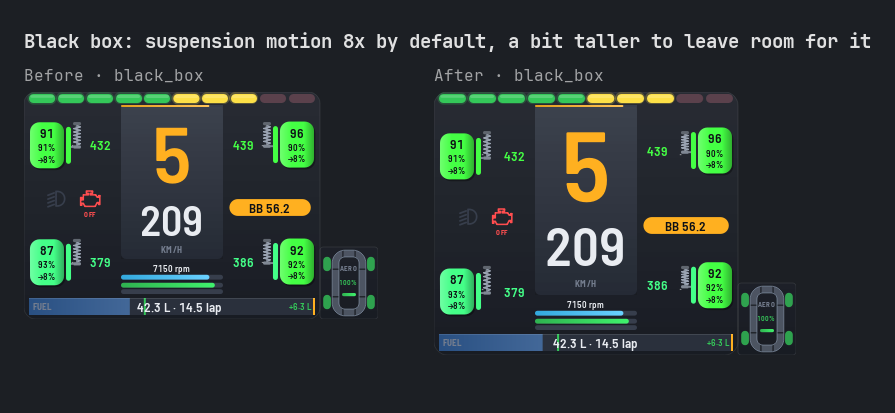
- Black box: suspension motion is magnified 8 times by default (
suspension_motion_scale) so it can be seen; presets still at 1 get 8 once, another value you chose is kept. The overlay is a bit taller (about 15 %) to leave room for the wheel travel; set the scale back to 1 for the previous size.
- Chat: messages fade out at the end of their display time also in the garage and menus (they stayed on screen while overlays were paused). Modern design: your own name in the accent color, game notices dimmed.
Race results, replays and driver stats
- Watch the replay of a session:
Race Resultsshows aWatch Replaybutton when LMU saved the replay of the session, and a camera icon in the session list. The replay opens in the game throughGame Replays(game state checked, confirmation, playback controls there). The replay is found from the time it was saved next to the results file, so the icons show even while the game is closed. - Game version of your lap times: every session recorded in
Driver Stats Viewernow keeps the game version (LMU). The personal best line shows it (PB 1:09.984 set on 03/10/2026 · Version 1.42), and so does each session of the list. Older sessions take it from the game results file of the session. - Race results in
Driver Stats Viewer: sessions are linked to the game results files. The list shows your class position (P3/12) and a mark when you had contacts or penalties; the tooltip adds position, gap, contacts, penalties, track limits points, online or single player and the server. Click a session to open it inRace Results. - Driver card (All Tracks): name, country, team and number of your game profile, your Steam profile picture (read from Steam's own cache, nothing downloaded), and your races in the results files: wins, podiums, average class finish, clean races, contacts per race.
- Complete your lap times: personal, qualifying and race bests that are missing from your stats, or slower than a best lap in an LMU results file, are offered with
Complete.... The confirmation lists every change, a backup is made first and Ctrl+Z undoes it. Laps invalidated by track limits have no time in LMU results, and in team races only your own laps count. Game Replaystrack map follows the cars like the Broadcast Director: with the game on this computer, cars are placed where the game shows them, 10 times a second, and glide smoothly from one place to the next, in a session or a replay (paused, slow motion, fast forward). Before, they moved by estimate along the track between game answers every 2 to 5 seconds, which is still the case when the game data can't be read.
Telemetry viewer
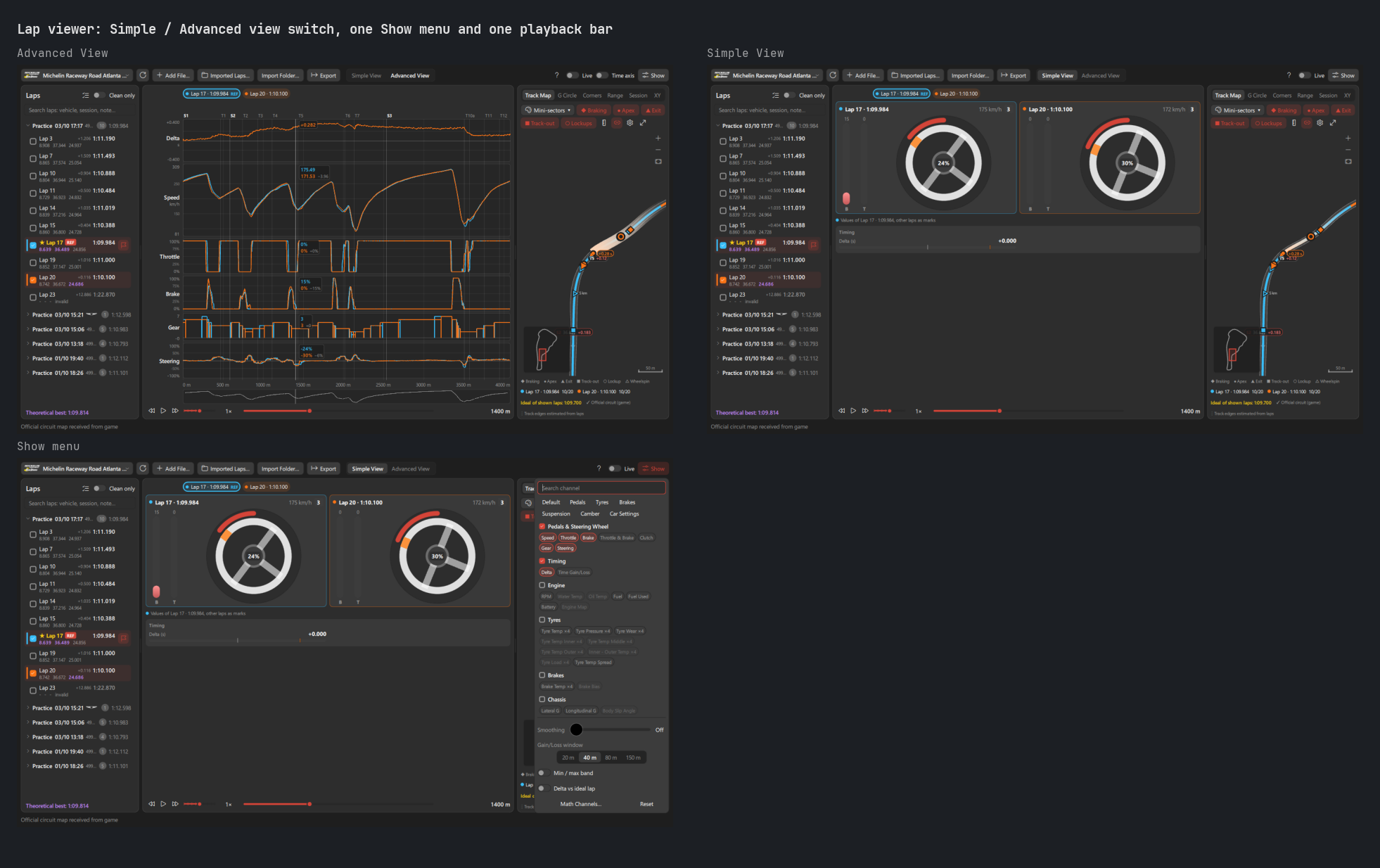
- New
Simple View: aSimple View/Advanced Viewswitch in the toolbar shows, in place of the charts, every shown channel at the cursor drawn like overlays. APedals & Steering Wheelcard per lap, side by side (throttle, brake, clutch, steering wheel turned by its real angle, gear, speed), thenTiming,Engine,Tyres(four wheels colored cold to hot),Brakes,Chassis,Electronics,TrackandMath Channels. Values of the main lap (click its card), other laps as marks of their color. The chosen view is kept per folder. - Same channels in both views: one
Showmenu, in place ofChannels, picks what both views show (a channel charted in the advanced view is a gauge or tile in the simple view), by group or channel, with search, presets and every chart option (smoothing, gain/loss window, min / max band, delta vs ideal lap, math channels). Channels of one wheel are found with the search. - One playback bar under both views: back, play, forward, A-B loop and speed moved under the charts, with a bar to drag along the lap and the cursor position. It stays at the same place in the simple view, where the charts are hidden.
- Recorded laps now keep the steering wheel rotation, so the wheel turns by its real angle.
- Long laps no longer freeze the page: charts, map, delta best and MoTeC export are made in the background, side tabs open without a stall.
Race calculator
- New
Livetab: every value the game gives, next to the value of the calculator, with where it comes from: race length, formation laps and start time of day (LMU session settings or the track clock), number of drivers (LMU team), lap time, fuel, energy and tyre wear per lap, tank capacity, compound on the car, fuel, energy and tread on the grid, pit lane time from the stops of the session, refuel and energy rates, tyre and driver change times and what is done while refuelling (LMU pit stop times of the series), tyre allocation and rain from the forecast (as a rain scenario). Fill a value in with its arrow, orFill In All; a switch per row leaves a value out. Load LiveandFollow Livetake every followed value, not only the laps: pit stop times, tyre rules, drivers, formation, start time, rain forecast... LMU garage screens are read in the background (every 10 s while the tab is shown or inputs follow live).- Race in progress read from the game: lap, race time and time left, fuel, energy, tread, stops, safety car or full course yellow (also in the
Live Racestatus), penalties, class position, pending repair and the game's next stop time. - Tyres available: the tyres the LMU pit menu offers, new compounds and used tyres of each wheel with their tread.
Add Used Tyres to Stockputs them in the tyre plan stock with their own tread (a used tyre starts the stint at 84 %, not as new). Driver Change While Refuelling: the driver change counts only when longer than the service, as in LMU.- Faster: a pit stop plan of a 10 hour race with safety car, rain and fuel effec...
Modern Tiny Pedals 0.22.4
VR overlay
- OpenXR layer off by default: in 0.22.3, turning on
enable_vr_overlayregistered the app's OpenXR layer, which every OpenXR game loads. Le Mans Ultimate is one of them (its VR goes through OpenXR with the built-in OpenComposite), and it could fail to start in VR ("Unable to start the game in VR mode"). The layer is now experimental, behind its ownenable_openxr_layeroption (off by default). Every start removes a layer left registered by 0.22.3, also in safe mode, and closing the app removes it too: games started without the app never load it. - SteamVR no longer stuck on a dark grey screen when you quit it: the SteamVR overlay of the app never answered SteamVR's quit request, so SteamVR waited for it before closing. The app now answers at once, releases its overlay and only connects again once SteamVR has fully closed and started again.
Commits
Fixed
- Fix VR breaking OpenXR games & SteamVR stuck on quit: OpenXR layer off by default (e5295e6)
Changed
- Keep PySide6 below 6.12: 6.12.0 aborts Python 3.11 with a refcount error (4a6d4c8)
- Use list in SteamVR quit test (ruff PIE807) (1549880)
SHA256
3452e4735165608785c7d29b8c67d0f8c40339479577b7c9af5adb81ec8f3fe5 ModernTinyPedals-0.22.4-windows-setup.exe022978a838516377ef7280a9315df2c03bcdd294b712ebcb181cb4ac01059f6d ModernTinyPedals-0.22.4-setup.zipab421056a506aa52edd9f741cbe8d9feb420ada860539c69aa63dccb4451cfbc ModernTinyPedals-0.22.4-source.zip