Repository navigation
v3.9.0

BambuHelper v3.9.0 - Release Notes
Firmware Builds
| Build Target | Board / Hardware | Display | OTA Update File | Full Flash File |
|---|---|---|---|---|
esp32s3 |
ESP32-S3 Super Mini | ST7789 240x240 | BambuHelper-esp32s3-v3.9.0-ota.bin |
BambuHelper-esp32s3-v3.9.0-Full.bin |
esp32s3_round |
ESP32-S3 Super Mini | GC9A01 1.28" round 240x240 | BambuHelper-esp32s3_round-v3.9.0-ota.bin |
BambuHelper-esp32s3_round-v3.9.0-Full.bin |
esp32s3_zero |
Waveshare ESP32-S3-Zero | external ST7789 240x240 | BambuHelper-esp32s3_zero-v3.9.0-ota.bin |
BambuHelper-esp32s3_zero-v3.9.0-Full.bin |
esp32s3_zero_320 |
Waveshare ESP32-S3-Zero | external ST7789 240x320 | BambuHelper-esp32s3_zero_320-v3.9.0-ota.bin |
BambuHelper-esp32s3_zero_320-v3.9.0-Full.bin |
esp32c3 |
ESP32-C3 Super Mini | ST7789 240x240 | BambuHelper-esp32c3-v3.9.0-ota.bin |
BambuHelper-esp32c3-v3.9.0-Full.bin |
esp32c3_round |
ESP32-C3 Super Mini | GC9A01 1.28" round 240x240 | BambuHelper-esp32c3_round-v3.9.0-ota.bin |
BambuHelper-esp32c3_round-v3.9.0-Full.bin |
ws_lcd_200 |
Waveshare ESP32-S3-Touch-LCD-2 | ST7789 240x320 | BambuHelper-ws_lcd_200-v3.9.0-ota.bin |
BambuHelper-ws_lcd_200-v3.9.0-Full.bin |
ws_lcd_154 |
Waveshare ESP32-S3-Touch-LCD-1.54 | ST7789 240x240 | BambuHelper-ws_lcd_154-v3.9.0-ota.bin |
BambuHelper-ws_lcd_154-v3.9.0-Full.bin |
ws_lcd_280 |
Waveshare ESP32-S3-Touch-LCD-2.8 | ST7789 240x320 | BambuHelper-ws_lcd_280-v3.9.0-ota.bin |
BambuHelper-ws_lcd_280-v3.9.0-Full.bin |
es3n28p |
QD ES3N28P 2.8" | ILI9341V 240x320 | BambuHelper-es3n28p-v3.9.0-ota.bin |
BambuHelper-es3n28p-v3.9.0-Full.bin |
sc05_x |
Panlee SC05_X (ZX2D80CE02S) 2.8" | ST7789 240x320 (8-bit parallel) | BambuHelper-sc05_x-v3.9.0-ota.bin |
BambuHelper-sc05_x-v3.9.0-Full.bin |
ws_lcd_350 |
Waveshare ESP32-S3-Touch-LCD-3.5 | ST7796 320x480 | BambuHelper-ws_lcd_350-v3.9.0-ota.bin |
BambuHelper-ws_lcd_350-v3.9.0-Full.bin |
ws_lcd_28c |
Waveshare ESP32-S3-Touch-LCD-2.8C | ST7701 2.8" round 480x480 | BambuHelper-ws_lcd_28c-v3.9.0-ota.bin |
BambuHelper-ws_lcd_28c-v3.9.0-Full.bin |
wt32_sc01_plus |
Panlee WT32-SC01 Plus 3.5" | ST7796 320x480 | BambuHelper-wt32_sc01_plus-v3.9.0-ota.bin |
BambuHelper-wt32_sc01_plus-v3.9.0-Full.bin |
jc3248w535 |
Guition JC3248W535 (ESP32-S3-N16R8, 16MB flash / 8MB PSRAM) | AXS15231B QSPI 320x480 | BambuHelper-jc3248w535-v3.9.0-ota.bin |
BambuHelper-jc3248w535-v3.9.0-Full.bin |
cyd |
ESP32-2432S028 (CYD / Cheap Yellow Display) | ILI9341 240x320 | BambuHelper-cyd-v3.9.0-ota.bin |
BambuHelper-cyd-v3.9.0-Full.bin |
tzt_2432 |
TZT ESP32-2432S028 (CYD variant) | ILI9341 240x320 | BambuHelper-tzt_2432-v3.9.0-ota.bin |
BambuHelper-tzt_2432-v3.9.0-Full.bin |
cyd_2432s024 |
ESP32-2432S024 (CYD 2.4") | ILI9341 240x320 | BambuHelper-cyd_2432s024-v3.9.0-ota.bin |
BambuHelper-cyd_2432s024-v3.9.0-Full.bin |
OTA is for updating an already working device from the BambuHelper web UI.
Full is for first-time flashing, recovery, or ESP Web Flasher use.
First-time flashing? Easiest path is the hosted web flasher at keralots.github.io/BambuHelper - pick your board in the dropdown, click Install, and the browser handles bootloader + partitions + firmware in one go (no downloads, no flash offsets). The
-Full.binfiles below are only needed if you prefer the generic ESP Web Flasher.
Setting up Cloud mode? Open the device's web page, pick Bambu Cloud, and sign in with your Bambu account - with a password, or with a code Bambu emails you. Then press My printers and pick yours from the list. The Companion Tool and the paste-a-token route both still work; see the cloud setup page.
Updating from v3.8.3 or a v3.9.0 beta? OTA the matching
-ota.binfor your board, or use Check for updates. Settings carry over and your screen looks the same as before - Cards stays off until you pick it. The web interface menu is reorganised, so some settings have moved (see below).
New Features
Cards print screen (beta)
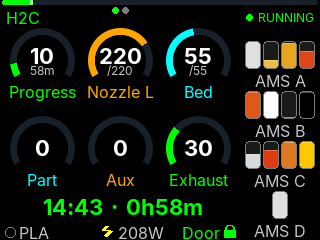
A calmer alternative to the gauges, readable from across the room: a big progress percentage, time left, finish time, a progress bar and one row of temperatures. The Ready and Print complete screens follow the same style. Gauges stays the default.
| Gauges (default) | Cards (beta) |
|---|---|
 |
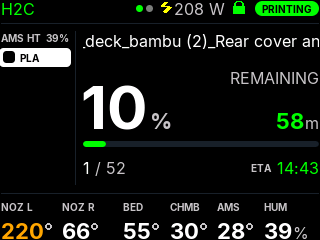 |
- Left column: AMS slots with the feeding slot highlighted, the plate preview of the running job (from Bambu Cloud), or nothing.
- Bottom row: the temperatures your printer has (both nozzles on H2, chamber, AMS temperature and humidity), or the filaments of this print with how much is left on each spool.
- AMS page: how much filament is left in every tray, Bambu Studio style. Show it on the Ready screen, or tap to switch to it for 30 s.
- Header: printer name, plug power, door state and status; long job names scroll; finish time gets "+1" when the print ends tomorrow.
- Uses your existing Colors and the Warning threshold.
Turn it on under Print screen -> Print screen style -> Cards (beta). It runs on every 240x320 and 320x480 board and on the 240x240 boards with PSRAM. The CYD family (no PSRAM) gets Cards too, without the plate preview. Not on the ESP32-C3 boards, round displays or the 480x480 boards. Split view keeps the gauges.
It is still a beta - feedback and photos in Issues are welcome. More in the README.
Plate preview tile for the gauges
The plate thumbnail from Cards is also available as a gauge: pick Plate preview (cloud) for any slot under Printer -> Gauge Layout. On the Ready / Print complete pair it shows the last job. Needs the Bambu account sign-in on the device, a job sent through the cloud, and a board with PSRAM.
Button & touch gestures
Screen -> Button & touch gestures sets what a tap, a double tap and a hold do:
| Gesture | Choices |
|---|---|
| Tap | Smart cycle (default), next printer only, switch status / AMS page, wake the screen only |
| Double tap | Nothing (default), plug power on/off, switch status / AMS page, next printer |
| Hold | Status LED brightness (default), switch status / AMS page, nothing |
If you had Button power control on, it becomes Double tap = Plug power on/off automatically.
Web interface reorganised
- Display is split into Screen, Print screen, After print, Clock and Colors. Advanced is gone: rotation moved to Printer, the danger zone to WiFi & System.
- Long help texts fold behind a ?.
- Save / Apply buttons show when something is not saved yet.
- Settings that only apply to the gauges are hidden while Cards is picked.
New board in the release files
- CYD 2.4" (ESP32-2432S024) now has its own
cyd_2432s024OTA and Full files (#186). Thanks @GizmoTheGreen for testing it on real hardware.
Improvements (all boards)
- No more short screen freezes with H2 printers over LAN. An H2C with several AMS units sends ~38 KB of status about every 2 s, and the device used to stop everything while it arrived. Status is now read in the background: the longest pause dropped from ~3 s to ~60 ms.
- Faster reconnect after a printer is switched on. A powered-off LAN printer is now checked every 20 s instead of backing off to 2 minutes.
- Router shows the device's hostname - the hostname you set is now sent over DHCP, not only mDNS (#192). Thanks @SafariKC.
- The web interface can no longer freeze the device when a browser stops reading (closed tab, weak WiFi).
Bug Fixes
- Brisbane and Darwin were an hour off from October to April (#194). They shared a timezone entry with cities that use daylight saving. They now have their own entries - if you are in Brisbane or Darwin, pick your city again under Clock after updating. Thanks @tmbailey70.
- "Printer Off" while the printer was printing. If the smart plug mapped to a printer read off (wrong plug in that slot, or a printer idling below the plug's watt threshold), the screen said "Printer Off" even though data was coming in. Live data from the printer now wins.
- Settings backup no longer contains your WiFi password. Importing a backup keeps the device's own WiFi. The backup now also includes the Landscape 8 slots / Portrait 9 slots grid modes.
- Web flasher installed the wrong board when you picked one while the page was still loading (or the browser restored an old choice): it flashed the default
esp32s3image. Fixed - already live on the flasher page. - "Unsaved changes" on a button is cleared only after the save really went through.
For tinkerers
GET /screen.bmpreturns a screenshot of whatever is on the screen (boards with PSRAM)./debugreports why the device last restarted (reset_reason).esp32s3,esp32s3_zeroandesp32s3_zero_320are now built without C++ exceptions (like the C3 builds) to free flash on their 4 MB chips. If one of them reboots unexpectedly, please open an issue.
Known Limitations
- Plate preview (Cards and the gauge tile) needs Bambu Cloud; jobs started from the SD card or over LAN only have no preview.
- Cards on the TZT CYD clone, the CYD 2.4" and several community boards has not been seen on real hardware yet - a photo in an issue helps.
- A spool on the external holder (no AMS) shows as "?" in Cards' "Filaments of this print".


