Repository navigation
Releases
Releases · Kisahime/promptmaker
PromptMaker 6.5.0

Added
- ADetailer for every Forge image: Settings -> Image generation -> ADetailer switches on the ADetailer extension's detect-and-redraw pass for all images PromptMaker sends to Forge / A1111. Pick the detector (the list is loaded from Forge's
/adetailer/v1/ad_model;face_yolov8s.ptby default), its denoise (0.4) and detection confidence (0.3), and an optional prompt for the detailed area (empty = the main prompt). - An optional second pass (e.g.
hand_yolov8n.ptfor hands) with its own denoise. Both passes inpaint only the masked area with 32 px padding. - The gallery sidecar records the ADetailer passes used (
adetailer: model, denoise, prompt). - ADetailer on ComfyUI through the Impact Pack's FaceDetailer: PromptMaker checks
/object_infoforFaceDetailerandUltralyticsDetectorProvider(ComfyUI-Impact-Pack + ComfyUI-Impact-Subpack), lists their detectors (e.g.bbox/face_yolov8m.pt), and adds one detector + FaceDetailer per pass after the VAE decode, on the workflow's own model, CLIP, VAE, prompts, seed, steps, CFG, sampler and scheduler (denoise and confidence from the pass; guide size 512, crop factor 3). Without the Impact Pack the block explains how to install both packs with ComfyUI Manager and stays off. - ADetailer presets: Face, Face + hands and Full body (person segmentation at denoise 0.3, then a face pass) fill the pass fields with detectors the backend actually has; a role with no matching detector is left out. Editing a field switches back to Custom.
- ADetailer toggle in the top bar next to the backend status, the same switch as in Settings. It's greyed out (with the reason as a tooltip) when the backend has no ADetailer / FaceDetailer.
- Start Forge / Start ComfyUI in Settings -> Image generation (and the Studio inspector). Each button shows only when its launcher is found: a saved path, the usual folders (e.g.
C:\AI\sd-webui-forge-classic\webui-user.bat,...\ComfyUI_windows_portable\run_nvidia_gpu.bat), or a short search; Launcher paths lets you choose another.bat. The backend starts in its own console window; PromptMaker waits up to 5 minutes for its API and then switches to it. If that backend is already running, it just connects; if the other one is running, it asks first, because both together can run out of VRAM on an 8 GB card. A ▶ button next to the backend status starts the selected backend when it's offline. - Face Swap: Remove background on the source face: the head (face, hair, neck) is cut out with the face-parsing / anime segmentation models, cropped tight, and set on a flat Fill colour (White, Grey or Black), so the source photo's background and clothes don't leak into the swap. Hair margin is ignored while it's on; without the segmentation models the normal crop is used and the status line says why.
- German and Spanish translations for all 6.5 strings.
Changed
- The Video maker's ADetailer faces (Forge) tick now uses the same Settings passes instead of a fixed face pass (still
face_yolov8s.ptwhen nothing is saved). Unticked means no ADetailer on stills. - The controls are greyed out with a note when the backend has no ADetailer (Forge) or FaceDetailer (ComfyUI). Face Swap jobs never get an ADetailer pass, because it would redraw the swapped face.
- Detector names carry over between backends: a ComfyUI name such as
bbox/face_yolov8m.ptis sent to Forge as its closest model, and the other way round. - Faster when something is offline: local defaults (Ollama, LM Studio, llama.cpp, KoboldCpp, vLLM) use
127.0.0.1instead oflocalhost. On Windowslocalhosttries IPv6 first, so a closed port took about 4 s to fail instead of 2 s. Saved URLs that are exactly an oldlocalhostdefault are switched over automatically; custom URLs are left alone.
Fixed
- The Generation inspector in the Studio no longer cuts off its right-hand side (long checkboxes wrap; one ADetailer control per row).
test_v53_detectno longer probes the real ports 7860 / 8188, so a running Forge or ComfyUI can't change its result.
PromptMaker 6.0.0
Added
- Video maker model presets: the Tools card's Model list is read from the installed Wan2GP (its model definitions and version-matched settings exports). Each preset shows separately whether its definition exists, whether its required files are on disk, and whether the workflow has been tested. FastWan 5B image-to-video stays the default at 1280×704, 3 steps, guidance 1 and flow shift 3; other presets use their own resolution, steps, guidance and flow shift. Switching models resets settings that don't fit the new one and says so in an amber note.
- Animated scenes get their frame count from the scene's length and the model's frame rate, on the frame grid the model accepts.
- One optional creative LoRA with a constant strength, plus None. None never removes a model's required acceleration adapter (e.g. FastWan's). The LoRA's own metadata is checked against the selected model where it has any; folder names are not treated as proof of compatibility, and no strength range is promised.
- Project animation defaults and per-scene overrides: the Tools card sets the project defaults; Override animation for this scene gives one scene its own model, frames, steps, guidance or LoRA, and Use current settings clears a scene's recorded settings.
- Each clip records the model, template version, settings, adapters, prompt and still it used (
scene.resolved); resume and Redo clip use that recording instead of later changes to the defaults. - Offline preflight: missing model or LoRA files and incompatible choices (such as a model without start-image support) are named before Wan2GP starts, and the job stops. Jobs run with Wan2GP's
--offline, so nothing is downloaded, installed or upgraded; an install whose own source doesn't define--offlineis refused instead of being run unprotected.
Changed
- Video projects move to version 3. 5.3 projects are migrated on open and keep their stills, clips, characters and seeds; old scenes inherit the FastWan defaults.
- On an error or cancel during Animate, completed clips are kept and the message says what to do next (fix the problem and press Animate ticked; finished scenes are skipped). The existing VRAM hand-off from Forge / ComfyUI, the single out-of-memory retry and the per-scene Wan2GP log are unchanged.
Notes
- Verified on an 8 GB GPU with FastWan 5B image-to-video through Wan2GP, plus the SDXL face lock.
- Not every model fits in 8 GB, and no VRAM prediction is made. Start/end frames, native continuation and camera-control workflows are not included.
- No new Python dependencies.
PromptMaker 5.3.0 – Video maker
PromptMaker 5.3.0 – Video maker
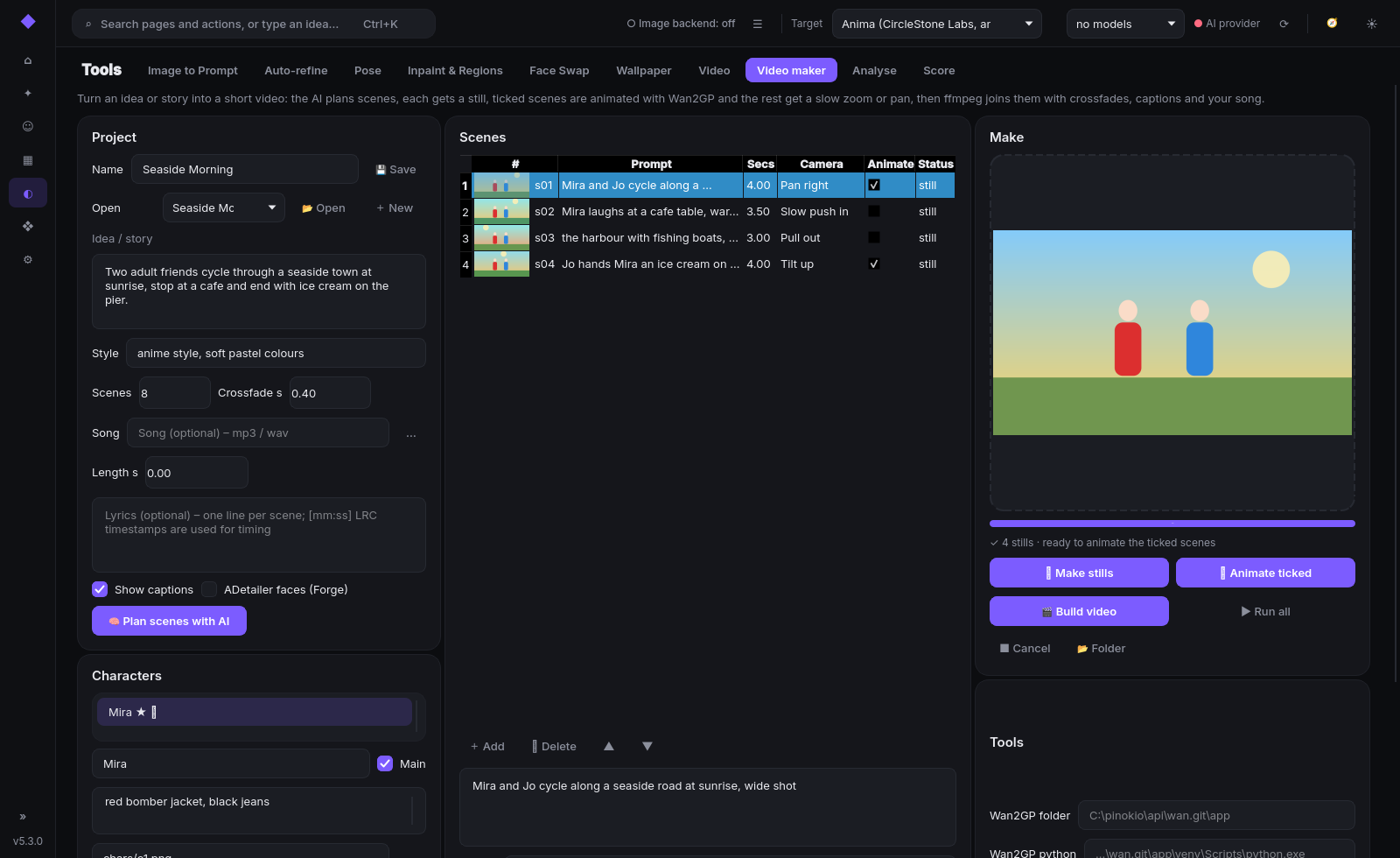
🎞 Video maker (Tools → Video maker): turn an idea or story into a short MP4, all on your own PC.
- Plan – your local AI splits the idea into scenes (still prompt, duration, camera move, motion, caption). Optional song + lyrics: one scene per lyric line, timed to the song (LRC
[mm:ss]timestamps supported). - Stills – one image per scene through Forge or ComfyUI with your current target model; Forge settings are restored afterwards, optional ADetailer.
- Animate – ticked scenes are animated with Wan2GP headless (FastWan 5B image-to-video, 1280×704, ~5 s per clip, ~2 min on 8 GB). Forge / ComfyUI free the GPU first; an out-of-memory clip is retried once and the real error + full log are shown.
- Build – ffmpeg adds a slow zoom / pan to the other scenes, captions, crossfades and your song → one MP4. No Node needed.
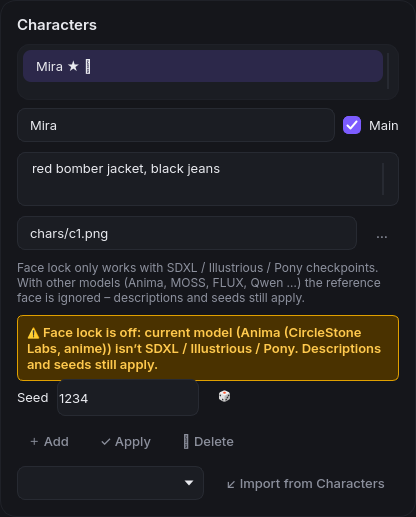
- Characters – fixed descriptions (added word for word), per-character seeds, import from the Characters library, and face lock with IP-Adapter Plus Face for the main character. Face lock only works with SDXL / Illustrious / Pony checkpoints; an amber warning shows when the current model can't use it (descriptions and seeds still apply).
- Projects in
data/videos/<name>/resume where they stopped; redo any single still or clip.
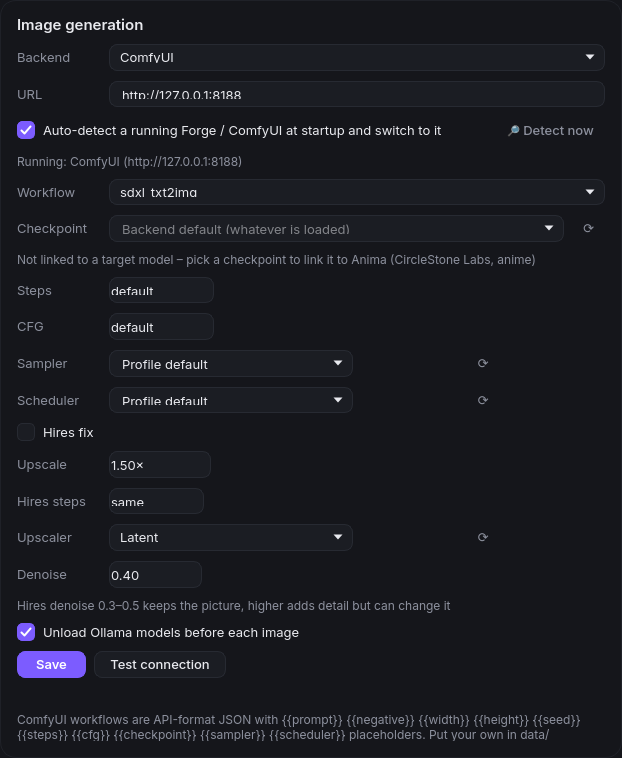
Backend auto-detect – at startup PromptMaker switches to the Forge or ComfyUI that is actually running (on/off + Detect now in Settings → Image generation).
Requirements for Video maker: ffmpeg (auto-detected, incl. Pinokio) and, for animated scenes, Wan2GP (e.g. Pinokio's wan.git).
Full list in CHANGELOG.md.
PromptMaker 5.2.0 – Wallpaper mode, MOSS & Civitai Model browser
PromptMaker 5.2.0
New
- Wallpaper mode (Tools → Wallpaper): exact-size desktop/phone wallpapers (1080p, 1440p, 4K, ultrawide, phone, custom) with automatic base size + hires plan (1920×1080 → 1280×720 ×1.5), icon-safe composition, Save to Gallery and Set as desktop wallpaper.
- MOSS Image workflow for ComfyUI (
moss_txt2img): UNETLoader + Qwen3.5 text encoder + FLUX.2 small VAE, auto-detected. - Civitai Model browser (Library → Model browser): search, filter and download models straight into your Forge/ComfyUI folders, with resume and SHA256 checks. NSFW off by default.
- Early Access / paid badges: free-from date, Buzz price, Use latest free version.
- Better model profiles: version-aware parsing, normalised sampler/scheduler, review dialog, Re-check from Civitai and Repair profiles (with backup).
Fixed
- Civitai downloads now authenticate correctly (fixes 403 with a saved API key).
- Profile parsing:
er_sde/bong_tangentpairs,4- 9 stepsranges, RES4LYF/custom-node samplers kept, MOSS base models mapped correctly.
Upgrading: copy or git pull over your folder (data/ is kept), then run install.bat. Full details in CHANGELOG.md.
PromptMaker 5.1.0
Added
- Face Swap (Tools): our take on Fooocus' FaceSwap image prompt. It uses the same model (IP-Adapter Plus Face SDXL with the CLIP ViT-H encoder) and the same defaults (weight 0.75, stop at 0.9), and adds hair:
- Source face: open a picture, use the last gallery image, or pick a Character's reference image. The face is detected (OpenCV anime + photo detectors, vision-model fallback) and cropped as a square with an adjustable hair margin, so the adapter sees face and hair. Fooocus' own crop is tighter and drops most of the hair.
- Generate with face: a new image from your prompt wearing the source face and hair.
- Swap into an existing image: one-click auto-mask of face + hair (head shape sized by hair length, GrabCut edge refine that follows the hair outline, grow and feather), a live mask preview with brush / eraser / invert fixes, then an inpaint (only masked, denoise 0.8) with the face IP-Adapter.
- Works with Forge (ControlNet unit
CLIP-ViT-H (IPAdapter), orInsightFace+CLIP-H (IPAdapter)for FaceID Plus v2, guidance end = stop at) and ComfyUI (ComfyUI_IPAdapter_plus,PLUS FACE (portraits)preset, end_at = stop at). - ⟳ Check models finds the face model and shows exact Hugging Face links and folders when something is missing. It warns that Anima / Flux and other non-SDXL models can't use it.
- Characters: a 🎭 Face Swap button sends the character's reference image to Face Swap.
- Face Swap segmentation mask (swap mode): the mask now follows the real face and hair outline instead of a head-shaped guess.
- Faces are found with OpenCV YuNet (photos) and deepghs' YOLOv8 anime face detector; every face is numbered on the preview, the largest is picked, and 👆 Pick face + a click chooses another person.
- Photos: a SegFormer face-parsing model (CelebAMask-HQ classes: skin, eyes, brows, nose, lips, ears, hair, hat, neck) on a crop around the chosen face. Anime: anime-seg (ISNet) cuts the character out, then the face plus the hair-coloured strands joined to it are kept.
- The mask only covers the chosen person: pixels are split between faces by distance, and only the region joined to the chosen face is kept, never the other person or the background.
- Options are now Include hair and Include neck (plus Style Auto / Photo / Anime, Grow, Feather, brush). Grow / feather changes are instant.
- Models (≈ 0.2 + 12 + 90 MB for photos, + 175 MB for anime) download on first use into
data/modelswith progress in the status line. Offline or without onnxruntime it falls back to the previous shape + GrabCut mask and says so.
- Face Swap Auto-blend (swap mode, on by default, each step can be switched off): blends the new face into the original picture.
- Harmonise pass (optional, costs one extra generation): a second inpaint at low denoise (0.25) over the mask plus a ring of ~15 % of the head size, without the face IP-Adapter and with the same prompt, so lighting and grain are redrawn as one piece.
- Colour match (strength 0–1): the new face's skin gets the LAB mean / spread of the original target's skin (skin found inside the mask by colour, hair and eyes excluded).
- Grain / sharpness match (strength 0–1): measures noise (high-pass std) and sharpness (Laplacian variance) in a ring around the face and adds matching luma grain and a slight blur or sharpen to the swapped area.
- Seam blend (Laplacian pyramid, Poisson or Poisson mixed): the result is composited onto the original target at its full resolution; pixels outside the mask are copied unchanged.
- Result panel: Show before toggles between the blended result and the original.
- Swap inpaint: "only masked" padding now scales with the head (20 %, 32–160 px), and big targets render at about 1 MP in their own aspect ratio instead of full size, so the head is redrawn at SDXL's native resolution, like ADetailer. With Auto-blend's seam blend the final image is put back at the original size.
Changed
- Auto-blend uses OpenCV + numpy only (no torch); without OpenCV the swap result is shown unblended.
- New optional dependencies
opencv-python-headless(face detection and masks) andonnxruntime(CPU, the segmentation models). Without them Face Swap still works with a simpler oval mask.
Setup notes
- Download the face model ip-adapter-plus-face_sdxl_vit-h.safetensors into Forge's
models\ControlNetfolder and restart Forge. - On 8 GB GPUs, Forge Classic can crash in IP-Adapter (tensors on cuda:0 and cpu). Launch Forge with
--api --disable-smart-memory.
PromptMaker 5.0.0
Added
- Characters (new Characters section on the rail): full characters built on the existing character presets, with reference images, multiple named outfits, several LoRAs with weights, trigger words and tag sets per target model. Insert a character + outfit into Create, Refine, a new region or the clipboard, also from the new 👤 Character buttons on Create and Inpaint & Regions and the command palette. Re-inserting swaps the outfit cleanly and never duplicates LoRA tags.
- Character reference images (IP-Adapter): optional per character. It is used only when the backend supports it (Forge: an IP-Adapter ControlNet model; ComfyUI: ComfyUI_IPAdapter_plus). Otherwise it is skipped, and Check reference support says why.
- Gallery character tags: new images record which characters appear, from trigger words / LoRAs in the prompt (always) and, if you opt in, from the local Ollama vision model in the background.
- Storyboard & comics: an AI panel plan from a short story using your Characters, per-panel or Generate all through the queue, a page layout editor (8 grid templates, 4 page sizes, fonts, editable speech bubbles and captions, drag Gallery images onto panels), PNG / PDF export and
.pmstoryproject files. - Live sketch (Studio): a paint canvas with a debounced, low-step img2img result beside it (Lightning/Turbo, Balanced and Quality presets), or ControlNet scribble when a scribble model is installed. Send the result to the Gallery, Inpaint or Image to Prompt.
- LoRA training (optional): dataset picker (15–50 images), captions from prompts or the vision model, VRAM presets, kohya-ss/sd-scripts run as a separate process with progress, log and cancel. The output goes to Forge's
models/Loraand is linked to a Character. Install trainer clones sd-scripts intotools/sd-scriptswith its own venv, only after you confirm. - Vision-model routing: every feature that sends images (Image to Prompt, auto-caption, Auto-refine, gallery tagging) checks the model's capabilities through Ollama
/api/showand only uses a real vision model. A vision model picker on the LoRA page; captioning stops on the first failure with a clear message instead of repeating HTTP 400s. - Home quick-start tiles and command-palette entries for the new pages.
Changed
- The trainer installer runs each step in the right folder, is resumable (marker file
.promptmaker_installed) and forces UTF-8 for sd-scripts. - The rail has a seventh section, Characters (Characters, Storyboard, LoRA training). Studio gains a Live sketch tab.
- Database schema 5: characters get an
extracolumn for the new fields. 4.x character presets are kept as they are and still work on the Presets page.
PromptMaker 4.1.5
Added
- Command palette (Ctrl+K, or the search box in the top bar): jump to any page, open the queue, run the setup wizard, show or hide the inspector, or switch theme. Anything else you type still writes a prompt from your idea, as the old quick bar did.
- Studio workspace: Create, Builder, Refine, Batch and Templates share one workspace. The prompt editor sits in the centre, with a collapsible Generation inspector on the right (backend, checkpoint, steps, CFG, sampler, scheduler and hires fix, all live) and a filmstrip of recent results along the bottom. Click a result to open it in the viewer.
- Theme picker in Settings → Appearance with four themes: Graphite dark (new default), Graphite light, Pastel and Pastel dusk (the cute pastel look, with bundled Nunito font, gradients, pill controls and sparkle headers). Each theme family has its own accent set: Violet, Blue, Teal, Pink and Orange for Graphite, and Lavender, Sakura pink, Mint, Baby blue and Peach for Pastel. Ctrl+T switches between light and dark within the current family.
- Home dashboard stat cards: counts for images, prompts, favourites and characters.
Changed
- New layout. The long sidebar is now a slim icon rail with six sections: Home, Studio, Gallery, Tools, Library and Settings. It expands to show labels, and its choice is remembered. Each section shows its pages as tabs, and each section remembers the last page you used.
- A top bar now holds the search / command palette, image-backend status and queue, target model, AI model and status, the inspector toggle, the setup wizard and the light/dark switch. These used to be crammed into the sidebar footer, so the collapsed sidebar no longer cuts off buttons.
- Settings is a two-pane page: a category list (Appearance, General, AI provider, Image generation, Civitai, Community gallery) on the left and one page per category on the right. Image generation settings move into the Studio inspector while you're in the Studio, and come back to Settings when you open it.
- New default look: clean graphite neutrals with one vivid accent, consistent radius, type and spacing tokens, and refined controls. All styling comes from
theme.py. - Create page: the action buttons wrap instead of clipping, and Generate is now a primary button next to Copy.
- The README screenshot script captures Create correctly (it used to capture Home) and now also captures light and Pastel shots.
- All pages, features and shortcuts are unchanged and reachable: Ctrl+K, Ctrl+T, Ctrl+Shift+C and every page via the rail, its tabs or the palette.
Fixed
- A/B Test generation no longer crashes with an overflow on large random seeds.
- Duplicate page titles removed; "&" now displays correctly in sub-tab labels.
- Pages scroll instead of clipping on small windows (e.g. Pastel dusk Create at 1440x900); the inspector auto-hides below 1360px wide (toggle still shows it).
- Gallery queue strip only appears while jobs are queued or running.
PromptMaker 4.1.0
Added
- 🏠 Home dashboard (new first page): target model and its linked checkpoint, Forge / Ollama status, recent images, and quick-start buttons (Create, Builder, Generate last prompt, Auto-refine, Inpaint, Gallery).
- Gallery actions: right-click or the detail-pane buttons for Inpaint this (opens Inpaint & Regions with the image and its prompt), Use as reference (Image to Prompt), Regenerate with hires (same prompt, seed and settings with hires fix on) and Upscale…. Drag a thumbnail onto the inpaint canvas to load it.
- One-click Upscale: Forge img2img at 1.5× (factor, upscaler and denoise 0.3 adjustable; same prompt and seed) or Pure upscale through Forge's Extras (
/sdapi/v1/extra-single-image). ComfyUI supports Pure upscale (ImageScaleBy). The result is saved to the Gallery withsource_imagein its sidecar. - Backend status in the sidebar: 🟢 Forge · active checkpoint / 🔴 Offline / Loading…, checked every 10 s in the background (one request at a time,
/sdapi/v1/optionsor ComfyUI/system_stats). Click it for Settings; ☰ opens the queue. - Queue view: pending and running jobs with size and origin page, ▲/▼ reorder, cancel selected, cancel all and progress for the running job. Opens from the sidebar ☰, the Gallery's Manage queue button or a double-click on the queue list.
- Per-target-model image settings: each target model also remembers aspect/size, steps, CFG, sampler and scheduler (
profile_image_settings, included in Library sync), restored when you switch. Settings shows Linked to: model · checkpoint · 16:9 · 30 steps · …. - Live generation preview from Forge's
/sdapi/v1/progresscurrent_image, shown in the Gallery queue area and on the Auto-refine page (Settings toggle). ComfyUI previews come over its websocket (see below). - Look & feel: justified gallery rows that keep each image's aspect ratio, a hover preview, a full-screen viewer (←/→, Esc); accent colour picker (purple, teal, pink, orange) for dark and light themes; collapsible icon-only sidebar (remembered); 150 ms page fade (can be switched off); loading placeholders for checkpoint pickers and LoRA scans.
- Live preview and exact step progress over ComfyUI's websocket (
/ws?clientId=…, same client id as/prompt; built-in client, no new dependency). Preview frames need ComfyUI started with--preview-method auto(ortaesd); without it you still get Step n/N progress. - Hires fix on ComfyUI:
LatentUpscaleBy+ a second KSampler pass with your hires scale, denoise and steps (the Settings checkbox is now just Hires fix; the upscaler list stays Forge-only).
Fixed
- Full-screen viewer "zoom-in" while browsing: each new picture enlarged the image label, which grew the window, which scaled the next picture bigger. The viewer now always fits the image to the window (aspect kept, centred), switches instantly with ←/→ or the mouse wheel, and hides the gallery hover preview.
- ComfyUI: sampler/scheduler names saved from a Forge list (e.g.
DPM++ 2M/Karras) are converted to ComfyUI names (dpmpp_2m/karras) instead of failing workflow validation. - Sidebar status for ComfyUI read "ComfyUI · ComfyUI 0.43.0"; now "ComfyUI · v0.43.0".
- Tests: windows are destroyed after each test (full suite ~9.6 min → ~1 min).
PromptMaker 4.0.1
Added
- The image checkpoint now follows the Target model: the checkpoint you pick in any picker is remembered per target model (
profile_checkpointssetting, included in Library sync) and restored when you switch. Civitai-imported profiles without a link are auto-matched to a backend checkpoint by file name or normalised name, only when the match is unique. Settings shows "Linked to: …"; choosing Backend default unlinks. - Sampler and Scheduler pickers in Settings → Image generation, with ⟳ to load the lists from Forge/A1111 or ComfyUI (built-in scheduler list as a fallback). "Profile default" keeps the profile's choice; anything else overrides it on every page. Forge/A1111 payloads now include
scheduler.
Fixed
- Forge Neo: grey/blank images after switching from an Anima checkpoint to SDXL. Anima's VAE and text encoder stayed selected in Forge's VAE / Text Encoder box. PromptMaker now sends
forge_additional_moduleswith every Forge image that names a checkpoint: none for SD1.5/SDXL/Illustrious/Pony,qwen_image_vae+qwen_3_06bfor Anima (found via/sdapi/v1/sd-modules). Other architectures (FLUX, Qwen…) and plain AUTOMATIC1111 are left untouched. - Checkpoint lists could stay empty (even after ⟳ / Test connection) when a background request's result was dropped before it reached the window. Workers are now kept until their result is delivered, and ⟳ always reloads.
- New optional profile field
forge_modules(list of module file names) overrides the automatic choice.
PromptMaker 4.0.0
Added
- Wildcards page (
promptmaker/wildcards.py): sd-dynamic-prompts-compatible syntax.__name__(.txtone entry per line, sub-folders, globs such as__places/*__, and.yamlpacks flattened to__file/key__and__key__),{a|b|c}, weights{2::a|b}, multi-pick{2$$a|b|c}, ranges and custom separators{1-3$$ and $$a|b}, and nested and recursive expansion with a loop guard. Seeded withrandom.Random(seed), so results are reproducible. Preview, a batch of N unique variations, unknown-wildcard warnings, "Keep ticked characters & styles", and one image queued per variation. The manager creates, edits and deletes files, and imports a folder, a single file or a Civitai.zip(handling awildcards/prefix, zips inside zips, and__MACOSXjunk) with keep / overwrite / keep-both. ✨ Generate has Ollama (or any provider) write a list from a description. - Wildcards are expanded in
make_job()with the image seed, so every page (Generate, Batch, Pose, Auto-refine, Inpaint …) supports them. This can be switched off. A lone{tag}is never touched. - Inpaint & Regions page (
promptmaker/regions.py,promptmaker/inpaintcanvas.py): a mask brush, eraser, invert, clear, "mask the selected region", open an image or take the last generated one, or a blank canvas at the profile size. Forge/A1111 inpaint goes through/sdapi/v1/img2img(denoise, mask blur, whole picture / only masked, padding, masked content). ComfyUI inpaint usesLoadImage(with the mask as alpha) →VAEEncode→GrowMask→SetLatentNoiseMask. - Regional prompts: draggable, resizable boxes, each with its own prompt and weight. ComfyUI uses
ConditioningSetArea+ConditioningCombinein front of every KSampler. Forge uses Forge Couple (Advanced mode, detected via/sdapi/v1/scripts), with the main prompt as a full-image background line. Without it, a message names the extension and offers "Send as one prompt instead" with position words. The page has the shared checkpoint picker. - Video page (
promptmaker/video.py): profiles for Wan 2.2, Wan 2.1, LTX-Video and HunyuanVideo (fps, valid frame counts 4n+1 / 8n+1, sizes, negative support, word range, prompting guide), 14 camera moves, 10 motion presets and 12 shot sizes. An offline structured builder in each model's preferred order, an AI writer, length and camera checks, default negatives, "Use ticked character", and saved video prompts. Prompt writing only. - Library sync page (
promptmaker/sync.py): export/import of history, favourites, templates, versions, characters, styles, video prompts, LoRA metadata, wildcards, model profiles and settings as.zipor.json. Merge or replace; same-name conflicts can keep mine, take theirs or keep both; content duplicates are skipped. Optional private GitHub gist push / pull / sync with last-modified conflict detection and a Keep this computer / Keep the gist / Merge both choice. The token is stored in the KeyStore. API keys are never exported: the KeyStore isn't read, and secret-looking settings names and values (sk-…,ghp_……) are removed. imagegen:Job.inpaint,Job.regions,A1111.regional_support()andComfyUI.regional_support(); Forge switches to/sdapi/v1/img2imgfor inpaint jobs.- Hires fix for Forge/A1111 (Settings → Image generation): on/off, upscale factor, an upscaler list loaded from Forge (latent modes plus installed upscalers), hires steps and denoise. Applied to every txt2img job (Generate, Batch, Auto-refine, Pose, Regions) and skipped for inpaint. Sends
hr_additional_modules: ["Use same choices"], which Forge Neo requires. - Free VRAM for images: Ollama's loaded text and vision models are unloaded (
keep_alive: 0) right before each image is sent to Forge or ComfyUI, so the image model gets the GPU memory. On by default when the AI provider is Ollama; there's a checkbox in Settings → Image generation. - Size picker on Auto-refine and Inpaint & Regions: Model default, 1024², 1344×768, 1216×832, 1152×896, 832×1216, 896×1152, 768×1344, and SD1.5 sizes. The choice is remembered for each page.
- Regions: Repeat main prompt in every region (on by default) puts the shared scene and count tags (e.g.
2girls, beach) on every Forge Couple line, which is what makes multi-character splits work, including on Anima. The default base weight is now 0.2. - 36 new tests (
tests/test_v4.py, plus a size-picker UI test) using local mock servers for Forge, ComfyUI, the GitHub gist API and Ollama.
Changed
- Database schema version 4: a migration adds the
video_promptsandsync_logtables. v2 and v3 databases upgrade automatically. - The tour covers the four new pages. There are new screenshots (
wildcards,inpaint,video,sync), and the README has sections on inpaint, regions, wildcards, sync, and troubleshooting. - Two v3 tests no longer pin the version number or schema version exactly.
Fixed
- Generate with regions always said "Forge Couple not found". Qt's
clicked(False)was passed in as the regional mode; the same issue affected Open image… and sync Import….