Repository navigation

⚡ LightFPS V1.3 Release!

made UI cleaner again and smoother animations
Fixed Reloading and saving options a BIT
Added A new Sound Option
Added a Website Checker
📦 Installation
- Clone or download this repository.
- Open
chrome://extensionsin your browser. - Enable Developer mode (top right).
- Click Load unpacked and select the folder containing the extension.
📸 Screenshots
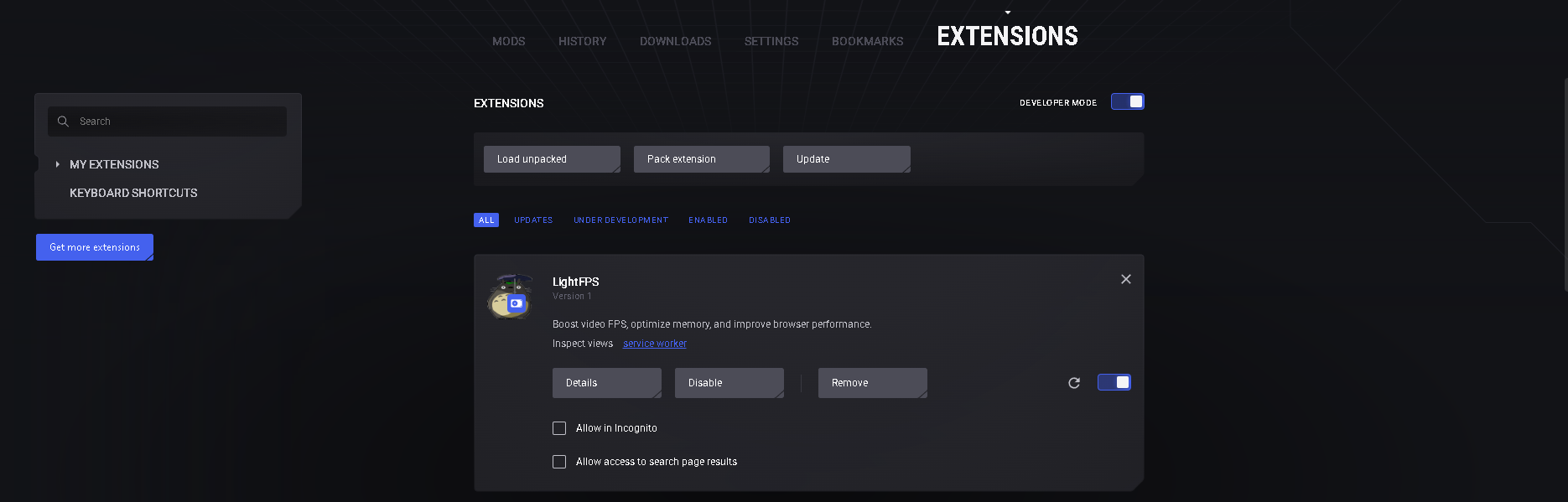
Important Extra Setup Info!

Enable Developer mode!

Click Load unpacked and select the folder containing the extension.
Open the extension.
⚙️ File Structure
lightfps/
├── popup.html        # Main extension UI
├── styles.css        # Styles for popup
├── popup.js          # Functionality and logic
├── manifest.json     # Extension manifest

**Full Changelog**: https://github.com/KloBraticc/LightFPS/compare/V1.1...V1.2

**Full Changelog**: https://github.com/KloBraticc/LightFPS/compare/V1.2...V1.3