Repository navigation
Releases
HomeWorkoutHero v2.3.0 - NEW NAME, THEME & MORE [ MacOS & Windows ]

NEW NAME AND DOMAIN
MyFitnessPlan is now HomeWorkoutHero. Same app, new name: updating keeps all your plans, videos and progress.
What's Changed
A new name
- The app is now called HomeWorkoutHero, everywhere you see it: the window, the header, Settings › About, the TV app and the installers.
- Nothing to move. An install from before the rename keeps using its existing data folder, so it opens on the same plans, Log and settings. On a Mac, delete the old MyFitnessPlan app from Applications once HomeWorkoutHero opens.
- Old files still work. Plan files and profile backups made with MyFitnessPlan import and restore as before. Files made with HomeWorkoutHero need HomeWorkoutHero to open them, so if you share a plan, the other person should update too.
- The TV app keeps working. The MyFitnessPlan TV app connects to HomeWorkoutHero as before, and the new TV app installs over it as an update.
- The website is now homeworkouthero.com and the guide bigdeckit.gitbook.io/homeworkouthero, both linked from Settings › About.
- A new, easier-to-read logo in the header: the mascot with HOME / WORKOUT / HERO stacked, as on the website.
YouTube workouts fix
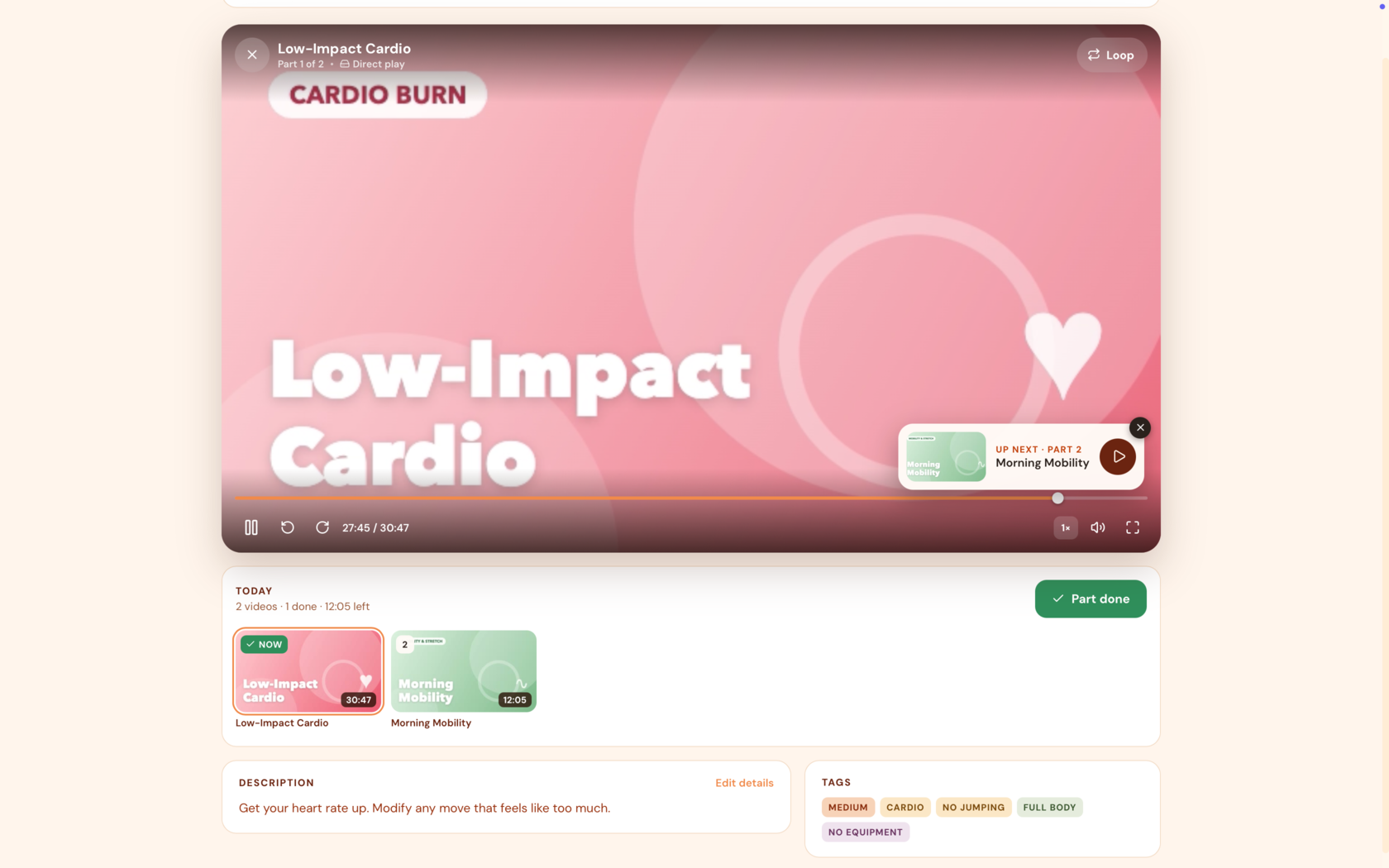
- YouTube videos play with YouTube's own controls, including its full-screen button, captions, quality and skipping ads, so full screen behaves exactly as it does on YouTube.
- The close button, title and Loop sit in a strip above a YouTube video instead of over it, and the loop settings open there too. "Up next" sits below the video.
- During a rest between loops the countdown takes the video's place, and full screen closes so you can see it.
Added
- Pumpkin Patch, a new dark theme: a dark background & pumpkin-orange accents. Pick it in Settings › Appearance.
Upgrading
Install over your current version. Nothing needs migrating, and your plans, profiles and settings carry over as they are.
⚠️ macOS users:
This build isn't code-signed, so Gatekeeper will say the app
"is damaged and should be moved to the Trash" — it isn't actually damaged.
After
installing, run this in Terminal:
xattr -cr "/Applications/HomeWorkoutHero.app"
Then open it normally. (Or right-click the app → Open, instead of double-clicking,
and confirm the dialog.)
MyFitnessPlan v2.2.0 - Improvements, fixes, guide [ MacOS & Windows ]
MyFitnessPlan v2.2.0
A user guide, a refreshed website, library scans that tag new videos for you, and plan sharing without hunting for playlist links. Plus a fix for calendars around the clocks changing.
Highlights
A guide, and a fresh website
- The new user guide at bigdeckit.gitbook.io/myfitnessplan covers plans, your library and the rest of the app, with answers to common questions.
- A banner on the Dashboard points new users to it. Close it and it stays closed for your profile. The guide is always in Settings › About.
- The website, myfitnessplan.bigdeckit.com, has been refreshed.
Scans that tag new videos for you
When a library scan finds a video for the first time, it's now tagged from its file name and folders, the same way imported YouTube playlists are. Nogi/hantle_20min.mp4 comes in tagged legs and dumbbells. Videos already in your library keep their tags exactly as you left them.
Sharing YouTube plans, simplified
- A plan made from YouTube videos carries those videos inside the plan file, so there's no playlist link to send along with it.
- When you import one, MyFitnessPlan offers to add its playlists to your library as albums with a simple tick box. Playlists you already have aren't offered.
Plan covers
Blur background is shown as soon as you open a plan's cover, and the thumbnails blur and unblur as you flip it, so you can see the result before you pick.
Fixed
- Around a daylight-saving clock change, the Calendar and Dashboard could show the same date twice, pushing every later workout back a day.
- Titles and file names with "ł" are tagged properly: "Całe ciało" now counts as full body.
- Pop-up messages line up: icon, text and close button sit on one line.
Under the hood
MyFitnessPlan now has an automated test suite that runs on every change, covering tagging, plan import and export, the schedule, profile separation and library rescans.
Upgrading
Install over your current version. Nothing needs migrating, and your plans, profiles and settings carry over as they are.
The TV app hasn't changed: keep using version 1.0.0.
⚠️ macOS users:
This build isn't code-signed, so Gatekeeper will say the app
"is damaged and should be moved to the Trash" — it isn't actually damaged.
After
installing, run this in Terminal:
xattr -cr "/Applications/MyFitnessPlan.app"
Then open it normally. (Or right-click the app → Open, instead of double-clicking,
and confirm the dialog.)
MyFitnessPlan v2.1.0 - Profiles & TV App [ MacOS & Windows ]
MyFitnessPlan v2.1.0
Profiles.
Everyone in the house gets their own plans, progress, Log and settings. Pick who's training on start, add an optional PIN, choose an avatar or your own photo. Your existing data becomes your profile automatically.
Automatic backups.
Back up your profile on a schedule into a folder you choose, restore it anytime (even on a new computer), or back up the whole app from the system tray.
Week-by-week rhythms.
Plans can now change their rhythm from week to week, for up to 12 weeks. Each week can get a different pattern.
More to explore.
Recently added videos, newest/oldest sorting, completion counts on videos and plans, a tag cloud and custom date ranges in the Log.
Phones and tablets.
Turn on network sharing in Settings › Devices and scan the QR code to open MyFitnessPlan on your phone or tablet. You can use your profile on your desktop, and your family can use their tablet / laptop / phone with their separate account at the same time.
New: MyFitnessPlan on your TV (preview)
A first version of the app for Android TV and Fire Stick. It finds MyFitnessPlan on your computer over your home network and runs it on the big screen, all with the remote: pick your profile, browse your plans and play workouts full screen.
MyFitnessPlanTV-1.0.0-debug.apk is a test build for sideloading:
- On your computer, turn on Share on Local Network (menu bar icon or Settings › Devices).
- On the TV, allow installing apps from unknown sources. On a Fire TV Stick, turn on Developer Options first (Settings › My Fire TV › About, click the device name 7 times).
- Install the APK, for example with the Downloader app or
adb install.
Because it's a test build, installing a later version may require uninstalling this one first.
Upgrading
Install over your current version — your plans, videos, log and settings carry over automatically. Worth backing up your data folder first, as always with a big update. macOS build isn't code-signed, so you'll get the "are you sure" prompt on first launch.
⚠️ macOS users:
This build isn't code-signed, so Gatekeeper will say the app
"is damaged and should be moved to the Trash" — it isn't actually damaged.
After
installing, run this in Terminal:
xattr -cr "/Applications/MyFitnessPlan.app"
Then open it normally. (Or right-click the app → Open, instead of double-clicking,
and confirm the dialog.)
MyFitnessPlan v2.0.0 - UI Redesign & More [ MacOS & Windows ]
MyFitnessPlan 2.0.0 🎉

Big one. This has been cooking since 1.6.0 back in August.
Here's everything that actually changed.
The redesign
Every screen got rebuilt from scratch: Dashboard, Library, Plans, Plan Builder, Calendar, Log, Settings, the Player… all of it.
Same shared design system across all seven themes. New bottom tab bar on phone, tighter top bar on tablet, and more.
Stream to your phone/tablet over wifi
New toggle in the desktop app's tray menu — Share on Local Network. Flip it on and your library, plans and player are reachable from any device on the same wifi.
Off by default, no password when it's on (just heads up), address stays the same across restarts so it's worth bookmarking.
Add it to your iPhone home screen and it acts like a real app.
Smarter video playback
Videos now play direct (no re-encoding, instant seeking) whenever your device can already handle the file — which is basically always for normal MP4s.
Only the odd stuff that genuinely can't play (MKV, AC-3 audio on an iPad, etc.) gets converted on the fly, and only the part that needs it. Player tells you which mode it's using.
Back up / share individual plans
Export any plan to a file from its card, or Back up all in one go. YouTube-only plans export in a way that works for anyone; plans built on your own files export as a personal backup.
Importing never overwrites — always makes a new (inactive) plan and matches videos you already have.
Fixed: editing a plan no longer resets your progress
This was a real one — saving any change to an active plan (even adding a single video) used to wipe every checkmark back to zero. Now your progress sticks; only what actually needs updating changes.
Plan Builder: Total redesign
The Plan Builder got a complete redesign, making it easier to navigate. You can pick between your default workout pattern schedule or adding a custom one for each plan. Your rest days will be recognized and displayed as “Rest” inside the Plan Builder.
Also in this release
- Favourites — mark your plans and videos as favourites, they get their own section
- Length filter + new sorting options everywhere you browse videos
- Day Tape now shows a green dot on finished workout days
- Plan preview: browse any plan week-by-week before starting it
- AI plan builder got a step-by-step mode and a preview before saving
- Fixed the nav bar breaking on tablet-width screens
Upgrading
Install over your current version — your plans, videos, log and settings carry over automatically. Worth backing up your data folder first, as always with a big update. macOS build isn't code-signed, so you'll get the "are you sure" prompt on first launch.
⚠️ macOS users:
This build isn't code-signed, so Gatekeeper will say the app
"is damaged and should be moved to the Trash" — it isn't actually damaged.
After
installing, run this in Terminal:
xattr -cr "/Applications/MyFitnessPlan.app"
Then open it normally. (Or right-click the app → Open, instead of double-clicking,
and confirm the dialog.)
Some screenshots:
New Plan Builder


Refreshed Grid View

Refreshed Tape View

New - Week View

Refreshed Player UI
MyFitnessPlan v1.6.0 - Loops & freezes [ MacOS & Windows ]
New Features
- Loop individual videos, with rest - as requested by pegasusvelata
- Freeze a plan without losing any workouts
- New "Day Tape" calendar view
⚠️ macOS users:
This build isn't code-signed, so Gatekeeper will say the app
"is damaged and should be moved to the Trash" — it isn't actually damaged.
After
installing, run this in Terminal:
xattr -cr "/Applications/MyFitnessPlan.app"
Then open it normally. (Or right-click the app → Open, instead of double-clicking,
and confirm the dialog.)
MyFitnessPlan v1.5.1 - [ MacOS & Windows ]
Fixed
- "Today" was a day behind for the first hours after midnight. The calendar, dashboard and the date fields in the plan builder derived today's date via toISOString(), which converts to UTC first — so anywhere east of Greenwich they showed yesterday until the local clock passed the UTC offset. They now use the local date, as the server already did.
- "Today" no longer goes stale in a window left open. It was computed once when the page rendered, so the highlight stayed on the old day after midnight until a reload. It now re-checks at midnight and whenever the window regains focus, which also covers a machine that was asleep when the day changed.
MyFitnessPlan v1.5.0 [ MacOS & Windows ]
MyFitnessPlan v1.5.0
Highlights
🏃 Run two plans side by side
A plan can now be activated as your main plan or as an extra plan running alongside it. A short mobility or core block no longer has to replace your main programme. The Calendar gains tabs when both slots are filled, and the Dashboard pages between them with arrows.
🗓️ Every plan on its own rhythm
The workout/rest cycle moves from one global setting to per plan. It's an override, not a replacement: a plan follows your Settings pattern unless you choose Set for this plan.
📋 Plan details, with the plan's actions in one place
Click a plan and get its full picture, plus the plan laid out day by day. Activate, deactivate, edit, duplicate and delete all live there.
🏆 Finished plans are kept for good
Completing a plan is recorded permanently — name, finish date, days taken, workout count — and survives editing or deleting the plan. A plan counts as finished when every workout day is marked, in whatever order.
🤖 The AI builder asks for workout days, not weeks
Asking for "4 weeks" could produce a plan a fraction of that length. It now asks for a number of workout days, and the number you pick is the number of sessions you get.
Also new
Plan descriptions · tags on calendar previews (with expandable +2 chips) · album covers in the AI builder · guided one-question-at-a-time AI form · Barbell/Step/Bench/No Equipment tags · redrawn body-part icons.
Log
Player-logged workouts can finally be removed · new Plans finished stat and Plan progress panel · month stat counts active days and follows the month you're viewing.
Fixed
Dashboard hero background tiling after paging · long titles running under the hero thumbnail · CSV upload no longer deactivating your extra plan.
Upgrading
Safe to install over your current version — additive schema only, existing data untouched, and plans you'd already finished are detected on first run.
MyFitnessPlan 1.4.1 - AI Plan Builder [ MacOS & Windows ]
Optional AI features are here.
Paste your API key in settings and build your workout plans with AI, using your own video library / albums imported from YouTube.
Also new:
- Settings split into tabs
- AI feature - clean up descriptions from links
- Collapsible plan categories on "Plans" page
- Various fixes and polish
NOTICE: Remember, the AI options are 100% optional. If you don't add & save your API keys, options requiring AI won't be displayed in the app.
MyFitnessPlan v1.4.0 - IMPORT FROM YOUTUBE ADDED [Download on MacOS & Windows]
MyFitnessPlan 1.4.0

YouTube playlists are here.
Paste a public or unlisted YouTube playlist link and it becomes a full album in your library. Tag, filter, search and drop the videos straight into your plans — they play through YouTube’s player (no Adblock included). Plans that need the internet are clearly marked.
Windows installer is here.
Grab the .exe below — the app should work fine with most popular video formats and codecs now.
Also new:
- Watermelon theme – green background, pink accents
- Mix local videos and YouTube videos in the same plan
- Source filter (All / My files / YouTube)
- Descriptions and smart tags are fetched automatically from YouTube
- Previous day button in the plan builder
- Various fixes and polish
Download the MacOS & Windows installers below.
MyFitnessPlan v1.3.0 [MacOS Desktop App]
⚠️ Upgrade notes
- Rescan your library after updating. Videos now store their runtime, which is
read from the file itself. Until you press Scan in Settings, the new "Total
time" statistic reads—and thumbnails show no duration badge. The scan does one
quick pass per video; afterwards it only probes files it hasn't measured before. - Database migrations run automatically on first launch. No manual steps.
- The "Snow" theme was removed. Anyone using it is moved to "Midnight" on first
launch.
Added
Plans
- The active plan now appears as a full-bleed featured card above the rest, showing
its background image, category, start date, workout count and the equipment its
videos need. - Every plan card lists how many workouts it contains and which equipment it uses,
shown as tags. - Plans can be given a category — Reduction, Strength, Cardio, Mobility,
Endurance, Flexibility, or a custom label you type yourself. Categories are picked
in the plan builder and can be changed by editing a plan. - The plan list is grouped under category headings, each with a count. Headings only
appear once at least one plan has a category.
Dashboard
- A banner shows the active plan's name, how many of its workouts are done, and how
many days remain — with the last day called out. - When a plan reaches its end, the dashboard congratulates you, reports how many of
its workouts you completed, and offers to start a new one. Plans no longer just
stop with no explanation. - Plans with a future start date show when they begin instead of an empty dashboard.
Workout log
- Entries completed as part of a plan carry a Plan: badge, so past
workouts can be traced back to the plan they belonged to. - Workouts can be annotated with notes — how it went, weights, reps, how you
felt. Notes are written in the expanded day view and shown there. - A Total time statistic joins the existing counters, summing the runtime of
everything logged. Its label states when the figure is partial, since manually
logged workouts have no video and contribute no time.
Player
- Videos played straight from the Library — outside any plan — can now be marked as
done, and are saved to the workout log like any other entry. Marking can be undone.
Library
- Video thumbnails show a runtime badge in the corner (
32:15, or1:04:20for
longer videos). - Scanning the library shows a progress bar with the number of videos processed, a
percentage, and the file currently being read.
About
- Added a link to the project website, myfitnessplan.bigdeckit.com.
Changed
- Plan builder — video browser redesigned. Cards are thumbnail-first: a large
16:9 preview, the title, and a round add button in the corner. File paths, the
"Selected" label and file extensions are gone, and the grid is denser, so browsing
a large library is calmer. - Plan builder — the day list marks your position. The day being edited holds
its place in the list as a labelled divider, separating earlier days from later
ones, and follows the selection as it changes. - Credits now read Klaudia Krzos throughout, including the desktop build's
copyright notice and installer metadata, with LinkedIn and GitHub links. - Selecting a video in the builder no longer nudges the grid by a pixel.
Fixed
- Multi-video days no longer collapse into one clump of titles. In the workout
log's calendar and expanded view, and in the dashboard's upcoming list, each video
is shown as its own item. - The expanded log view listed every video scheduled that day, not the ones you
actually completed. A day where you finished 2 of 8 videos showed all 8. It now
shows only what was marked done. - The "Plan:" badge was unreadable in the pastel themes. It used the theme accent
as its text color, which in the Pastel Orange, Pastel Pink and Sky Blue themes is a
light pastel on a tint of itself. Text now uses the primary color in every theme. - The active plan's start date was unreadable in the orange theme, for the same
reason. All text on the featured card now sits white on a dark scrim, independent
of the palette. - The plan builder showed "Week 1 - Day 1" in English regardless of language.
Week and day headings were baked in when a plan was created; they are now derived
at display time and follow the interface language.
Removed
- The Snow theme. Six themes remain.
Internal
workout_plansgainscategory;workout_loggainsnotes;videosgains
duration_seconds. All added by idempotent migrations at startup.- New endpoints:
GET /api/library/scan-progress,PUT /api/profile/history/notes. GET /api/plannow returns each plan's workout count and combined equipment, and
sorts the active plan first.- Video durations are read via
ffmpeg -irather thanffprobe, because only
ffmpegships with the packaged desktop app.