Repository navigation
Releases
Bookland 0.1.4 preview

Bookland 0.1.4 preview
Bookland is a free, MIT-licensed hover island for Apple Silicon Macs running macOS 26 or later. It opens beside the camera for music, Calendar, Codex activity, and everyday tools.
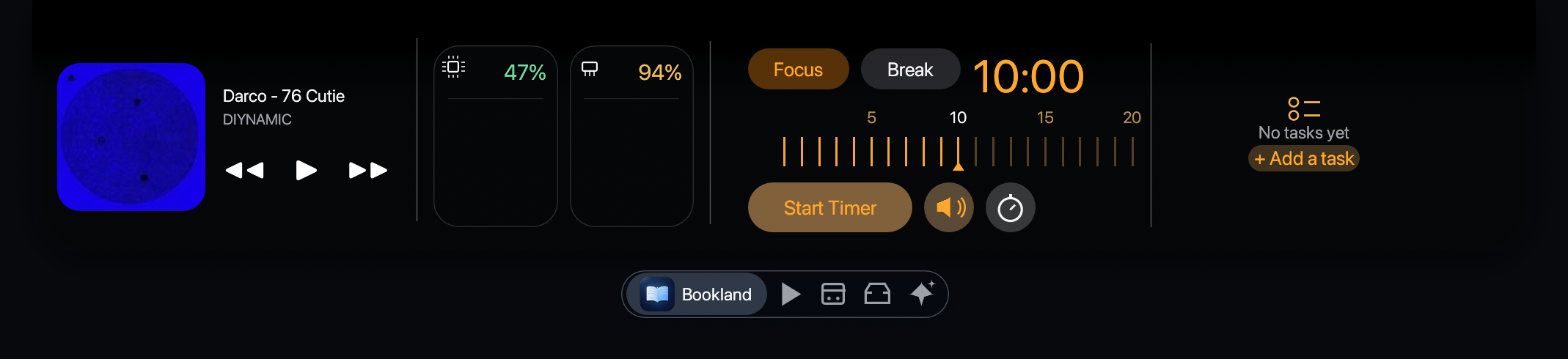
Real capture from the 0.1.4 preview.
Start here: Download Bookland-0.1.4-macOS-26.0.zip below, extract it, move Bookland.app to Applications, and open it. Watch the 25-second real Mac walkthrough before installing. The ZIP is locally signed but not Apple-notarized; macOS may require System Settings → Privacy & Security → Open Anyway after the first launch attempt. Verify the ZIP with the companion SHA-256 file.
Clicking the compact island now keeps its panel open until you close it. Hovering still opens the island immediately and closes it after the pointer leaves. This makes it easier to use music, Calendar, and Codex controls without holding the pointer over the panel.
On a Mac with YouTube playing in Chrome, the Music workspace displayed the live track and artwork. Its play/pause control and 15-second forward/back buttons changed the browser player; after a pause, Bookland's timeline synchronized to the stopped time. The connected Office calendar still showed its saved events after the desktop app was updated with the same local signing identity.
If you try the preview, tell us what worked or felt slow in the first-look discussion. Use the feedback form or bug report form for a specific problem. Please include your Mac model, macOS version, and player or browser, and remove private details from screenshots. If you only watched the demo, the first-look form also accepts design and animation feedback without Mac details.
The README lists current features and limits. In particular, approvals raised by turns already running in Codex Desktop cannot yet be answered inside Bookland; Bookland-connected turns can show their own approvals in the island.
Bookland 0.1.3 preview
Bookland 0.1.3 preview
This update makes the island's horizontal media gestures agree with its visible controls. In supported browser media sessions, a swipe seeks 15 seconds backward or forward. In Apple Music and Spotify, it changes tracks. The Behavior settings now explain the difference.
Bookland remains a free, open-source preview for Apple Silicon Macs running macOS 26 or later. This ZIP is locally signed with the same Bookland identity as 0.1.2; it is not Apple-notarized. macOS may require System Settings → Privacy & Security → Open Anyway after the first launch attempt. Verify the ZIP with the companion SHA-256 file.
The README lists features, installation steps, and current limits. In particular, approvals raised by turns already running in Codex Desktop cannot yet be answered inside Bookland; Bookland-connected turns can show their own approvals in the island.
Watch the 22-second real Mac demo, then share a five-minute hover and media-control test in the Bookland feedback thread. Include your Mac model, macOS version, and player or browser so we can reproduce problems.
Bookland 0.1.2 preview
Bookland 0.1.2 preview
This preview brings the public download up to the locally tested Bookland build.
- Browser media controls in the Nook now seek 15 seconds backward or forward instead of sending previous or next track commands. The Chrome YouTube check confirmed the video position moved from 0:15 to 0:30 and back, and Play/Pause changed its state.
- The native Core Animation island morph now has enough sampled spring frames to settle at the slowest animation speed without a visible final-size jump.
Bookland remains a free, open-source preview for Apple Silicon Macs running macOS 26 or later. It is locally signed and is not Apple-notarized. macOS may require System Settings → Privacy & Security → Open Anyway after the first launch attempt. The ZIP includes Bookland.app; the companion SHA-256 file lets you verify the download.
The README documents installation, permissions, the current feature set, and known limits. In particular, Codex approvals appear in the island only for turns started through Bookland, and browser media support can vary with macOS and browser updates.
Bookland 0.1.1 preview
Bookland 0.1.1 preview
Bookland is a free, MIT-licensed macOS camera-edge island. This preview keeps the same Bookland identity and moves the public build forward from 0.1.0.
Changes
- Improved browser media controls, including 15-second seeking from the compact Music controls and stable seek position during media refreshes. Failed seeks restore the shown position.
- Added a single-instance guard so launching a second Bookland copy does not leave two islands on the screen.
- Reduced idle redraws and kept the Liquid Glass reveal on its native 60 Hz animation path. The closed activity ring uses Core Animation.
- Refined the Settings sidebar and its icons, Calendar date markers, and the display of the selected calendar when access is unavailable.
- Improved the local Codex activity view and connected the selected turn to the in-island chat. Decisions remain limited to Codex turns connected through Bookland.
Install
Requires an Apple Silicon Mac running macOS 26 or later. Download the ZIP and SHA-256 file attached to this release, verify the checksum, extract the ZIP, and move Bookland.app to Applications or the Desktop. This build is locally signed with a stable Bookland update identity, but it is not Apple-notarized. macOS may show Open Anyway on first launch. Calendar, microphone, Bluetooth, and system audio features request their own permissions when used.
Preview limits
Bookland does not receive approval requests from turns already running in the Codex desktop app. Apple's private MediaRemote framework can change between macOS versions. AirPlay route changes, live AirPods connection cues, voice following, and some other permission-dependent flows have not been verified end to end on every Mac. This is not a complete recreation of every NotchNook feature. Please report the Mac model, macOS version, media player, and exact steps for any issue in GitHub Issues.
Bookland 0.1.0 — first public preview
Bookland 0.1.0
First downloadable preview of Bookland, a free and open-source hover island for macOS.
What's in this build
- A camera-aligned island that opens on hover or click, closes when you leave, and collapses when you select the active workspace pill.
- Adaptive native Liquid Glass panels for Music, Calendar, Nook, Tray and Pocket, Agents, and optional tools.
- Media playback controls, focus timer, to-dos, file tools, clipboard history, and events from calendars connected to macOS.
- Local Codex activity and in-island decisions for turns started through Bookland. Existing Codex desktop turns do not forward approvals into Bookland.
- The current Bookland app icon, premium settings layout, and English interface with right-to-left music metadata support.
Install
- Download
Bookland-0.1.0-macOS-26.zipand extract it. - Move
Bookland.appto Applications, then open it. Bookland is a menu-bar-style utility; its island appears at the top edge of the screen rather than in a normal window. - If macOS blocks the first launch, use System Settings → Privacy & Security → Open Anyway after attempting to open it. Grant optional permissions only for the features you want to use.
Requires macOS 26 or later on Apple Silicon. This build is ad hoc signed and not notarized. It does not include a trial, subscription, or Bookland account. The source is MIT licensed; bundled third-party software retains its own terms.
The SHA-256 checksum is in Bookland-0.1.0-SHA256.txt. Known limitations and build instructions are in the repository README.