Repository navigation
Lighthouse v26.10.16.6


Feature Size on the Team
How much of a Feature does your Team usually take on? Until now, the only Feature Size chart was the Portfolio's, and it counts every Team's Work Items. A Team that wanted its own number had to open the Portfolio and subtract everyone else's.
Every Team now has the Feature Size chart and the Feature Size Percentiles widget. On a Team, a Feature's size is the Team's own share of it, and the Status Indicator flags an open Feature whose share has already grown past what the Team usually finishes. Reading the Team is enough: Features from Portfolios you cannot open are counted too, without naming those Portfolios.
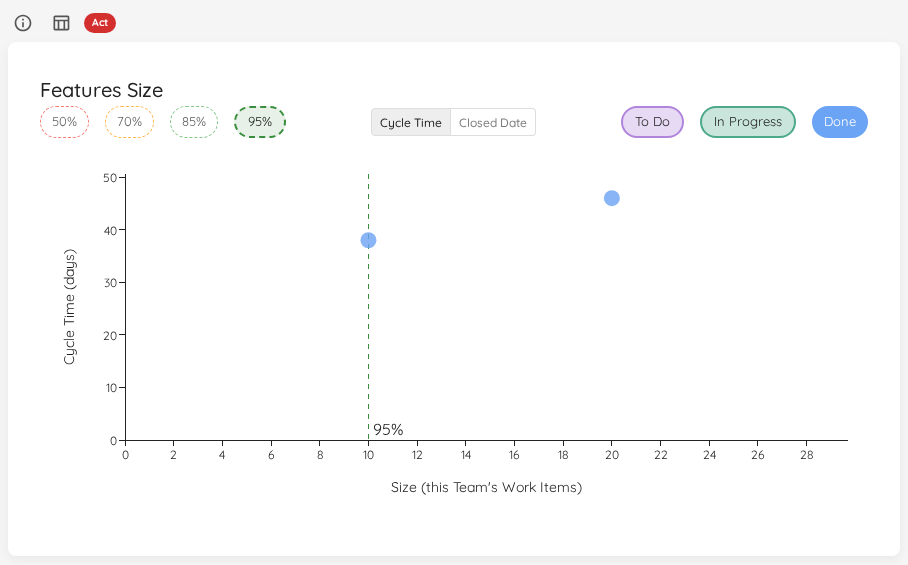
Feature Size Percentiles also gets View Data, on Teams and on Portfolios, listing the closed Features its percentiles are based on. Full detail: Feature Size on a Team.
Reporting: Then & Now
You started coaching a Team three months ago. They limited their WIP and began slicing smaller. Then someone asks: did it change anything? The Metrics tab shows only recent days, so the "before" has long dropped out of view, and screenshots taken back then never quite compare to today's.
Every Team and Portfolio now has a Reports tab, and its first report type is Then & Now. Pick a window, Then, such as the 90 days before you came in. Lighthouse freezes its flow metrics on the spot, rebuilding them from history if Then ended in the past. Now slides and always ends today. Each time you open the report, Cycle Time, Throughput, WIP and Work Item Age sit side by side, Then against Now, with the change on every line. A summary at the top tells you at a glance what improved and what got worse.
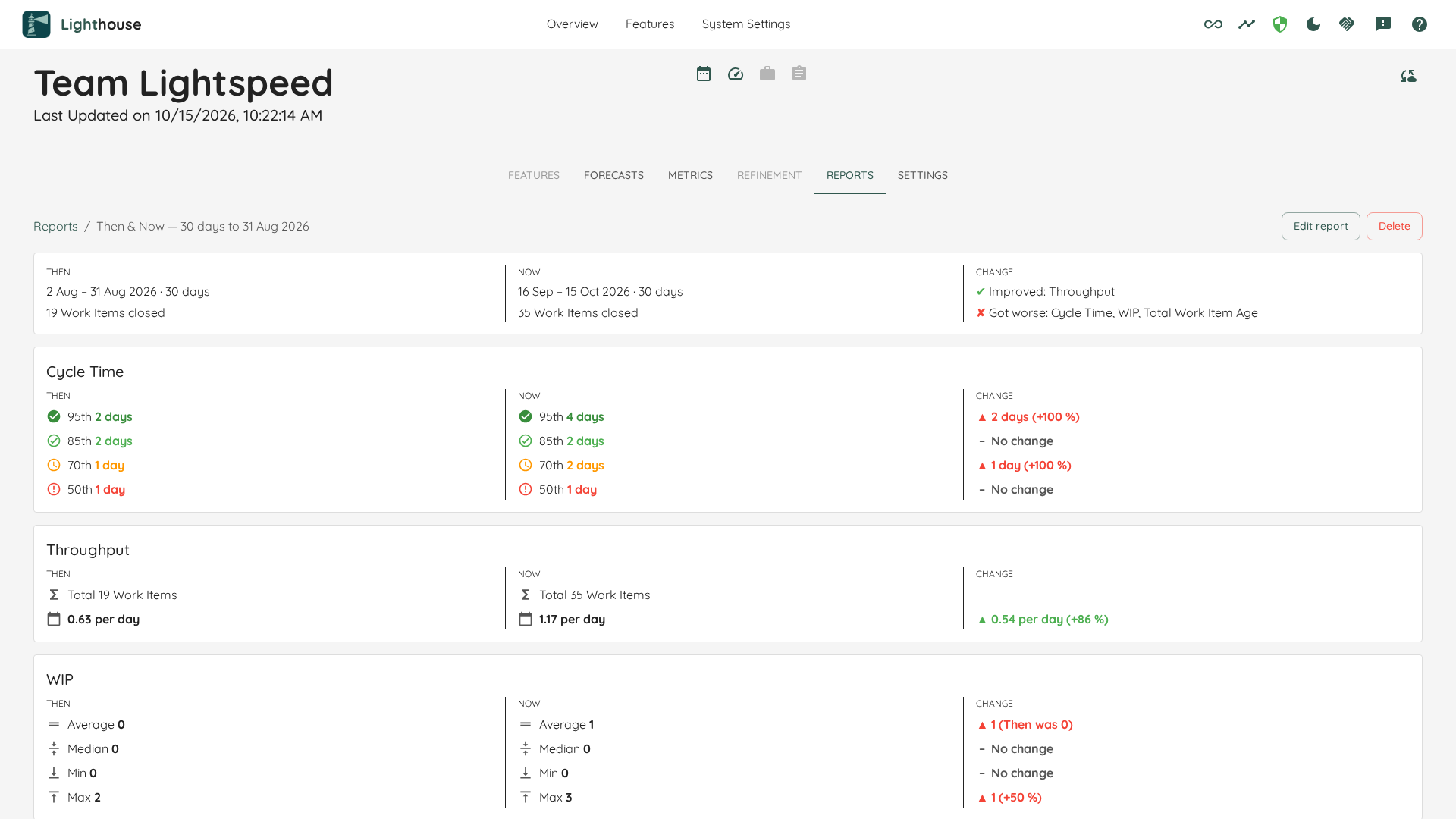
Reports are listed on the Overview next to each Team and Portfolio, so the evidence is one click away when the question comes. Community includes one Then & Now report per Team and Portfolio; Premium has no limit. Full detail: Reports.
Bugfixes and Improvements
- Clicking a chart now lists the Work Items with the columns that explain why they are there. The Estimation vs. Cycle Time dialog shows each Work Item's Estimate next to its Cycle Time, the Blocked list shows since when each Work Item is Blocked, a Feature's child items show when each started and closed, and Manage columns offers the rest; the layout you choose is remembered for each chart. Full detail: Viewing the Data Behind a Widget.
- Every row of a long list can now be reached. A list used to stop at its first 100 rows without saying there were more, so a Team with 143 Work Items in refinement could not vote on the last 43. A list of more than 100 rows now says how many it holds, for example
1–100 of 143, and its arrows page to the rest. Sorting, filtering, the search in Third-party packages, and Export and Copy all cover the whole list. Lists of 100 rows or fewer look as before. - The Overview's Deliveries column stays readable. It shows at most two Deliveries per Portfolio, then a +N more link to the rest. While loading it shows a spinner, and if the Deliveries cannot be loaded it says so, instead of claiming there are none.
- Deliveries can follow a Jira Release on Jira Server and Data Center too. On a self-hosted Jira the list of Releases to pick from came up empty, so a Delivery could not be bound to one, and nothing said why. Lighthouse now reads Releases the way Jira Server and Data Center (version 8 or later) serve them: the picker lists them, a bound Release's date and Work Items refresh, and the forecast is written back to the Release. Jira Cloud works as before.
- Over-time charts always fill in the days Lighthouse missed. Fill in past days on over-time charts left a Team added last week, or an instance that does not run every day, with a short or gappy trend wherever someone had switched it off. It is no longer a Preview and no longer a setting: Percentiles Over Time and PBC Over Time fill in past days on every instance, including ones where it had been switched off. Filled days cannot be told apart from recorded ones afterwards, so take a backup before you upgrade if you might want your unfilled history back. Full detail: Filling in past days.
- Jira status changes keep their real time on every server. On a Lighthouse server that does not run in UTC, the moments a Jira Work Item or Feature changed status, and the day it was created, were stored shifted by the server's offset, so a change made late in the evening could count on the next day and Cycle Time could be a day off. They are now stored as the time Jira names. Times stored earlier are corrected the next time Lighthouse downloads that Work Item or Feature again with its complete history, which happens once it changes in Jira; until then it keeps the times it had. A history entry Jira sends without a readable time no longer stops the whole item from loading.
- Work Items whose Jira links name several issues now land under the right Feature. When the parent comes from an issue link type and a Work Item is also linked the same way to an incident or another issue, Lighthouse used to leave it where it was and only warn. Now only Features count, and among several Features the oldest link wins, then the Feature created first, then the lowest key. Features with several parent links are placed the same way. Every refresh lists what it decided in a warning, and Settings > System Info shows how many records needed it. Full detail: When a Work Item's links name more than one issue.
- A new Additional Field fills in without a manual update. Adding a field to a connection left it empty on every Work Item already in Lighthouse until each Team and Portfolio on that connection had been updated, so a rule on the new field quietly matched nothing. Saving a change to a connection's Additional Fields now offers to update its Teams and Portfolios straight away, and the field fills in within that update. Full detail: Additional Fields.
Contributions ❤️
Special thanks to everyone who contributed feedback for this release: