Repository navigation
Player Guide
City Evolution is an open-source city builder by Levan, based on LinCity-NG. Grow a settlement by linking homes, jobs, markets, utilities and public services. This guide covers Preview 26, including the port status update where indicated.
Downloads · Object Reference · Changelog · Report a bug
- Install and start
- Build your first settlement
- Inspect your city
- Passenger transport
- Markets, freight and foreign trade
- Power and public services
- City Hall and finances
- Regional airport and Grand Prix circuit
- Save, recover and report problems
- Project and source
| Platform | Package | How to launch |
|---|---|---|
| Windows x64 | Portable ZIP | Extract the entire ZIP into a writable folder and run City Evolution.exe. Keep the included folders alongside the launcher. |
| Linux x86_64 | AppImage | Extract the AppImage if it came in a ZIP, make it executable, then launch it. |
On Linux, open a terminal in the folder holding the AppImage. Substitute your downloaded filename:
chmod +x "./CityEvolution-Preview-26-Linux-x86_64.AppImage"
./CityEvolution-Preview-26-Linux-x86_64.AppImage
Choose a starter village to learn the economy with a settlement already in place. For more control, start with an empty natural map or barren flatland. New maps range from 50 × 50 to 400 × 400. Classic scenarios use their own maps.
- Start with homes and supplies. Keep housing near a stocked market and make sure food and water reach residents. A farm gives the local economy a source of food.
- Connect the settlement. Use tracks or roads to connect buildings that exchange supplies. Keep the first neighborhood compact so a market can reach homes and businesses.
- Add jobs and check staffing. Inspect workplace labor and whether households have food, water and jobs. A workforce shortage can stall a factory even when all its other inputs are stocked.
- Add power as demand builds. Check generation and building supply before expanding into power-hungry industry.
- Watch the monthly budget. Let the city run long enough to see its regular income and expenses. Add infrastructure or services in stages so you can see which changes improved the city.
| Tool | What it tells you |
|---|---|
| Query | Inspect a building's inventory, production and operating information. Preview 26 highlights missing inputs and some access or storage problems. Check the individual commodity amounts when diagnosing a shortage. |
| Minimap and overlays | Navigate to another part of the city and inspect conditions such as power, pollution and transport. Scroll to zoom and click to jump to a location. |
| City Hall and City Advisors | Check approval, workforce, housing and other citywide problems. Advisors can point you to crowded bus stops. |
| Transport report | Review estimated monthly journeys, routes, connections and fares. |
| F1 Help | Open illustrated building and control guides. |
Read a building's status and its stock together. For example, labor, water and electricity can all constrain a venue on the same day. A stockpile can also be full because the next building in the chain is unable to accept it.
Every journey needs an occupied home that can reach an origin stop, a connected route between active stops, and a destination that can be reached on foot. Stops need workers. Passenger rail and metro also need power.
| Mode | Infrastructure | Maximum walking reach from the facility footprint |
|---|---|---|
| Bus | Connected tracks or roads, including matching bridges | 8 tiles for a bus stop, 14 for a bus terminal |
| Passenger rail | Connected rail, including rail bridges | 30 tiles |
| Underground metro | Underground track | 20 tiles |
| Elevated metro | Elevated track | 20 tiles |
Select or place a station to inspect its actual walking coverage. Water and building footprints can block a walk. Rail and metro transfers also need usable track paths and accessible interchange stations. When removing underground or elevated tracks, select the corresponding layer before using the bulldozer.
The game estimates journeys and delivers labor according to a monthly schedule. It considers the closest walkable workplace near each destination stop whose labor stock is below half capacity. If several workplaces qualify, a more distant building can be passed over even if its labor shortage is more urgent. The planner also favors walking when the workplace is already within walking reach of the origin stop.
Check both stops in the Transport report. Look for a connected route, an occupied home in the origin catchment, and a workplace in the destination catchment. Check station staffing, rail power, fares and seat capacity. After changing the route, let the next monthly calculation run and inspect the trip counts again.
For a port, “Waiting for labor” means the port's current labor stock is below its trade threshold of 100. Rail access can be intact and the port can still have too little labor to trade that day. A nearby stop's Running status describes the stop itself. Its trip count tells you whether the planner assigned journeys to it.
Each mode has its own fare, from $0 to $10 per trip. Higher fares above the default reduce estimated ridership. Direct services also let residents reach stocked markets for food and goods. Shopping uses seats left after commuting, and bus journeys add road traffic.
- Market. A staffed market serves local buildings up to 14 tiles from its footprint. It supplies homes and businesses and can exchange raw materials and labor. Check Receive locally and Supply locally for the commodity you need.
- Freight warehouse. A connected warehouse serves a 14-tile local catchment and dispatches freight up to 48 connected transport tiles away. It can transfer freight between rail and road, store surplus or pass it to another warehouse. Warehouses prioritize local buyers before port exports.
- Distribution center. A larger warehouse with four times the storage capacity. Routes still share the capacity of the transport tiles they use.
- Port. A 4 × 4 foreign-trade facility. Place a full edge along a river and connect the port to your freight network. Any side can face the river in Preview 26.
For an ore supply chain, connect a mine to a warehouse and connect that warehouse to a buyer, such as a pottery, or a staffed market that serves the buyer. Tracks, roads and rail have different freight capacities. When goods accumulate, check route capacity, receiving settings and whether the buyer has storage available.
Double-click the port to open trade settings. Choose Import or Export for each commodity you want to trade. A commodity with both directions checked or both unchecked has no active order. Red indicates a trade direction is closed until the next year boundary.
The port needs at least 100 labor to trade. Exports move half the stock on hand and imports fill half the available space, rounded down. An order must meet the minimum shipment size, based on one fifteenth of the port's capacity for that commodity. Imports require cash and carry a markup. The report shows both the latest completed month's totals and the current month to date.
With the Preview 26 port status patch, the panel shows available labor against the trade threshold and lists export stock in the status area. On earlier Preview 26 builds, a “storage full” message could appear above half capacity even for an export commodity. Compare the stock to the actual capacity if you see that warning.
Coal generation, substations and power lines unlock at 5% technology. Dedicated lines have the lowest losses. Roads, rail and metro can also carry power, with losses over distance. Inspect a built substation to see the area it can actually supply. The placement preview shows its maximum possible reach. Energized overhead crossings display animated pulses across roads, rails and water.
Fund education, healthcare, fire and police in Budget / public services. Each funding setting ranges from 0% to 200% in steps of 5%. Fire engines, ambulances and police crews travel to incidents and need a usable route. Paved roads are fastest. Water requires a crossing.
Use schools and universities to develop the skilled workforce needed by specialized industries. Check the workforce report when a new facility has trouble recruiting. Pollution can affect household health. A City Park under Land can be drawn from 3 × 3 to 20 × 20 and gradually reduces nearby air pollution. Seasonal flu is optional.
Open City Hall to view approval, elections, news, workforce, districts and development plans. Use districts to organize areas around goals such as farming, industry, trade, education or technology.
The Mayor controls allow limited or full autonomy, a selected area or a citywide scope, and settings for construction permission, pace and spending. Use the decision history to see what the mayor built or why it held off.
Income, goods and coal taxes and export proceeds post monthly. The budget separates operating items from construction costs, and annual totals are available. Income tax and public-service funding can be automated independently. Review the monthly ledger before committing to more recurring upkeep.
At 60% approval, an income-tax referendum can authorize another ten percentage points per term, up to a 70% legal limit. An election below 50% approval resets the legal limit to 30%.
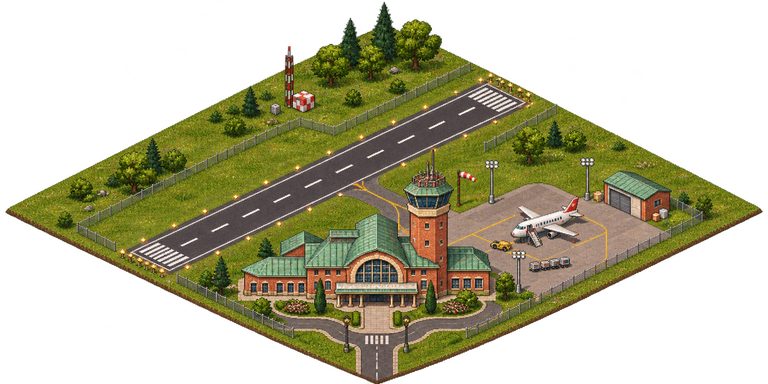
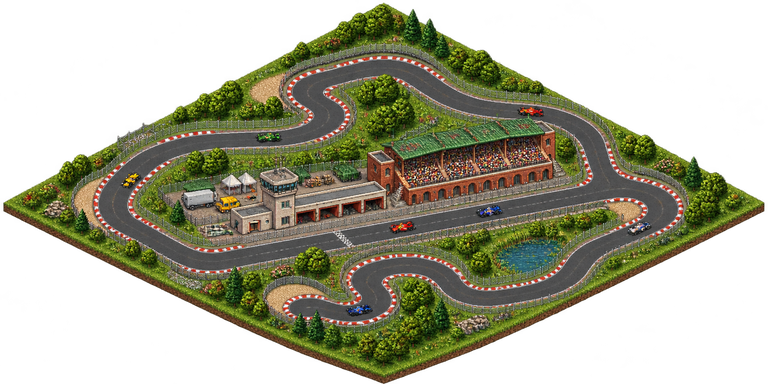
Both facilities are under Civic. Connect any side to a track, road or rail. Keep the required supplies available and leave space for waste removal. Both facilities add pollution and incur upkeep on idle days.
| Facility | Unlock | Build cost and footprint | Inputs per operating day | Upkeep per day | Revenue per operating day |
|---|---|---|---|---|---|
| Regional airport | 50% technology | $180,000 · 6 × 6 | 60 labor, 30 water, 200 low-voltage power, 20 goods | $30 | $60 |
| Grand Prix circuit | 40% technology | $140,000 · 6 × 6 | 35 labor, 20 water, 100 low-voltage power, 12 goods | $20 | $45 |
Airport operations add 4 waste per day and the circuit adds 3. Both post receipts under Service revenue in the finance panel. Planes arrive from outside the map and depart while the airport is operating. Their animation represents airport activity.
Use named manual saves to keep separate versions of a city. The autosave runs every 30 minutes of active play and appears in Load Game. Back up the save directory before testing a new preview.
| Platform | Save location | Where to look after a crash |
|---|---|---|
| Linux AppImage |
~/.local/share/lincity-ng/ by default, or $XDG_DATA_HOME/lincity-ng/ if configured |
crash.log in the save directory, when generated, and terminal output if launched there |
| Windows portable |
PortableData next to the launcher |
PortableData/launch.log and PortableData/crash.log, when generated |
Save files end in .scn.gz. Autosave.scn.gz is the automatic recovery save. On Linux, open the folder with:
xdg-open "${XDG_DATA_HOME:-$HOME/.local/share}/lincity-ng"When reporting a problem, include the Preview version or commit, operating system, steps to reproduce, and relevant screenshots. For a simulation issue, a save made shortly before the problem is especially helpful. For a crash, attach the available logs. Open GitHub Issues
Read the project README for the CMake build steps, dependencies and project background. The changelog tracks changes by preview. Source and asset licensing is recorded in the repository's COPYING*.txt files. See the upstream README for LinCity-NG.